Creating own theme pack windows 7

amithapase

New member
Member
VIP
Local time
4:52 AM
Messages
101
Hello,
I want to create my own windows 7 theme pack as follows :

1] Own Start Orb
2] Start Menu's "Glass" part should be full transparent (not glow transparent) (white background part
should be white)
3] Task bar should be full transparent
4] Window title bar should be full transparent
5] Color of window (glass) i.e. window color should be white(transparent)
6] Buttons like Minimize, Maximize(restore), Close should be flat as windows 8
7] As well as list in start menu on glass part i.e. My computer, Control panel etc. mouse over effect should
like windows 8
8] In windows 7 default theme, window corners and start menu corners are quite curve. But windows 8
don't have curve corners, it have quite sharp corners. So, I wish to make windows corner sharp.

Thank you.
 

My Computer

Computer type
PC/Desktop
OS
Microsoft Windows 7 Ultimate 32-bit 7601 Multiprocessor Free Service Pack 1
CPU
Intel(R) Pentium(R) Dual CPU E2160 @ 1.80GHz
Motherboard
Intel DL-G41MX3-LT
Memory
2.00 GB
Graphics Card(s)
Intel(R) G41 Express Chipset
Sound Card
Realtek High Definition Audio
Screen Resolution
1024 x 768 x 32 bits (4294967296 colors) @ 75 Hz
Hard Drives
ST500DM002-1BD142 ATA Device

My Computer

Computer type
Laptop
Computer Manufacturer/Model Number
Sager NP9170
OS
Win 7 Pro x64 / Win 10 Pro
CPU
Intel(R) Core(TM) i7-3630QM CPU @ 2.40GHz
Motherboard
CLEVO P170EM
Memory
12 GB
Graphics Card(s)
(1) Intel(R) HD Graphics 4000 (2) NVIDIA GeForce GTX 675M
Sound Card
(1) Realtek High Definition Audio (2) Intel(R) Display Aud
Monitor(s) Displays
17.3
Screen Resolution
1920x1080
Hard Drives
(1) Samsung 860 EVO 500GB(OS) (1) Samsung 860 EVO 500GB(Data)
Keyboard
Backlite
Antivirus
MSE, Malwarebytes Pro
Browser
Firefox
Other Info
DESKTOP: Custom-built.
OS: Win 10 Pro x64.
CASE: Rosewill R5.
CPU: Intel I5 4670K CPU @ 3.40GHz.
CPU COOLER: Cool Master Hyper 212 EVO.
MOTHERBOARD: Asus Z87-A.
MEMORY: Kingston HyperX 2x4 GB.
GPU: Nvidia Geforce 650 TI.
PSU: Corsair TX750.
DRIVES: (1) Samsung 840 120 GB SSD (2) Western Digital blue 500 GB 7200 RPM.
With all you want done I would recommend that you purchase Ave's Windows7 Style Builder so that you can create your own custom theme.

The start orb is not part of the .msstyles so you would either manually have to change that or look into How to use theme resource changer

Jerry

Thanks for the software link but it's too hard to use and create. Can you give me any other way to do it.

Or

Can you tell me how to make just Start Menu's "Glass" part full transparent (not glow transparent) (white background part should be white) AND
Task bar full transparent
 

My Computer

Computer type
PC/Desktop
OS
Microsoft Windows 7 Ultimate 32-bit 7601 Multiprocessor Free Service Pack 1
CPU
Intel(R) Pentium(R) Dual CPU E2160 @ 1.80GHz
Motherboard
Intel DL-G41MX3-LT
Memory
2.00 GB
Graphics Card(s)
Intel(R) G41 Express Chipset
Sound Card
Realtek High Definition Audio
Screen Resolution
1024 x 768 x 32 bits (4294967296 colors) @ 75 Hz
Hard Drives
ST500DM002-1BD142 ATA Device
First I recommend you start a new theme so you do not corrupt the original, look at Post #38 Here it will show you how.

You will need to do 1 of these 2 ways of Enabling custom themes for it to work.
http://www.sevenforums.com/tutorials/34579-enabling-custom-themes-windows-7-a.html
Or
http://www.sevenforums.com/tutorials/28377-theme-how-apply-custom-themes.html?filter

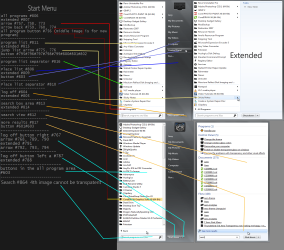
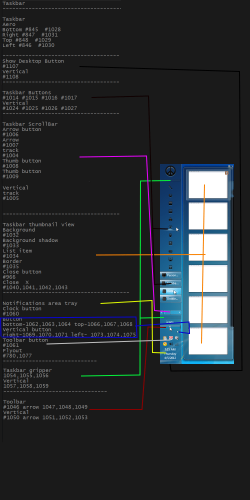
You'll need to use a resource hacker of some kind. In the two screenshots below are the image numbers for the start menu and taskbar that are in the default aero.msstyles

Jerry
Start Menu (2).pngtaskbar.png
 

My Computer

Computer type
Laptop
Computer Manufacturer/Model Number
Sager NP9170
OS
Win 7 Pro x64 / Win 10 Pro
CPU
Intel(R) Core(TM) i7-3630QM CPU @ 2.40GHz
Motherboard
CLEVO P170EM
Memory
12 GB
Graphics Card(s)
(1) Intel(R) HD Graphics 4000 (2) NVIDIA GeForce GTX 675M
Sound Card
(1) Realtek High Definition Audio (2) Intel(R) Display Aud
Monitor(s) Displays
17.3
Screen Resolution
1920x1080
Hard Drives
(1) Samsung 860 EVO 500GB(OS) (1) Samsung 860 EVO 500GB(Data)
Keyboard
Backlite
Antivirus
MSE, Malwarebytes Pro
Browser
Firefox
Other Info
DESKTOP: Custom-built.
OS: Win 10 Pro x64.
CASE: Rosewill R5.
CPU: Intel I5 4670K CPU @ 3.40GHz.
CPU COOLER: Cool Master Hyper 212 EVO.
MOTHERBOARD: Asus Z87-A.
MEMORY: Kingston HyperX 2x4 GB.
GPU: Nvidia Geforce 650 TI.
PSU: Corsair TX750.
DRIVES: (1) Samsung 840 120 GB SSD (2) Western Digital blue 500 GB 7200 RPM.
  • Like
Reactions: Arc
First I recommend you start a new theme so you do not corrupt the original, look at Post #38 Here it will show you how.

You will need to do 1 of these 2 ways of Enabling custom themes for it to work.
http://www.sevenforums.com/tutorials/34579-enabling-custom-themes-windows-7-a.html
Or
http://www.sevenforums.com/tutorials/28377-theme-how-apply-custom-themes.html?filter

You'll need to use a resource hacker of some kind. In the two screenshots below are the image numbers for the start menu and taskbar that are in the default aero.msstyles

Jerry
View attachment 267893View attachment 267894

Ok. I understood your post no 38. But i did not understood how it would complete my wishes about making theme as I described in my first post of this thread.
 

My Computer

Computer type
PC/Desktop
OS
Microsoft Windows 7 Ultimate 32-bit 7601 Multiprocessor Free Service Pack 1
CPU
Intel(R) Pentium(R) Dual CPU E2160 @ 1.80GHz
Motherboard
Intel DL-G41MX3-LT
Memory
2.00 GB
Graphics Card(s)
Intel(R) G41 Express Chipset
Sound Card
Realtek High Definition Audio
Screen Resolution
1024 x 768 x 32 bits (4294967296 colors) @ 75 Hz
Hard Drives
ST500DM002-1BD142 ATA Device
You'll need to use a resource hacker of some kind so you can export the images and edit the with a image editor then import them back into the .msstyles.

Jerry
 

My Computer

Computer type
Laptop
Computer Manufacturer/Model Number
Sager NP9170
OS
Win 7 Pro x64 / Win 10 Pro
CPU
Intel(R) Core(TM) i7-3630QM CPU @ 2.40GHz
Motherboard
CLEVO P170EM
Memory
12 GB
Graphics Card(s)
(1) Intel(R) HD Graphics 4000 (2) NVIDIA GeForce GTX 675M
Sound Card
(1) Realtek High Definition Audio (2) Intel(R) Display Aud
Monitor(s) Displays
17.3
Screen Resolution
1920x1080
Hard Drives
(1) Samsung 860 EVO 500GB(OS) (1) Samsung 860 EVO 500GB(Data)
Keyboard
Backlite
Antivirus
MSE, Malwarebytes Pro
Browser
Firefox
Other Info
DESKTOP: Custom-built.
OS: Win 10 Pro x64.
CASE: Rosewill R5.
CPU: Intel I5 4670K CPU @ 3.40GHz.
CPU COOLER: Cool Master Hyper 212 EVO.
MOTHERBOARD: Asus Z87-A.
MEMORY: Kingston HyperX 2x4 GB.
GPU: Nvidia Geforce 650 TI.
PSU: Corsair TX750.
DRIVES: (1) Samsung 840 120 GB SSD (2) Western Digital blue 500 GB 7200 RPM.
You'll need to use a resource hacker of some kind so you can export the images and edit the with a image editor then import them back into the .msstyles.

Jerry

what do u mean by resource hacker ?
 

My Computer

Computer type
PC/Desktop
OS
Microsoft Windows 7 Ultimate 32-bit 7601 Multiprocessor Free Service Pack 1
CPU
Intel(R) Pentium(R) Dual CPU E2160 @ 1.80GHz
Motherboard
Intel DL-G41MX3-LT
Memory
2.00 GB
Graphics Card(s)
Intel(R) G41 Express Chipset
Sound Card
Realtek High Definition Audio
Screen Resolution
1024 x 768 x 32 bits (4294967296 colors) @ 75 Hz
Hard Drives
ST500DM002-1BD142 ATA Device
Can you just tell me how to remove glow effect from glass?

Including menu and taskbar.
 

My Computer

Computer type
PC/Desktop
OS
Microsoft Windows 7 Ultimate 32-bit 7601 Multiprocessor Free Service Pack 1
CPU
Intel(R) Pentium(R) Dual CPU E2160 @ 1.80GHz
Motherboard
Intel DL-G41MX3-LT
Memory
2.00 GB
Graphics Card(s)
Intel(R) G41 Express Chipset
Sound Card
Realtek High Definition Audio
Screen Resolution
1024 x 768 x 32 bits (4294967296 colors) @ 75 Hz
Hard Drives
ST500DM002-1BD142 ATA Device
You'll need to use a resource hacker of some kind so you can export the images and edit the with a image editor then import them back into the .msstyles.

Jerry

what do u mean by resource hacker ?
Look at this tutorial http://www.sevenforums.com/tutorials/266336-taskbar-button-change-color-orange-flashing-button.html it will show how.

Can you just tell me how to remove glow effect from glass?

Including menu and taskbar.
Post some screenshots
Use these tutorials for posting screenshots.
http://www.sevenforums.com/tutorials/9717-screenshot-paint.html
How to Use the Snipping Tool in Vista - Vista Forums
http://www.sevenforums.com/tutorials/9733-screenshots-files-upload-post-seven-forums.html

Jerry
 

My Computer

Computer type
Laptop
Computer Manufacturer/Model Number
Sager NP9170
OS
Win 7 Pro x64 / Win 10 Pro
CPU
Intel(R) Core(TM) i7-3630QM CPU @ 2.40GHz
Motherboard
CLEVO P170EM
Memory
12 GB
Graphics Card(s)
(1) Intel(R) HD Graphics 4000 (2) NVIDIA GeForce GTX 675M
Sound Card
(1) Realtek High Definition Audio (2) Intel(R) Display Aud
Monitor(s) Displays
17.3
Screen Resolution
1920x1080
Hard Drives
(1) Samsung 860 EVO 500GB(OS) (1) Samsung 860 EVO 500GB(Data)
Keyboard
Backlite
Antivirus
MSE, Malwarebytes Pro
Browser
Firefox
Other Info
DESKTOP: Custom-built.
OS: Win 10 Pro x64.
CASE: Rosewill R5.
CPU: Intel I5 4670K CPU @ 3.40GHz.
CPU COOLER: Cool Master Hyper 212 EVO.
MOTHERBOARD: Asus Z87-A.
MEMORY: Kingston HyperX 2x4 GB.
GPU: Nvidia Geforce 650 TI.
PSU: Corsair TX750.
DRIVES: (1) Samsung 840 120 GB SSD (2) Western Digital blue 500 GB 7200 RPM.


My current theme (glow/blur glass transparent i.e Menu, taskbar, window title bar)


Menu, taskbar, window title bar that i want full and clear transparent is like this :

lolnm.png


In 2nd Image, the whole menu is transparent but I wish white part of Menu should be white as in image 1st but glass transparency should be as image 2nd
 

My Computer

Computer type
PC/Desktop
OS
Microsoft Windows 7 Ultimate 32-bit 7601 Multiprocessor Free Service Pack 1
CPU
Intel(R) Pentium(R) Dual CPU E2160 @ 1.80GHz
Motherboard
Intel DL-G41MX3-LT
Memory
2.00 GB
Graphics Card(s)
Intel(R) G41 Express Chipset
Sound Card
Realtek High Definition Audio
Screen Resolution
1024 x 768 x 32 bits (4294967296 colors) @ 75 Hz
Hard Drives
ST500DM002-1BD142 ATA Device
Untitled.png


In above image i am modifying orange buttons corner and making them sharp. I am I doing it right ?
Do i need to make sharp black and white button also ?
 

My Computer

Computer type
PC/Desktop
OS
Microsoft Windows 7 Ultimate 32-bit 7601 Multiprocessor Free Service Pack 1
CPU
Intel(R) Pentium(R) Dual CPU E2160 @ 1.80GHz
Motherboard
Intel DL-G41MX3-LT
Memory
2.00 GB
Graphics Card(s)
Intel(R) G41 Express Chipset
Sound Card
Realtek High Definition Audio
Screen Resolution
1024 x 768 x 32 bits (4294967296 colors) @ 75 Hz
Hard Drives
ST500DM002-1BD142 ATA Device
BUT the main question is, How can I make start menu glass part and task bar clean/clear transparent using Bome and GIMP ?

Also tell me how to identify which image number is used for what ?
 
Last edited:

My Computer

Computer type
PC/Desktop
OS
Microsoft Windows 7 Ultimate 32-bit 7601 Multiprocessor Free Service Pack 1
CPU
Intel(R) Pentium(R) Dual CPU E2160 @ 1.80GHz
Motherboard
Intel DL-G41MX3-LT
Memory
2.00 GB
Graphics Card(s)
Intel(R) G41 Express Chipset
Sound Card
Realtek High Definition Audio
Screen Resolution
1024 x 768 x 32 bits (4294967296 colors) @ 75 Hz
Hard Drives
ST500DM002-1BD142 ATA Device
Are you using a custom third-party theme already that is transparent?
lolnm.png

I do not see an image with the orange buttons on them.

Some of the things I think you want to do can only be done with Windows Style Builder.

Jerry
 

My Computer

Computer type
Laptop
Computer Manufacturer/Model Number
Sager NP9170
OS
Win 7 Pro x64 / Win 10 Pro
CPU
Intel(R) Core(TM) i7-3630QM CPU @ 2.40GHz
Motherboard
CLEVO P170EM
Memory
12 GB
Graphics Card(s)
(1) Intel(R) HD Graphics 4000 (2) NVIDIA GeForce GTX 675M
Sound Card
(1) Realtek High Definition Audio (2) Intel(R) Display Aud
Monitor(s) Displays
17.3
Screen Resolution
1920x1080
Hard Drives
(1) Samsung 860 EVO 500GB(OS) (1) Samsung 860 EVO 500GB(Data)
Keyboard
Backlite
Antivirus
MSE, Malwarebytes Pro
Browser
Firefox
Other Info
DESKTOP: Custom-built.
OS: Win 10 Pro x64.
CASE: Rosewill R5.
CPU: Intel I5 4670K CPU @ 3.40GHz.
CPU COOLER: Cool Master Hyper 212 EVO.
MOTHERBOARD: Asus Z87-A.
MEMORY: Kingston HyperX 2x4 GB.
GPU: Nvidia Geforce 650 TI.
PSU: Corsair TX750.
DRIVES: (1) Samsung 840 120 GB SSD (2) Western Digital blue 500 GB 7200 RPM.
Are you using a custom third-party theme already that is transparent?
View attachment 268008

I do not see an image with the orange buttons on them.

Some of the things I think you want to do can only be done with Windows Style Builder.

Jerry

1] Do you mean the theme that i wish to create is third party type of theme ?

2] How can I make start menu glass part and task bar clean/clear transparent using Bome and GIMP ?

3] Also tell me how to identify which image number is used for what ? (while editing in builder like bome)

4] Am I doing correct step in post no. 11 of this thread ?
 

My Computer

Computer type
PC/Desktop
OS
Microsoft Windows 7 Ultimate 32-bit 7601 Multiprocessor Free Service Pack 1
CPU
Intel(R) Pentium(R) Dual CPU E2160 @ 1.80GHz
Motherboard
Intel DL-G41MX3-LT
Memory
2.00 GB
Graphics Card(s)
Intel(R) G41 Express Chipset
Sound Card
Realtek High Definition Audio
Screen Resolution
1024 x 768 x 32 bits (4294967296 colors) @ 75 Hz
Hard Drives
ST500DM002-1BD142 ATA Device
1
No I want to know if you are already using the transparent theme that you posted a screenshot of.
2
Like I posted earlier you need to open up the .msstyles and then navigate to the image folder export the image, edit it with gimp, import the image back in the .msstyles and save it. This tutorial http://www.sevenforums.com/tutorials/266336-taskbar-button-change-color-orange-flashing-button.html will give you the basics on how to do it.
3
If you are starting a new theme from scratch then look at Post #4 in this thread here will show you the image numbers for the start menu and taskbar I posted it in a screenshot.
If you are trying to edit a third-party custom theme that someone else made post a link and I can look at it and give you the image numbers (a third-party custom theme made with Windows Style Builder changes the image numbers)
4
I do not see a image in post number 11 so I don't know if you're doing it right or not.

Jerry
 

My Computer

Computer type
Laptop
Computer Manufacturer/Model Number
Sager NP9170
OS
Win 7 Pro x64 / Win 10 Pro
CPU
Intel(R) Core(TM) i7-3630QM CPU @ 2.40GHz
Motherboard
CLEVO P170EM
Memory
12 GB
Graphics Card(s)
(1) Intel(R) HD Graphics 4000 (2) NVIDIA GeForce GTX 675M
Sound Card
(1) Realtek High Definition Audio (2) Intel(R) Display Aud
Monitor(s) Displays
17.3
Screen Resolution
1920x1080
Hard Drives
(1) Samsung 860 EVO 500GB(OS) (1) Samsung 860 EVO 500GB(Data)
Keyboard
Backlite
Antivirus
MSE, Malwarebytes Pro
Browser
Firefox
Other Info
DESKTOP: Custom-built.
OS: Win 10 Pro x64.
CASE: Rosewill R5.
CPU: Intel I5 4670K CPU @ 3.40GHz.
CPU COOLER: Cool Master Hyper 212 EVO.
MOTHERBOARD: Asus Z87-A.
MEMORY: Kingston HyperX 2x4 GB.
GPU: Nvidia Geforce 650 TI.
PSU: Corsair TX750.
DRIVES: (1) Samsung 840 120 GB SSD (2) Western Digital blue 500 GB 7200 RPM.
1
No I want to know if you are already using the transparent theme that you posted a screenshot of.
2
Like I posted earlier you need to open up the .msstyles and then navigate to the image folder export the image, edit it with gimp, import the image back in the .msstyles and save it. This tutorial http://www.sevenforums.com/tutorials/266336-taskbar-button-change-color-orange-flashing-button.html will give you the basics on how to do it.
3
If you are starting a new theme from scratch then look at Post #4 in this thread here will show you the image numbers for the start menu and taskbar I posted it in a screenshot.
If you are trying to edit a third-party custom theme that someone else made post a link and I can look at it and give you the image numbers (a third-party custom theme made with Windows Style Builder changes the image numbers)
4
I do not see a image in post number 11 so I don't know if you're doing it right or not.

Jerry

1. I tried it yesterday. It was made by someone but I didn't like it because the WHOLE menu is full transparent. But as per my wish, i want white part of menu white, and glass part of menu full transparent. So, i want to know about building own theme as per my wish. I am using basic aero theme of win 7.

2. Yes I know. But what to do with image so it will make full transparency ? what to do with it in GIMP, so it will be full transparent with sharp corners ? What is orange button for ? is it just a button or taskbar image ?

3. What is difference in files of themepack of third party and first party ? (OS is first party ?)
 

My Computer

Computer type
PC/Desktop
OS
Microsoft Windows 7 Ultimate 32-bit 7601 Multiprocessor Free Service Pack 1
CPU
Intel(R) Pentium(R) Dual CPU E2160 @ 1.80GHz
Motherboard
Intel DL-G41MX3-LT
Memory
2.00 GB
Graphics Card(s)
Intel(R) G41 Express Chipset
Sound Card
Realtek High Definition Audio
Screen Resolution
1024 x 768 x 32 bits (4294967296 colors) @ 75 Hz
Hard Drives
ST500DM002-1BD142 ATA Device
1
To make this theme like you want to you will need to purchase Windows Style Builder because there are some things (like adding properties and the changing menu colors (they are fill colors not images)) to the .msstyles that can only be done with Windows Style Builder
2
Can make a transparent theme some of the images need to be black in some of the images can have all of the color remove it depends on the location, to make square or sharp corners you are going to have to edit and make your own images with square or sharp corners.
3
Yes first party theme are the original that came with Windows 7, third-party themes are all custom themes made by others.

Jerry
 

My Computer

Computer type
Laptop
Computer Manufacturer/Model Number
Sager NP9170
OS
Win 7 Pro x64 / Win 10 Pro
CPU
Intel(R) Core(TM) i7-3630QM CPU @ 2.40GHz
Motherboard
CLEVO P170EM
Memory
12 GB
Graphics Card(s)
(1) Intel(R) HD Graphics 4000 (2) NVIDIA GeForce GTX 675M
Sound Card
(1) Realtek High Definition Audio (2) Intel(R) Display Aud
Monitor(s) Displays
17.3
Screen Resolution
1920x1080
Hard Drives
(1) Samsung 860 EVO 500GB(OS) (1) Samsung 860 EVO 500GB(Data)
Keyboard
Backlite
Antivirus
MSE, Malwarebytes Pro
Browser
Firefox
Other Info
DESKTOP: Custom-built.
OS: Win 10 Pro x64.
CASE: Rosewill R5.
CPU: Intel I5 4670K CPU @ 3.40GHz.
CPU COOLER: Cool Master Hyper 212 EVO.
MOTHERBOARD: Asus Z87-A.
MEMORY: Kingston HyperX 2x4 GB.
GPU: Nvidia Geforce 650 TI.
PSU: Corsair TX750.
DRIVES: (1) Samsung 840 120 GB SSD (2) Western Digital blue 500 GB 7200 RPM.
1
To make this theme like you want to you will need to purchase Windows Style Builder because there are some things (like adding properties and the changing menu colors (they are fill colors not images)) to the .msstyles that can only be done with Windows Style Builder
2
Can make a transparent theme some of the images need to be black in some of the images can have all of the color remove it depends on the location, to make square or sharp corners you are going to have to edit and make your own images with square or sharp corners.
3
Yes first party theme are the original that came with Windows 7, third-party themes are all custom themes made by others.

Jerry

Ok. This time I could open .msystyle in Ave's windows style builder. I have opened copy of Aero. But many images are not displaying in image box of builder. And I didn't understand your 2nd point about full transparency.

I found ave's windows style builder has very less option/features than Restorater but will use Ave because you are saying some things that i can make only with it.
 

My Computer

Computer type
PC/Desktop
OS
Microsoft Windows 7 Ultimate 32-bit 7601 Multiprocessor Free Service Pack 1
CPU
Intel(R) Pentium(R) Dual CPU E2160 @ 1.80GHz
Motherboard
Intel DL-G41MX3-LT
Memory
2.00 GB
Graphics Card(s)
Intel(R) G41 Express Chipset
Sound Card
Realtek High Definition Audio
Screen Resolution
1024 x 768 x 32 bits (4294967296 colors) @ 75 Hz
Hard Drives
ST500DM002-1BD142 ATA Device
How to change image editor in Ave ? Can i select GIMP as image editor in Ave ?
 

My Computer

Computer type
PC/Desktop
OS
Microsoft Windows 7 Ultimate 32-bit 7601 Multiprocessor Free Service Pack 1
CPU
Intel(R) Pentium(R) Dual CPU E2160 @ 1.80GHz
Motherboard
Intel DL-G41MX3-LT
Memory
2.00 GB
Graphics Card(s)
Intel(R) G41 Express Chipset
Sound Card
Realtek High Definition Audio
Screen Resolution
1024 x 768 x 32 bits (4294967296 colors) @ 75 Hz
Hard Drives
ST500DM002-1BD142 ATA Device
How to change image editor in Ave ? Can i select GIMP as image editor in Ave ?

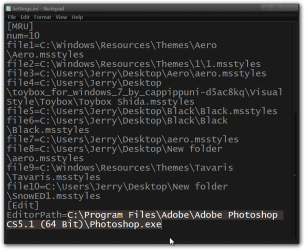
Go to C:\Users\YOUR USER NAME\AppData\Roaming\VistaStyleBuilder folder (AppData is hidden use step 3 of this tutorial to unhide it http://www.sevenforums.com/tutorials/56005-file-folder-hide-unhide.html )and open the Settings.ini with notepad and edit/remove from the bottom line as shown in my screenshot, the next time you open up Windows Style Builder and then click on the edit button you will be able to set a new image editor.

Jerry
Settings.ini - Notepad.png
 

My Computer

Computer type
Laptop
Computer Manufacturer/Model Number
Sager NP9170
OS
Win 7 Pro x64 / Win 10 Pro
CPU
Intel(R) Core(TM) i7-3630QM CPU @ 2.40GHz
Motherboard
CLEVO P170EM
Memory
12 GB
Graphics Card(s)
(1) Intel(R) HD Graphics 4000 (2) NVIDIA GeForce GTX 675M
Sound Card
(1) Realtek High Definition Audio (2) Intel(R) Display Aud
Monitor(s) Displays
17.3
Screen Resolution
1920x1080
Hard Drives
(1) Samsung 860 EVO 500GB(OS) (1) Samsung 860 EVO 500GB(Data)
Keyboard
Backlite
Antivirus
MSE, Malwarebytes Pro
Browser
Firefox
Other Info
DESKTOP: Custom-built.
OS: Win 10 Pro x64.
CASE: Rosewill R5.
CPU: Intel I5 4670K CPU @ 3.40GHz.
CPU COOLER: Cool Master Hyper 212 EVO.
MOTHERBOARD: Asus Z87-A.
MEMORY: Kingston HyperX 2x4 GB.
GPU: Nvidia Geforce 650 TI.
PSU: Corsair TX750.
DRIVES: (1) Samsung 840 120 GB SSD (2) Western Digital blue 500 GB 7200 RPM.
Back
Top