creating system image

berabbit

New member
Local time
2:23 AM
Messages
8
i want to create a system image.. but the problem is that my windows partition contains 74 gb of data...i will be storing the image on DVDs .... so i would like to know that will the image be compressed (so that it takes lesser DVDs) or will it be of the same size as my windows partition is?
 

My Computer

Computer Manufacturer/Model Number
ASUS a42jp vx029v
OS
windows 7 Home Premium 64bit
CPU
intel dual core P6200 2.1 Ghz
Memory
4gb ddr3
Graphics Card(s)
HD6570M 2gb ddr3
Screen Resolution
1366x768
Hard Drives
500 gb
Internet Speed
512 Kbps
Please check this tutorial before you start to create your backup.

http://www.sevenforums.com/tutorials/663-backup-complete-computer-create-image-backup.html

I certainly wouldn't recommend data compression as it can lead to problems when restoring your system from the backup, but I would recommend you use an external hard drive rather than separate DVDs. If just one DVD is scratched or corrupted in any way, the complete backup will become worthless and unusable.

If you want to use DVDs, check here: http://www.pagestart.com/win7bckuprstrdvd071910b.html

Restoring from an image: http://windows.microsoft.com/en-US/windows7/Restore-your-computer-from-a-system-image-backup
 

My Computer

Computer Manufacturer/Model Number
HP Pavilion Elite 495UK
OS
Windows 7 Ultimate SP1 64-Bit
CPU
Intel Core i7 870 @ 2.93GHz
Motherboard
MSI 2A9C (CPU1)
Memory
8Gb Dual-Channel DDR3 @ 664MHz
Graphics Card(s)
nVidia GeForce GTX 460 1024MB dedicated RAM
Sound Card
Realtek HD Audio
Monitor(s) Displays
HP2310i
Screen Resolution
1920 x 1080
Hard Drives
1x1954GB Hitachi HDS22020ALA 330 (RAID), 1x1954GB Hitachi External for backup and storage
PSU
460W
Case
HP Elite
Cooling
Air cooled
Keyboard
Logitech K750 solar-powered keyboard
Mouse
Logitech Wireless M180 mouse
Internet Speed
2Mb
Other Info
Pure Avanti Flow Internet Radio with iPod Dock, 64Gb iPod, HP USB Speakers, Sony MDR-V500 Headphones, Sony Vaio F-Series Laptop
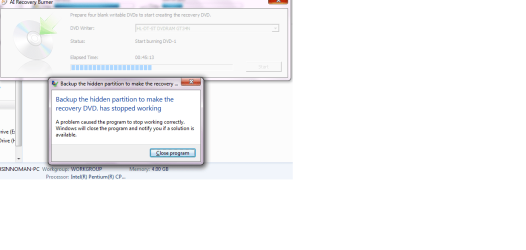
plus i cant use AI recovery burner because it stops working!
using the backup and restore center does the same thing right?
 

Attachments

  • Untitled.png
    Untitled.png
    27.9 KB · Views: 56

My Computer

Computer Manufacturer/Model Number
ASUS a42jp vx029v
OS
windows 7 Home Premium 64bit
CPU
intel dual core P6200 2.1 Ghz
Memory
4gb ddr3
Graphics Card(s)
HD6570M 2gb ddr3
Screen Resolution
1366x768
Hard Drives
500 gb
Internet Speed
512 Kbps
Asus have a big problem with the AI recovery burner.

You can Order Asus recovery disks from here:
ASUS eStore
At the search box, type in RECOVERY

IMO, ASUS should send out Recovery Disks FREE.
 

My Computer

OS
ME/XP/Vista/Win7
i dont think that they wud be kind enough:S
 

My Computer

Computer Manufacturer/Model Number
ASUS a42jp vx029v
OS
windows 7 Home Premium 64bit
CPU
intel dual core P6200 2.1 Ghz
Memory
4gb ddr3
Graphics Card(s)
HD6570M 2gb ddr3
Screen Resolution
1366x768
Hard Drives
500 gb
Internet Speed
512 Kbps
seavixen32 is right--making your own backup DVDs, especially of a 74Gb partition, is not a good idea at all. DVD-Rs are not very reliable; they can-and-do develop errors just sitting on a shelf.

You're MUCH better off to have a $50 USB drive or two, and use that instead, keeping it offline (powered-down) unless you are actually making a backup.

If you want System recovery disks, factory-made discs (as opposed to writeable DVD-R and DVD+R) are the best bet, or an alternative is to make ISO images and keep them on an external USB drive.
 

My Computer

Computer type
Laptop
Computer Manufacturer/Model Number
Dell Latitude E6540 Laptop
OS
Windows 7 Professional 64bit
CPU
Intel Core i7 4600M @ 2.90GHz
Motherboard
Dell Inc. 0CYT5F (SOCKET 0)
Memory
16.0GB Dual-Channel DDR3 @ 797MHz (11-11-11-28)
Graphics Card(s)
Intel HD Graphics 4600 (Dell) 2048MB ATI AMD Radeon HD 8790M
Sound Card
Realtek High Definition Audio
Monitor(s) Displays
HP ZR30w (2560x1600@60Hz)
Hard Drives
256GB LITEONIT LMT-256M6M-41 mm SATA (SSD)
1TB Samsung SSD 860 EVO mSATA SATA (SSD)
2TB USB 3.0 USB Device
115GB SanDisk Ultra Fit USB
Other Info
Multiple Dell E-Port Plus II Port Replicator/Docking Stations 0Y72NH USB 3.0 + 130W AC Adapters

My Computer

Computer type
PC/Desktop
Computer Manufacturer/Model Number
Home Built Desktop By DataTech
OS
Windows 7 Ultimate X64 SP1
CPU
Intel i5-2550K, Differing ~4.4-4.8GHz No built in GPU
Motherboard
ASUS P8Z68-V PRO/GEN3
Memory
16GB G.Skill Sniper 1866MHz @ 2133MHz 2x8GB
Graphics Card(s)
ASUS GTX650TIB-DC2OC-2GD5, (650TI Boost)
Sound Card
Onboard Realtek 5-1
Monitor(s) Displays
Samsung P2570HD
Screen Resolution
1920x1080
Hard Drives
Samsung 840 Pro 256GB SSD for OS, 500GB Seagate Constellation (Enterprise drive) for Data
PSU
Corsair HX650W
Case
Inwin Dragon Rider
Cooling
Hyper 212 EVO w/two Noctua fans, push-pull, @1300 RPM
Keyboard
E-Z Eyes, bright yellow keys with large characters
Mouse
steelseries SENSEI Laser Pro Gaming
Internet Speed
48-51Mbs Mbs down, 11 Mbs up Xfinity Cable
Antivirus
Norton Internet Security 2013
Browser
IE 10, Opera, Pale Moon if needed
Other Info
4 case fans, LG BluRay-RE, ASUS DVD-RW, Mr. Fusion power supply, 1.21 gigawatts.
Back
Top