Solved Creating Win7 Sytem Restore points

AaLF

New member
Member
VIP
Local time
6:47 AM
Messages
488
Can System Restore be automated by the user to backup multiple times per day??
 

My Computer

Computer type
PC/Desktop
Computer Manufacturer/Model Number
Generic - custom build
OS
Microsoft Windows 7 HomePremium 64-bit 7601 Multiprocessor Free Service Pack 1
CPU
Intel(R) Core(TM)2 Duo CPU E4500 @ 2.20GHz
Motherboard
Gigabyte Technology Co., Ltd. EP35-DS3P
Memory
8Gb
Graphics Card(s)
NVIDIA GeForce GT 710
Sound Card
(1) USB Audio Device (2) USB Audio Device (3) NVIDIA Hig
Monitor(s) Displays
older 21" thinkvision brand?
Screen Resolution
1680 x 1050
Hard Drives
WDC WD5000AAKS-22A7B0 ATA Device
ST3500418AS ATA Device
ST3320813AS ATA Device
PSU
ANTEC NEO ECO 520W
Case
generic tower
Cooling
couple of 4" fans
Keyboard
logitech k220
Mouse
logitech 305
Antivirus
malwarebytes premium
Browser
FireFox + opera
Yes it can
Start>All Programs>Accessories>System Tools>Task Scheduler

Navigate through folders top left to find system restore
SR Overview.PNG

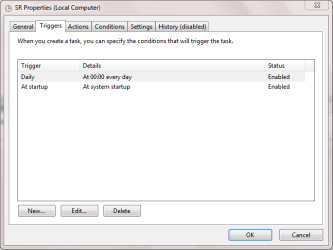
Right click top line and select properties then click triggers tab
SR Triggers.PNG

Click edit trigger
Edit Triggers.PNG

There is option to run task every X number of hours which is what i think you are looking for

Hope this helps

Paul
 

My Computer

Computer type
PC/Desktop
Computer Manufacturer/Model Number
Pauly Special
OS
Win7 Ultimate X64
CPU
Intel i5 3570K
Motherboard
Gigabyte Z77X-DS3H
Memory
8GB DDR3 1600
Graphics Card(s)
Onboard
Sound Card
Onboard
Screen Resolution
1280x1024
Hard Drives
Samsung 840 Evo SSD (OS)
1TB Spinner (Data)
PSU
800W Arctic
Case
Cooler Master
Cooling
3x120mm Fans
Keyboard
MS Wireless
Mouse
MS Wireless
Internet Speed
20M
Can System Restore be automated by the user to backup multiple times per day??

You DO know that System Restore won't backup or restore the ENTIRE system, right?

It should be called OPERATING System Restore -- cause it only backs up some OS-related stuff and restores that.

If you're making changes to your system such that you need the ability to restore it in its entirety, you're better off doing an image backup or using something like Macrium Reflect. Those will backup and restore the entire system.
 

My Computer

Computer type
PC/Desktop
Computer Manufacturer/Model Number
Custom
OS
Win7 Pro 32-bit, Win8 Pro 32-bit
CPU
AMD Phenom II X6 1090T
Motherboard
Gigabyte
Memory
4GB ddr3 1300
Graphics Card(s)
AMD HD 4290 onboard
Sound Card
Builtin Realtek HD Audio
Monitor(s) Displays
Samsung 24" widescreen, LG 23" widescreen
Screen Resolution
1920x1200/1920x1080
Hard Drives
Kingston 256GB SSD
Keyboard
Logitech Illuminated Keyboard
Mouse
Logitech M705 wireless mouse
Antivirus
Norton Av 2013
Browser
IE v10
I have Imaging backup for serious stuff. I want something lite for things such as Windows updates that go astray or a driver install by me that needs reverting etc.

QUESTION: If I set Sys. Restore to back up 3 extra times per day (as above) does it delete old useless backups after a week or two - or is it going to keep growing in GBs forever?
 

My Computer

Computer type
PC/Desktop
Computer Manufacturer/Model Number
Generic - custom build
OS
Microsoft Windows 7 HomePremium 64-bit 7601 Multiprocessor Free Service Pack 1
CPU
Intel(R) Core(TM)2 Duo CPU E4500 @ 2.20GHz
Motherboard
Gigabyte Technology Co., Ltd. EP35-DS3P
Memory
8Gb
Graphics Card(s)
NVIDIA GeForce GT 710
Sound Card
(1) USB Audio Device (2) USB Audio Device (3) NVIDIA Hig
Monitor(s) Displays
older 21" thinkvision brand?
Screen Resolution
1680 x 1050
Hard Drives
WDC WD5000AAKS-22A7B0 ATA Device
ST3500418AS ATA Device
ST3320813AS ATA Device
PSU
ANTEC NEO ECO 520W
Case
generic tower
Cooling
couple of 4" fans
Keyboard
logitech k220
Mouse
logitech 305
Antivirus
malwarebytes premium
Browser
FireFox + opera
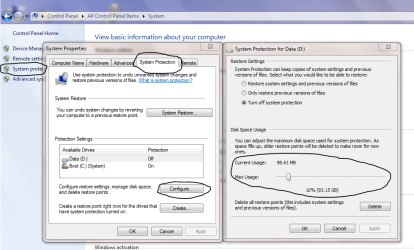
You can set size as % of drive space, when capacity is used older points will auto delete

Control Panel>System>System Protection>Configure
Capture.PNG

PS
Ignore settings you see in my snip as this is not my system drive
 

My Computer

Computer type
PC/Desktop
Computer Manufacturer/Model Number
Pauly Special
OS
Win7 Ultimate X64
CPU
Intel i5 3570K
Motherboard
Gigabyte Z77X-DS3H
Memory
8GB DDR3 1600
Graphics Card(s)
Onboard
Sound Card
Onboard
Screen Resolution
1280x1024
Hard Drives
Samsung 840 Evo SSD (OS)
1TB Spinner (Data)
PSU
800W Arctic
Case
Cooler Master
Cooling
3x120mm Fans
Keyboard
MS Wireless
Mouse
MS Wireless
Internet Speed
20M
Back
Top