Creative Audigy help

Fetter

New member
Local time
8:21 AM
Messages
17
Been trying to fix this for the past few hours.

I've got a Creative SB Audigy 2 ZS card installed with the latest drivers from Creative. I'm also using Logitech Z-5500 5.1 speakers.

The thing is, there's only audio out of the R and L speakers.. Normally I wouldn't care, but another issue has arisen.

When I play games (specifically Mass Effect and L4D), the audio cuts in and out depending on the camera angle (I only get dialogue and the sound of my weapon firing in L4D. No ambient).

I've tried installing ALchemy, messing with settings, installing RealTek, and nothing seems to work.

Thanks in advance for any assistance (also, ignore the 7100 build thing on the left).


-F

EDIT: also, forgot to mention, using Direct connect, but Realtek isn't reading that I'm plugged into the back panel. When I test audio when switched to 6 Ch Direct, I get noise from all the speakers, but there's nothing for games, videos, etc.
 
Last edited:

My Computer

OS
Windows 7 Ultimate 64-Bit
CPU
AMD Athlon(tm) 64 X2 Dual Core Processor 5000+ (2 CPUs)
Motherboard
ECS-USA GeForce6100PM-M2
Memory
4.00 GB (RAM)
Graphics Card(s)
NVIDIA GeForce 9800 GTX+
Sound Card
Creative SB Audigy 2 ZS
Hard Drives
500gb ; Dual Partition
Creative.

Audigy.

Ugh.

I'm not saying you can't get this working right because with effort you probably could.

Creative + VistaOrWin7 = fail

You're probably glad to read this post to regain a sense of sanity after dealing with that. Don't worry. It's not you. lol

Advice: use your onboard audio or get something like this: http://www.newegg.com/Product/Product.aspx?Item=N82E16829132007
and say goodbye to Creative.

If you want a real high end solution and are very serious about audio, which you probably aren't but I mention so anyone interested can benefit, MOTU and M-Audio offer excellent firewire solutions. Check my specs. :):):D

If you are daring enough to try to fix your Creative card so it works in 7, uninstall the driver and clear your entire system of all Creative files, registry entries etc...
Then start fresh. Old files of Creative around your system will mess it up straight away. Google for how to do this if you aren't completely sure.

:)
 

My Computer

Computer Manufacturer/Model Number
self built
OS
7600.20510 x86
CPU
P4 550 3.4 GHz HT running at 3.5 GHz
Motherboard
MSI PM8M3-V (MS-7211 v1.x) Micro-ATX mainboard
Memory
OCZ 2 GB(2x1GB) DDR400mHz running @ 414 mHz
Graphics Card(s)
HIS Radeon HD 3850 IceQ 3 Turbo HDMI Dual DL-DVI AGP
Sound Card
MOTU Traveler firewire studio interface 192 kHz 24 bit
Monitor(s) Displays
22" widescreen Acer X223W LCD, 17" Compaq P75 CRT
Screen Resolution
1680x1050 and 1280x1024
Hard Drives
SATA I x2 WD, 400 GB and 120 GB, SATA 2 WD Caviar Black 1 TB
PSU
350W generic
Case
Cybertronpc, it glows blue
Cooling
stock cpu fan, Ice-Q 3 gpu and system, many case fans
Keyboard
Logitch Classical Keyboard 200
Mouse
Logitech Mediaplay cordless
Internet Speed
1792/448 kbits/sec
Other Info
SATA II PCI fake RAID adapter, 1 GB Readyboost, original ATI Remote Wonder (even works with WMC perfectly), Logitech Rumblepad 2 game controller x2
Creative.

Audigy.

Ugh.

I'm not saying you can't get this working right because with effort you probably could.

Creative + VistaOrWin7 = fail

You're probably glad to read this post to regain a sense of sanity after dealing with that. Don't worry. It's not you. lol

Advice: use your onboard audio or get something like this: Newegg.com - ASUS Xonar D1 7.1 Channels 24-bit 192KHz PCI Interface Sound Card - Sound Cards
and say goodbye to Creative.

If you want a real high end solution and are very serious about audio, which you probably aren't but I mention so anyone interested can benefit, MOTU and M-Audio offer excellent firewire solutions. Check my specs. :):):D

If you are daring enough to try to fix your Creative card so it works in 7, uninstall the driver and clear your entire system of all Creative files, registry entries etc...
Then start fresh. Old files of Creative around your system will mess it up straight away. Google for how to do this if you aren't completely sure.

:)

Finally someone else besides me who knows the facts about Creative and their terrible drivers. Once they break..."and they are easy to break" reinstalling alone will not fix them. You must get all the Creative files outta your machine before reinstalling the drivers.

On a side note, I heard that the Daniel K drivers work for the Audigy 2SZ so I would look for those if the Creative ones won't work properly.

According to Creative you need the SBO350 drivers for the Audigy 2ZS.
Here is the driver support list from Creative.
Creative Worldwide Support
 

My Computer

Computer type
PC/Desktop
Computer Manufacturer/Model Number
Home built
OS
Windows 7 Ult, Windows 8.1 Pro,
CPU
Q9650-4.275GHz, E8600 4.5GHz, E6750-3.8GHz
Motherboard
Evga 780i FTW
Memory
G.Skill PC2 9600 1200Mhz 5 5 5 15 2T
Graphics Card(s)
GTX480
Sound Card
Asus Xonar D2
Monitor(s) Displays
HannsG
Screen Resolution
1680X1050
Hard Drives
GSkill Phoenix Pro 120GB SSD
PSU
ThermalTake Toughpower 1000Watt modular
Case
ThermalTake XaserV
Cooling
Xigmatek S1283
Keyboard
Logitech G15
Mouse
Logitech G9
Internet Speed
T1
Many thanks for the replies. I think I was able to fix it for now (switched effect to Stereo X2, reinstalled the games that had no sound).

But I'm going to take your advice and uninstall all of the creative files, then see where it goes from there.
 

My Computer

OS
Windows 7 Ultimate 64-Bit
CPU
AMD Athlon(tm) 64 X2 Dual Core Processor 5000+ (2 CPUs)
Motherboard
ECS-USA GeForce6100PM-M2
Memory
4.00 GB (RAM)
Graphics Card(s)
NVIDIA GeForce 9800 GTX+
Sound Card
Creative SB Audigy 2 ZS
Hard Drives
500gb ; Dual Partition

My Computer

Computer Manufacturer/Model Number
Self Built
OS
Windows 7 ultimate 64 bit / XP Home sp3
CPU
intel Core 2 Duo E8400 3.0ghz
Motherboard
Asus P5ND bios 1401
Memory
8 gigs 1066 OCZ Fata1ty
Graphics Card(s)
EVGA GTX 580 Call of Duty Black Ops Edition
Sound Card
Creative Soundblaster Audigy 2zs
Monitor(s) Displays
Asus 24in LCD's 2MS X2
Screen Resolution
1920x1080p @60Hz
Hard Drives
WD Caviar 500 Black/ WD Caviar 200 Blue
PSU
OCZ 700W GameXtreme
Case
NZXT Apollo
Cooling
Corsair H50 CPU/120mm x3 /60mm x2 /Corsair Dominator Ram
Keyboard
Logitech Bluetooth Wireless MX5000
Mouse
Logitech Bluetooth Wireless MX1000
Internet Speed
Download 19.83 Upload 0.97
Other Info
Logitech Z2300 Speakers/ Bose Noise Cancelling Headphones/Avermedia PCI-e Hybrid TV Bravo/Epson NX415 all in one/ 4 Port Powered USB Hub/ LG 10x Bluray Burner /TSST Corp DVDRW External
Gonna try the Daniel K drivers out now, i had a problem with my volume being too low, even on max volume. Im using the Audigy 2 ZS Front panel with optical in/out for home surround.

Just installed old pack from creative, to see if that would help.. waiting on daniel k's drivers to finish downloading.

Any updates would be great.
 

My Computer

OS
XP Pro
Gonna try the Daniel K drivers out now, i had a problem with my volume being too low, even on max volume. Im using the Audigy 2 ZS Front panel with optical in/out for home surround.

Just installed old pack from creative, to see if that would help.. waiting on daniel k's drivers to finish downloading.

Any updates would be great.

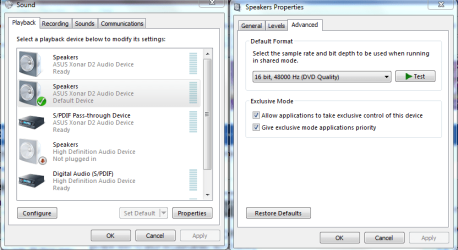
For the low volume problem try this and switch to DVD quality.
 

Attachments

  • application control of this device.PNG
    application control of this device.PNG
    34.8 KB · Views: 193

My Computer

Computer type
PC/Desktop
Computer Manufacturer/Model Number
Home built
OS
Windows 7 Ult, Windows 8.1 Pro,
CPU
Q9650-4.275GHz, E8600 4.5GHz, E6750-3.8GHz
Motherboard
Evga 780i FTW
Memory
G.Skill PC2 9600 1200Mhz 5 5 5 15 2T
Graphics Card(s)
GTX480
Sound Card
Asus Xonar D2
Monitor(s) Displays
HannsG
Screen Resolution
1680X1050
Hard Drives
GSkill Phoenix Pro 120GB SSD
PSU
ThermalTake Toughpower 1000Watt modular
Case
ThermalTake XaserV
Cooling
Xigmatek S1283
Keyboard
Logitech G15
Mouse
Logitech G9
Internet Speed
T1
Back
Top