Creative Labs VF0380 webcam issue

weescotsman

New member
Local time
4:29 PM
Messages
6
Need some assistance with getting my webcam to work as I need it for Skype interviews.

Running Windows 7 Professional 64 bit.

Appreciate this is an old webcam but it has worked previously on Windows 7 but now it doesn't work regardless of whether I plug it into USB 2 slot or USB 3.

The latest Creative Labs drivers are installed - I have the auto updater from CL. The webcam is detected in Device Manager with no errors. Skype also detects it but when I try to take a test picture with it the cam remains black, the actual camera light comes on though and the microphone works fine on it.

Not sure what else can be causing this. Any assistance is appreciated :D
 

My Computer

Computer type
PC/Desktop
Computer Manufacturer/Model Number
Custom build
OS
Win 7 Professional 64 bit
CPU
Core i3
Motherboard
Asus z170-E
Memory
8 GB DDR4
Hard Drives
Lots...
Browser
Chrome, Firefox, Opera
I had this kind of problem with a Sony laptop. The laptop came with Win Vista. When I upgraded to Win 7, the camera didn't work anymore. In device manager it showed that the driver was working correctly. But Win 7 installed the wrong driver.
Open device manager - look for the camera. Is it without a yellow alert?
Right click on the camera - Properties. On the Details tab choose Hardware ID.
It's something as USB\VID_03F0&PID_A707&REV_0030&MI_00
Put the Hardware ID on the Google search and you may find some answers.
If you don't find the driver, paste the Hardware ID at here.

Fond a driver here:
Creative Worldwide Support
 

My Computers

System One System Two

  • Computer type
    PC/Desktop
    Computer Manufacturer/Model Number
    custom build
    OS
    Windows 7 HP 64
    CPU
    i5 6600K - 800MHz to 4200MHz
    Motherboard
    GA-Z170-HD3P
    Memory
    4+4G GSkill DDR4 3000
    Graphics Card(s)
    IG - Intel 530
    Monitor(s) Displays
    Samsung 226BW
    Screen Resolution
    1680x1050
    Hard Drives
    (1) -1 SM951 – 128GB M.2 AHCI PCIe SSD drive for Windows 7 and Lubuntu
    (2) -1 WD SATA 3 - 1T for Data
    (3) -1 WD SATA 3 - 1T for backup
    PSU
    Thermaltake 450W TR2 gold
    Keyboard
    Old and good Chicony mechanical keyboard
    Mouse
    Logitech mX performance - 9 buttons (had to disable some)
    Internet Speed
    500Mb/s
    Browser
    Firefox 64
    Other Info
    TinyWall firewall
  • Computer type
    Laptop
    System Manufacturer/Model Number
    Asus Q550LF
    OS
    Windows 7 Pro
    CPU
    i7-4500U 800MHz to 3.0GHz
    Motherboard
    Asus Q550LF
    Memory
    (4+4)G DDR3 1600
    Graphics Card(s)
    IG intel 4400 + NVIDIA GeForce GT 745M
    Sound Card
    Realtek
    Monitor(s) Displays
    LG Display LP156WF4-SPH1
    Screen Resolution
    1920 x 1080
    Hard Drives
    BX500 120G SSD for Windows and programs +
    1T HDD for data
    Internet Speed
    500 Mb/s
    Browser
    Firefox
    Other Info
    TinyWall firewall
Hi thanks for a prompt reply.

The webcam is listed in device manager with no exclamation marks indicating an error. The latest drivers are installed and requesting an update via the Device Properties returns saying I have the latest drivers.

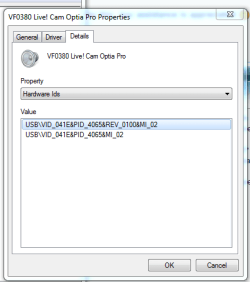
As for the hardware id's - it's reporting 2 of them as per the attached image. Googling the id takes me to various driver pages but since I already have the most up to date drivers I'm kinda stuck.
 

Attachments

  • webcam hardware id.PNG
    webcam hardware id.PNG
    9.7 KB · Views: 5

My Computer

Computer type
PC/Desktop
Computer Manufacturer/Model Number
Custom build
OS
Win 7 Professional 64 bit
CPU
Core i3
Motherboard
Asus z170-E
Memory
8 GB DDR4
Hard Drives
Lots...
Browser
Chrome, Firefox, Opera

My Computers

System One System Two

  • Computer type
    PC/Desktop
    Computer Manufacturer/Model Number
    custom build
    OS
    Windows 7 HP 64
    CPU
    i5 6600K - 800MHz to 4200MHz
    Motherboard
    GA-Z170-HD3P
    Memory
    4+4G GSkill DDR4 3000
    Graphics Card(s)
    IG - Intel 530
    Monitor(s) Displays
    Samsung 226BW
    Screen Resolution
    1680x1050
    Hard Drives
    (1) -1 SM951 – 128GB M.2 AHCI PCIe SSD drive for Windows 7 and Lubuntu
    (2) -1 WD SATA 3 - 1T for Data
    (3) -1 WD SATA 3 - 1T for backup
    PSU
    Thermaltake 450W TR2 gold
    Keyboard
    Old and good Chicony mechanical keyboard
    Mouse
    Logitech mX performance - 9 buttons (had to disable some)
    Internet Speed
    500Mb/s
    Browser
    Firefox 64
    Other Info
    TinyWall firewall
  • Computer type
    Laptop
    System Manufacturer/Model Number
    Asus Q550LF
    OS
    Windows 7 Pro
    CPU
    i7-4500U 800MHz to 3.0GHz
    Motherboard
    Asus Q550LF
    Memory
    (4+4)G DDR3 1600
    Graphics Card(s)
    IG intel 4400 + NVIDIA GeForce GT 745M
    Sound Card
    Realtek
    Monitor(s) Displays
    LG Display LP156WF4-SPH1
    Screen Resolution
    1920 x 1080
    Hard Drives
    BX500 120G SSD for Windows and programs +
    1T HDD for data
    Internet Speed
    500 Mb/s
    Browser
    Firefox
    Other Info
    TinyWall firewall
Yes that's the one I already installed. I can't get any tech support from Creative Labs themselves as it's a very old camera. Might have to bite the bullet and buy a new camera perhaps.
 

My Computer

Computer type
PC/Desktop
Computer Manufacturer/Model Number
Custom build
OS
Win 7 Professional 64 bit
CPU
Core i3
Motherboard
Asus z170-E
Memory
8 GB DDR4
Hard Drives
Lots...
Browser
Chrome, Firefox, Opera
The driver ID is related to the audio.
Can't be sure, but maybe your camera has failed.
 

My Computers

System One System Two

  • Computer type
    PC/Desktop
    Computer Manufacturer/Model Number
    custom build
    OS
    Windows 7 HP 64
    CPU
    i5 6600K - 800MHz to 4200MHz
    Motherboard
    GA-Z170-HD3P
    Memory
    4+4G GSkill DDR4 3000
    Graphics Card(s)
    IG - Intel 530
    Monitor(s) Displays
    Samsung 226BW
    Screen Resolution
    1680x1050
    Hard Drives
    (1) -1 SM951 – 128GB M.2 AHCI PCIe SSD drive for Windows 7 and Lubuntu
    (2) -1 WD SATA 3 - 1T for Data
    (3) -1 WD SATA 3 - 1T for backup
    PSU
    Thermaltake 450W TR2 gold
    Keyboard
    Old and good Chicony mechanical keyboard
    Mouse
    Logitech mX performance - 9 buttons (had to disable some)
    Internet Speed
    500Mb/s
    Browser
    Firefox 64
    Other Info
    TinyWall firewall
  • Computer type
    Laptop
    System Manufacturer/Model Number
    Asus Q550LF
    OS
    Windows 7 Pro
    CPU
    i7-4500U 800MHz to 3.0GHz
    Motherboard
    Asus Q550LF
    Memory
    (4+4)G DDR3 1600
    Graphics Card(s)
    IG intel 4400 + NVIDIA GeForce GT 745M
    Sound Card
    Realtek
    Monitor(s) Displays
    LG Display LP156WF4-SPH1
    Screen Resolution
    1920 x 1080
    Hard Drives
    BX500 120G SSD for Windows and programs +
    1T HDD for data
    Internet Speed
    500 Mb/s
    Browser
    Firefox
    Other Info
    TinyWall firewall
Did you try the drive I've found: Creative Worldwide Support

That driver is for the creative webcam software the driver is this one: Creative Worldwide Support

OP should try this one and see what they get then if it works then install the previous mentioned one afterwards.

EDIT: OP please first get the driver file then disconnect from the internet and go into the device manger and uninstall the found camera device and make sure you check the box that says also remove software for this device then reboot and install the driver, then reboot again and install the other software first mentioned. 03.exe is the driver and 13.exe is the software that is optional.

Good luck.
 

My Computer

Computer type
PC/Desktop
Computer Manufacturer/Model Number
Custom
OS
10 Pro x64
CPU
Ryzen 9 3900X
Motherboard
Asrock x370 Tachi
Memory
64GB(4x16GB) DDR4
Graphics Card(s)
EVGA 1080ti FTW3
Sound Card
ASUS Xonar Essence STX (V4 Bursons), ODAC rev B, NFB-11, O2
Monitor(s) Displays
3xASUS PB278Q/R, Optoma HD142X
Screen Resolution
3x1440p, 1080p
Hard Drives
512GB 850 EVO(OS, Programs)
4TB (Movies)
3TB (Downloads)
3TB (Programs)
1TB HDD (Games)
2x6TB R1 (videos)
PSU
AX760
Case
Fractal Define R5
Cooling
NH-D15S
Keyboard
Massdrop Ctrl with Box Navy's
Mouse
G903, Alioth XXL Mat
Internet Speed
280/40
Antivirus
MBAM, ESET
Browser
Canary 64 Bit
Other Info
I also own a Thinkpad P50 Xeon 4K, X220T, X1C5
Back
Top