Creative Sound Cards.

Hello everyone

I have the X-Fi Xtreme Gamer edition soundcard from Creative and I wonder if it is possible to set one of the audio out ports play on separate channel. I would like to DJ a bit. I have regular speakers plugged into the general audio out socket (the green one). Is it possible to make one of others to work with my headphones?

Thank you
 

My Computer My Computer

OS
Windows 7 Enterprise x64
CPU
Intel i3 2120 3.3ghz
Motherboard
Asrock Fatal1ty Performance
Memory
Kingston HyperX DDR3 1600mhz 8GB Limited Edition
Graphics Card(s)
GeForce 7600GT 256MB
Sound Card
Creative Xtreme Gamer
Monitor(s) Displays
Samsung 943BW
Hard Drives
Samsung 1TB
PSU
Fortron 450W
Keyboard
Microsoft Ditigal Media
Mouse
Logitech G400
Hello,

That's my situation.

I have Sound Blaster X-Fi Go sound card and I am using SRS HD Audio Lab. SRS HD Audio Lab was selected as the default audio device and X-Fi effects (X-Fi CMSS-3d, Equalizer etc.) was working without any problem in Windows Xp. I have Windows 7 now and when i select SRS HD Audio Lab as the default device, Creative effects are not working, i must select "SB X-Fi Go!" to get them working but i can't use SRS HD Audio Lab in that case. I want to run two of them. Is it possible to do it in Windows 7? Thanks.
 

My Computer My Computer

OS
Windows 7 Ultimate 32 bit
Newbie here, so sorry if I this is a repeat. I searched the forum and couldn't find what I needed. I upgraded to Windows 7 64 bit and my Sound Blaster X-Fi Hendicks that came with the computer is now acting strangely. It is plugged in correctly (according the the jack detection) but in entertainment mode it auto-detects 5.1 but on testing (within Creative Console Launcher) it only plays the left/right channel. In game mode, it only sees 2/2.1 and again only plays left/right channel. My driver is 6.0.1.1376 from 5/5/2010 which was the latest I could find for this card but I am at wit's end. Any help is much appreciated.
 

My Computer My Computer

Computer Manufacturer/Model Number
Alienware/Area-51 R6
OS
Windows 7 Home Premium 64bit
CPU
Intel Core2 Extreme CPU X9770 @3.20 GHz
Motherboard
nForce 790i Ultra SLI
Memory
4 GB DDR3 Dual Channel 533.33 MHz
Graphics Card(s)
NVIDIA GeForce 9800 GTX/9800 GTX+
Sound Card
Creative X-Fi Audio Processor (WDM)
Monitor(s) Displays
Dell LCD
Screen Resolution
1920 X 1200 x 59 hertz
Cooling
Liquid and air
Keyboard
Microsoft 3000
Mouse
Microsoft 5000
Internet Speed
11.35 Mbps download, 1.45 Mbps upload per Speedtest.com
I have a problem with my Creative SB X-Fi Fatality. It worked fine under Vista. I upgraded to windows 7 Ultimate and I can"t get it to work. When I go to the mixer-Speakers (Creative SB X-Fi) I can see the green volume level lines moving to the top of the volume range for both the speakers and windows media player. Yet I have no sound from my speakers. I know the speakers work, because they work fine on my laptop. I am a novice so I need some help. I have no idea what my problem is. One more thing...my speakers have one jack so I bought a splitter with two male ends into one female end to plug into the two SB speaker jacks on the left of the SB card. I could really use some help!
THANKS!!!!!!
Eddie
 

My Computer My Computer

OS
Windows 7 Ultimate 32 bit
My PC is hanging everytime i try and install the drivers for my X-fi xtreme music from the drivers listed in this thread.

I've been working my way through the solutions in here but have now hit a wall. Desktop speakers and onboard sound are still working ok.

It goes as follows:

Used driversweeper in safe mode to remove all traces of creative drivers. Had previously tried drivers from creative website, both official and beta. With the creative official driver i would get sound but with lots of crackling. WMP12 was unusable. Sound would come and go then just disappear. Reboot would cure for about 10mins or so before it would disappear again.

Driver/software installation started off CD (typical install), first time it got to the point where its asks you if you want to install the uncertified driver. BSOD about 30 seconds after that and every consequent time windows started. Went back to restore point and went through removing all traces of creative again.

Second time i used the minimum install. No BSOD, the system just froze. Rebooted and removed all traces again.

Third time, card in a different PCI slot. Same as the second time.

Does anyone know of any other drivers that will work with the xtreme music? I'm starting to consider seeing how well the soundcard will act as a frisbee from my 5th floor flat window!

Thanks in advance for any replies, i know this is a pretty old thread now!
 

My Computer My Computer

OS
Windows 7 Ultimate X64
CPU
AMD Athlon X2 4400+ 2.21GHz
Motherboard
Gigabyte GA-K8NXP-SLI
Memory
4 Gb DDR2 400MHz
Graphics Card(s)
Nvidia GeForce GT240
Sound Card
on board sound - AC'97
Hard Drives
Multiple
PSU
650W
Gonz, a couple of reasons for the problems you're having,

1. The ever popular Nvidia NF4 chipset and Creative sound cards; they either play together nicely, or they do what you're getting. Only thing is that I don't think I have ever come across a definitive solution for it.

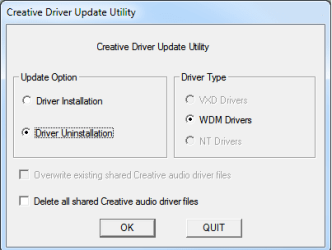
2. You used Driver Cleaner to remove leftovers, something that even Daniel K recommends never doing as it can and does on occasion remove more than it should and leaving it unable to install the drivers without a clean install of Windows (or loading a system image from before using DC). Ideally the best way to remove Creative drivers is to uninstall through Programs and Features and then use Creative's own uninstaller,

creativeuninstall.png

which can be found in the Support folder of the driver file after extracting (Audio\Drivers\support\amd64 for 64 bit and Audio\Drivers\support\i386 for 32 bit).

As for drivers that workI have used both Daniel's Support Pack 2.0 as well as his unofficial install disk with zero problems on my Xtreme Music.
 

My Computer My Computer

Computer type
PC/Desktop
Computer Manufacturer/Model Number
Me
OS
Win 7 Ultimate x64
CPU
FX-8350 @ 4.6 GHz so far
Motherboard
Asus M5A97 EVO
Memory
ADATA XPG V1 Series Black 8GB DDR3 1600
Graphics Card(s)
Sapphire R9 270x Dual-X
Sound Card
Xonar DGX w/ Corsair Vengence 1300
Monitor(s) Displays
Acer S232HL Abid
Screen Resolution
1920x1080
Hard Drives
120 GB OCZ Vertex 3
500 GB Seagate 7200.12
PSU
Antec Earthwatts 650W Green
Case
Antec Three Hundred
Cooling
Cooler Master 212 EVO
Keyboard
Logitech G510
Mouse
Logitech G500s
Internet Speed
35000/3000
Thanks for the reply stormy!

I restored the drivers using the backup within driversweeper then proceeded to uninstall the drivers using the creative utility as you described above.

Ran the cd and did the minimum install and it completed this time with no BSOD or hanging.

However, i'm now back to the same situation as i was before, sound with lots of snap, crackle and pop :(

Can you think of anything else to try? Or am i just going to have to resign myself to the fact that this card will never work in my present machine?
 

My Computer My Computer

OS
Windows 7 Ultimate X64
CPU
AMD Athlon X2 4400+ 2.21GHz
Motherboard
Gigabyte GA-K8NXP-SLI
Memory
4 Gb DDR2 400MHz
Graphics Card(s)
Nvidia GeForce GT240
Sound Card
on board sound - AC'97
Hard Drives
Multiple
PSU
650W
Not that it helps any but I was one of those that when I had my NF4 board (Asus A8N-SLI SE), I didn't get any of the snap, crackle, pop or BSOD problems with my Xtreme Music.

Unfortunately like I said that doesn't help but this should show that you're not alone,

nf4 x-fi - Google Search

and if you read enough of those you'll see that there never has been a definitive fix for it. The third post here pretty much sums up some of what worked for some and not others,

NF4, XFI and GFX IRQ Issue

Your issue might be BIOS related because a lot of folks fixed their problem after new BIOS Flashes. Asus was one of the last to get their fix out. Again, Flash BIOS and then reinstall the Chip Set Drivers from nVidia instead of Microsoft's. Yet others have had fewer problems with the MS CS Drivers.
No, Cussing Creative while using that board is like cussing at your car because you forgot to put gas in it. Other issues include too many USB devices, NCQ turned on when not properly supported, PCI-E bus not locked or higher than 110MHz, Memory Hole enabled when it should be disabled, even Initial Video Boot Device set to PCI instead of PEG or etc..

It is also possible that the card itself is bad. Have you ever tried it in another computer to see if the problems still occur? If not and you can it would help determine if it is the card that is the problem, or any of the host of things mentioned above.
 

My Computer My Computer

Computer type
PC/Desktop
Computer Manufacturer/Model Number
Me
OS
Win 7 Ultimate x64
CPU
FX-8350 @ 4.6 GHz so far
Motherboard
Asus M5A97 EVO
Memory
ADATA XPG V1 Series Black 8GB DDR3 1600
Graphics Card(s)
Sapphire R9 270x Dual-X
Sound Card
Xonar DGX w/ Corsair Vengence 1300
Monitor(s) Displays
Acer S232HL Abid
Screen Resolution
1920x1080
Hard Drives
120 GB OCZ Vertex 3
500 GB Seagate 7200.12
PSU
Antec Earthwatts 650W Green
Case
Antec Three Hundred
Cooling
Cooler Master 212 EVO
Keyboard
Logitech G510
Mouse
Logitech G500s
Internet Speed
35000/3000
Got the card from a friend last week, although i'm beginning to wonder about the friend bit now, lol. He had it working in his machine under vista no problem. He said he was getting crackling too but if he dropped from 4 gig to 3 gig of ram the crackling problems disappeared?!

Right, next mission is to work my way through that thread, thanks for the link.

I've just been testing the extents of the problems with the card/setup now and it seems a lot better than it was. Windows sounds and music/vids sound terrible (if at all) but when i load a game up everything sounds absolutely perfect, bar the occasional crack :confused:
 

My Computer My Computer

OS
Windows 7 Ultimate X64
CPU
AMD Athlon X2 4400+ 2.21GHz
Motherboard
Gigabyte GA-K8NXP-SLI
Memory
4 Gb DDR2 400MHz
Graphics Card(s)
Nvidia GeForce GT240
Sound Card
on board sound - AC'97
Hard Drives
Multiple
PSU
650W
Further to my mission to get this pesky card to work, on going to check the IRQ's of the graphics card and sound card i discovered that the sound card isn't showing up in the device manager anywhere, even though its working near enough fine in certain games?! I'm assuming that its going to be a windows reinstall for me to have any hope of getting this working :(

Ever heard of that happening before?
 

My Computer My Computer

OS
Windows 7 Ultimate X64
CPU
AMD Athlon X2 4400+ 2.21GHz
Motherboard
Gigabyte GA-K8NXP-SLI
Memory
4 Gb DDR2 400MHz
Graphics Card(s)
Nvidia GeForce GT240
Sound Card
on board sound - AC'97
Hard Drives
Multiple
PSU
650W
After using something like Driver Sweeper (or Driver Cleaner), more than I care to think about over the years. One reason I am loathe to recommend programs like that at all.
 

My Computer My Computer

Computer type
PC/Desktop
Computer Manufacturer/Model Number
Me
OS
Win 7 Ultimate x64
CPU
FX-8350 @ 4.6 GHz so far
Motherboard
Asus M5A97 EVO
Memory
ADATA XPG V1 Series Black 8GB DDR3 1600
Graphics Card(s)
Sapphire R9 270x Dual-X
Sound Card
Xonar DGX w/ Corsair Vengence 1300
Monitor(s) Displays
Acer S232HL Abid
Screen Resolution
1920x1080
Hard Drives
120 GB OCZ Vertex 3
500 GB Seagate 7200.12
PSU
Antec Earthwatts 650W Green
Case
Antec Three Hundred
Cooling
Cooler Master 212 EVO
Keyboard
Logitech G510
Mouse
Logitech G500s
Internet Speed
35000/3000
Further to my mission to get this pesky card to work, on going to check the IRQ's of the graphics card and sound card i discovered that the sound card isn't showing up in the device manager anywhere, even though its working near enough fine in certain games?! I'm assuming that its going to be a windows reinstall for me to have any hope of getting this working :(

Ever heard of that happening before?

I had the same problem. I fixed the problem by swapping sound card to graphics card slot. Try it and see if it works or not :)
 

My Computer My Computer

Computer Manufacturer/Model Number
MICRO-STAR INTERNATIONAL CO.LTD
OS
Windows 7 Ultimate x86
CPU
Intel Core 2 Quad [email protected]
Motherboard
MSI (MS-7345)
Memory
Transcend 4GB (2x2); DDR-2 (PC2-6400); Speed: 400Mhz
Graphics Card(s)
Nvidia GeForce 8600GT, 128bits 1024MB
Sound Card
Realtek High Definition Audio
Monitor(s) Displays
LG Flatron W2043T 22" Widescreen
Hard Drives
Samsung HD501LJ 500GB
Well i reinstalled windows today but it hasn't changed anything :( Soundcard is now appearing in the device amnager at least.

Installed the nvidia chipset drivers first then installed the creative drivers before the graphics card but it made no odds. Sound card is using IRQ 19 and the graphics card is 18. Still getting the crackling in windows, won't play MP3's etc.

Anyone got any other suggestions i can try?
 

My Computer My Computer

OS
Windows 7 Ultimate X64
CPU
AMD Athlon X2 4400+ 2.21GHz
Motherboard
Gigabyte GA-K8NXP-SLI
Memory
4 Gb DDR2 400MHz
Graphics Card(s)
Nvidia GeForce GT240
Sound Card
on board sound - AC'97
Hard Drives
Multiple
PSU
650W
Latest Update available:

Release date : 12 Sep 11

File Name : XFTI_PCDRVBETA_US_2_17_0008B.exe
This download is a beta driver providing Microsoft® Windows® 7, Windows Vista® and Windows XP support for Creative Sound Blaster® X-Fi™ Titanium series of audio devices. For more details, read the rest of the web release note.

Take note of the following:

  • THIS IS AN UNSUPPORTED BETA DRIVER. There is no technical support for this driver.
  • We recommend that only experienced users install this driver. Do not install this driver on a system used to perform critical tasks.
  • Users who are looking for stable drivers should wait for the final release. When this happens, user should install the latest Sound Blaster X-Fi Titanium series driver available.
This download supports the following audio devices only:

  • Creative Sound Blaster X-Fi Titanium Fatal1ty® Champion Series
  • Creative Sound Blaster X-Fi Titanium Fatal1ty® Professional Series
  • Creative Sound Blaster X-Fi Titanium Professional Audio
  • Creative Sound Blaster X-Fi Titanium
Fixes:

  • Minimized the issue of no audio playback on certain system configurations.
Known Issues:

  • Audio stutters during the opening video for certain game titles while Dolby Digital® Live is enabled. This issue occurs on certain hardware and OS configurations only. More details and a workaround are available here.
Requirements:

  • Microsoft Windows 7 64-bit, Windows 7 32-bit, Windows Vista 64-bit with Service Pack 1 (SP1), Windows Vista 32-bit with SP1, Windows XP Professional x64 Edition, Windows XP Service Pack 3 (SP3), Windows XP Media Center Edition (MCE) 2005 or Windows XP MCE 2004
  • Sound Blaster X-Fi Titanium series audio devices listed above
Notes:

  • To install this driver
    1. Download the file onto your local hard disk.
    2. Double-click the downloaded file.
    3. Follow the instructions on the screen.
Download
Code:
 http://support.creative.com/downloads/welcome.aspx?nDriverType=11#type_11
 

My Computer My Computer

Computer Manufacturer/Model Number
MICRO-STAR INTERNATIONAL CO.LTD
OS
Windows 7 Ultimate x86
CPU
Intel Core 2 Quad [email protected]
Motherboard
MSI (MS-7345)
Memory
Transcend 4GB (2x2); DDR-2 (PC2-6400); Speed: 400Mhz
Graphics Card(s)
Nvidia GeForce 8600GT, 128bits 1024MB
Sound Card
Realtek High Definition Audio
Monitor(s) Displays
LG Flatron W2043T 22" Widescreen
Hard Drives
Samsung HD501LJ 500GB
I have found with the beta posted by nireagle that I could only use Stereo sound. There was no option for 5.1 or 7.1!

I've just purchased the Creative Sound Blaster X-Fi™ Titanium Fatal1ty® Champion Series and the CD supplied or downloaded drivers will not install. It will unpack and that's it. If I manually unpack and try running the setup.exe, nothing happens. Process not even running. Tried changing compatibility modes and run as administrator with no success.

I've run Win7 updates and installed Microsoft’s driver version ok. Runs with no problems but I am unable to use the functions on the I/O drive. So I manually installed the Creative drivers via DM which does allow me to use the I/O Drive. However, I do get cracking and interference noises. (With beta of final version drivers from Creative website) I have discovered if you mute the Microphone FP under the Levels tab in the speaker properties this stops the horrid noises. (And no I don't have a Mic plugged in.) So you might wanna check that Gonz.

But I still have the problem trying to install the software. I can install other programs ok so this is starting to bug me now! lol. I haven't had the chance to get my teeth into it yet, but I am a techy so hopefully I will get on top of the problemo...

UPDATE:- TuneUp Utilities 2012 was my problem! It was stopping the installer from working and it only affected the Creative software. In the end I had to uninstall it as no matter what I did I just couldn’t get the installer to run while TuneUp was installed. Just disabling it did not work….
 
Last edited:

My Computer My Computer

OS
Windows 7 Ultimate x64
Creative - Skype - Bluetooth - No sound

Who might think of the problem? The situation is next, when I connect the bluetooth headset and at the same time the creative sound card is connected I cannot hear a person while speaking on the skype. But the interesting part is that i can hear a music thru the headphone. Although the microphone works well and the listener can hear me.
 

My Computer My Computer

OS
Windows 7 professional 64 bit
CPU
ULV 8 U7300
Graphics Card(s)
GMA 4500 MHD
Well, Heres something to stump you all.

Got an XFI fatal1ty, from a friend with no driver disc. Installed the PCI Card and I/O Module and windows found the Card etc, and tried to install drivers. As we all know that would never happen. SO i went to creative and got the latest driver package. What follows is a night and day of a complete farse of a card + install.

Everytime i load any driver to the card, When i restart the driver will be gone. And the only way to get the card to be registered is if i wipe the OS and reinstall windows. Put the card into another PC in the home. Perfect install no issues.

If the card installs, At times it will crash / restart / BSOD, then when i try to turn the PC back on it hangs after BIOS with a - flashing in the top corner. I have tried ALL drivers known to man. About to attempt an XP install to see how that goes. Bear in mind im on OS wipe number 13, and i HAVE tried Ccleaner etc to get rid of all the installed components and nothing changes.

Running, ASROCK KN7810D Motherboard, 8GB DDR2 Ram, ASUS GT420 1GB GFX Card, Belkin N1 Wireless card. 5x Sata HDD, 750W PSU, 1x Optical DVD Drive. The problem is atm, this is all going into a HTPC build as these are all my old parts. But it feels like a waste now its not working / causing more issues than i have ever had with a PC.
 

My Computer My Computer

Computer Manufacturer/Model Number
Hi Grade
OS
32 Bit Windows 7 Ultimate
CPU
1.6ghz
Motherboard
n/A
Memory
2gb
Graphics Card(s)
N/A
Sound Card
n/A
Monitor(s) Displays
1
Hard Drives
1 160gb
PSU
n/a
Case
n/a
Cooling
n/a
You have to make sure the drivers from windows update are not being installed at all. When you first install windows, disable auto updates from being installed (it asks you at the end of windows installation) and hide the update from within windows update when you manually run it.
 

My Computer My Computer

Computer type
PC/Desktop
Computer Manufacturer/Model Number
Elsa
OS
windows 8.1 Pro x64
CPU
intel [email protected]
Motherboard
msi mpower max ac
Memory
2x8gb ripjaws x @2133
Graphics Card(s)
asus r9-290@1100/1300
Sound Card
creative sbz
Monitor(s) Displays
dell u3011
Hard Drives
840 evo 250 & 8.5tb
PSU
evga supernova p2-1000
Case
corsair air 540
Cooling
corsair h100
Keyboard
logitech g710+
Mouse
logitech g502
Internet Speed
50/10
Antivirus
avg
Browser
firefox
You have to make sure the drivers from windows update are not being installed at all. When you first install windows, disable auto updates from being installed (it asks you at the end of windows installation) and hide the update from within windows update when you manually run it.

As i stated they are not installing. windows update doesnt even find drivers.
 

My Computer My Computer

Computer Manufacturer/Model Number
Hi Grade
OS
32 Bit Windows 7 Ultimate
CPU
1.6ghz
Motherboard
n/A
Memory
2gb
Graphics Card(s)
N/A
Sound Card
n/A
Monitor(s) Displays
1
Hard Drives
1 160gb
PSU
n/a
Case
n/a
Cooling
n/a
Which chipset is that board using? I can find nothing about it
 

My Computer My Computer

Computer type
PC/Desktop
Computer Manufacturer/Model Number
Elsa
OS
windows 8.1 Pro x64
CPU
intel [email protected]
Motherboard
msi mpower max ac
Memory
2x8gb ripjaws x @2133
Graphics Card(s)
asus r9-290@1100/1300
Sound Card
creative sbz
Monitor(s) Displays
dell u3011
Hard Drives
840 evo 250 & 8.5tb
PSU
evga supernova p2-1000
Case
corsair air 540
Cooling
corsair h100
Keyboard
logitech g710+
Mouse
logitech g502
Internet Speed
50/10
Antivirus
avg
Browser
firefox
Back
Top