critical system drivers missing

stuckchris

New member
Local time
6:30 PM
Messages
10
All,

Firstly thank you in advance for any help. I have had a read through the common questions section and tried a few things but to no avail!!

Firstly my laptop is a Acer Aspire 5738z with an Intel T4200 processor.

I bought the laptop with Vista however i was never very impressed and when the OS seemed to get corrupted i decided it was time to try 7 but have been unable to install it.

The installation gets all the way through and restarts. it then comes up with and error:

File: \Windows\system32\DRIVERS\q12300.sys

status: 0xc00000e9

info: Windows failed to load because a critical system driver is missing, or corrupt.

I have deleted the Acer recovery partition and downloaded drivers from the Acer website however each time i get a the same error but with different .sys files.

Am i missing something or is this just a case of getting the correct drivers loaded for the install to work. I have tried numerous combinations and am running out of patience!! PLEASE HELP! :mad:
 

My Computer

Computer Manufacturer/Model Number
Acer Aspire 5738z
OS
Windows 7 32bit OEM (Hopefully!!)
CPU
Intel Pentium T4200

My Computer

Computer Manufacturer/Model Number
Samsung NP530U4B-S02IN
OS
Windows® 8 Pro (64-bit)
CPU
Intel® Core™ i5 Processor 2467M (1.60GHz, 3MB L3 Cache)
Motherboard
Samsung Electronics
Memory
6GB DDR3 System Memory at 1,333MHz (on BD 4GB + 2GB x 1)
Graphics Card(s)
AMD Radeon™ HD7550M 1GB DDR3 (Ext. Graphic)
Sound Card
Realtek High Definition Audio
Monitor(s) Displays
35.56cm (14.0) SuperBright 300nit HD LED Display
Screen Resolution
1366x768
Hard Drives
1TB S-ATA II Hard Drive (5400RPM) with ExpressCache 16GB SSD
Internet Speed
sucks
Antivirus
Microsoft Security Essentials
Browser
Google Chrome (Sync enabled)
I agree with Dinesh 100%... Doing an "upgrade" can have problematic results at best..You're most likely going to bring the problems you had with Vista to 7..

when the OS seemed to get corrupted i decided it was time to try 7 but have been unable to install it.

Forget about upgrading and do a clean install... you'll be glad you did... ;)
 

My Computer

Computer type
PC/Desktop
Computer Manufacturer/Model Number
LENOVO K450 @3.0GHZ
OS
64-bit Windows 8.1 Pro
CPU
Core(TM) i5 CPU 4330 Haswell @ 3.20GHz
Motherboard
LENOVO
Memory
12.00 GB
Graphics Card(s)
Intel(R) HD Graphics
Sound Card
Intel HD integtrated
Monitor(s) Displays
HP 25' ISP Monitor
Screen Resolution
1900/1020
Hard Drives
(1) ST1000DM003-1CH162 (2) Generic STORAGE DEVICE USB Device (3) Generic STORAGE DEVICE USB Device
Internet Speed
100mb down/10mb up
Hi Dinesh,

Thanks for the reply. Yes doing a clean install, i have deleted all the partitions using diskpart and am installing to unallocated disk space.

The only think i did notice is that in a command window there a drive x: called boot that it will not let me format. could this be the Acer recovery partition and i've not managed to deleted it correctly?

Chris
 

My Computer

Computer Manufacturer/Model Number
Acer Aspire 5738z
OS
Windows 7 32bit OEM (Hopefully!!)
CPU
Intel Pentium T4200
Simply wipe out the entire HDD and try installing again.
 

My Computer

Computer Manufacturer/Model Number
Samsung NP530U4B-S02IN
OS
Windows® 8 Pro (64-bit)
CPU
Intel® Core™ i5 Processor 2467M (1.60GHz, 3MB L3 Cache)
Motherboard
Samsung Electronics
Memory
6GB DDR3 System Memory at 1,333MHz (on BD 4GB + 2GB x 1)
Graphics Card(s)
AMD Radeon™ HD7550M 1GB DDR3 (Ext. Graphic)
Sound Card
Realtek High Definition Audio
Monitor(s) Displays
35.56cm (14.0) SuperBright 300nit HD LED Display
Screen Resolution
1366x768
Hard Drives
1TB S-ATA II Hard Drive (5400RPM) with ExpressCache 16GB SSD
Internet Speed
sucks
Antivirus
Microsoft Security Essentials
Browser
Google Chrome (Sync enabled)
sorry for asking such a simple question but what would be the best way of doing this?
 

My Computer

Computer Manufacturer/Model Number
Acer Aspire 5738z
OS
Windows 7 32bit OEM (Hopefully!!)
CPU
Intel Pentium T4200

My Computer

Computer Manufacturer/Model Number
Samsung NP530U4B-S02IN
OS
Windows® 8 Pro (64-bit)
CPU
Intel® Core™ i5 Processor 2467M (1.60GHz, 3MB L3 Cache)
Motherboard
Samsung Electronics
Memory
6GB DDR3 System Memory at 1,333MHz (on BD 4GB + 2GB x 1)
Graphics Card(s)
AMD Radeon™ HD7550M 1GB DDR3 (Ext. Graphic)
Sound Card
Realtek High Definition Audio
Monitor(s) Displays
35.56cm (14.0) SuperBright 300nit HD LED Display
Screen Resolution
1366x768
Hard Drives
1TB S-ATA II Hard Drive (5400RPM) with ExpressCache 16GB SSD
Internet Speed
sucks
Antivirus
Microsoft Security Essentials
Browser
Google Chrome (Sync enabled)

Attachments

  • Capture5.JPG
    Capture5.JPG
    45.3 KB · Views: 293

My Computer

OS
ME/XP/Vista/Win7
great!

Thanks for help i will try this and report back.

Chris.
 

My Computer

Computer Manufacturer/Model Number
Acer Aspire 5738z
OS
Windows 7 32bit OEM (Hopefully!!)
CPU
Intel Pentium T4200
Clean All command will zero the drive which takes a long time on a large HD but is the deepest clean.

Very likely that boot partition is blocking your install so good to get it cleaned off since you want your HD cleaned.

Then boot DVD, select Custom install, use Drive Tools to create New partition(s) as you wish, format before installing to first partition.

Intsaller is driver complete with newer arriving quickly via optional Windows updates. Put your wireless driver on a stick in case needed to get online. After updates, find any drivers missing in Device Manager plus any favorite apps on the Support Downloads webpage for your model computer/device.
 
All,

Thanks for your help so far. Here is an update..

cleaned the HD and did a new install - things looked alot better this time (previously it was doing odd things like creating a 100mb C drive and installing 7 to the D drive).

Anyway the instalation got all the way through and restarted the machine. It then was updating the registry when it just restarts and says "Windows failed to start" trying to start in any mode results in the machine restarting.

I have tried installing 7 twice now and both times a repair has not worked either.

Any suggestions welcome....

Chris
 

My Computer

Computer Manufacturer/Model Number
Acer Aspire 5738z
OS
Windows 7 32bit OEM (Hopefully!!)
CPU
Intel Pentium T4200
This is a nightmare - i thought computers were supposed to be getting more user friendly!!!

Managed to get the install a bit further after removing the hidden Acer partition and removing some RAM. Now the laptop takes ages to load (sits at a blank screen with a cursor then at the "please wait..." screen) and loads to a log on screen. This would be great however i have not been given the chance to do any of the installtion set-up - time zone, user accounts etc so i do not have a log on. if i try leaving it blank that doesn't work either!!!

update.. just tried a repair and it could not find any problems
 

My Computer

Computer Manufacturer/Model Number
Acer Aspire 5738z
OS
Windows 7 32bit OEM (Hopefully!!)
CPU
Intel Pentium T4200
Can you boot into Safe Mode? If so, check the Event Viewer for which driver is failing.

Run chkdsk on the HD, then the maker's diagnostics/repair full CD scan: http://www.tacktech.com/display.cfm?ttid=287

Test your memory using memtest86 CD.

Clear the CMOS to return BIOS to defaults: http://pcsupport.about.com/od/fixtheproblem/tp/clearcmos.htm

Try setting SATA controller to AHCI first, then IDE if necessary.

Did you zero the HD using Clean All command, then create and format partition before install?
 
Hi gregrocker thanks for the reply,

unable to boot into safe mode i get the same problems.

I did a clean all nad created a new partition although i havn't done this every time i have reinstalled (which is quite a few times now!!) i have just being formatting the drive using the drive options during the installtion.

BIOS has been reset aprt from a change to the boot order to boot from the cd.

Did a chkdsk and a memery test earlier on and no problems were found.

I now seem to get two different problems. if i install with no additional drivers (for both AHCI and IDE) i get a BSOD during the "updating registry..." stage. if i set the HD to AHCI and add drivers i get the same as above, set it to IDE and add drivers i get back to my orginal issue and get "critical system file missing".

Thanks for the help,

i'm starting to loose hope on this now..

Chris

Chris
 
Last edited:

My Computer

Computer Manufacturer/Model Number
Acer Aspire 5738z
OS
Windows 7 32bit OEM (Hopefully!!)
CPU
Intel Pentium T4200
Where did you get the Windows 7 DVD from? I guess it could be due to a corrupt DVD. I guess so.
 

My Computer

Computer Manufacturer/Model Number
Samsung NP530U4B-S02IN
OS
Windows® 8 Pro (64-bit)
CPU
Intel® Core™ i5 Processor 2467M (1.60GHz, 3MB L3 Cache)
Motherboard
Samsung Electronics
Memory
6GB DDR3 System Memory at 1,333MHz (on BD 4GB + 2GB x 1)
Graphics Card(s)
AMD Radeon™ HD7550M 1GB DDR3 (Ext. Graphic)
Sound Card
Realtek High Definition Audio
Monitor(s) Displays
35.56cm (14.0) SuperBright 300nit HD LED Display
Screen Resolution
1366x768
Hard Drives
1TB S-ATA II Hard Drive (5400RPM) with ExpressCache 16GB SSD
Internet Speed
sucks
Antivirus
Microsoft Security Essentials
Browser
Google Chrome (Sync enabled)
Hi Dinesh,

CD is a guenuine windows CD form my local computer store so i would hope it wasn't the CD.

I have just run a chkdsk on the c: drive and got the same error four times:

Error detected in index $I30 for file 2774. Does this give any more clues?

chkdsk is still running.
 

My Computer

Computer Manufacturer/Model Number
Acer Aspire 5738z
OS
Windows 7 32bit OEM (Hopefully!!)
CPU
Intel Pentium T4200
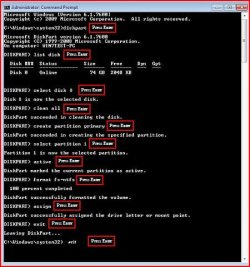
As a last resort, try the tutorial which I have mentioned on page 1 of this thread. This will delete all the partitions of the HDD and will re-create Sector 0 of the HDD. It SHOULD work.
 

My Computer

Computer Manufacturer/Model Number
Samsung NP530U4B-S02IN
OS
Windows® 8 Pro (64-bit)
CPU
Intel® Core™ i5 Processor 2467M (1.60GHz, 3MB L3 Cache)
Motherboard
Samsung Electronics
Memory
6GB DDR3 System Memory at 1,333MHz (on BD 4GB + 2GB x 1)
Graphics Card(s)
AMD Radeon™ HD7550M 1GB DDR3 (Ext. Graphic)
Sound Card
Realtek High Definition Audio
Monitor(s) Displays
35.56cm (14.0) SuperBright 300nit HD LED Display
Screen Resolution
1366x768
Hard Drives
1TB S-ATA II Hard Drive (5400RPM) with ExpressCache 16GB SSD
Internet Speed
sucks
Antivirus
Microsoft Security Essentials
Browser
Google Chrome (Sync enabled)
are you sure the Hdd isnt failing? :(
 

My Computer

Computer type
PC/Desktop
Computer Manufacturer/Model Number
self build
OS
win 7 ultimate32bit, Win8.1pro wmc 32bit
CPU
amd phenom x4 9600
Motherboard
asus m2n32-sli deluxe
Memory
corsair twinxs 2x2gb
Graphics Card(s)
2x nvidia 1gb 8500gt
Sound Card
onboard
Monitor(s) Displays
23" PB Viseo 233d
Screen Resolution
1920x1080
Hard Drives
maxtor sata 500gb
maxtor sata 320gb
fujitsu sata200gb
PSU
oryxx tornado 750w
Case
thermaltake xaser lll
Cooling
artic freezer64 pro + 7 case fans
Hi Pebbly,

I did suspect the HDD may be failing however i didn't want to go and waste £50 on a new one until i had tried everything else and was sure that was the problem. chkdsk has finished and it looks like it had to do a lot of work! 12 kb of bad sectors have now been identifed so i will try an install one more time and if this fails the only think left i can see to do is try an new HD. I just don't want to do this if it's a driver issue not a HD issue as i will loose £50.

If i do a clean all and create a new partition (again) would the the hard drive still remember the bad sectors or would i need to re-run chkdsk?
 

My Computer

Computer Manufacturer/Model Number
Acer Aspire 5738z
OS
Windows 7 32bit OEM (Hopefully!!)
CPU
Intel Pentium T4200
Here, test your hard drive with one of these programs: HD Diagnostic

You can also take the hard drive to another machine and run SeaTools on it.
 

My Computer

Computer Manufacturer/Model Number
Custom
OS
Windows 7 Professional x64
CPU
Intel i7 2600K OC'd @ 4620 MHz
Motherboard
Asus P8Z68-V Pro
Memory
16GB GSkill Sniper 2133 Mhz (4x4GB)
Graphics Card(s)
EVGA GeForce GTX 480 SuperClocked+
Sound Card
Realtek High Definition Audio
Monitor(s) Displays
2x Acer S273HLbmii 27"
Screen Resolution
2 x 1920x1080
Hard Drives
64GB Crucial M4 SSD

Storage: Hitachi 1TB 5400RPM, Samsung 1.5TB 5400RPM
PSU
Corsair HW Series 750w (modular)
Case
Cooler Master HAF 932 Advanced Blue Edition
Cooling
CM Hyper 212+ CPU cooler, 3x 230mm + 1x 140mm case fans
Keyboard
Logitech MK320 (wireless)
Mouse
Logitech MK320 (wireless)
Internet Speed
30 Mb/s : 2 Mb/s
Back
Top