Cross-linked files???

Davy7RC

New member
Local time
7:00 PM
Messages
47
Location
Massachusetts
Hey all, I was using the Paragon Partitioning Manager Express 9.0 to create a partition for 7RC (dual boot with Vista) and it was going smoothly until it said there was an error due to "cross-linked files" and it could not proceed until I fixed it...it said there was some programs I should already have in Vista to fix this problem. I'd like to know which programs and how to fix this. Thanks for the help!!!:D
 

My Computer

Computer Manufacturer/Model Number
HP Pavilion a6009n Desktop
OS
Vista / 7 RC 7100/Virtual XP
CPU
AMD Athlon 64x2 Dual-Core Processor 3800 + 2.00GHz
Motherboard
Asus M2N68-LA
Memory
2.00GB
Graphics Card(s)
NVidia GeForce 6150SE nForce 430
Monitor(s) Displays
HPmx705
Screen Resolution
1024x768
Hard Drives
SeaGate 7200.10 Barracuda 250GB
Mouse
Logitech TrackMan Wheel
Internet Speed
DSL--1056kbits/sec x 448kbits/sec
Why are you using Paragon Partitioning Manager Express 9.0? :huh:

This might help you, Here
 

My Computer

Computer type
PC/Desktop
Computer Manufacturer/Model Number
Self Build
OS
MS Windows 7 Professional 64-bit SP1
CPU
AMD FX(tm)-6100 Six-Core Processor Socket AM3+ (942)
Motherboard
ASUSTeK COMPUTER INC. SABERTOOTH 990FX (AM3r2)
Memory
8.00 GB Dual-Channel DDR3 @ 802MHz (11-11-11-36) 1.5Volts
Graphics Card(s)
NVIDIA GeForce GTX 560 Ti
Sound Card
Onboard Realtek HD
Monitor(s) Displays
shimian (1920x1080@60Hz)
Screen Resolution
1920*1080
Hard Drives
OCZ-AGIL ITY3 SATA Disk Device 120GB
PSU
Corsair TX 750
Case
Corsair
Cooling
WaterCooled
Keyboard
Microsoft Wired
Mouse
Logitech USB Optical TiltWheel Mouse
Internet Speed
Realtek PCIe GBE Family Controller 20MB*1MB
Antivirus
Avast
Browser
Firefox
Other Info
150GB Internal Hard Drive for Backing Up Important Files -
Hauppauge Nova-DT Dual DVB-T Tuner Device (+IR) -
USB PC Camera with Mic (SN9C105)
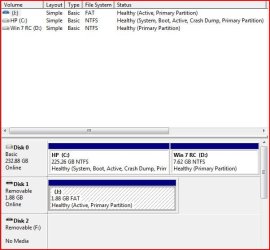
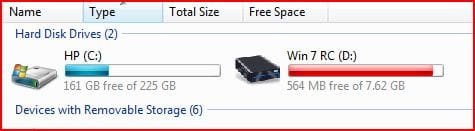
That video doesn't help me at all...Did all that and installed it just fine and had no problems EXCEPT the amount of space allocated to me for the 7 OS...if you look closely you can see that I was only given about 7 GB for it. IT"S NOT EVEN SUPPOSED TO INSTALL TO A PARTITION THAT SMALL!!! But it did and I ran out of space almost immediately; while my Vista partition has 225GB and only about 158GB or so has been used.That's the problem....no matter what I do I can only get 7GB for the partition.Even disabled the pagefile and hiberfile(hibernation) ...NO DICE!!! Take a good look at the screenshots and tell me what you think......
 

Attachments

  • Capture.JPG
    Capture.JPG
    45 KB · Views: 86
  • Drives.JPG
    Drives.JPG
    18.9 KB · Views: 33

My Computer

Computer Manufacturer/Model Number
HP Pavilion a6009n Desktop
OS
Vista / 7 RC 7100/Virtual XP
CPU
AMD Athlon 64x2 Dual-Core Processor 3800 + 2.00GHz
Motherboard
Asus M2N68-LA
Memory
2.00GB
Graphics Card(s)
NVidia GeForce 6150SE nForce 430
Monitor(s) Displays
HPmx705
Screen Resolution
1024x768
Hard Drives
SeaGate 7200.10 Barracuda 250GB
Mouse
Logitech TrackMan Wheel
Internet Speed
DSL--1056kbits/sec x 448kbits/sec
Sorry for being a little brusque....I've been wrestling with this issue for a few days now. That J: partition in the screenshot is a SanDisk CruzerMicro 2GBUSB Flash Drive...maybe this could help in some way???
 

My Computer

Computer Manufacturer/Model Number
HP Pavilion a6009n Desktop
OS
Vista / 7 RC 7100/Virtual XP
CPU
AMD Athlon 64x2 Dual-Core Processor 3800 + 2.00GHz
Motherboard
Asus M2N68-LA
Memory
2.00GB
Graphics Card(s)
NVidia GeForce 6150SE nForce 430
Monitor(s) Displays
HPmx705
Screen Resolution
1024x768
Hard Drives
SeaGate 7200.10 Barracuda 250GB
Mouse
Logitech TrackMan Wheel
Internet Speed
DSL--1056kbits/sec x 448kbits/sec
Back
Top