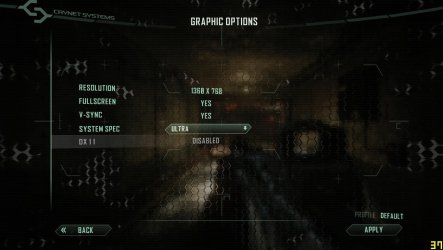
Solved Crysis 2 dx11 disabled

bala2289

New member
Member
VIP
Local time
12:01 PM
Messages
101
Location
india
Hi everyone, i got a weird problem. I had played crysis 2 in dx11 previously but i thought of playing it again now i cant enable the dx11 in game and also in system and game.cfg files.

When i manually enter the command in both the cfg's as r_driver = "dx11" [both all small and D and DX caps] it doesn't change anything also the log file says that the video card doesn't support dx11 or dx11.pak not found.

Don't ask me to re-install delete all profiles and save games coz i've done that 4 or 5 times. Also i manually removed the entries from and registry and also used registry cleaner from windows 7 manager.

System.cfg

; crysis2

sys_game_folder=GameCrysis2
sys_dll_game=CryGameCrysis2.dll
sys_user_folder=Crysis2
r_SkipIntro = 1
r_ShaderCompilerServer=192.168.14.180;192.168.14.181

log_IncludeTime = 1
sys_languages = "english,french,spanish,german,russian,polish,italian,czech,chineseT"

log_verbosity = 0

r_displayInfo = 1

sys_PakLogInvalidFileAccess=0
sys_float_exceptions=0


game.cfg

-- [Game-Configuration]
-- Attention: This file is re-generated by the system! Editing is not recommended!

r_Driver = "DX9"
r_fullscreen = 1
r_Height = 768
r_Width = 1360
sys_spec = -1


Thanks in advance..:D:D:D
 

Attachments

  • Crysis2 2012-02-20 21-48-23-74.jpg
    Crysis2 2012-02-20 21-48-23-74.jpg
    82.1 KB · Views: 137

My Computer

Computer type
PC/Desktop
Computer Manufacturer/Model Number
Intel
OS
windows 7 ultimate x32
CPU
core i3 530 @ 3.63 ghz
Motherboard
Intel dh55pj
Memory
4 gb ddr3 1333mhz
Graphics Card(s)
Sapphire radeon 7770 1gb Ghz Edition
Monitor(s) Displays
lg 19"
Screen Resolution
1368*768
Hard Drives
Seagate 500gb @ 7200 rpm
PSU
Zebronics 450 w
Case
Zebronics
Cooling
Cooler master Tx3 Evo cpu and cooler master 120mm Inlet fan
Mouse
Lenovo razer 1600 dpi laser
Internet Speed
8 Mbps dsl
Antivirus
Avast Free
Browser
Chrome

My Computer

Computer type
PC/Desktop
Computer Manufacturer/Model Number
custom build
OS
Windows 10 64bit
CPU
AMD Phenom II X4 925 (Deneb)(2.8GHz) OC 3.4GHz
Motherboard
M5A78L-MLX Plus
Memory
Corsair Vengeance DDR3 4GBX2 (8192MB)
Graphics Card(s)
XFX HD 6870 1GB (OC)- 940MHz core, mem 1150MHz
Monitor(s) Displays
Vizio 26' 1920x1080 / Acer 1336x768
Screen Resolution
1920x1080 60Hz /1336x768
Hard Drives
Kingston Digital 60GB SSDNow V300/500gb HDD Western Digital 7200rpm (/WD 160GB HDD 7200rpm
PSU
CORSAIR CX600 600w
Case
AZZA Orion 202 EVO
Cooling
cooler master hyper TX3 cpu cooler
Keyboard
Razer DeathStalker
Mouse
Logitech Optical Gaming Mouse G400
Antivirus
Defualt on win 10
Browser
Firefox
Other Info
cpu is overclocked in bios

My Computer

Computer type
PC/Desktop
Computer Manufacturer/Model Number
Intel
OS
windows 7 ultimate x32
CPU
core i3 530 @ 3.63 ghz
Motherboard
Intel dh55pj
Memory
4 gb ddr3 1333mhz
Graphics Card(s)
Sapphire radeon 7770 1gb Ghz Edition
Monitor(s) Displays
lg 19"
Screen Resolution
1368*768
Hard Drives
Seagate 500gb @ 7200 rpm
PSU
Zebronics 450 w
Case
Zebronics
Cooling
Cooler master Tx3 Evo cpu and cooler master 120mm Inlet fan
Mouse
Lenovo razer 1600 dpi laser
Internet Speed
8 Mbps dsl
Antivirus
Avast Free
Browser
Chrome

My Computer

Computer type
PC/Desktop
Computer Manufacturer/Model Number
Custom Built... Intel/Nvidia/ASRock
OS
Windows 7 x64 (Ultimate)
CPU
Intel i5-4670K
Motherboard
ASRock Z87 Extreme 6
Memory
8GBs Ripjaws 2133Mhz
Graphics Card(s)
Asus GTX660 (2GBs)
Sound Card
Onboard Realtek HD
Monitor(s) Displays
Acer AL2216W
Screen Resolution
1680 x 1050
Hard Drives
Samsung 840 SSD 120GBs
Samsung 750GB 32MB cache
1.5 TB
PSU
PC Cooling 750w Silencer
Case
Thermaltake Spedo Advance
Cooling
Std Cooler
Keyboard
Logitech G15
Mouse
Logitech G9
Internet Speed
Comcast 20Mbit
Antivirus
Avast
Browser
Firefox
As a rule of thumb and from what I have learn here and in other forums... the last thing you want to do is get your Video and Audio drivers get updated from Microsoft Windows Update.

You always want to go to the main source... AMD/ATI or Nvidia.
it's to update the direct x not the ati/nvdia drivers. Direct x is disturbed by Microsoft not amd or nvdia. I wasn't giving a link to update the video drivers i was giving a link to update direct x since he could of not installed dx11 and could of been causing the problem.
 

My Computer

Computer type
PC/Desktop
Computer Manufacturer/Model Number
custom build
OS
Windows 10 64bit
CPU
AMD Phenom II X4 925 (Deneb)(2.8GHz) OC 3.4GHz
Motherboard
M5A78L-MLX Plus
Memory
Corsair Vengeance DDR3 4GBX2 (8192MB)
Graphics Card(s)
XFX HD 6870 1GB (OC)- 940MHz core, mem 1150MHz
Monitor(s) Displays
Vizio 26' 1920x1080 / Acer 1336x768
Screen Resolution
1920x1080 60Hz /1336x768
Hard Drives
Kingston Digital 60GB SSDNow V300/500gb HDD Western Digital 7200rpm (/WD 160GB HDD 7200rpm
PSU
CORSAIR CX600 600w
Case
AZZA Orion 202 EVO
Cooling
cooler master hyper TX3 cpu cooler
Keyboard
Razer DeathStalker
Mouse
Logitech Optical Gaming Mouse G400
Antivirus
Defualt on win 10
Browser
Firefox
Other Info
cpu is overclocked in bios
My bad... this is what happens when you don't pay attention and assume something is not.:zip: :o
 

My Computer

Computer type
PC/Desktop
Computer Manufacturer/Model Number
Custom Built... Intel/Nvidia/ASRock
OS
Windows 7 x64 (Ultimate)
CPU
Intel i5-4670K
Motherboard
ASRock Z87 Extreme 6
Memory
8GBs Ripjaws 2133Mhz
Graphics Card(s)
Asus GTX660 (2GBs)
Sound Card
Onboard Realtek HD
Monitor(s) Displays
Acer AL2216W
Screen Resolution
1680 x 1050
Hard Drives
Samsung 840 SSD 120GBs
Samsung 750GB 32MB cache
1.5 TB
PSU
PC Cooling 750w Silencer
Case
Thermaltake Spedo Advance
Cooling
Std Cooler
Keyboard
Logitech G15
Mouse
Logitech G9
Internet Speed
Comcast 20Mbit
Antivirus
Avast
Browser
Firefox

Thanks for the Link, but I dont think that s the latest.. its published 2 years ago. I had played it in dx11 before and i have battlefield 3 it runs with no problem.. :D
Have you applied all the patches after doing the reinstall since you mentioned you did a reinstall already.You can find the latest patch for enabling dx11 here MyCrysis - DirectX 11 Ultra Upgrade for Crysis 2

Because by default when you install crysis 2 it only has dx9
 

My Computer

Computer type
PC/Desktop
Computer Manufacturer/Model Number
custom build
OS
Windows 10 64bit
CPU
AMD Phenom II X4 925 (Deneb)(2.8GHz) OC 3.4GHz
Motherboard
M5A78L-MLX Plus
Memory
Corsair Vengeance DDR3 4GBX2 (8192MB)
Graphics Card(s)
XFX HD 6870 1GB (OC)- 940MHz core, mem 1150MHz
Monitor(s) Displays
Vizio 26' 1920x1080 / Acer 1336x768
Screen Resolution
1920x1080 60Hz /1336x768
Hard Drives
Kingston Digital 60GB SSDNow V300/500gb HDD Western Digital 7200rpm (/WD 160GB HDD 7200rpm
PSU
CORSAIR CX600 600w
Case
AZZA Orion 202 EVO
Cooling
cooler master hyper TX3 cpu cooler
Keyboard
Razer DeathStalker
Mouse
Logitech Optical Gaming Mouse G400
Antivirus
Defualt on win 10
Browser
Firefox
Other Info
cpu is overclocked in bios
Have you applied all the patches after doing the reinstall since you mentioned you did a reinstall already.You can find the latest patch for enabling dx11 here MyCrysis - DirectX 11 Ultra Upgrade for Crysis 2

Because by default when you install crysis 2 it only has dx9
Yes i have applied both 1.9 patch and the dx11 ultra upgrade:)
When i manually add the command r_driver="dx11" it reverts back to dx9 as the game starts and in the game log it says that the video card doesnt support dx11 or dx11.pak file not found. Its right in the patch folder inside the crysis 2 folder. My card is ati 5670 hd and it supports dx11 and previously also i have enabled dx11 in crysis 2. Dont know what is the problem here:shock::shock::shock:.
 

My Computer

Computer type
PC/Desktop
Computer Manufacturer/Model Number
Intel
OS
windows 7 ultimate x32
CPU
core i3 530 @ 3.63 ghz
Motherboard
Intel dh55pj
Memory
4 gb ddr3 1333mhz
Graphics Card(s)
Sapphire radeon 7770 1gb Ghz Edition
Monitor(s) Displays
lg 19"
Screen Resolution
1368*768
Hard Drives
Seagate 500gb @ 7200 rpm
PSU
Zebronics 450 w
Case
Zebronics
Cooling
Cooler master Tx3 Evo cpu and cooler master 120mm Inlet fan
Mouse
Lenovo razer 1600 dpi laser
Internet Speed
8 Mbps dsl
Antivirus
Avast Free
Browser
Chrome
Reinstalled Operating system

Reinstalled windows 7 everything working fine:D:D:D
 

My Computer

Computer type
PC/Desktop
Computer Manufacturer/Model Number
Intel
OS
windows 7 ultimate x32
CPU
core i3 530 @ 3.63 ghz
Motherboard
Intel dh55pj
Memory
4 gb ddr3 1333mhz
Graphics Card(s)
Sapphire radeon 7770 1gb Ghz Edition
Monitor(s) Displays
lg 19"
Screen Resolution
1368*768
Hard Drives
Seagate 500gb @ 7200 rpm
PSU
Zebronics 450 w
Case
Zebronics
Cooling
Cooler master Tx3 Evo cpu and cooler master 120mm Inlet fan
Mouse
Lenovo razer 1600 dpi laser
Internet Speed
8 Mbps dsl
Antivirus
Avast Free
Browser
Chrome
Cool nice to hear it works now. Something must of corrupted in the windows install possibly.
 

My Computer

Computer type
PC/Desktop
Computer Manufacturer/Model Number
custom build
OS
Windows 10 64bit
CPU
AMD Phenom II X4 925 (Deneb)(2.8GHz) OC 3.4GHz
Motherboard
M5A78L-MLX Plus
Memory
Corsair Vengeance DDR3 4GBX2 (8192MB)
Graphics Card(s)
XFX HD 6870 1GB (OC)- 940MHz core, mem 1150MHz
Monitor(s) Displays
Vizio 26' 1920x1080 / Acer 1336x768
Screen Resolution
1920x1080 60Hz /1336x768
Hard Drives
Kingston Digital 60GB SSDNow V300/500gb HDD Western Digital 7200rpm (/WD 160GB HDD 7200rpm
PSU
CORSAIR CX600 600w
Case
AZZA Orion 202 EVO
Cooling
cooler master hyper TX3 cpu cooler
Keyboard
Razer DeathStalker
Mouse
Logitech Optical Gaming Mouse G400
Antivirus
Defualt on win 10
Browser
Firefox
Other Info
cpu is overclocked in bios
Back
Top