Solved CScript Error: Can't find script engine "VBScript" -alternate solution

Thanks for keeping this topic around! It was just the fix I needed after installing Stardock's DesktopX and scripts would not run causing any theme which contained scripted objects to immediately crash the program. I had to change permissions in the registry before I was allowed to edit the neccessary key, then I applied the your patch and Voila! Thanks Guys and Gals!

Oh and by the way it was avast antivirus that had altered the registry key! And even though I had removed Avast a year prior, it hadn't removed the alteration.
 
Last edited:

My Computer

Computer type
PC/Desktop
Computer Manufacturer/Model Number
Custom Build
OS
Windows 7 Ultimate 32 bit
CPU
Phoenom II 3.2 GHz quadcore
Motherboard
MSI 790GX
Memory
4GB
Graphics Card(s)
Invidia
Hard Drives
1x 1TB
Browser
IE9
Office 2013 failing to activate.

(I purchased OEM not a VL)
How showld I know what version I have, since I have it installed
or from CD Rom?


I read on a forum that one possible solution to the failure to activate was to go into an Office application, go to File, then Account and use the change license button to enter a new key.

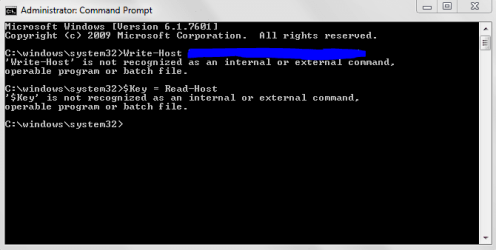
Here is what I have done, But fail with out success

Write-Host “Enter your Office 2013 License key, then press enter”
$Key = Read-Host
Set-Location “C:\Program Files (x86)\Microsoft Office\Office15”
CScript OSPP.vbs /InpKey:$Key
CScript OSPP.vbs /act
 

Attachments

  • Error Write-Host .PNG
    Error Write-Host .PNG
    19.8 KB · Views: 31

My Computer

Computer type
Laptop
Computer Manufacturer/Model Number
Azure Blade 15.6
OS
Windows 10 Pro Version 22H2 64-bit Edition
CPU
Intel(R) Core(TM) i7-10875H CPU @ 2.30GHz 2.30 GHz
Memory
2.0 GB (31.8 GB usable)
Monitor(s) Displays
4K UHD OLED TOUCH
Screen Resolution
3840 x 2160
Hard Drives
1 TB
Mouse
Logitech MX Master 3S
Antivirus
Windows Security
Browser
Google Chrome
Other Info
______________________________________________


______________________________________________
From what little I can make out of your problem, it is that you have a version of Office, which fails to activate.

Which version of Office? If it's not Office 2013 then you're on a loser anyhow.

What EXACT error message do you get when you attempt to activate?
 

My Computer

Computer type
Laptop
Computer Manufacturer/Model Number
Asus K52F or Lenovo B51-80
OS
Win 7 x64 Home Premium (and x86 VirtualBox VM)/Win10
CPU
i3 370M/i7 6500U
Motherboard
Asus/Lenovo
Memory
8GB - finally :)/8GB
Graphics Card(s)
it's an i3, dude!/dual Intel&nVidia
Sound Card
onboard
Monitor(s) Displays
15.6" built-in
Screen Resolution
1366x768/1920x1080
Hard Drives
750GB Seagate internal
Sundry external drives attached to other computers on the local network
1TB SSD on the Lenovo
PSU
n/a
Internet Speed
as much as I can get - usually on a dongle/phone, so <1MB/s
Antivirus
MSE/Defender
Browser
IE11/12/Edge/Chrome/FF(if I must)
Microsoft Office Professional Plus 2013Microsoft Office Professional P

Thank you for your response I dint receiver email of you post!


Which version of Office? If it's not Office 2013 then you're on a loser anyhow
==========================
Microsoft Office Professional Plus 2013
==========================

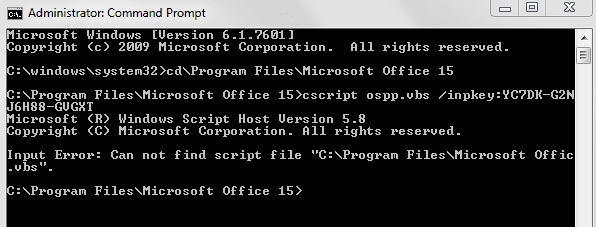
What EXACT error message do you get when you attempt to activate?

I have posted Image.. If you wanted to run different code please let me know!
by changing from:

OEM to VL
 

Attachments

  • Capture00000.PNG
    Capture00000.PNG
    16.2 KB · Views: 25

My Computer

Computer type
Laptop
Computer Manufacturer/Model Number
Azure Blade 15.6
OS
Windows 10 Pro Version 22H2 64-bit Edition
CPU
Intel(R) Core(TM) i7-10875H CPU @ 2.30GHz 2.30 GHz
Memory
2.0 GB (31.8 GB usable)
Monitor(s) Displays
4K UHD OLED TOUCH
Screen Resolution
3840 x 2160
Hard Drives
1 TB
Mouse
Logitech MX Master 3S
Antivirus
Windows Security
Browser
Google Chrome
Other Info
______________________________________________


______________________________________________
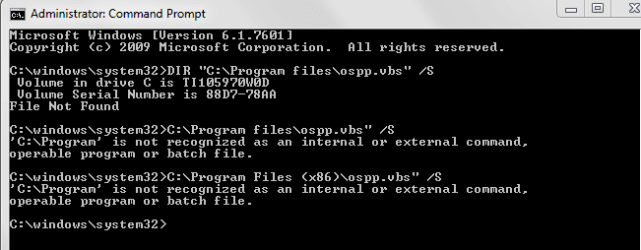
The problem here is that the script file itself (ospp.vbs) is missing (or at least, can't be found) - not that the engine is disabled.

Are you sure that you have the right folder?
Open the Command Prompt Window and type the following commands one at a time:

DIR "C:\Program files\ospp.vbs" /S
DIR "C:\Program Files (x86)\ospp.vbs" /S

These should return with the proper location for the vbs file.
 

My Computer

Computer type
Laptop
Computer Manufacturer/Model Number
Asus K52F or Lenovo B51-80
OS
Win 7 x64 Home Premium (and x86 VirtualBox VM)/Win10
CPU
i3 370M/i7 6500U
Motherboard
Asus/Lenovo
Memory
8GB - finally :)/8GB
Graphics Card(s)
it's an i3, dude!/dual Intel&nVidia
Sound Card
onboard
Monitor(s) Displays
15.6" built-in
Screen Resolution
1366x768/1920x1080
Hard Drives
750GB Seagate internal
Sundry external drives attached to other computers on the local network
1TB SSD on the Lenovo
PSU
n/a
Internet Speed
as much as I can get - usually on a dongle/phone, so <1MB/s
Antivirus
MSE/Defender
Browser
IE11/12/Edge/Chrome/FF(if I must)
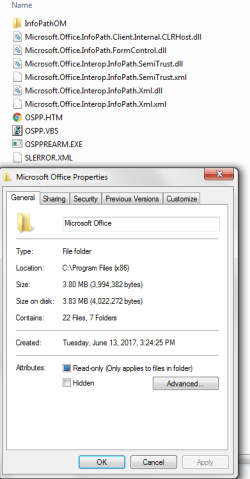
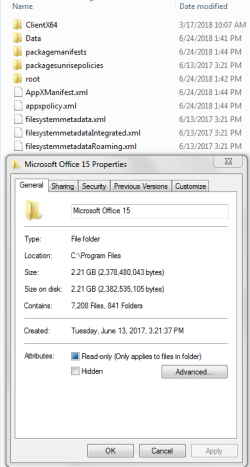
Office 2013 Location file

here are photo images, posted
 

Attachments

  • Program Files (x86).PNG
    Program Files (x86).PNG
    42.6 KB · Views: 18
  • Program Files_Microsoft Office 15.PNG
    Program Files_Microsoft Office 15.PNG
    40.4 KB · Views: 18
  • Program files CMD.PNG
    Program files CMD.PNG
    17.5 KB · Views: 18

My Computer

Computer type
Laptop
Computer Manufacturer/Model Number
Azure Blade 15.6
OS
Windows 10 Pro Version 22H2 64-bit Edition
CPU
Intel(R) Core(TM) i7-10875H CPU @ 2.30GHz 2.30 GHz
Memory
2.0 GB (31.8 GB usable)
Monitor(s) Displays
4K UHD OLED TOUCH
Screen Resolution
3840 x 2160
Hard Drives
1 TB
Mouse
Logitech MX Master 3S
Antivirus
Windows Security
Browser
Google Chrome
Other Info
______________________________________________


______________________________________________
I don't have a copy of Office 2013 installed anywhere, so I can't check he proper locations for the files, but that doesn't appear right to me.
In My Office 2010, the ospp file is in the main 64-bit Office folder, rather than the 32-bit one.

In the Command Prompt window, you neglected to type the command DIR prior to the location and switch - which is what caused the error messages.

It looks to me as if you have a schizophrenic installation of Office - part thinks it's 32-bit, and part thinks its 64-bit!

A repair install of Office is required - use the option to repair the install from within Programs & Features.
 

My Computer

Computer type
Laptop
Computer Manufacturer/Model Number
Asus K52F or Lenovo B51-80
OS
Win 7 x64 Home Premium (and x86 VirtualBox VM)/Win10
CPU
i3 370M/i7 6500U
Motherboard
Asus/Lenovo
Memory
8GB - finally :)/8GB
Graphics Card(s)
it's an i3, dude!/dual Intel&nVidia
Sound Card
onboard
Monitor(s) Displays
15.6" built-in
Screen Resolution
1366x768/1920x1080
Hard Drives
750GB Seagate internal
Sundry external drives attached to other computers on the local network
1TB SSD on the Lenovo
PSU
n/a
Internet Speed
as much as I can get - usually on a dongle/phone, so <1MB/s
Antivirus
MSE/Defender
Browser
IE11/12/Edge/Chrome/FF(if I must)
Q1. In My Office 2010, the ospp file is in the main 64-bit Office folder, rather than the 32-bit one.

I would like to think I have installed 32bit version

Q2. Command DIR prior to the location and switch - which is what caused the error messages.
Becaus of : ospp file

Q3. schizophrenic installation of Office - part thinks it's 32-bit, and part thinks its 64-bit
what does mean schizophrenic?
Yes, I agree because as you know it show file: 32-64_Bite's

Q4. Repair install of Office is required
I would reinstall from CD Room. I though was better by download from a website because it was lighter, the think is I dont know if is OEM nor VL

looking forward for your response

Thanks again:D

Note:

Where is good site to download it, since I dont need all features from CD Rom?
My goal is to download "VL" Version
 
Last edited:

My Computer

Computer type
Laptop
Computer Manufacturer/Model Number
Azure Blade 15.6
OS
Windows 10 Pro Version 22H2 64-bit Edition
CPU
Intel(R) Core(TM) i7-10875H CPU @ 2.30GHz 2.30 GHz
Memory
2.0 GB (31.8 GB usable)
Monitor(s) Displays
4K UHD OLED TOUCH
Screen Resolution
3840 x 2160
Hard Drives
1 TB
Mouse
Logitech MX Master 3S
Antivirus
Windows Security
Browser
Google Chrome
Other Info
______________________________________________


______________________________________________
I have Office 2013 Pro 32 bit version & files appear in both the 32 bit Program Files & the 64 bit Program Files.

As far as I know Office 2013 came in 2 installation types, one came as full install DVD which I thought was Office 2013 Professional Plus & was mainly for schools & institutions for multi installations.

The other was a retail version of Office 2013, which was a Click to Run version & while an installation DVD was supplied, most of the installation occurred from MS via the internet.
 

My Computer

Computer type
PC/Desktop
Computer Manufacturer/Model Number
Self built using existing case
OS
Windows 7 Home Premium 64 bit sp1
CPU
Intel i5 3570 3.4Ghz Ivy Bridge SKT 1155 quad core
Motherboard
Gigabyte Z77-HD3 SKT 1155 2xSata 3, 4x USB 3.0
Memory
G-Skill Rip Jaws 16Gb (8x2) DDR3 -1600 PC3 12800 CL 10 red
Graphics Card(s)
Gigabyte NVIDIA GT610 1Gb DDR3 810/1200 PCI-E 2.0 Silent
Sound Card
NVIDIA High Definition & Realtech High Definition Audio
Monitor(s) Displays
2 x Philips 226V4L 16:9 aspect ratio
Screen Resolution
1920 x 1080 HD
Hard Drives
Samsung 840 Pro 256gb SSD, SATA 3.
Hitachi Touro Portable 1tb, USB 3.0 HDD used for image b/ups.
PSU
Corsair VS450
Case
Codeng
Cooling
PSU fan & CPU fan
Keyboard
Logitech
Mouse
Logitech Wireless trackball M570
Internet Speed
Wireless 3G. 3mg down & 550kb up.
Antivirus
Bitdefender Internet Security 2020
Browser
Opera (Current Version) & Firefox
Other Info
MS Office 2013 Pro. Davis weather station software. MGE Nova 600 avr UPS.
Ranger 4
are you compatible / available to change to Volume license, once installed?

Do you know the pat from:
ospp file


Thank!
 

My Computer

Computer type
Laptop
Computer Manufacturer/Model Number
Azure Blade 15.6
OS
Windows 10 Pro Version 22H2 64-bit Edition
CPU
Intel(R) Core(TM) i7-10875H CPU @ 2.30GHz 2.30 GHz
Memory
2.0 GB (31.8 GB usable)
Monitor(s) Displays
4K UHD OLED TOUCH
Screen Resolution
3840 x 2160
Hard Drives
1 TB
Mouse
Logitech MX Master 3S
Antivirus
Windows Security
Browser
Google Chrome
Other Info
______________________________________________


______________________________________________
squirtmph. No I cannot change the license & the Click to Run is a not a Volume license as it's only a license for a single computer.

The only thing I can find on the OSPP file is from Office 2013 but is an HTM file only accessible from the internet & it doesn't seem to provide any info, other than saying it is to do with activation of Office.
 

My Computer

Computer type
PC/Desktop
Computer Manufacturer/Model Number
Self built using existing case
OS
Windows 7 Home Premium 64 bit sp1
CPU
Intel i5 3570 3.4Ghz Ivy Bridge SKT 1155 quad core
Motherboard
Gigabyte Z77-HD3 SKT 1155 2xSata 3, 4x USB 3.0
Memory
G-Skill Rip Jaws 16Gb (8x2) DDR3 -1600 PC3 12800 CL 10 red
Graphics Card(s)
Gigabyte NVIDIA GT610 1Gb DDR3 810/1200 PCI-E 2.0 Silent
Sound Card
NVIDIA High Definition & Realtech High Definition Audio
Monitor(s) Displays
2 x Philips 226V4L 16:9 aspect ratio
Screen Resolution
1920 x 1080 HD
Hard Drives
Samsung 840 Pro 256gb SSD, SATA 3.
Hitachi Touro Portable 1tb, USB 3.0 HDD used for image b/ups.
PSU
Corsair VS450
Case
Codeng
Cooling
PSU fan & CPU fan
Keyboard
Logitech
Mouse
Logitech Wireless trackball M570
Internet Speed
Wireless 3G. 3mg down & 550kb up.
Antivirus
Bitdefender Internet Security 2020
Browser
Opera (Current Version) & Firefox
Other Info
MS Office 2013 Pro. Davis weather station software. MGE Nova 600 avr UPS.
Where is good site to download it, since I dont need all features from CD Rom?
My goal is to download "VL" Version

As I said - the best place is to do a repair install from the Add/Remove Programs panel. When you initially installed Office it should have put a full set of install files in place for this purpose.

If you really want to download the thing... Office (you'll need to enter your Microsoft Account details and the Product Key - which has the benefit of linking the Key to your account, and also checks that the key is a valid one!)
 

My Computer

Computer type
Laptop
Computer Manufacturer/Model Number
Asus K52F or Lenovo B51-80
OS
Win 7 x64 Home Premium (and x86 VirtualBox VM)/Win10
CPU
i3 370M/i7 6500U
Motherboard
Asus/Lenovo
Memory
8GB - finally :)/8GB
Graphics Card(s)
it's an i3, dude!/dual Intel&nVidia
Sound Card
onboard
Monitor(s) Displays
15.6" built-in
Screen Resolution
1366x768/1920x1080
Hard Drives
750GB Seagate internal
Sundry external drives attached to other computers on the local network
1TB SSD on the Lenovo
PSU
n/a
Internet Speed
as much as I can get - usually on a dongle/phone, so <1MB/s
Antivirus
MSE/Defender
Browser
IE11/12/Edge/Chrome/FF(if I must)
Thank you......

Thank you for all responses to my concern!


:-)
 

My Computer

Computer type
Laptop
Computer Manufacturer/Model Number
Azure Blade 15.6
OS
Windows 10 Pro Version 22H2 64-bit Edition
CPU
Intel(R) Core(TM) i7-10875H CPU @ 2.30GHz 2.30 GHz
Memory
2.0 GB (31.8 GB usable)
Monitor(s) Displays
4K UHD OLED TOUCH
Screen Resolution
3840 x 2160
Hard Drives
1 TB
Mouse
Logitech MX Master 3S
Antivirus
Windows Security
Browser
Google Chrome
Other Info
______________________________________________


______________________________________________
Back
Top