
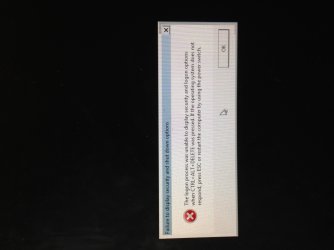
Ctrl Alt Del Error

Calmrade

New member
Local time
4:25 PM
Messages
13
I have this problem every time I use my computer. It works for a while then randomly starts going blank and when I press ctrl alt delete I get this error. :mad:
 

Attachments

  • image.jpg
    image.jpg
    389 KB · Views: 34

My Computer

Computer type
PC/Desktop
Computer Manufacturer/Model Number
Custom Build
OS
Windows 7 Home Premium
CPU
AMD Phenom II X2 555 3.20 GHz
Motherboard
MSI
Memory
Kingston Hyper X Blue
Graphics Card(s)
GeForce GTS 450
Hard Drives
500GB HDD
Antivirus
Norton
Browser
FireFox

My Computer

Computer type
PC/Desktop
Computer Manufacturer/Model Number
Dell / Lenovo g550
OS
Windows 7 Ultimate 64-bit
CPU
Intel Core 2 Duo E6550 @2.33GHz
Motherboard
foxconn g33m02
Memory
4GB DDR"
Graphics Card(s)
NVIDIA GeForce 8600 GS
Hard Drives
HDD 1 = 150GB
HDD 2 = 1.5TB
PSU
450W
Cooling
Stock fan
Internet Speed
12Mb
Antivirus
AVG Internet Security
A few months ago, I've had my pc for a little over two years. I've installed team speak , battlefield, origin, windows security, and chrome. I've had this problem for a while though. I've re installed win7 at least 5 times over the last year. I even bought a new HDD about 2 weeks ago and it still happens. Idk what other details would help.
 

My Computer

Computer type
PC/Desktop
Computer Manufacturer/Model Number
Custom Build
OS
Windows 7 Home Premium
CPU
AMD Phenom II X2 555 3.20 GHz
Motherboard
MSI
Memory
Kingston Hyper X Blue
Graphics Card(s)
GeForce GTS 450
Hard Drives
500GB HDD
Antivirus
Norton
Browser
FireFox
A few months ago, I've had my pc for a little over two years. I've installed team speak , battlefield, origin, windows security, and chrome. I've had this problem for a while though. I've re installed win7 at least 5 times over the last year. I even bought a new HDD about 2 weeks ago and it still happens. Idk what other details would help.

Ok does it happen the minute you reinstall windows? Or after you have everything up and running?

Did you run the sfc /scannow command?
 

My Computer

Computer type
PC/Desktop
Computer Manufacturer/Model Number
Dell / Lenovo g550
OS
Windows 7 Ultimate 64-bit
CPU
Intel Core 2 Duo E6550 @2.33GHz
Motherboard
foxconn g33m02
Memory
4GB DDR"
Graphics Card(s)
NVIDIA GeForce 8600 GS
Hard Drives
HDD 1 = 150GB
HDD 2 = 1.5TB
PSU
450W
Cooling
Stock fan
Internet Speed
12Mb
Antivirus
AVG Internet Security
Once I have my basic programs installed, but it feels like even if I didn't install anything that its more of a matter of time and it will happen either way. It not starting at the moment so I'm gonna flick the motherboard battery out because that usually seems to be the only way it will start back up. But then my computer is in 2010 and I update the time after.
 

My Computer

Computer type
PC/Desktop
Computer Manufacturer/Model Number
Custom Build
OS
Windows 7 Home Premium
CPU
AMD Phenom II X2 555 3.20 GHz
Motherboard
MSI
Memory
Kingston Hyper X Blue
Graphics Card(s)
GeForce GTS 450
Hard Drives
500GB HDD
Antivirus
Norton
Browser
FireFox
Hi Calmrade, welcome to the Seven Forums.

This is quite typical issue caused by Winsock.

Simple fix:
Open Elevated Command Prompt, type following command to reset Winsock:
Code:
netsh winsock reset
Reboot and CTRL + ALT + DEL should work as before.

Kari
 

My Computer

Computer type
Laptop
Computer Manufacturer/Model Number
HP ENVY 17-1150eg
OS
Windows 10 Pro x64 EN-GB
CPU
1.6 GHz Intel Core i7-720QM Processor
Memory
6 GB
Graphics Card(s)
ATI Mobility Radeon HD 5850 Graphics
Sound Card
Beats sound system with integrated subwoofer
Monitor(s) Displays
17" laptop display, 22" LED and 32" Full HD TV through HDMI
Screen Resolution
1600*900 (1), 1920*1080 (2&3)
Hard Drives
Internal: 2 x 500 GB SATA Hard Disk Drive 7200 rpm
External: 2TB for backups, 3TB USB3 network drive for media
Cooling
As Envy runs a bit warm, I have it on a Cooler Master pad
Keyboard
Logitech diNovo Media Desktop Laser (bluetooth)
Mouse
Logitech Performance Mouse MX
Internet Speed
50/10 Mbps VDSL
Antivirus
Windows Defender 4.3.9431.0
Browser
Maxthon 3.5.2., IE11

My Computer

Computer type
PC/Desktop
Computer Manufacturer/Model Number
Dell / Lenovo g550
OS
Windows 7 Ultimate 64-bit
CPU
Intel Core 2 Duo E6550 @2.33GHz
Motherboard
foxconn g33m02
Memory
4GB DDR"
Graphics Card(s)
NVIDIA GeForce 8600 GS
Hard Drives
HDD 1 = 150GB
HDD 2 = 1.5TB
PSU
450W
Cooling
Stock fan
Internet Speed
12Mb
Antivirus
AVG Internet Security

My Computer

Computer type
Laptop
Computer Manufacturer/Model Number
HP ENVY 17-1150eg
OS
Windows 10 Pro x64 EN-GB
CPU
1.6 GHz Intel Core i7-720QM Processor
Memory
6 GB
Graphics Card(s)
ATI Mobility Radeon HD 5850 Graphics
Sound Card
Beats sound system with integrated subwoofer
Monitor(s) Displays
17" laptop display, 22" LED and 32" Full HD TV through HDMI
Screen Resolution
1600*900 (1), 1920*1080 (2&3)
Hard Drives
Internal: 2 x 500 GB SATA Hard Disk Drive 7200 rpm
External: 2TB for backups, 3TB USB3 network drive for media
Cooling
As Envy runs a bit warm, I have it on a Cooler Master pad
Keyboard
Logitech diNovo Media Desktop Laser (bluetooth)
Mouse
Logitech Performance Mouse MX
Internet Speed
50/10 Mbps VDSL
Antivirus
Windows Defender 4.3.9431.0
Browser
Maxthon 3.5.2., IE11
Well my real problems is that my computer will boot up normally maybe 1 out of ten times. I usually to the battery trick. And I don't know what the battery is but it a little nickel sized one on my mb. I just don't understand why my pc shuts down randomly and won't start up normally. I'm on it now, so I'll try what you guys recommended and let you know after.
 

My Computer

Computer type
PC/Desktop
Computer Manufacturer/Model Number
Custom Build
OS
Windows 7 Home Premium
CPU
AMD Phenom II X2 555 3.20 GHz
Motherboard
MSI
Memory
Kingston Hyper X Blue
Graphics Card(s)
GeForce GTS 450
Hard Drives
500GB HDD
Antivirus
Norton
Browser
FireFox
Well my real problems is that my computer will boot up normally maybe 1 out of ten times. I usually to the battery trick. And I don't know what the battery is but it a little nickel sized one on my mb. I just don't understand why my pc shuts down randomly and won't start up normally. I'm on it now, so I'll try what you guys recommended and let you know after.
This means you have far more serious problems than winsock waiting to be reseted.

Please post your complete issue, problems you are having with your PC in here: BSOD Help and Support - Windows 7 Help Forums

I believe that would be the best forum for you to post.

Kari
 

My Computer

Computer type
Laptop
Computer Manufacturer/Model Number
HP ENVY 17-1150eg
OS
Windows 10 Pro x64 EN-GB
CPU
1.6 GHz Intel Core i7-720QM Processor
Memory
6 GB
Graphics Card(s)
ATI Mobility Radeon HD 5850 Graphics
Sound Card
Beats sound system with integrated subwoofer
Monitor(s) Displays
17" laptop display, 22" LED and 32" Full HD TV through HDMI
Screen Resolution
1600*900 (1), 1920*1080 (2&3)
Hard Drives
Internal: 2 x 500 GB SATA Hard Disk Drive 7200 rpm
External: 2TB for backups, 3TB USB3 network drive for media
Cooling
As Envy runs a bit warm, I have it on a Cooler Master pad
Keyboard
Logitech diNovo Media Desktop Laser (bluetooth)
Mouse
Logitech Performance Mouse MX
Internet Speed
50/10 Mbps VDSL
Antivirus
Windows Defender 4.3.9431.0
Browser
Maxthon 3.5.2., IE11
Alright, will do. If I recorded the problem so you guys could see exactly what's happening would that be any better?
 

My Computer

Computer type
PC/Desktop
Computer Manufacturer/Model Number
Custom Build
OS
Windows 7 Home Premium
CPU
AMD Phenom II X2 555 3.20 GHz
Motherboard
MSI
Memory
Kingston Hyper X Blue
Graphics Card(s)
GeForce GTS 450
Hard Drives
500GB HDD
Antivirus
Norton
Browser
FireFox
It doesn't hurt to see it.
 

My Computer

Computer type
Laptop
Computer Manufacturer/Model Number
HP ENVY 17-1150eg
OS
Windows 10 Pro x64 EN-GB
CPU
1.6 GHz Intel Core i7-720QM Processor
Memory
6 GB
Graphics Card(s)
ATI Mobility Radeon HD 5850 Graphics
Sound Card
Beats sound system with integrated subwoofer
Monitor(s) Displays
17" laptop display, 22" LED and 32" Full HD TV through HDMI
Screen Resolution
1600*900 (1), 1920*1080 (2&3)
Hard Drives
Internal: 2 x 500 GB SATA Hard Disk Drive 7200 rpm
External: 2TB for backups, 3TB USB3 network drive for media
Cooling
As Envy runs a bit warm, I have it on a Cooler Master pad
Keyboard
Logitech diNovo Media Desktop Laser (bluetooth)
Mouse
Logitech Performance Mouse MX
Internet Speed
50/10 Mbps VDSL
Antivirus
Windows Defender 4.3.9431.0
Browser
Maxthon 3.5.2., IE11

My Computer

Computer type
PC/Desktop
Computer Manufacturer/Model Number
Custom Build
OS
Windows 7 Home Premium
CPU
AMD Phenom II X2 555 3.20 GHz
Motherboard
MSI
Memory
Kingston Hyper X Blue
Graphics Card(s)
GeForce GTS 450
Hard Drives
500GB HDD
Antivirus
Norton
Browser
FireFox
Ok well want Kari here meant was run as administrator with command prompt. Did you do the winsock reset?
 

My Computer

Computer type
PC/Desktop
Computer Manufacturer/Model Number
Dell / Lenovo g550
OS
Windows 7 Ultimate 64-bit
CPU
Intel Core 2 Duo E6550 @2.33GHz
Motherboard
foxconn g33m02
Memory
4GB DDR"
Graphics Card(s)
NVIDIA GeForce 8600 GS
Hard Drives
HDD 1 = 150GB
HDD 2 = 1.5TB
PSU
450W
Cooling
Stock fan
Internet Speed
12Mb
Antivirus
AVG Internet Security
This is the CMOS battery which provides power for the motherboard to hold setting while the machine is powered off. To remove it, push the tab highlighted in the direction of the arrow and it should pop up. Replace it with a new CR2032, available with camera or watch batteries in any Wal*Mart, target, etc.

You POST screen showed the time and date need to be set, pressing F2 to load default seatings won't do it, you'll have to set it in your BIOS, after installing a new battery.

2032.jpg
 

My Computer

Computer type
PC/Desktop
Computer Manufacturer/Model Number
Home Built Desktop By DataTech
OS
Windows 7 Ultimate X64 SP1
CPU
Intel i5-2550K, Differing ~4.4-4.8GHz No built in GPU
Motherboard
ASUS P8Z68-V PRO/GEN3
Memory
16GB G.Skill Sniper 1866MHz @ 2133MHz 2x8GB
Graphics Card(s)
ASUS GTX650TIB-DC2OC-2GD5, (650TI Boost)
Sound Card
Onboard Realtek 5-1
Monitor(s) Displays
Samsung P2570HD
Screen Resolution
1920x1080
Hard Drives
Samsung 840 Pro 256GB SSD for OS, 500GB Seagate Constellation (Enterprise drive) for Data
PSU
Corsair HX650W
Case
Inwin Dragon Rider
Cooling
Hyper 212 EVO w/two Noctua fans, push-pull, @1300 RPM
Keyboard
E-Z Eyes, bright yellow keys with large characters
Mouse
steelseries SENSEI Laser Pro Gaming
Internet Speed
48-51Mbs Mbs down, 11 Mbs up Xfinity Cable
Antivirus
Norton Internet Security 2013
Browser
IE 10, Opera, Pale Moon if needed
Other Info
4 case fans, LG BluRay-RE, ASUS DVD-RW, Mr. Fusion power supply, 1.21 gigawatts.
The cause of the problem seems evident in the beginning of the video:

  • CMOS Setting Wrong
  • CMOS Date/Time Not Set
Everything happening after that is a symptom. You've got to solve the CMOS problem first.


And here is the $1.00, most likely, solution: Replace the 3v Motherboard battery. When these are going dead they will throw up CMOS errors.


When you replace the battery, do a ClearCMOS procedure at the same time (you must remove the battery to do the procedure anyway).

The procedure can be different on newer motherboards, but the procedure below is the classic standard. You should refer to your motherboard manual to check for the proper procedure.


  • Note all your current BIOS settings
  • Shut down the computer > remove the power cord.
  • Remove the 3v battery.
  • Move the CLRTC jumper from pins 1-2 to 2-3.
  • Touch a metal part of the case and Press and Hold the reset button for approx. 30 seconds to discharge all power from the board.
  • Put the CLRTC jumper back on pins 1-2.
  • Replace the 3v battery > replace the power cord > boot.
  • Immediately go back into BIOS and reset all your preferred settings. If the CLRTC worked you will need to reset the date and time.
Also, if the ClearCMOS jumper is missing, or is not on the correct pins, that can cause the CMOS to clear with every shutdown. So check to be sure in your manual.
 

My Computer

Computer type
PC/Desktop
Computer Manufacturer/Model Number
Home Built - Jan 2013
OS
Windows 7 64 Bit Home Premium SP1
CPU
i7-3820
Motherboard
Asus P9X79-PRO - Bios 4608
Memory
GSkill F3-14900CL9Q - 16GB
Graphics Card(s)
EVGA GeForce GTX660 - Driver 352.86
Sound Card
On board Realtek ALC898
Monitor(s) Displays
Acer S271HL
Screen Resolution
1920 x 1080
Hard Drives
#1- Samsung 840 Pro Series
#2- Western Digital WD1002FAEX Sata3 Black
#3- Western Digital WD1002FAEX Sata3 Black
PSU
Corsair CMPSU-850TX-V2 - 850 watt (by Seasonic)
Case
Corsair Obsidian 550D
Cooling
Standard 3 120mm case fans, Cooler Master Hyper 212 EVO
Keyboard
MS KC-0405
Mouse
Intellimouse 5-button
Internet Speed
56 Mbits/Sec (on a good day)
Antivirus
Avast & Malwarebytes
Browser
Firefox
Other Info
Asus DVD - DRW-24B1ST 24X
You guys understand I purposely pulled that battery out because that is the only way it will start up usually right? I understand the time and date are off because that is what pulling the battery does. But If you still think its the battery cause random slow but forced shutdowns along with disk read error start ups then Ill happily replace it. I just want my PC to be able to start up normally and never shut down on me at any moment. But I really appreciate all the feedback and suggestions so far.

I did the winsock reset but I don't know if that will or has made a difference. I know my videos aren't very helpful but I have a few uploaded.
 

My Computer

Computer type
PC/Desktop
Computer Manufacturer/Model Number
Custom Build
OS
Windows 7 Home Premium
CPU
AMD Phenom II X2 555 3.20 GHz
Motherboard
MSI
Memory
Kingston Hyper X Blue
Graphics Card(s)
GeForce GTS 450
Hard Drives
500GB HDD
Antivirus
Norton
Browser
FireFox
I noticed the first time you hit the power button on the front of your machine the fan on the CPU did a quick shuffle and the PC did not fire up right away. Did you then cycle the power on the power supply switch? If so I suspect your power supply is weak and does not like cold boots. What is the make and model and wattage of the unit?
 

My Computer

Computer type
PC/Desktop
Computer Manufacturer/Model Number
Bluethunder II
OS
Windows 7 x64 Ultimate and numerous virtual machines
CPU
AMD FX-8350 Vishera 32nm Technology @ 4.2 GHz default
Motherboard
ASUSTeK COMPUTER INC. SABERTOOTH 990FX R2.0 (Socket 942)
Memory
G Skill 32.0GB Dual-Channel DDR3 @ 1204MHz (11-13-13-31)
Graphics Card(s)
EVGA GeForce GTX 960 4GB Super SC ACX 2.0+ with Back Plate
Sound Card
Creative X-Fi Titanium HD Audiophile PCIe
Monitor(s) Displays
LG L227WTG x 3
Screen Resolution
1680 x 1050 16:10
Hard Drives
238GB Samsung850 PRO SATA Disk Device (SSD)
1863GB Seagate ST2000DM 001-1CH164 (SATA)
1397GB Seagate ST1500DL 003-9VT16L(SATA)
466GB Western Digital WDC WD50 03AZEX-00K1GA0 (SATA) x 2
932GB Seagate ST310005 28AS SATA Disk Device (SATA)
PSU
Enermax Revolution87+ 1000 Watts Gold Certified Power Supply
Case
Rocketfish Full Tower
Cooling
Cooler Master Hyper 212 EVO Push Pull 120mm Fans
Keyboard
Logitech K740
Mouse
Logitech G100S Laser LED + Logitech Gamepad F310
Internet Speed
500 mbs down and 30mbs up
Antivirus
Malwarebytes Pro & Avast and MSE on certain Virtual Machines
Browser
Firefox (Main) Chrome, Internet Explorer (Back Up)
Other Info
Logitech X 230 2.1 Stereo System and 5.1 Yamaha RX V2090
B&W DM6 Monitor Speakers + Center and Surround Speakers
Using Mouse Without Borders (Google it)
You need the time and date set. Many problems can happen without it.
 

My Computer

Computer type
PC/Desktop
Computer Manufacturer/Model Number
Home Built Desktop By DataTech
OS
Windows 7 Ultimate X64 SP1
CPU
Intel i5-2550K, Differing ~4.4-4.8GHz No built in GPU
Motherboard
ASUS P8Z68-V PRO/GEN3
Memory
16GB G.Skill Sniper 1866MHz @ 2133MHz 2x8GB
Graphics Card(s)
ASUS GTX650TIB-DC2OC-2GD5, (650TI Boost)
Sound Card
Onboard Realtek 5-1
Monitor(s) Displays
Samsung P2570HD
Screen Resolution
1920x1080
Hard Drives
Samsung 840 Pro 256GB SSD for OS, 500GB Seagate Constellation (Enterprise drive) for Data
PSU
Corsair HX650W
Case
Inwin Dragon Rider
Cooling
Hyper 212 EVO w/two Noctua fans, push-pull, @1300 RPM
Keyboard
E-Z Eyes, bright yellow keys with large characters
Mouse
steelseries SENSEI Laser Pro Gaming
Internet Speed
48-51Mbs Mbs down, 11 Mbs up Xfinity Cable
Antivirus
Norton Internet Security 2013
Browser
IE 10, Opera, Pale Moon if needed
Other Info
4 case fans, LG BluRay-RE, ASUS DVD-RW, Mr. Fusion power supply, 1.21 gigawatts.
The reason it didn't turn on was because I had the power switch flipped to off instead of on. Ok so I should pickup a new battery and go from there?
 

My Computer

Computer type
PC/Desktop
Computer Manufacturer/Model Number
Custom Build
OS
Windows 7 Home Premium
CPU
AMD Phenom II X2 555 3.20 GHz
Motherboard
MSI
Memory
Kingston Hyper X Blue
Graphics Card(s)
GeForce GTS 450
Hard Drives
500GB HDD
Antivirus
Norton
Browser
FireFox
Back
Top