
Ctrl Panel-Devices & Printers-Device Inst.:Difference between settings

galacticninja

New member
Local time
3:15 AM
Messages
19
Ctrl Panel-Devices & Printers-Device Inst.:Difference between settings

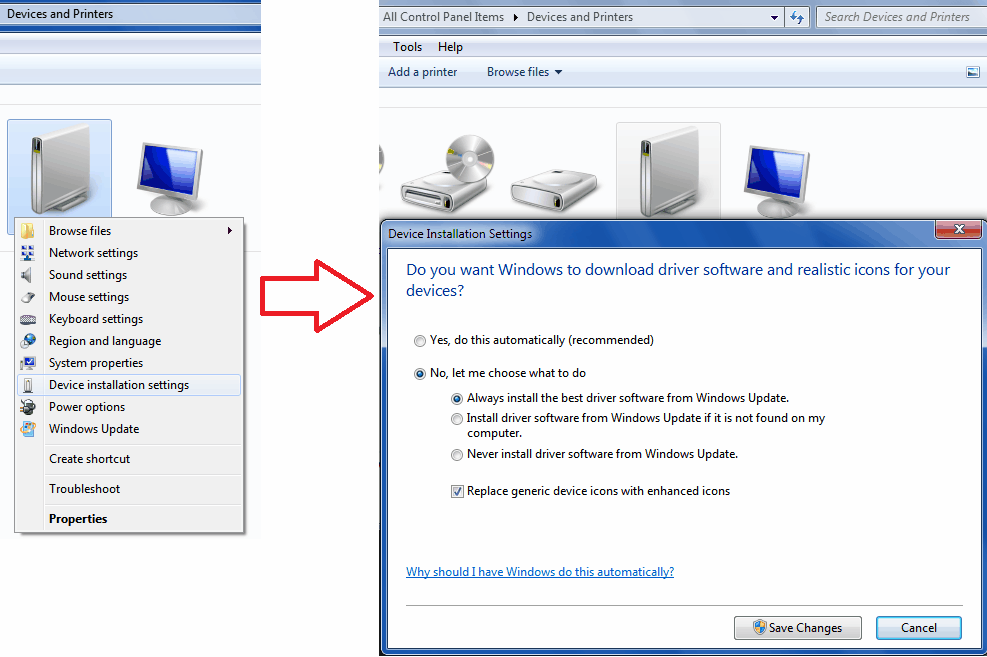
Windows 7's Windows Update device driver update settings can be configured in Control Panel - Devices and Printers - Device installation settings:
GP0KG.png


What is the difference between the first two 'No, let me choose what to do' options: 'Always install the best driver software from Windows Update' and 'Install driver from Windows Update if it is not found in my computer.'? Will both settings install drivers from Windows Update, if Windows Update has a more updated version than the one found in the computer?
 

My Computer

OS
Windows 7 Ultimate, 64-bit
Memory
4 GB
as far as i know in the first case, the system will first look for the relivent driver in the microsoft's driver databae and then compare it to the one on your system(if any present) and install the same. While in the later case, the system will look for drivers online only if it can't find any on the net.
I would personally recommend you to set to the later option cause it wastes a lot of time serching the net for drivers when set to always. Besides, if there is a newer version of the driver it is automatically added to the optional updates in "Windows update".

Hope it helps you out
 

My Computer

Computer Manufacturer/Model Number
`
OS
Windows 7 Professional 64-bit
CPU
AMD Phenom II X6 1050T
Motherboard
M4A87TD-m EVO\USB3
Memory
GSkill Trident 1600 MHz 4 GB Kit
Graphics Card(s)
MSi N580GTX Lightning Edition
Sound Card
On board
Monitor(s) Displays
dell ST2210 22" Full HD
Screen Resolution
1920x1080
Hard Drives
WD Caviar Green 1TB @ 3 GBps
WD Black Caviar 1TB @ 6 GBps
PSU
Cooler Master GX750
Case
CoolerMaster HAF922
Cooling
Stock
Keyboard
Logitech Classic Keyboard
Mouse
Logitech MX518
Internet Speed
BSNL unlimited @ 512 kbps
Will both settings install drivers from Windows Update

Yes and no. The first will always install an updated driver if it has been added to the WU database, where the second will only install a driver from WU if,

a. Windows actually knows what the device is. It will not install the proper driver if the device is using a generic driver/name; "standard VGA adapter" and "high definition audio device" are a couple of examples, and require you to install the proper driver for it because Windows doesn't know what it actually is beyond a video card or audio device.

b. Windows does identify what it is but there is no driver for the device included in Windows DriverStore.

the system will look for drivers online only if it can't find any on the net.

There is no searching of the net, the only searching WU does is of the WU catalogue.
 

My Computer

Computer type
PC/Desktop
Computer Manufacturer/Model Number
Me
OS
Win 7 Ultimate x64
CPU
FX-8350 @ 4.6 GHz so far
Motherboard
Asus M5A97 EVO
Memory
ADATA XPG V1 Series Black 8GB DDR3 1600
Graphics Card(s)
Sapphire R9 270x Dual-X
Sound Card
Xonar DGX w/ Corsair Vengence 1300
Monitor(s) Displays
Acer S232HL Abid
Screen Resolution
1920x1080
Hard Drives
120 GB OCZ Vertex 3
500 GB Seagate 7200.12
PSU
Antec Earthwatts 650W Green
Case
Antec Three Hundred
Cooling
Cooler Master 212 EVO
Keyboard
Logitech G510
Mouse
Logitech G500s
Internet Speed
35000/3000
Will both settings install drivers from Windows Update

Yes and no. The first will always install an updated driver if it has been added to the WU database, where the second will only install a driver from WU if,

a. Windows actually knows what the device is. It will not install the proper driver if the device is using a generic driver/name; "standard VGA adapter" and "high definition audio device" are a couple of examples, and require you to install the proper driver for it because Windows doesn't know what it actually is beyond a video card or audio device.

b. Windows does identify what it is but there is no driver for the device included in Windows DriverStore.
Does a.) also apply for 'No... > Always install the best driver software from Windows Update'? If not, how does it differ? What about the ''Yes, do this automatically'' option?
 

My Computer

OS
Windows 7 Ultimate, 64-bit
Memory
4 GB
Back
Top