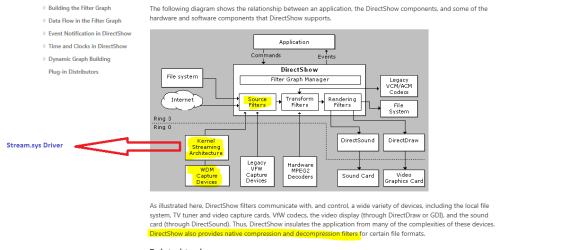
Curious about what (stream.sys driver-based applications) is .

homer-hiding-1374842711.gif

It's working fine for me, try right clicking on the page and clicking refresh a few times just incase you have any corrupt js from the toolbar.
 

My Computer

Computer type
PC/Desktop
OS
Windows 11
Tried refresh and even rebooted but still get the error window when I click on Attach.

Added:
Also noticed something else. The Smile drop-down is abbreviated (fewer entries) unless in Advanced mode. Never noticed that before. :confused:

Something strange is happing. Smiles worked now. Paper clip is missing now (on Edit).

What are you guys doing? Are you messing with me? :D
 
Last edited:

My Computer

Computer type
PC/Desktop
Computer Manufacturer/Model Number
Built 2/11/2011
OS
Windows 7 Pro-x64
CPU
i7-2600 3.4GHz - 3.8GHz Turbo
Motherboard
Intel DH67BL-B3
Memory
8Gb - 2x4GB, Muskin 991770 PC3-1333
Graphics Card(s)
Integrated Intel HD 2000
Sound Card
Integrated Intel 10.1 HD, RealTek ALC892
Monitor(s) Displays
Asus LCD VH222H, Haier HL24XSL2a
Screen Resolution
1920x1080, 1920x1080
Hard Drives
Crucial SSD C300-128Gb,
Western Digital WD5002AALX - 500Gb,
Western Digital WD7501AALS - 750Gb
PSU
Seasonic 650W 80+ Gold Modular
Case
Rosewill Defender
Cooling
Stock CPU, Four 120mm case fans, PCH fan added
Keyboard
Logitech EX100 Y-RBH94 Wireless
Mouse
Logitech EX100 M-RCE95 Wireless
Internet Speed
3.0/1.5 Mbs
Antivirus
Microsoft Security Essentials
Browser
Microsoft Internet Explorer 11
Other Info
Antec Veris Premier-Multimedia IR Station,
Cyber Accoustics-3602 Speakers,
AFT XM-5U Card Reader,
Hauppauge TV-HVR-2250,
Sony LX300 USB Turntable
Yes, I'll give you that but I don't think the Stream.sys driver is used during WEI evaluation. I don't have a video capture card but I do have a TV card and WEI doesn't evaluate that. At least I've never seen it in the test log. Or perhaps I don't understand completely how/where the driver is implemented. :o

Source: https://msdn.microsoft.com/en-us/library/windows/desktop/dd375470(v=vs.85).aspx

Tried to post image of Direct Draw components but the attachment link isn't working. :(

The stream.sys is only a source filter and it might depends on what kind of adapters it goes through.
If you look inside the Winsat folder you can see WEI is using three media file formats: .wmv, .mpg, .mp4.
 

Attachments

  • Capture.PNG
    Capture.PNG
    20.2 KB · Views: 2

My Computer

Computer type
PC/Desktop
Computer Manufacturer/Model Number
Custom Build
OS
Windows 7 Professional SP1 - x64 [Non-UEFI Boot]
CPU
Ivy Bridge Core i5 3570K (Delidded)
Motherboard
Asus P8Z77-V LE PLUS
Memory
G.Skill "Ares" DDR3 PC3-12800 - 1600MHz (16Gb)
Graphics Card(s)
Asus Dual-RX480-O4G
Sound Card
Creative Sound Blaster Z w/5.1 sound system
Monitor(s) Displays
Asus IPS 23"
Screen Resolution
16/9
Hard Drives
Internal:
500Go Sata 6Gb/s (x2)
500Go Sata 3Gb/s (x2)
SSD 60Go Sata 6Gb/s
PSU
In Win C 900W Series 80+ Platinum
Case
Thermaltake Chaser A71
Cooling
Custom Water Cooling Loop
Keyboard
Cooler Master QuickFire XTi
Mouse
Razer Imperator 2012 (4G)
Antivirus
MSE
Browser
IE 11.0.xxx Rtm
Other Info
"Raid0" with Intel Smart Response Technology (HDD/SSD)
Extremly odd issue after kb3054476 appied!

well, I evaluated this Optional update as safe and likely beyond that damn free upgrade to Win10... and applied it onto 3 Win7 PCs around me...

a couple of days ago it gave me z very much odd system BSOD and Win7 fail to start on 1 desktop then. oops... first moment I guessed a lost of my system hdd but it was later found in BIOS jumped to abnormal position in boot sequence hdds' list.

anyhow problem was solved. however all troubles started from system errors:

System log error ID 7011 no response/delay of "LanmanServer", then ID 7011 no response/delay of "ShellHWDetection", then a number of Error IDs 10110 & 10111 - Kernel Drivers in User Mode.

p.s. z funniest point was when I clicked for help on one of these errors - z first popup showed inquiry for error of kernel mode drivers version 6.2.something.... not 6.1 as it's expected for Win7.

summary - not decided but maybe I'll remove this WU patch.:mad:
 

My Computer

Computer type
Laptop
Computer Manufacturer/Model Number
Dell Laptop & Asus Desktop
OS
Windows 7 Ultimate x64 SP1u OEM Dell & OEM Asus
CPU
Intel Core 2 T9500 2.60GHz & Core 2 Duo E7500 @ 2.93GHz
Motherboard
DELL PRECISION M4300 & ASUS P5Q-EM
Memory
DDR2 - 2x4GB Hyundai SODIMM 800Mhz & 2x2GB GeIL DIMM 1066MHz
Graphics Card(s)
nVIDIA Quadro FX360M & Mobo Integrated Intel4500
Sound Card
Mobos' Integrated SigmaTel & RealTek ALC1200 8Ch HD Audio
Monitor(s) Displays
Samsung 15.4" LCD & Samsung SyncMaster 245B+ Monitor
Screen Resolution
1920x1200 both
Hard Drives
SSDs Kingston, HDDs WDC & HGST - many
PSU
DELL & Some PSU of 450W
Case
DELL & IRBIS
Cooling
Dell & Cooler Master
Keyboard
Dell & Logitech
Mouse
Logitech & Genuis
Internet Speed
100Mbps
Antivirus
N360 + MalwareBytes on both
Browser
IE11 + latest Chrome on both
Detailed description of Stream.sys

For what its worth, here is a detailed description of stream.sys from IUTools:

"Stream.sys is also known as WDM CODEC Class Device Driver 2.0. It is a driver file produced by Microsoft Corporation and is part of Microsoft(R) Windows(R) Operating System. WDM is short for the Windows Driver Model (WDM) and is otherwise called the Win32 Driver Model.

"WDM is a platform that was preinstalled with Windows 98 and Windows 2000 in order to replace VxD for device drivers, because VxD was only available for older versions of Windows such as Windows 95 and Windows 3.1, as well as the Windows NT Driver Model. WDM drivers have layers of a complex hierarchy and interact with each other via I/O request packets (IRPs). The Microsoft Windows Driver Model standardized requirements and reduced the amount of code that required to be programmed. Because of WDM, driver models became consistent for the Windows 98 and Windows 2000 product lines.


"WDM drivers feature forward compatibility for a newer version of Windows. That means the driver will fail to leverage any new features included in the new version. On the whole, WDM drivers are not backward compatible with earlier versions of operating systems than Windows 98 or Windows 2000, namely, a WDM driver is not surely able to work for any older version of Windows. WDM was designed to enhance the functionality and convenience of compiling drivers for Windows. WDM was primarily created to be compatible with binary source from Windows 98 to Windows 2000.


"Stream.sys is not only related to WDM drivers which have the types of Device function drivers, Class drivers, Miniport drivers and so on, but also includes the concept and functions for a codec. A codec is program that is applied to compress or decompress a digital media file, such as a song or video. Codecs have been implemented in Windows Media Player and other programs to play and generate digital media files. The codec can make up of two parts: an encoder and a decoder capable of encoding or decoding a digital data stream or signal."


That site also lists common stream.sys errors and solutions.
 
Last edited:

My Computer

Computer type
PC/Desktop
OS
Windows 7 Ultimate x64
Next-generation stream- based applications

If your interested it what STREAM- BASED APPLICATIONS are you can find some info here
https://cs.brown.edu/about/conduit/conduit_v11n2.pdf
it is an old issue of Conduit (Fall, 2002) it is published by the Department of Computer Science at Brown University that does a good job of explaining the basics because it is actually an introduction to what was then a new technology.


My Computer

Computer type
PC/Desktop
OS
Windows 7 Home Premium x64
Back
Top