Curious Cursor Conundrum.

Xantutsuken

New member
Local time
1:48 PM
Messages
2
For some odd reason my cursor circles, as if busy, and freezes Windows for a few minutes. I just purchased this computer in May of last year and it's had the problem ever since. At first I thought it was internet related, but today it was the straw that broke the camel's back when it froze for a few minutes upon loading up the calculator.

I keep my computer very clean, I scan malware, adware, etc. religiously; it's not infected with anything whatsoever. I've searched high and low for any solutions to the problem and I was lead to these forums by this thread:

http://www.sevenforums.com/general-discussion/22236-freezing-busy-cursor.html

They have the exact same problem I have, though I don't have the computer actually freeze to the point of manually rebooting it. It simply freezes for a few minutes then I can continue using Windows. Alas, I don't see any solutions in their thread. Was hoping there'd be better luck with mine.
 

My Computer

OS
Windows 7 Home Premium 64bit
For some odd reason my cursor circles, as if busy, and freezes Windows for a few minutes. I just purchased this computer in May of last year and it's had the problem ever since. At first I thought it was internet related, but today it was the straw that broke the camel's back when it froze for a few minutes upon loading up the calculator.

I keep my computer very clean, I scan malware, adware, etc. religiously; it's not infected with anything whatsoever. I've searched high and low for any solutions to the problem and I was lead to these forums by this thread:

http://www.sevenforums.com/general-discussion/22236-freezing-busy-cursor.html

They have the exact same problem I have, though I don't have the computer actually freeze to the point of manually rebooting it. It simply freezes for a few minutes then I can continue using Windows. Alas, I don't see any solutions in their thread. Was hoping there'd be better luck with mine.
Is this a name brand or custom build? If name brand computer have you uninstalled all the crapware that comes preinstalled? Check to see what is starting at bootup using msconfig or other third party solutions such as autoruns.

Fill out your system specs so we can better help.
 

My Computer

Computer type
PC/Desktop
Computer Manufacturer/Model Number
Me, as in myself
OS
Win 7 32bit HP
CPU
Intel Core 2 Duo 6600
Motherboard
Gigabyte 965P-DQ6
Memory
2 GB DDR2
Graphics Card(s)
Zotac GeForce GTX 550 Ti
Sound Card
Realtek on board
Monitor(s) Displays
Philips 32" LED-LCD 1080p
Screen Resolution
1920 x 1080
Internet Speed
cable 15mbs
Once your removed all the crap ware your system came with type msconfig in search box/ go to startup/ and uncheck items you DON'T need for your system to startup.
See my snap picture.
View attachment 129660
 
Last edited:

My Computer

Computer Manufacturer/Model Number
HP M9077c
OS
Windows 7 Home Premium 64bit
CPU
Intel(R)Core(TM)2 quad [email protected] 2.39GHz
Motherboard
ASUSeK
Memory
6GB DDR2 6400
Graphics Card(s)
GeForce 8500/512MB
Sound Card
Realtek High Def Audio
Monitor(s) Displays
HP w2408 LCD 24" widescreen
Screen Resolution
1920x1200
Cooling
6 pack of Bud
Keyboard
MS wireless Inteli
Mouse
MS wireless Inteli
That can also signal a failing hard drive. The manufacturer of your drive will have free diagnostics tools on their site that you can run.
 

My Computer

OS
Windows 7 Ultimate x64 SP1
CPU
Intel Core i7-2600
Motherboard
Gigabyte GA-P67A-UD3P-B3
Memory
12 GB Patriot Extreme DDR3-1333
Graphics Card(s)
Nvidia GTX 470
Monitor(s) Displays
Dell UltraSharp 2209WA
Hard Drives
OCZ Agility3 240 GB, WD5001AALS, WD7501AALS
PSU
OCZ ModStream 700W
Case
CoolerMaster HAF 912 Advanced
Cooling
CoolerMaster Hyper 212 Plus
Is this a name brand or custom build? If name brand computer have you uninstalled all the crapware that comes preinstalled? Check to see what is starting at bootup using msconfig or other third party solutions such as autoruns.

Fill out your system specs so we can better help.

Uninstalled all the Dell Dock, etc. files as well as unchecked the misc startup programs. Will give it a day and see if any improvements are made.
That can also signal a failing hard drive. The manufacturer of your drive will have free diagnostics tools on their site that you can run.

I wouldn't be surprised, Dell has usually been very kind to me over the years. This recent purchase had a fan die out within the first two months.

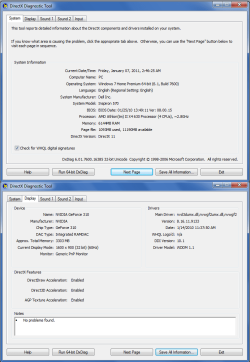
Also:
 

Attachments

  • ogc4V.png
    ogc4V.png
    35.6 KB · Views: 14

My Computer

OS
Windows 7 Home Premium 64bit
Back
Top