Solved curious if I had an undetected malware infection

sdowney717

New member
Power User
VIP
Local time
8:06 PM
Messages
705
I have been bumping up on a unsolvable problem with HDTV streaming video becoming visibly corrupted.
So I finally pulled the drive, put in a new drive and did a fresh install, did all security updates and an optional platform update.

The glitchy streaming is gone all day long.
The computer is not very powerful pentium 4 prescott.
I was struggling for weeks trying things and the glitchy streaming was so random, drove me crazy.

what the chance something was on the drive that malwarebytes did not detect?
I had installed other oddball programs things which malwarebytes found malware in at least three of them.

So I am cloning this good drive onto the old bad drive using clonezilla.

edit, clonezilla worked, it boots and works fine, no weird glitches so far on the clone drive.
Who knows, maybe a corrupted file system?
 

My Computer My Computer

At a glance

Windows 7 Ultimate x64
OS
Windows 7 Ultimate x64
PC worked all night long with no glitching problem, just perfect.
 

My Computer My Computer

At a glance

Windows 7 Ultimate x64
OS
Windows 7 Ultimate x64
Haha, I think the 'undetected malware' was Chrome browser.

PC did an update and installed IE11, even though I had it set to notify but not install.

Was not totally happy with that. Seems ok.

Then I decided to install Chrome, then I logged into chrome and all my extensions were installed and then whamo, glitching badly. Not even closing Chrome made it stop. So I thought maybe an extension is doing this? So I uninstall Chrome and verify the HDTV is streaming with no glitches.
Then reinstall Chrome, do not log in, and whamo, glitching badly. Even closing chrome browser and looking for chrome in task manager and seeing nothing obviously 'chrome' and still glitching. IT takes only a few minutes for chrome to start causing this glitch.

So I uninstall chrome again and perfect smooth HDTV streaming, no glitches.

So something about chrome is causing it. Maybe chrome is exploring (spying) the computer and trying to phone home.

I can try firefox and see what that does. IE11 is ok, does not cause this glitch, except when it first starts up.

So I can not even install chrome and be ok.
 

My Computer My Computer

At a glance

Windows 7 Ultimate x64
OS
Windows 7 Ultimate x64

My Computer My Computer

At a glance

Desk1 7 Home Prem / Desk2 10 Pro / Main lap A...Desk1 i5 3750K / Laptop i7 GTX 860M / Desk2 i...Desk1 8GB (1866) / Desk2 16GB (1333) / Laptop...Desk 1& 2NVidia GTX 650 & Laptops on board Intel
Computer type
PC/Desktop
Computer Manufacturer/Model Number
Own build (new) Desk1 / Asus ROG Win 7 / Desk2 1st build
OS
Desk1 7 Home Prem / Desk2 10 Pro / Main lap Asus ROG 10 Pro 2 laptop Toshiba 7 Pro Asus P2520 7 & 10
CPU
Desk1 i5 3750K / Laptop i7 GTX 860M / Desk2 i5 2500
Motherboard
Desk1 Asus P877-V / Desk2 Gigabyte H67 UD3H / Laptop ?
Memory
Desk1 8GB (1866) / Desk2 16GB (1333) / Laptop 8Gb DDR3
Graphics Card(s)
Desk 1& 2NVidia GTX 650 & Laptops on board Intel
Sound Card
Desk 1 & 2 -XONAR DG Realtek High Def audio Laptop
Monitor(s) Displays
Desk 1 Benq HD 2450 / Desk2 Philips 24" / Laptop 17.5"
Screen Resolution
1920x1080 D1 & D2 & Laptop 1
Hard Drives
Desk1 Samsung 120GB 830 SSD
Asus ROG 256GB 850 Pro SSD
Desk2 Samsung 840 256 SSD
Toshiba 120GB EVO
PSU
Desk 1 Corsair HX 1050/ Laptop ? / Desk 2 Corsair HX 650
Case
Desk 1 Cooler HAF XM ? Toshiba laptop / Desk2 Coolermaster
Cooling
Fans on all Desk1 -2 Desk2 - all Coolermasters 5 Laptop ?
Keyboard
Desk 1 MS Sidewinder X6 Desk 2 MS Sidewinder X 4
Mouse
Desk 1&2 - Gigabyte MS 900 gamer - laptop - Logitec wireless
Internet Speed
ADSL2+
Other Info
One other Desktop (tester) and spare Toshba laptop both with SSD's
Running Kaspersky 2016 ISS on all machines config'd identically
Logitec audio stereo systems on each machine (x3)
Canon MG5250MFC
Router/modem TP-Link running WPA2SK
In trying to figure this out over several weeks I have run those programs.
I like chrome browser and install it on all my PC.
Never would have thought chrome browser would do such a thing. I do like using the chrome remote desktop, but cant now with this PC.

Doing a clean new install, cloning the drive for a known working backup and then careful testing adding in programs helped me figure out what was happening. This older PM8M mainboard with 3.2ghz Prescott clocked up to 3.5 ghz is adequate for win 7 but streaming HD video pushes this to the edge.

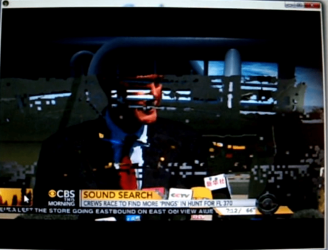
Took a video of the screen glitch, typical breaking up like you would think was the antenna. But was the PC overtaxed by software running chrome.

I have had it on all day watching TV and it has been perfect.

Couple pics when it was badly glitching-pixelating. Sound was also affected, badly breaking up along with picture.
 

Attachments

  • Screenshot from 2014-04-08 12:23:06.png
    Screenshot from 2014-04-08 12:23:06.png
    139.5 KB · Views: 1
  • Screenshot from 2014-04-08 12:26:09.png
    Screenshot from 2014-04-08 12:26:09.png
    183.2 KB · Views: 1

My Computer My Computer

At a glance

Windows 7 Ultimate x64
OS
Windows 7 Ultimate x64
Warning: Your Browser Extensions Are Spying On You

IMO, not just extensions, chrome also phones home, reporting everything you do. Maybe also looking through the hard drive? Something chrome working in the background did caused the PC to have problems with the video streaming.
That wont make me stop using chrome. Most people are blissfully unawares.

What do you think?
 

My Computer My Computer

At a glance

Windows 7 Ultimate x64
OS
Windows 7 Ultimate x64
Back
Top