Currency issues

legrena

New member
Local time
8:07 AM
Messages
3
I have recently changed to a new computer. My old one was set up in the US, but I now reside in Greece. I have both US and Greek bank accounts and do internet banking. The old computer used Windows XP whereas the new computer is on Windows 7. Today I went on line to my US bank account and found that I could not make payments or do other operations as I had not changed the settings. I’ve since changed the location to US, the currency to Dollars etc and did a restart. Then I tried the US back account only to get an error message as follows:
“The Memo contains at least one invalid character. Please remove any invalid characters before continuing. Valid characters include: letters, numbers, the at sign (@), the pound sign (#), period, underscore and hyphen.”

I’ve tried using Firefox and Internet Explorer so the problem is not in the Browser

The input shows the dollar format of $ and decimal point

Any help available or comments or things to try?
 

My Computer

Computer Manufacturer/Model Number
HP Probook 6400
OS
Windows 7
Hi legrena,

Welcome to the forums. :)

PLAN A
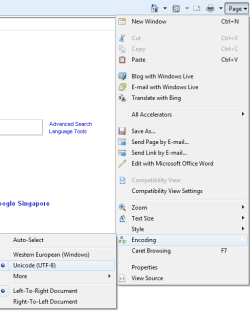
In windows Internet explorer go to PAGE then ENCODING and check that it is the same as mine in the picture. If not change it. Close internet explorer and restart it.

PLAN B
Not a solution, but a workaround. Being able to transfer your money around is pretty important. So you could try to create a new user (now that your PC settings are all correct) and use this user temporarily until we can offer another solution.

Hope this helps

Tim
 

Attachments

  • internet explorer.png
    internet explorer.png
    12.9 KB · Views: 7

My Computer

Computer Manufacturer/Model Number
Custom Hack job
OS
Windows 7 Ultimate 64 bit
CPU
Intel(R) Core(TM)2 Quad CPU Q8200 @ 2.33GHz
Motherboard
GigaByte EP45-UD3
Memory
8 GB Kingston
Graphics Card(s)
Nvidia GeForce 9600GT
Sound Card
Soundblaster Audigy
Monitor(s) Displays
AOC x2 22"
Hard Drives
2 x Samsung 500GB (RAID)
2 x Samsung 2TB
1 x WD Green 2TB
1 x Seagate 1TB
1 x Samsung 500GB
PSU
Thermaltake QFan 750W
Case
CM Scout Gaming
Cooling
Coolermaster V10
Keyboard
Microsoft Wireless Keyboard 1000
Mouse
Microsoft Wireless Optical 2000
Internet Speed
320
Other Info
Winfast PVR2000CP
LG DVD-RAM DVD/RW/DL Super Multi
Linksys WMP300Nx2 Wireless Adapter
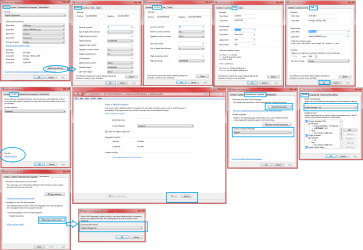
I also wanted to add the steps to change Region (I changed from Australia to Singapore). Some things such as my keyboard needed to stay in Australian format. As you look at the attached picture, just go through the screens that I show and check the contents of each one. I've highlighted the main steps in blue (but check all cells anyway). It won't be exactly the same as mine; but mine should be a good guide as to what should be changed.
 

Attachments

  • changing region.png
    changing region.png
    173.4 KB · Views: 29

My Computer

Computer Manufacturer/Model Number
Custom Hack job
OS
Windows 7 Ultimate 64 bit
CPU
Intel(R) Core(TM)2 Quad CPU Q8200 @ 2.33GHz
Motherboard
GigaByte EP45-UD3
Memory
8 GB Kingston
Graphics Card(s)
Nvidia GeForce 9600GT
Sound Card
Soundblaster Audigy
Monitor(s) Displays
AOC x2 22"
Hard Drives
2 x Samsung 500GB (RAID)
2 x Samsung 2TB
1 x WD Green 2TB
1 x Seagate 1TB
1 x Samsung 500GB
PSU
Thermaltake QFan 750W
Case
CM Scout Gaming
Cooling
Coolermaster V10
Keyboard
Microsoft Wireless Keyboard 1000
Mouse
Microsoft Wireless Optical 2000
Internet Speed
320
Other Info
Winfast PVR2000CP
LG DVD-RAM DVD/RW/DL Super Multi
Linksys WMP300Nx2 Wireless Adapter
TimStitt, thank you for your help. I checked and rechecked every setting over and over again. The response from the bank when trying to set up a payment was:
The Memo contains at least one invalid character. Please remove any invalid characters before continuing. Valid characters include: letters, numbers, the at sign (@), the pound sign (#), period, underscore and hyphen.
Unfortunatly I was looking at everything but the account name which we had been using for years. The name included a (/) in the middle. Once changed to (-) everything worked. Shame on the bank for not making this clear, and shame on my for not clearly reading everything!


Thanks for the help


Legrena
 

My Computer

Computer Manufacturer/Model Number
HP Probook 6400
OS
Windows 7
Legrena,

Don't beat yourself up. This is much better than your computer being broken don;t you think?

With a grin.....in the IT world we call these PICNIC errors. Problem In Chair Not In Computer. I've been prone to few myself. :D

I'm just glad your issue is resolved. If anything other problems occur, you know where to find us.

Tim
 

My Computer

Computer Manufacturer/Model Number
Custom Hack job
OS
Windows 7 Ultimate 64 bit
CPU
Intel(R) Core(TM)2 Quad CPU Q8200 @ 2.33GHz
Motherboard
GigaByte EP45-UD3
Memory
8 GB Kingston
Graphics Card(s)
Nvidia GeForce 9600GT
Sound Card
Soundblaster Audigy
Monitor(s) Displays
AOC x2 22"
Hard Drives
2 x Samsung 500GB (RAID)
2 x Samsung 2TB
1 x WD Green 2TB
1 x Seagate 1TB
1 x Samsung 500GB
PSU
Thermaltake QFan 750W
Case
CM Scout Gaming
Cooling
Coolermaster V10
Keyboard
Microsoft Wireless Keyboard 1000
Mouse
Microsoft Wireless Optical 2000
Internet Speed
320
Other Info
Winfast PVR2000CP
LG DVD-RAM DVD/RW/DL Super Multi
Linksys WMP300Nx2 Wireless Adapter
Tim, Thanks again. As an update I wrote the bank about this as then never noticed clients of this change and the Account Name is not near the location of the amount and transaction date, so you are not inclined to look at an account name expecially when you've been using it for years. One of the key points to my discovery is that my 7 yr old Dell is still running but a bit slow. So after following your suggestions I fired up the Dell with XP and had the same problem, thus meaning it was not Window 7 and it was not the new computer or it's settings.

The bank did send a note of appology indicating that sending a memo to all internt banking customers was a good idea and that they would do that. In addition they are going to re-organize the payment page to show all info in one location on the site with the language below now being clearified to include the words "in account names and numbers" At least that will make it clearer for anyone else experiencing the same problems.

Thanks again
Legrena
 

My Computer

Computer Manufacturer/Model Number
HP Probook 6400
OS
Windows 7
Tim, Thanks again. As an update I wrote the bank about this as then never noticed clients of this change and the Account Name is not near the location of the amount and transaction date, so you are not inclined to look at an account name expecially when you've been using it for years. One of the key points to my discovery is that my 7 yr old Dell is still running but a bit slow. So after following your suggestions I fired up the Dell with XP and had the same problem, thus meaning it was not Window 7 and it was not the new computer or it's settings.

The bank did send a note of appology indicating that sending a memo to all internt banking customers was a good idea and that they would do that. In addition they are going to re-organize the payment page to show all info in one location on the site with the language below now being clearified to include the words "in account names and numbers" At least that will make it clearer for anyone else experiencing the same problems.

Thanks again
Legrena

Awesome, I can't get my bank to change anything! :p
 

My Computer

Computer Manufacturer/Model Number
Custom Hack job
OS
Windows 7 Ultimate 64 bit
CPU
Intel(R) Core(TM)2 Quad CPU Q8200 @ 2.33GHz
Motherboard
GigaByte EP45-UD3
Memory
8 GB Kingston
Graphics Card(s)
Nvidia GeForce 9600GT
Sound Card
Soundblaster Audigy
Monitor(s) Displays
AOC x2 22"
Hard Drives
2 x Samsung 500GB (RAID)
2 x Samsung 2TB
1 x WD Green 2TB
1 x Seagate 1TB
1 x Samsung 500GB
PSU
Thermaltake QFan 750W
Case
CM Scout Gaming
Cooling
Coolermaster V10
Keyboard
Microsoft Wireless Keyboard 1000
Mouse
Microsoft Wireless Optical 2000
Internet Speed
320
Other Info
Winfast PVR2000CP
LG DVD-RAM DVD/RW/DL Super Multi
Linksys WMP300Nx2 Wireless Adapter
Back
Top