Cursor & Keys Cease Functioning

Apefinger

New member
Local time
12:27 AM
Messages
2
Hi, my cursor disappears after a few seconds, likewise the keys just stop typing at anything from 5 seconds onwards, as I use my laptop (Acer 5733) mainly for forums this is very frustrating because I look at the keys whilst typing, so I can type a lot that just doesn't appear on the screen & has to be done again.

I have to left click with the mouse to continue typing or scrolling.

The laptop has a dual boot system with Ubuntu & it works fine on that so it must be windows & not the laptop itself,( oddly enough it seems fine on here, but some forums seem better than others bizarrely.)
 

My Computer

Computer type
Laptop
Computer Manufacturer/Model Number
Acer 5733
OS
Windows 7 home 64 bit
CPU
intel i3-380m
Motherboard
standard acer ?
Memory
4GB DR3
Graphics Card(s)
intel HD
Hard Drives
750gb 7200rpm

Dual boot system, @ 550gb Windows, @ 200gb Ubuntu
Antivirus
McAffee
Browser
Firefox
Do you know off hand how much ram is in your laptop? I only ask because I have had that same issue with my prior computer running xp; and it turned out it was a lack of enough available ram. Usually if that happens sometimes it can in fact be a lack of ram for what you have open and if there are other programs open then that can affect it as well.
 

My Computer

Computer type
PC/Desktop
Computer Manufacturer/Model Number
custom built
OS
Windows 7 ultimate 64-bit
CPU
Intel I7 2600K 3.4ghz
Motherboard
Asus Evo P8P67
Memory
Corsair 16gb ddr3 1600mhz
Graphics Card(s)
Nvidia Geforce gt 430
Sound Card
Sound Blaster Titanium x-fi pci express
Monitor(s) Displays
Dell E198WFP
Hard Drives
1 western digital 2TB drive.
PSU
Antec 1200 watt
Case
Inwin Dragon Rider
Cooling
6 case supplied cooling fans
Keyboard
logitech mk700
Mouse
logitech m705
Internet Speed
25-50mbps download; 10mbps upload(i think)
Antivirus
avg free 2014
Browser
mozilla firefox
Other Info
Also have a pretty bad speaker setup which is a klipsch promedia 5.1 surround speaker setup with huge subwoofer and lg blu ray player/writer. Also a hp officejet pro 8600 plus wireless all in one and a logitech s7500 webcam.
Thanks Matts, you may well be onto something there, Windows seems to demand a lot more of everything than Ubuntu, the fan is on almost constantly on windows and barely ever on Ubuntu.

I have one of those CPU meters & its reading 67% for RAM with only firefox browser & thunderbird mail open, but I do tend to have a lot of windows open at once (10 +).

This laptop only has one 4gb ddr card, I might upgrade to a matched pair.
beer.gif
 

My Computer

Computer type
Laptop
Computer Manufacturer/Model Number
Acer 5733
OS
Windows 7 home 64 bit
CPU
intel i3-380m
Motherboard
standard acer ?
Memory
4GB DR3
Graphics Card(s)
intel HD
Hard Drives
750gb 7200rpm

Dual boot system, @ 550gb Windows, @ 200gb Ubuntu
Antivirus
McAffee
Browser
Firefox
If i were you; and if i could afford it; i would definitely max out the ram if you can; that way you will have more available resources to work with because yes; windows does use quite a bit of ram with all the background services that it uses etc.
 

My Computer

Computer type
PC/Desktop
Computer Manufacturer/Model Number
custom built
OS
Windows 7 ultimate 64-bit
CPU
Intel I7 2600K 3.4ghz
Motherboard
Asus Evo P8P67
Memory
Corsair 16gb ddr3 1600mhz
Graphics Card(s)
Nvidia Geforce gt 430
Sound Card
Sound Blaster Titanium x-fi pci express
Monitor(s) Displays
Dell E198WFP
Hard Drives
1 western digital 2TB drive.
PSU
Antec 1200 watt
Case
Inwin Dragon Rider
Cooling
6 case supplied cooling fans
Keyboard
logitech mk700
Mouse
logitech m705
Internet Speed
25-50mbps download; 10mbps upload(i think)
Antivirus
avg free 2014
Browser
mozilla firefox
Other Info
Also have a pretty bad speaker setup which is a klipsch promedia 5.1 surround speaker setup with huge subwoofer and lg blu ray player/writer. Also a hp officejet pro 8600 plus wireless all in one and a logitech s7500 webcam.
matts6887 is correct Windows 7 does like ram but if set up correctly Windows 7 will run great with 4 gig of ram.

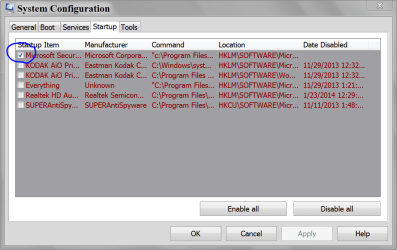
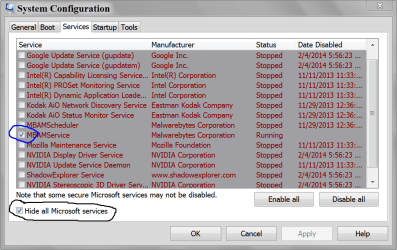
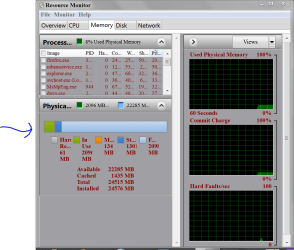
Could you show us these using this tutorial.

By Brink:
MSCONFIG STARTUP.PNG

MSCONFIG SERVICES.PNG

RAM USAGE.PNG
 

My Computer

Computer type
PC/Desktop
Computer Manufacturer/Model Number
Home made Desktop
OS
Windows 10 Pro. 64/ version 1709 Windows 7 Pro/64
CPU
Intel i7-6800K @ 4.3
Motherboard
ASUS X-99 Deluxe II
Memory
Corsair Platinum 16 gig @2400
Graphics Card(s)
EVGA GTX 1070 OC
Monitor(s) Displays
Asus 27" LED LCD/VE278Q
Screen Resolution
1920-1080 or 1280-720 HDMI
Hard Drives
INTEL SSD 730-240 Gb Sata 3.0/
PSU
EVGA Platium 1200W
Case
Phanteks Luxe Tempered Glass 8 fans/ one radiator
Cooling
XSPC/ Water Cooled CPU
Keyboard
Das 4 Professional
Mouse
Logitech M705/MX Anywhere 2-S
Internet Speed
100 mbits
Antivirus
Microsoft Security Essentials/ Malwarebytes Premium 3.0/ SAS
Browser
I.E. 11 default/Firefox/ ISP Time Warner Cable/Spectrum
Other Info
LG BluRay Burner/
Sound system-KLipsch-THX/
Icy Dock ssd Hot Swap bays.
Back
Top