Solved CURSOR ON WIRELESS MOUSE FREEZING AND COMPUTER

cocod2

New member
Member
VIP
Local time
2:40 AM
Messages
204
Hi.. I have had this problem for about a week now....
I have a sony vaio windows 7 IE 8 Laptop that I love and it is only a year old.
in the past 5 days the cursor on my logitech wireless mouse freezes. The only way to get out of it is ctrl. alt. del and it goes to my home screen and I cancel and the cursor comes back.. sometimes I go for hours and it doesnt
freeze and then sometimes it freezes every 5 minutes. there are times when I ctl. alt delete and it goes to my screen and I have to manually shutdown as even if I touch the pad on my laptop I cannot close it.. and of course when the cursor freezes
the screen freezes too.

Just to let you know that there is nothing wrong with my battery or mouse
as I have another one just like it and it does the same thing

I contacted Sony Vaio and they came in by remote and put in a patch
and said that should do the trick. but it did not...

any ideas....

do you need more info and if so what else would help in this situation.

I also play some games and that is when I most get this. and I have
the flash 102..... the latest version. and my java is uptodate.

I should also say that at times my IE8 says not responding.....

thanx Coco.

p.s.I have a friend who is very computer savy and comes in by remote
to fix things on my computer and this is stumping even him..
 

My Computer

OS
Microsoft Windows 7 Professional 64-bit 7601 Multiprocessor Free Service Pack 1
CPU
Intel(R) Core(TM) i7 CPU Q 740 @ 1.73GHz
Motherboard
Sony Corporation VAIO
Memory
6.00 GB
Graphics Card(s)
(1) NVIDIA GeForce GT 425M (2) LogMeIn Mirror Driver
Sound Card
(1) NVIDIA High Definition Audio (2) Bluetooth Hands-free
Screen Resolution
1600 x 900 x 32 bits (4294967296 colors) @ 59 Hz
Hard Drives
SAMSUNG HM641JI
Where do you have your transmitter/receiver plugged in on the front or back of your machine?
 

My Computer

Computer type
PC/Desktop
Computer Manufacturer/Model Number
Custom Build
OS
Windows 7 Home Premium 64 bit SP1
CPU
Intel i7 4790k
Motherboard
MSI Z97-G55 SLI
Memory
16 GB Corsair 2400 MHz DDR3
Graphics Card(s)
Visiontek Radeon R9 285
Sound Card
None
Monitor(s) Displays
Gateway FHX2402L
Screen Resolution
1920 X 1080
Hard Drives
Samsung 840 EVO 500GB
PSU
Corsair 750 TX
Case
Fractal Design
Cooling
Stock fans
Keyboard
Logitech K800
Mouse
Logitech M510
Internet Speed
60.88 Mbps download 10.47 Mbps upload (Speedtest.net)
Antivirus
Norton
Browser
Opera
Other Info
First Computer used: A Commodore Pet of course
Love using Manjaro KDE Linux 64 bit and Windows 7/10 64 bit
Sorry forgot you said laptop! Try moving the unit to a different usb port.
 

My Computer

Computer type
PC/Desktop
Computer Manufacturer/Model Number
Custom Build
OS
Windows 7 Home Premium 64 bit SP1
CPU
Intel i7 4790k
Motherboard
MSI Z97-G55 SLI
Memory
16 GB Corsair 2400 MHz DDR3
Graphics Card(s)
Visiontek Radeon R9 285
Sound Card
None
Monitor(s) Displays
Gateway FHX2402L
Screen Resolution
1920 X 1080
Hard Drives
Samsung 840 EVO 500GB
PSU
Corsair 750 TX
Case
Fractal Design
Cooling
Stock fans
Keyboard
Logitech K800
Mouse
Logitech M510
Internet Speed
60.88 Mbps download 10.47 Mbps upload (Speedtest.net)
Antivirus
Norton
Browser
Opera
Other Info
First Computer used: A Commodore Pet of course
Love using Manjaro KDE Linux 64 bit and Windows 7/10 64 bit
little usb thing is on the side of laptop on right handside right near the front..... there are three ports on that side and I just moved it to the third one..
i have my cooling pad plugged in there too
 

My Computer

OS
Microsoft Windows 7 Professional 64-bit 7601 Multiprocessor Free Service Pack 1
CPU
Intel(R) Core(TM) i7 CPU Q 740 @ 1.73GHz
Motherboard
Sony Corporation VAIO
Memory
6.00 GB
Graphics Card(s)
(1) NVIDIA GeForce GT 425M (2) LogMeIn Mirror Driver
Sound Card
(1) NVIDIA High Definition Audio (2) Bluetooth Hands-free
Screen Resolution
1600 x 900 x 32 bits (4294967296 colors) @ 59 Hz
Hard Drives
SAMSUNG HM641JI
Do you have a usb port on the right? (your mouse side)
 

My Computer

Computer type
PC/Desktop
Computer Manufacturer/Model Number
Custom Build
OS
Windows 7 Home Premium 64 bit SP1
CPU
Intel i7 4790k
Motherboard
MSI Z97-G55 SLI
Memory
16 GB Corsair 2400 MHz DDR3
Graphics Card(s)
Visiontek Radeon R9 285
Sound Card
None
Monitor(s) Displays
Gateway FHX2402L
Screen Resolution
1920 X 1080
Hard Drives
Samsung 840 EVO 500GB
PSU
Corsair 750 TX
Case
Fractal Design
Cooling
Stock fans
Keyboard
Logitech K800
Mouse
Logitech M510
Internet Speed
60.88 Mbps download 10.47 Mbps upload (Speedtest.net)
Antivirus
Norton
Browser
Opera
Other Info
First Computer used: A Commodore Pet of course
Love using Manjaro KDE Linux 64 bit and Windows 7/10 64 bit
it is on the right
i have three ports on the right
it usually freezes when I play games
like jeopardy on :p facebook
or wheel of fortune as dumb as it all is :p
lol
 

My Computer

OS
Microsoft Windows 7 Professional 64-bit 7601 Multiprocessor Free Service Pack 1
CPU
Intel(R) Core(TM) i7 CPU Q 740 @ 1.73GHz
Motherboard
Sony Corporation VAIO
Memory
6.00 GB
Graphics Card(s)
(1) NVIDIA GeForce GT 425M (2) LogMeIn Mirror Driver
Sound Card
(1) NVIDIA High Definition Audio (2) Bluetooth Hands-free
Screen Resolution
1600 x 900 x 32 bits (4294967296 colors) @ 59 Hz
Hard Drives
SAMSUNG HM641JI
Sorry, I must be losing it today!
Do you have the latest driver installed for your mouse from Logitech? Also I believe I just read here that a newer version of flash just came out.
 

My Computer

Computer type
PC/Desktop
Computer Manufacturer/Model Number
Custom Build
OS
Windows 7 Home Premium 64 bit SP1
CPU
Intel i7 4790k
Motherboard
MSI Z97-G55 SLI
Memory
16 GB Corsair 2400 MHz DDR3
Graphics Card(s)
Visiontek Radeon R9 285
Sound Card
None
Monitor(s) Displays
Gateway FHX2402L
Screen Resolution
1920 X 1080
Hard Drives
Samsung 840 EVO 500GB
PSU
Corsair 750 TX
Case
Fractal Design
Cooling
Stock fans
Keyboard
Logitech K800
Mouse
Logitech M510
Internet Speed
60.88 Mbps download 10.47 Mbps upload (Speedtest.net)
Antivirus
Norton
Browser
Opera
Other Info
First Computer used: A Commodore Pet of course
Love using Manjaro KDE Linux 64 bit and Windows 7/10 64 bit

My Computer

Computer type
PC/Desktop
Computer Manufacturer/Model Number
Custom Build
OS
Windows 7 Home Premium 64 bit SP1
CPU
Intel i7 4790k
Motherboard
MSI Z97-G55 SLI
Memory
16 GB Corsair 2400 MHz DDR3
Graphics Card(s)
Visiontek Radeon R9 285
Sound Card
None
Monitor(s) Displays
Gateway FHX2402L
Screen Resolution
1920 X 1080
Hard Drives
Samsung 840 EVO 500GB
PSU
Corsair 750 TX
Case
Fractal Design
Cooling
Stock fans
Keyboard
Logitech K800
Mouse
Logitech M510
Internet Speed
60.88 Mbps download 10.47 Mbps upload (Speedtest.net)
Antivirus
Norton
Browser
Opera
Other Info
First Computer used: A Commodore Pet of course
Love using Manjaro KDE Linux 64 bit and Windows 7/10 64 bit
I don't know what you mean by latest driver
I have the same mouse since I got the laptop
June 2010....

and the latest flash is 102.......
and i have that

how would i look in my computer for latest driver although i dont think that applies...since it is the same mouse since i got the computer and where do I look for flash....

also it just started happening

am i confusing you lol:geek:
 

My Computer

OS
Microsoft Windows 7 Professional 64-bit 7601 Multiprocessor Free Service Pack 1
CPU
Intel(R) Core(TM) i7 CPU Q 740 @ 1.73GHz
Motherboard
Sony Corporation VAIO
Memory
6.00 GB
Graphics Card(s)
(1) NVIDIA GeForce GT 425M (2) LogMeIn Mirror Driver
Sound Card
(1) NVIDIA High Definition Audio (2) Bluetooth Hands-free
Screen Resolution
1600 x 900 x 32 bits (4294967296 colors) @ 59 Hz
Hard Drives
SAMSUNG HM641JI
thanks for the link for flash player
could you tell me where I look in my control panel to find out what I have then I could tell you.. I believe I have it.
 

My Computer

OS
Microsoft Windows 7 Professional 64-bit 7601 Multiprocessor Free Service Pack 1
CPU
Intel(R) Core(TM) i7 CPU Q 740 @ 1.73GHz
Motherboard
Sony Corporation VAIO
Memory
6.00 GB
Graphics Card(s)
(1) NVIDIA GeForce GT 425M (2) LogMeIn Mirror Driver
Sound Card
(1) NVIDIA High Definition Audio (2) Bluetooth Hands-free
Screen Resolution
1600 x 900 x 32 bits (4294967296 colors) @ 59 Hz
Hard Drives
SAMSUNG HM641JI
What is the model # of your Logitech mouse? It should be on the mouse.
 

My Computer

Computer type
PC/Desktop
Computer Manufacturer/Model Number
Custom Build
OS
Windows 7 Home Premium 64 bit SP1
CPU
Intel i7 4790k
Motherboard
MSI Z97-G55 SLI
Memory
16 GB Corsair 2400 MHz DDR3
Graphics Card(s)
Visiontek Radeon R9 285
Sound Card
None
Monitor(s) Displays
Gateway FHX2402L
Screen Resolution
1920 X 1080
Hard Drives
Samsung 840 EVO 500GB
PSU
Corsair 750 TX
Case
Fractal Design
Cooling
Stock fans
Keyboard
Logitech K800
Mouse
Logitech M510
Internet Speed
60.88 Mbps download 10.47 Mbps upload (Speedtest.net)
Antivirus
Norton
Browser
Opera
Other Info
First Computer used: A Commodore Pet of course
Love using Manjaro KDE Linux 64 bit and Windows 7/10 64 bit
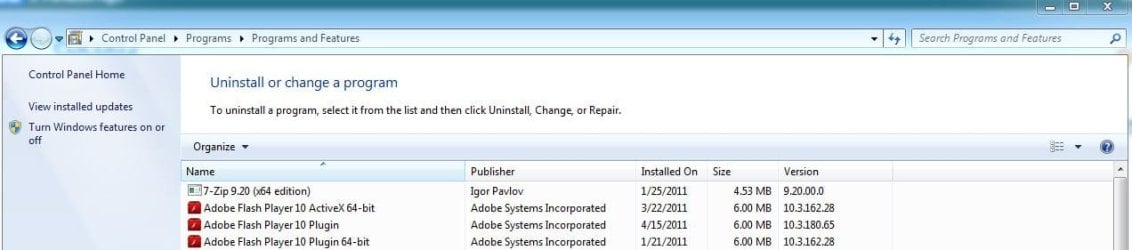
Here is my path at the top of the picture.
 

Attachments

  • Progs.JPG
    Progs.JPG
    50 KB · Views: 49

My Computer

Computer type
PC/Desktop
Computer Manufacturer/Model Number
Custom Build
OS
Windows 7 Home Premium 64 bit SP1
CPU
Intel i7 4790k
Motherboard
MSI Z97-G55 SLI
Memory
16 GB Corsair 2400 MHz DDR3
Graphics Card(s)
Visiontek Radeon R9 285
Sound Card
None
Monitor(s) Displays
Gateway FHX2402L
Screen Resolution
1920 X 1080
Hard Drives
Samsung 840 EVO 500GB
PSU
Corsair 750 TX
Case
Fractal Design
Cooling
Stock fans
Keyboard
Logitech K800
Mouse
Logitech M510
Internet Speed
60.88 Mbps download 10.47 Mbps upload (Speedtest.net)
Antivirus
Norton
Browser
Opera
Other Info
First Computer used: A Commodore Pet of course
Love using Manjaro KDE Linux 64 bit and Windows 7/10 64 bit
LOGITECH M305
But I have another laptop with a Logitech (different type of wireless logitech)
and I put it in my laptop and it still happened
 

My Computer

OS
Microsoft Windows 7 Professional 64-bit 7601 Multiprocessor Free Service Pack 1
CPU
Intel(R) Core(TM) i7 CPU Q 740 @ 1.73GHz
Motherboard
Sony Corporation VAIO
Memory
6.00 GB
Graphics Card(s)
(1) NVIDIA GeForce GT 425M (2) LogMeIn Mirror Driver
Sound Card
(1) NVIDIA High Definition Audio (2) Bluetooth Hands-free
Screen Resolution
1600 x 900 x 32 bits (4294967296 colors) @ 59 Hz
Hard Drives
SAMSUNG HM641JI
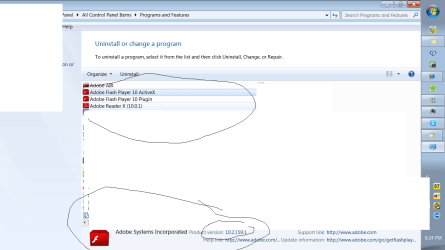
I know I am 64 bit
when I do the new Java I do both
32 and 64... it asks for it
 

Attachments

  • Untitled 2.png
    Untitled 2.png
    44.5 KB · Views: 29

My Computer

OS
Microsoft Windows 7 Professional 64-bit 7601 Multiprocessor Free Service Pack 1
CPU
Intel(R) Core(TM) i7 CPU Q 740 @ 1.73GHz
Motherboard
Sony Corporation VAIO
Memory
6.00 GB
Graphics Card(s)
(1) NVIDIA GeForce GT 425M (2) LogMeIn Mirror Driver
Sound Card
(1) NVIDIA High Definition Audio (2) Bluetooth Hands-free
Screen Resolution
1600 x 900 x 32 bits (4294967296 colors) @ 59 Hz
Hard Drives
SAMSUNG HM641JI
You have the 32 bit version of Flash installed, which is quite normal. If you follow the link I posted, you can get the upgrade to the latest version. Your version is newer but not the newest.

I will try and find you a link for a new mouse driver. As Logitech (or any company) make improvements they will update the driver. What worked fine in 2010 may not be compatible after several Windows 7 updates such as SP1 and a newer driver is required.
 

My Computer

Computer type
PC/Desktop
Computer Manufacturer/Model Number
Custom Build
OS
Windows 7 Home Premium 64 bit SP1
CPU
Intel i7 4790k
Motherboard
MSI Z97-G55 SLI
Memory
16 GB Corsair 2400 MHz DDR3
Graphics Card(s)
Visiontek Radeon R9 285
Sound Card
None
Monitor(s) Displays
Gateway FHX2402L
Screen Resolution
1920 X 1080
Hard Drives
Samsung 840 EVO 500GB
PSU
Corsair 750 TX
Case
Fractal Design
Cooling
Stock fans
Keyboard
Logitech K800
Mouse
Logitech M510
Internet Speed
60.88 Mbps download 10.47 Mbps upload (Speedtest.net)
Antivirus
Norton
Browser
Opera
Other Info
First Computer used: A Commodore Pet of course
Love using Manjaro KDE Linux 64 bit and Windows 7/10 64 bit

My Computer

Computer type
PC/Desktop
Computer Manufacturer/Model Number
Custom Build
OS
Windows 7 Home Premium 64 bit SP1
CPU
Intel i7 4790k
Motherboard
MSI Z97-G55 SLI
Memory
16 GB Corsair 2400 MHz DDR3
Graphics Card(s)
Visiontek Radeon R9 285
Sound Card
None
Monitor(s) Displays
Gateway FHX2402L
Screen Resolution
1920 X 1080
Hard Drives
Samsung 840 EVO 500GB
PSU
Corsair 750 TX
Case
Fractal Design
Cooling
Stock fans
Keyboard
Logitech K800
Mouse
Logitech M510
Internet Speed
60.88 Mbps download 10.47 Mbps upload (Speedtest.net)
Antivirus
Norton
Browser
Opera
Other Info
First Computer used: A Commodore Pet of course
Love using Manjaro KDE Linux 64 bit and Windows 7/10 64 bit
thank you
I installed the new adobe flash
what do I do with the link on the logitech mouse you just sent me.\
 

My Computer

OS
Microsoft Windows 7 Professional 64-bit 7601 Multiprocessor Free Service Pack 1
CPU
Intel(R) Core(TM) i7 CPU Q 740 @ 1.73GHz
Motherboard
Sony Corporation VAIO
Memory
6.00 GB
Graphics Card(s)
(1) NVIDIA GeForce GT 425M (2) LogMeIn Mirror Driver
Sound Card
(1) NVIDIA High Definition Audio (2) Bluetooth Hands-free
Screen Resolution
1600 x 900 x 32 bits (4294967296 colors) @ 59 Hz
Hard Drives
SAMSUNG HM641JI
I dont know what to do with the link for the logitech...
and when I spoke to logitech 2 days ago
they should have done this for me when they
came in by remote.........
:mad:
and all they are doing is sending me a new mouse....
sighhhhhhhhhhhhhh
 

My Computer

OS
Microsoft Windows 7 Professional 64-bit 7601 Multiprocessor Free Service Pack 1
CPU
Intel(R) Core(TM) i7 CPU Q 740 @ 1.73GHz
Motherboard
Sony Corporation VAIO
Memory
6.00 GB
Graphics Card(s)
(1) NVIDIA GeForce GT 425M (2) LogMeIn Mirror Driver
Sound Card
(1) NVIDIA High Definition Audio (2) Bluetooth Hands-free
Screen Resolution
1600 x 900 x 32 bits (4294967296 colors) @ 59 Hz
Hard Drives
SAMSUNG HM641JI
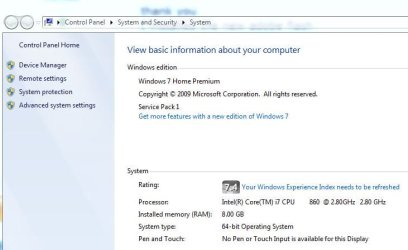
For some reason the "Download Software" button does not appear to work. However, if you look under tip and click on 32 or 64 bit operating system the download will start. To check what version of the operating system you have, look at the picture.
 

Attachments

  • Tip.JPG
    Tip.JPG
    13.9 KB · Views: 4
  • version.JPG
    version.JPG
    40.8 KB · Views: 22

My Computer

Computer type
PC/Desktop
Computer Manufacturer/Model Number
Custom Build
OS
Windows 7 Home Premium 64 bit SP1
CPU
Intel i7 4790k
Motherboard
MSI Z97-G55 SLI
Memory
16 GB Corsair 2400 MHz DDR3
Graphics Card(s)
Visiontek Radeon R9 285
Sound Card
None
Monitor(s) Displays
Gateway FHX2402L
Screen Resolution
1920 X 1080
Hard Drives
Samsung 840 EVO 500GB
PSU
Corsair 750 TX
Case
Fractal Design
Cooling
Stock fans
Keyboard
Logitech K800
Mouse
Logitech M510
Internet Speed
60.88 Mbps download 10.47 Mbps upload (Speedtest.net)
Antivirus
Norton
Browser
Opera
Other Info
First Computer used: A Commodore Pet of course
Love using Manjaro KDE Linux 64 bit and Windows 7/10 64 bit
Hi.. I have had this problem for about a week now....
I have a sony vaio windows 7 IE 8 Laptop that I love and it is only a year old.
in the past 5 days the cursor on my logitech wireless mouse freezes. The only way to get out of it is ctrl. alt. del and it goes to my home screen and I cancel and the cursor comes back.. sometimes I go for hours and it doesnt
freeze and then sometimes it freezes every 5 minutes. there are times when I ctl. alt delete and it goes to my screen and I have to manually shutdown as even if I touch the pad on my laptop I cannot close it.. and of course when the cursor freezes
the screen freezes too.

Just to let you know that there is nothing wrong with my battery or mouse
as I have another one just like it and it does the same thing

I contacted Sony Vaio and they came in by remote and put in a patch
and said that should do the trick. but it did not...

any ideas....

do you need more info and if so what else would help in this situation.

I also play some games and that is when I most get this. and I have
the flash 102..... the latest version. and my java is uptodate.

I should also say that at times my IE8 says not responding.....

thanx Coco.

p.s.I have a friend who is very computer savy and comes in by remote
to fix things on my computer and this is stumping even him..


My cursor did not freeze, but it went crazy after one year of use.

Solution: I disabled TouchPad. Then, I went into Msconfig and unchecked the TouchPad program. Try it.
 

My Computer

OS
Windows 7 professional 32 bit
Back
Top