
Custom icon on DVD does not show

amss1976

New member
Local time
2:02 PM
Messages
38
Hi.

I have created some DVD's for myself with an "Autorun.inf" file on the root of the DVD with the .ico file also on the root and with the following command on the Autorun.inf:

Code:
[AutoRun]
ICON="AS14_NewOrleans_cmyk.ICO"
When I insert the DVD on the drive, the icon is not read and it does not show the icon I put there. Instead it shows the default Windows icon. I am using Windows 7.

When I click on "Autoplay", an error box pops-up (I have attached an image with this error message.

I have tried the same DVD on other computers running Windows 7, Windows 8.1 and even with Windows XP and when I insert the DVD on the drive it shows the icon I have put on it (as I wanted to) and not the default Windows icon.

Any idea of what is happening with my computer and why it does not show the icon it should?

Maybe it is a very simple problem to solve but I am not getting it...

Please let me know if is there any more information you need.

Thanks in advance for all the help.
 

Attachments

  • error message.gif
    error message.gif
    20.6 KB · Views: 12

My Computer My Computer

Computer type
PC/Desktop
Computer Manufacturer/Model Number
assembled by myself
OS
MS Windows 7 Ultimate 64-bit SP1
CPU
Intel Core i5 2500K @ 3.30GHz Sandy Bridge 32nm Technology
Motherboard
ASUSTeK Computer INC. P8Z68-V LX (LGA1155)
Memory
16,00 GB Dual-Channel DDR3 1333MHz
Graphics Card(s)
ATI Radeon 6800 HD
Sound Card
Realtek High Definition Audio
Monitor(s) Displays
SyncMaster 710N (1280x1024@60Hz)
Hard Drives
Two 1954GB Seagate ST2000DL003-9VT166 ATA Device (SATA) [used for storage]
One 244GB Western Digital WDC WD2500AAKX-001CA0 ATA Device (SATA) [used for the OS]
PSU
OCZ 600W
Cooling
CPU (own fan) + PSU fan
Keyboard
MS
Mouse
Logitech
Internet Speed
Optical Carrier 100MB
Antivirus
MS Security Essentials; Malwarebytes Anti-Malware (updated)
Browser
IE11, Firefox, Chrome (most recent versions), Opera 12
Other Info
This computer was assembled on 28/03/2012.
All main components are new except for:
- case
- PSU
- Graphics Card
- 1954GB Seagate ST2000DL003-9VT166 ATA Device (SATA) [used for storage]
- 160GB Maxtor Maxtor 6 SCS [used for storage]
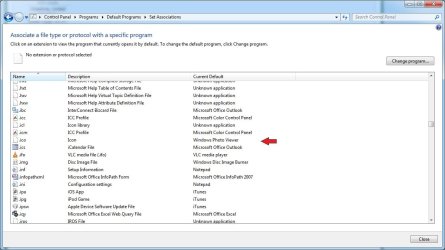
From the error message you're getting, it looks like you don't have anything on your computer that can read .ICO file extensions, Windows should be able to read them automatically but maybe the association has been removed due to a different program for images, try setting the association to windows photo viewer in the default program control panel.

association.jpg
 

My Computer My Computer

Computer type
PC/Desktop
Computer Manufacturer/Model Number
Custom Build
OS
Windows 7 Ultimate x64 SP1
CPU
Intel Q6600 @ 2.6Ghz
Motherboard
Evga NF78-CK-132-A 3-Way SLI
Memory
4Gb DDR2 Corsair Dominator @ 800Mhz 5-5-5-15
Graphics Card(s)
EVGA 560 GTX SC FTW 1GB
Sound Card
Realtek HD 7.1 Audio, Plantronics GameCom780 7.1 Headset
Monitor(s) Displays
Dell S2409W
Screen Resolution
1920 x 1080
Hard Drives
SanDisk SDSSDHII-120G-G25 120GB SSD
Samsung 7200RPM 750Gb SATA
Samsung 850 EVO 120GB SSD
Western Digital Green 1TB 7200RPM
PSU
Xigmatek 750W Quad sli quad core 80% eff
Case
Antec 900 Gaming Case
Cooling
Zalman CNPS9700-NT NVIDIA Tritium
Keyboard
Logitech generic keyboard, MS wireless keyboard
Mouse
Razor Lachesis Banshee V2 Blue, 4000DPI, MS wireless mouse
Internet Speed
152Mb Virgin Media Fibre Optic
Antivirus
Microsoft Security Essentials
Browser
Google Chrome
Other Info
Wireless Gaming Receiver for Windows, Wireless Xbox 360 Pad
From the error message you're getting, it looks like you don't have anything on your computer that can read .ICO file extensions, Windows should be able to read them automatically but maybe the association has been removed due to a different program for images, try setting the association to windows photo viewer in the default program control panel.

View attachment 325102

I have checked what you have suggested and the .ico is also associated with the Windows Photo Viewer as in the pic you have posted... I really do not understand what is going on with my PC on this perticular matter... :(
 

My Computer My Computer

Computer type
PC/Desktop
Computer Manufacturer/Model Number
assembled by myself
OS
MS Windows 7 Ultimate 64-bit SP1
CPU
Intel Core i5 2500K @ 3.30GHz Sandy Bridge 32nm Technology
Motherboard
ASUSTeK Computer INC. P8Z68-V LX (LGA1155)
Memory
16,00 GB Dual-Channel DDR3 1333MHz
Graphics Card(s)
ATI Radeon 6800 HD
Sound Card
Realtek High Definition Audio
Monitor(s) Displays
SyncMaster 710N (1280x1024@60Hz)
Hard Drives
Two 1954GB Seagate ST2000DL003-9VT166 ATA Device (SATA) [used for storage]
One 244GB Western Digital WDC WD2500AAKX-001CA0 ATA Device (SATA) [used for the OS]
PSU
OCZ 600W
Cooling
CPU (own fan) + PSU fan
Keyboard
MS
Mouse
Logitech
Internet Speed
Optical Carrier 100MB
Antivirus
MS Security Essentials; Malwarebytes Anti-Malware (updated)
Browser
IE11, Firefox, Chrome (most recent versions), Opera 12
Other Info
This computer was assembled on 28/03/2012.
All main components are new except for:
- case
- PSU
- Graphics Card
- 1954GB Seagate ST2000DL003-9VT166 ATA Device (SATA) [used for storage]
- 160GB Maxtor Maxtor 6 SCS [used for storage]
just looking at your code, you don't need the quotation marks
Code:
ICON="AS14_NewOrleans_cmyk.ICO"
so the code should look like this
Code:
ICON=AS14_NewOrleans_cmyk.ICO
 

My Computer My Computer

Computer type
PC/Desktop
Computer Manufacturer/Model Number
Custom Build
OS
Windows 7 Ultimate x64 SP1
CPU
Intel Q6600 @ 2.6Ghz
Motherboard
Evga NF78-CK-132-A 3-Way SLI
Memory
4Gb DDR2 Corsair Dominator @ 800Mhz 5-5-5-15
Graphics Card(s)
EVGA 560 GTX SC FTW 1GB
Sound Card
Realtek HD 7.1 Audio, Plantronics GameCom780 7.1 Headset
Monitor(s) Displays
Dell S2409W
Screen Resolution
1920 x 1080
Hard Drives
SanDisk SDSSDHII-120G-G25 120GB SSD
Samsung 7200RPM 750Gb SATA
Samsung 850 EVO 120GB SSD
Western Digital Green 1TB 7200RPM
PSU
Xigmatek 750W Quad sli quad core 80% eff
Case
Antec 900 Gaming Case
Cooling
Zalman CNPS9700-NT NVIDIA Tritium
Keyboard
Logitech generic keyboard, MS wireless keyboard
Mouse
Razor Lachesis Banshee V2 Blue, 4000DPI, MS wireless mouse
Internet Speed
152Mb Virgin Media Fibre Optic
Antivirus
Microsoft Security Essentials
Browser
Google Chrome
Other Info
Wireless Gaming Receiver for Windows, Wireless Xbox 360 Pad
just looking at your code, you don't need the quotation marks
Code:
ICON="AS14_NewOrleans_cmyk.ICO"
so the code should look like this
Code:
ICON=AS14_NewOrleans_cmyk.ICO

I appologize for not having answered earlier but I was on holidays and only have returned this weekend.

Thank you for the suggestion. I have tried it but the situation did not change. I still am not able to make the custom icon to show when I insert the DVD... :confused:
 

My Computer My Computer

Computer type
PC/Desktop
Computer Manufacturer/Model Number
assembled by myself
OS
MS Windows 7 Ultimate 64-bit SP1
CPU
Intel Core i5 2500K @ 3.30GHz Sandy Bridge 32nm Technology
Motherboard
ASUSTeK Computer INC. P8Z68-V LX (LGA1155)
Memory
16,00 GB Dual-Channel DDR3 1333MHz
Graphics Card(s)
ATI Radeon 6800 HD
Sound Card
Realtek High Definition Audio
Monitor(s) Displays
SyncMaster 710N (1280x1024@60Hz)
Hard Drives
Two 1954GB Seagate ST2000DL003-9VT166 ATA Device (SATA) [used for storage]
One 244GB Western Digital WDC WD2500AAKX-001CA0 ATA Device (SATA) [used for the OS]
PSU
OCZ 600W
Cooling
CPU (own fan) + PSU fan
Keyboard
MS
Mouse
Logitech
Internet Speed
Optical Carrier 100MB
Antivirus
MS Security Essentials; Malwarebytes Anti-Malware (updated)
Browser
IE11, Firefox, Chrome (most recent versions), Opera 12
Other Info
This computer was assembled on 28/03/2012.
All main components are new except for:
- case
- PSU
- Graphics Card
- 1954GB Seagate ST2000DL003-9VT166 ATA Device (SATA) [used for storage]
- 160GB Maxtor Maxtor 6 SCS [used for storage]
Back
Top