Custom Icons on the Taskbar?

AvengeTheFall3n

New member
Local time
7:07 AM
Messages
7
Ive been trying to customize chrome, skype, etc icons that show when the application is active on the taskbar but nothing seems to work. I've tried changing the icon of the shortcut or pinning the shortcut to the taskbar.

I've also tried using registry hacker to change the icon files in the application but then whatever application i change the icon files to it just becomes unusable. I hope someone can help me with this. I can post screenshots of what im talking about as well
 

My Computer

Computer type
PC/Desktop
OS
windows 7 ultimate x64
Welcome to the Seven Forums

Most likely you need to change the icon in the .exe of each program that is located in both C:\Program Files and C:\Program Files (x86)

Jerry
 

My Computer

Computer type
Laptop
Computer Manufacturer/Model Number
Sager NP9170
OS
Win 7 Pro x64 / Win 10 Pro
CPU
Intel(R) Core(TM) i7-3630QM CPU @ 2.40GHz
Motherboard
CLEVO P170EM
Memory
12 GB
Graphics Card(s)
(1) Intel(R) HD Graphics 4000 (2) NVIDIA GeForce GTX 675M
Sound Card
(1) Realtek High Definition Audio (2) Intel(R) Display Aud
Monitor(s) Displays
17.3
Screen Resolution
1920x1080
Hard Drives
(1) Samsung 860 EVO 500GB(OS) (1) Samsung 860 EVO 500GB(Data)
Keyboard
Backlite
Antivirus
MSE, Malwarebytes Pro
Browser
Firefox
Other Info
DESKTOP: Custom-built.
OS: Win 10 Pro x64.
CASE: Rosewill R5.
CPU: Intel I5 4670K CPU @ 3.40GHz.
CPU COOLER: Cool Master Hyper 212 EVO.
MOTHERBOARD: Asus Z87-A.
MEMORY: Kingston HyperX 2x4 GB.
GPU: Nvidia Geforce 650 TI.
PSU: Corsair TX750.
DRIVES: (1) Samsung 840 120 GB SSD (2) Western Digital blue 500 GB 7200 RPM.
and how might i be able to do that? ive tried finding the icons that could be in the folders for chrome and changing them which did nothing. seriously confusing
 

My Computer

Computer type
PC/Desktop
OS
windows 7 ultimate x64
the only icons i can change are shortcuts, i cant change the chrome application icon in the properties
 

My Computer

Computer type
PC/Desktop
OS
windows 7 ultimate x64
I will do some testing and get back to you tomorrow.

Jerry
 

My Computer

Computer type
Laptop
Computer Manufacturer/Model Number
Sager NP9170
OS
Win 7 Pro x64 / Win 10 Pro
CPU
Intel(R) Core(TM) i7-3630QM CPU @ 2.40GHz
Motherboard
CLEVO P170EM
Memory
12 GB
Graphics Card(s)
(1) Intel(R) HD Graphics 4000 (2) NVIDIA GeForce GTX 675M
Sound Card
(1) Realtek High Definition Audio (2) Intel(R) Display Aud
Monitor(s) Displays
17.3
Screen Resolution
1920x1080
Hard Drives
(1) Samsung 860 EVO 500GB(OS) (1) Samsung 860 EVO 500GB(Data)
Keyboard
Backlite
Antivirus
MSE, Malwarebytes Pro
Browser
Firefox
Other Info
DESKTOP: Custom-built.
OS: Win 10 Pro x64.
CASE: Rosewill R5.
CPU: Intel I5 4670K CPU @ 3.40GHz.
CPU COOLER: Cool Master Hyper 212 EVO.
MOTHERBOARD: Asus Z87-A.
MEMORY: Kingston HyperX 2x4 GB.
GPU: Nvidia Geforce 650 TI.
PSU: Corsair TX750.
DRIVES: (1) Samsung 840 120 GB SSD (2) Western Digital blue 500 GB 7200 RPM.
So ive been experimenting since my last reply, granting myself all the permissions and found a way to change the application icon but it still didnt switch it when it is not combined with the label (see first image.) however if its shortened down without the label it ends up using the right icon? (see second image)
 

Attachments

  • 0263f2f1c32423a994e75b785052e52c.png
    0263f2f1c32423a994e75b785052e52c.png
    2 KB · Views: 20
  • fc32d9436e1dc57aebfbfd4590436aff.png
    fc32d9436e1dc57aebfbfd4590436aff.png
    1.8 KB · Views: 19

My Computer

Computer type
PC/Desktop
OS
windows 7 ultimate x64
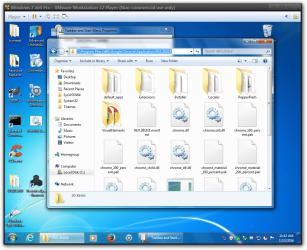
I did some testing and to get that Chrome icon to change with not combined and show labels is to change the icon #101 in the icon folder in the chrome.dll in the C:\Program Files (x86)\Google\Chrome\Application\49.0.2618.8 folder. Use a copy of the chrome.dll so you do not corrupt the original. http://www.sevenforums.com/tutorials/73191-icons-change-using-resource-hacker.html then rename the chrome.dll to chrome.old.dll and copy and paste the new one in, be sure to not have Chrome running.
I tried to find a way to change the skype icon and I could not find a way to do it they must have it hidden.

Jerry
Windows 7 x64 Pro - VMware Workstation 12 Player (Non-commercial use only).png

Windows 7 x64 Pro - VMware Workstation 12 Player (Non-commercial use only)2.png
 

My Computer

Computer type
Laptop
Computer Manufacturer/Model Number
Sager NP9170
OS
Win 7 Pro x64 / Win 10 Pro
CPU
Intel(R) Core(TM) i7-3630QM CPU @ 2.40GHz
Motherboard
CLEVO P170EM
Memory
12 GB
Graphics Card(s)
(1) Intel(R) HD Graphics 4000 (2) NVIDIA GeForce GTX 675M
Sound Card
(1) Realtek High Definition Audio (2) Intel(R) Display Aud
Monitor(s) Displays
17.3
Screen Resolution
1920x1080
Hard Drives
(1) Samsung 860 EVO 500GB(OS) (1) Samsung 860 EVO 500GB(Data)
Keyboard
Backlite
Antivirus
MSE, Malwarebytes Pro
Browser
Firefox
Other Info
DESKTOP: Custom-built.
OS: Win 10 Pro x64.
CASE: Rosewill R5.
CPU: Intel I5 4670K CPU @ 3.40GHz.
CPU COOLER: Cool Master Hyper 212 EVO.
MOTHERBOARD: Asus Z87-A.
MEMORY: Kingston HyperX 2x4 GB.
GPU: Nvidia Geforce 650 TI.
PSU: Corsair TX750.
DRIVES: (1) Samsung 840 120 GB SSD (2) Western Digital blue 500 GB 7200 RPM.
Cool thanks. its usually in a .dll file then? if so then i can dabble in a couple of different areas for different programs
 

My Computer

Computer type
PC/Desktop
OS
windows 7 ultimate x64
the only things i want to change are battlenet, league of legends, skype and steam. everything else is fine and i dont really care about skype as it has different colours for each status and notifications on the icon
 

My Computer

Computer type
PC/Desktop
OS
windows 7 ultimate x64
Cool thanks. its usually in a .dll file then? if so then i can dabble in a couple of different areas for different programs
They're not always in the .dll most of the time I find them in the .exe in the Program File folder.


the only things i want to change are battlenet, league of legends, skype and steam. everything else is fine and i dont really care about skype as it has different colours for each status and notifications on the icon

Could you post some links so I know what I'm trying to change.

Jerry
 

My Computer

Computer type
Laptop
Computer Manufacturer/Model Number
Sager NP9170
OS
Win 7 Pro x64 / Win 10 Pro
CPU
Intel(R) Core(TM) i7-3630QM CPU @ 2.40GHz
Motherboard
CLEVO P170EM
Memory
12 GB
Graphics Card(s)
(1) Intel(R) HD Graphics 4000 (2) NVIDIA GeForce GTX 675M
Sound Card
(1) Realtek High Definition Audio (2) Intel(R) Display Aud
Monitor(s) Displays
17.3
Screen Resolution
1920x1080
Hard Drives
(1) Samsung 860 EVO 500GB(OS) (1) Samsung 860 EVO 500GB(Data)
Keyboard
Backlite
Antivirus
MSE, Malwarebytes Pro
Browser
Firefox
Other Info
DESKTOP: Custom-built.
OS: Win 10 Pro x64.
CASE: Rosewill R5.
CPU: Intel I5 4670K CPU @ 3.40GHz.
CPU COOLER: Cool Master Hyper 212 EVO.
MOTHERBOARD: Asus Z87-A.
MEMORY: Kingston HyperX 2x4 GB.
GPU: Nvidia Geforce 650 TI.
PSU: Corsair TX750.
DRIVES: (1) Samsung 840 120 GB SSD (2) Western Digital blue 500 GB 7200 RPM.
Well thats odd because when i edit the icon of a .exe file using registry hacker it becomes basically worthless and doesnt work
 

My Computer

Computer type
PC/Desktop
OS
windows 7 ultimate x64
I have had trouble in the past with Resource Hacker so I bought a program called Restorator 2007 and I have never had a problem with any .exe or .dll after editing them.

Jerry
 

My Computer

Computer type
Laptop
Computer Manufacturer/Model Number
Sager NP9170
OS
Win 7 Pro x64 / Win 10 Pro
CPU
Intel(R) Core(TM) i7-3630QM CPU @ 2.40GHz
Motherboard
CLEVO P170EM
Memory
12 GB
Graphics Card(s)
(1) Intel(R) HD Graphics 4000 (2) NVIDIA GeForce GTX 675M
Sound Card
(1) Realtek High Definition Audio (2) Intel(R) Display Aud
Monitor(s) Displays
17.3
Screen Resolution
1920x1080
Hard Drives
(1) Samsung 860 EVO 500GB(OS) (1) Samsung 860 EVO 500GB(Data)
Keyboard
Backlite
Antivirus
MSE, Malwarebytes Pro
Browser
Firefox
Other Info
DESKTOP: Custom-built.
OS: Win 10 Pro x64.
CASE: Rosewill R5.
CPU: Intel I5 4670K CPU @ 3.40GHz.
CPU COOLER: Cool Master Hyper 212 EVO.
MOTHERBOARD: Asus Z87-A.
MEMORY: Kingston HyperX 2x4 GB.
GPU: Nvidia Geforce 650 TI.
PSU: Corsair TX750.
DRIVES: (1) Samsung 840 120 GB SSD (2) Western Digital blue 500 GB 7200 RPM.
Back
Top