Custom made country flag orbs/icons.

Kari, any chance you want that logo as a start orb? ;) then i could do one for you :geek:
That would be nice. Please do not put it here, though. Send it by email, you'll find it in my profile. I'm still using 7100, can you also tell how to change it or is it possible only on 7600?

Kari
 

My Computer My Computer

At a glance

Windows 10 Pro x64 EN-GB1.6 GHz Intel Core i7-720QM Processor6 GBATI Mobility Radeon HD 5850 Graphics
Computer type
Laptop
Computer Manufacturer/Model Number
HP ENVY 17-1150eg
OS
Windows 10 Pro x64 EN-GB
CPU
1.6 GHz Intel Core i7-720QM Processor
Memory
6 GB
Graphics Card(s)
ATI Mobility Radeon HD 5850 Graphics
Sound Card
Beats sound system with integrated subwoofer
Monitor(s) Displays
17" laptop display, 22" LED and 32" Full HD TV through HDMI
Screen Resolution
1600*900 (1), 1920*1080 (2&3)
Hard Drives
Internal: 2 x 500 GB SATA Hard Disk Drive 7200 rpm
External: 2TB for backups, 3TB USB3 network drive for media
Cooling
As Envy runs a bit warm, I have it on a Cooler Master pad
Keyboard
Logitech diNovo Media Desktop Laser (bluetooth)
Mouse
Logitech Performance Mouse MX
Internet Speed
50/10 Mbps VDSL
Antivirus
Windows Defender 4.3.9431.0
Browser
Maxthon 3.5.2., IE11
That would be nice. Please do not put it here, though. Send it by email, you'll find it in my profile. I'm still using 7100, can you also tell how to change it or is it possible only on 7600?

Kari
It is possible to change it on 7100 ;)
I'll see what i can do ;)
 
I totally forgot: Do you get original from Bull, or do you want me to send it? In that case I need your email.

Kari
 

My Computer My Computer

At a glance

Windows 10 Pro x64 EN-GB1.6 GHz Intel Core i7-720QM Processor6 GBATI Mobility Radeon HD 5850 Graphics
Computer type
Laptop
Computer Manufacturer/Model Number
HP ENVY 17-1150eg
OS
Windows 10 Pro x64 EN-GB
CPU
1.6 GHz Intel Core i7-720QM Processor
Memory
6 GB
Graphics Card(s)
ATI Mobility Radeon HD 5850 Graphics
Sound Card
Beats sound system with integrated subwoofer
Monitor(s) Displays
17" laptop display, 22" LED and 32" Full HD TV through HDMI
Screen Resolution
1600*900 (1), 1920*1080 (2&3)
Hard Drives
Internal: 2 x 500 GB SATA Hard Disk Drive 7200 rpm
External: 2TB for backups, 3TB USB3 network drive for media
Cooling
As Envy runs a bit warm, I have it on a Cooler Master pad
Keyboard
Logitech diNovo Media Desktop Laser (bluetooth)
Mouse
Logitech Performance Mouse MX
Internet Speed
50/10 Mbps VDSL
Antivirus
Windows Defender 4.3.9431.0
Browser
Maxthon 3.5.2., IE11
A bit problem here now. I got Start Orbs. Took ownership, renamed explorer.exe to explorer.old and replaced original with the one you sent. Couldn't use it ("Class not registered").

Could not restore explorer.old because even I could start command prompt elevated from Task Manager, I could not rename explorer.exe to something else to be able to restore explorer.old. Had to do System File Scan with /scannow option to restore it.

Build issue?

Kari
 

My Computer My Computer

At a glance

Windows 10 Pro x64 EN-GB1.6 GHz Intel Core i7-720QM Processor6 GBATI Mobility Radeon HD 5850 Graphics
Computer type
Laptop
Computer Manufacturer/Model Number
HP ENVY 17-1150eg
OS
Windows 10 Pro x64 EN-GB
CPU
1.6 GHz Intel Core i7-720QM Processor
Memory
6 GB
Graphics Card(s)
ATI Mobility Radeon HD 5850 Graphics
Sound Card
Beats sound system with integrated subwoofer
Monitor(s) Displays
17" laptop display, 22" LED and 32" Full HD TV through HDMI
Screen Resolution
1600*900 (1), 1920*1080 (2&3)
Hard Drives
Internal: 2 x 500 GB SATA Hard Disk Drive 7200 rpm
External: 2TB for backups, 3TB USB3 network drive for media
Cooling
As Envy runs a bit warm, I have it on a Cooler Master pad
Keyboard
Logitech diNovo Media Desktop Laser (bluetooth)
Mouse
Logitech Performance Mouse MX
Internet Speed
50/10 Mbps VDSL
Antivirus
Windows Defender 4.3.9431.0
Browser
Maxthon 3.5.2., IE11
Yes. Time allotment expired. Resolution pending. Please log off.
Took some time before I understood your point.:D Once again I blame English being a foreign language to me (or is it for me? Always mix English pronouns; I never know if it's in or on, to or for etc.)
 

My Computer My Computer

At a glance

Windows 10 Pro x64 EN-GB1.6 GHz Intel Core i7-720QM Processor6 GBATI Mobility Radeon HD 5850 Graphics
Computer type
Laptop
Computer Manufacturer/Model Number
HP ENVY 17-1150eg
OS
Windows 10 Pro x64 EN-GB
CPU
1.6 GHz Intel Core i7-720QM Processor
Memory
6 GB
Graphics Card(s)
ATI Mobility Radeon HD 5850 Graphics
Sound Card
Beats sound system with integrated subwoofer
Monitor(s) Displays
17" laptop display, 22" LED and 32" Full HD TV through HDMI
Screen Resolution
1600*900 (1), 1920*1080 (2&3)
Hard Drives
Internal: 2 x 500 GB SATA Hard Disk Drive 7200 rpm
External: 2TB for backups, 3TB USB3 network drive for media
Cooling
As Envy runs a bit warm, I have it on a Cooler Master pad
Keyboard
Logitech diNovo Media Desktop Laser (bluetooth)
Mouse
Logitech Performance Mouse MX
Internet Speed
50/10 Mbps VDSL
Antivirus
Windows Defender 4.3.9431.0
Browser
Maxthon 3.5.2., IE11
How about one for Sri Lanka for my brother-in-law living there?

Appreciate the U.S. one which I downloaded.

Many thanks in advance!
 

My Computer My Computer

At a glance

Win 7_x64 Linux Kubuntu Jaunty_x64E74002GB DDR2
Computer Manufacturer/Model Number
Intel
OS
Win 7_x64 Linux Kubuntu Jaunty_x64
CPU
E7400
Motherboard
Intel GZ35
Memory
2GB DDR2
Monitor(s) Displays
IBM 19"
Screen Resolution
1400x1050
Hard Drives
300GB SATA
PSU
650W
Cooling
Zalman
Other Info
Avira AVP, MSE, ASC Pro, IObit 360 Pro, Customized Win FW

My Computer My Computer

At a glance

Windows 10 Pro x64 EN-GB1.6 GHz Intel Core i7-720QM Processor6 GBATI Mobility Radeon HD 5850 Graphics
Computer type
Laptop
Computer Manufacturer/Model Number
HP ENVY 17-1150eg
OS
Windows 10 Pro x64 EN-GB
CPU
1.6 GHz Intel Core i7-720QM Processor
Memory
6 GB
Graphics Card(s)
ATI Mobility Radeon HD 5850 Graphics
Sound Card
Beats sound system with integrated subwoofer
Monitor(s) Displays
17" laptop display, 22" LED and 32" Full HD TV through HDMI
Screen Resolution
1600*900 (1), 1920*1080 (2&3)
Hard Drives
Internal: 2 x 500 GB SATA Hard Disk Drive 7200 rpm
External: 2TB for backups, 3TB USB3 network drive for media
Cooling
As Envy runs a bit warm, I have it on a Cooler Master pad
Keyboard
Logitech diNovo Media Desktop Laser (bluetooth)
Mouse
Logitech Performance Mouse MX
Internet Speed
50/10 Mbps VDSL
Antivirus
Windows Defender 4.3.9431.0
Browser
Maxthon 3.5.2., IE11
How about one for Sri Lanka for my brother-in-law living there?

Appreciate the U.S. one which I downloaded.

Many thanks in advance!

Here you go! :)

Sri-Lanka.png
 

My Computer My Computer

At a glance

Windows 7 RTM 64bit, Windows 8 Pro 64bitIntel i5-2500K @ 3.3Ghz16GB G.Skill RaptorX 1600MHz DDR3N570GTX Twin Frozr III Power Edition
Computer type
PC/Desktop
Computer Manufacturer/Model Number
Self built.
OS
Windows 7 RTM 64bit, Windows 8 Pro 64bit
CPU
Intel i5-2500K @ 3.3Ghz
Motherboard
Asus Maximus IV GENE-Z/GEN3
Memory
16GB G.Skill RaptorX 1600MHz DDR3
Graphics Card(s)
N570GTX Twin Frozr III Power Edition
Sound Card
SupremeFX X-Fi 2
Monitor(s) Displays
BenQ XL2420T 120Hz 24 inch gaming monitor, Acer V233H 23 inc
Screen Resolution
1920x1080
Hard Drives
320GB Seagate Barracuda
WD 1TB Black Caviar
2TB WD Green Caviar
Samsung SSD 840 PRO Series
PSU
CoolerMaster Silent Pro Gold 1200WATT 80 Plus Gold
Case
CoolerMaster HAF X RC-942
Cooling
CoolerMaster V6GT Multi-Platform CPU Cooler
Keyboard
Logitech G510 Gaming Keyboard
Mouse
Logitech G700 Gaming Mouse
Antivirus
Norton Internet Security
Browser
Firefox 21
Other Info
Logitech Extreme 3D Pro Gaming Joystick, Logitech G930 Wireless Gaming Headset
there's a good "how to" in the Custom Themes, Icons and Start Buttons. thread. Look through that and you'll find it

edit: if you can't find it post back and I'll sort it when I get home
I found a guide that tells you to use Resource Tuner, but when I try it, it can't open explorer.exe. Is there another program that will work?

Also, do I have to modify only the explorer.exe file in C:\Windows or do I have to do it in C:\Windows\System32 and C:\Windows\SysWOW64 as well?

Here was the guide:

How to edit:
  • Open your explorer.exe backup with Resource Tuner (or a comparable tool)
  • Extract the image files
  • Modify the file(s) to your likes
  • In Resource Tuner select “Edit Resource” to add the edited image. (Important: the filename has to be the same as the original file)
  • Select “Save File as…” and create a copy of explorer.exe somewhere
  • Make sure all explorer windows are closed
  • In Task Manager, kill explorer.exe
  • Replace the old file with the newly created one
  • In Task Manager restart explorer.exe (File --> new task --> explorer)
Repeat steps 3 -9 untill you’re satisfied. Enjoy!
By the way, how do you replace the explorer.exe file if explorer isn't being used, meaning you can't open anything?
 

My Computer My Computer

At a glance

Windows 7 Home Premium x64Intel Core i5-2410M Quad Core CPU @ 2.30 GHz8 GB Shared Channel DDR3 MemoryIntel HD Graphics 3000, AMD Radeon HD 6470M
Computer Manufacturer/Model Number
Dell Inspiron 14R N4110
OS
Windows 7 Home Premium x64
CPU
Intel Core i5-2410M Quad Core CPU @ 2.30 GHz
Memory
8 GB Shared Channel DDR3 Memory
Graphics Card(s)
Intel HD Graphics 3000, AMD Radeon HD 6470M
Sound Card
Intel Display Audio, Realtek High Definition Audio
Monitor(s) Displays
14" HD 720p LED Display
Screen Resolution
1366x768
Hard Drives
500 GB 5400 RPM SATA Hard Drive
Mouse
Microsoft USB IntelliMouse Explorer 3.0

My Computer My Computer

At a glance

Win 7_x64 Linux Kubuntu Jaunty_x64E74002GB DDR2
Computer Manufacturer/Model Number
Intel
OS
Win 7_x64 Linux Kubuntu Jaunty_x64
CPU
E7400
Motherboard
Intel GZ35
Memory
2GB DDR2
Monitor(s) Displays
IBM 19"
Screen Resolution
1400x1050
Hard Drives
300GB SATA
PSU
650W
Cooling
Zalman
Other Info
Avira AVP, MSE, ASC Pro, IObit 360 Pro, Customized Win FW

My Computer My Computer

At a glance

Windows 7 RTM 64bit, Windows 8 Pro 64bitIntel i5-2500K @ 3.3Ghz16GB G.Skill RaptorX 1600MHz DDR3N570GTX Twin Frozr III Power Edition
Computer type
PC/Desktop
Computer Manufacturer/Model Number
Self built.
OS
Windows 7 RTM 64bit, Windows 8 Pro 64bit
CPU
Intel i5-2500K @ 3.3Ghz
Motherboard
Asus Maximus IV GENE-Z/GEN3
Memory
16GB G.Skill RaptorX 1600MHz DDR3
Graphics Card(s)
N570GTX Twin Frozr III Power Edition
Sound Card
SupremeFX X-Fi 2
Monitor(s) Displays
BenQ XL2420T 120Hz 24 inch gaming monitor, Acer V233H 23 inc
Screen Resolution
1920x1080
Hard Drives
320GB Seagate Barracuda
WD 1TB Black Caviar
2TB WD Green Caviar
Samsung SSD 840 PRO Series
PSU
CoolerMaster Silent Pro Gold 1200WATT 80 Plus Gold
Case
CoolerMaster HAF X RC-942
Cooling
CoolerMaster V6GT Multi-Platform CPU Cooler
Keyboard
Logitech G510 Gaming Keyboard
Mouse
Logitech G700 Gaming Mouse
Antivirus
Norton Internet Security
Browser
Firefox 21
Other Info
Logitech Extreme 3D Pro Gaming Joystick, Logitech G930 Wireless Gaming Headset

My Computer My Computer

At a glance

Windows 7 Professional, Windows XPIntel Dual Core2GBIntel 82945G Express
Computer Manufacturer/Model Number
Intel
OS
Windows 7 Professional, Windows XP
CPU
Intel Dual Core
Motherboard
Intel D945GCNL
Memory
2GB
Graphics Card(s)
Intel 82945G Express
Monitor(s) Displays
HP Pavilion 1859m
Screen Resolution
1366x768
Hard Drives
Samsung 250GB SATA
Maxtor 80GB SATA
Case
High Tower
Cooling
Air
Keyboard
Delux
Mouse
A4Tech
Internet Speed
512kbps downlink and 128kbps uplink :(

My Computer My Computer

At a glance

Windows 7 RTM 64bit, Windows 8 Pro 64bitIntel i5-2500K @ 3.3Ghz16GB G.Skill RaptorX 1600MHz DDR3N570GTX Twin Frozr III Power Edition
Computer type
PC/Desktop
Computer Manufacturer/Model Number
Self built.
OS
Windows 7 RTM 64bit, Windows 8 Pro 64bit
CPU
Intel i5-2500K @ 3.3Ghz
Motherboard
Asus Maximus IV GENE-Z/GEN3
Memory
16GB G.Skill RaptorX 1600MHz DDR3
Graphics Card(s)
N570GTX Twin Frozr III Power Edition
Sound Card
SupremeFX X-Fi 2
Monitor(s) Displays
BenQ XL2420T 120Hz 24 inch gaming monitor, Acer V233H 23 inc
Screen Resolution
1920x1080
Hard Drives
320GB Seagate Barracuda
WD 1TB Black Caviar
2TB WD Green Caviar
Samsung SSD 840 PRO Series
PSU
CoolerMaster Silent Pro Gold 1200WATT 80 Plus Gold
Case
CoolerMaster HAF X RC-942
Cooling
CoolerMaster V6GT Multi-Platform CPU Cooler
Keyboard
Logitech G510 Gaming Keyboard
Mouse
Logitech G700 Gaming Mouse
Antivirus
Norton Internet Security
Browser
Firefox 21
Other Info
Logitech Extreme 3D Pro Gaming Joystick, Logitech G930 Wireless Gaming Headset

My Computer My Computer

At a glance

Windows 7 RTM 64bit, Windows 8 Pro 64bitIntel i5-2500K @ 3.3Ghz16GB G.Skill RaptorX 1600MHz DDR3N570GTX Twin Frozr III Power Edition
Computer type
PC/Desktop
Computer Manufacturer/Model Number
Self built.
OS
Windows 7 RTM 64bit, Windows 8 Pro 64bit
CPU
Intel i5-2500K @ 3.3Ghz
Motherboard
Asus Maximus IV GENE-Z/GEN3
Memory
16GB G.Skill RaptorX 1600MHz DDR3
Graphics Card(s)
N570GTX Twin Frozr III Power Edition
Sound Card
SupremeFX X-Fi 2
Monitor(s) Displays
BenQ XL2420T 120Hz 24 inch gaming monitor, Acer V233H 23 inc
Screen Resolution
1920x1080
Hard Drives
320GB Seagate Barracuda
WD 1TB Black Caviar
2TB WD Green Caviar
Samsung SSD 840 PRO Series
PSU
CoolerMaster Silent Pro Gold 1200WATT 80 Plus Gold
Case
CoolerMaster HAF X RC-942
Cooling
CoolerMaster V6GT Multi-Platform CPU Cooler
Keyboard
Logitech G510 Gaming Keyboard
Mouse
Logitech G700 Gaming Mouse
Antivirus
Norton Internet Security
Browser
Firefox 21
Other Info
Logitech Extreme 3D Pro Gaming Joystick, Logitech G930 Wireless Gaming Headset
A bit problem here now. I got Start Orbs. Took ownership, renamed explorer.exe to explorer.old and replaced original with the one you sent. Couldn't use it ("Class not registered").

Could not restore explorer.old because even I could start command prompt elevated from Task Manager, I could not rename explorer.exe to something else to be able to restore explorer.old. Had to do System File Scan with /scannow option to restore it.

Build issue?

Kari
I would think so but here's a guide on how to do it yourself:

Your gonna use:
Restorator (http://www.bome.com/Restorator/)
Registry key (from the zip I sent to you) applied
BMP file (attached)
and last of all: Common sense :p

How to:
First backup explorer.exe
Open explorer.exe with restorator.
Find the folder "bitmap" and replace:
6801.bmp
6805.bmp
6809.bmp
with the one attached, overwrite the explorer.exe in the windows folder with this one.
Open task manager kill the process explorer.exe, and start it again :geek:
 

Attachments

I would think so but here's a guide on how to do it yourself:
...
Tried first with Restorator. Got this when trying to replace bitmaps:

restorator.PNG

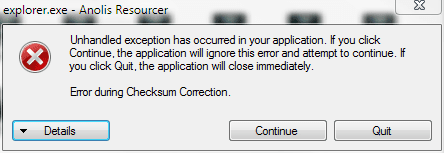
Tried then Anolis Resourcer, thinking maybe my Restorator 2007 was an outdated version. Anolis gives this dialog when trying to save:

resourcer.PNG

Would appreciate if you still got some tips but please, this is not so important so I do not want you to use too much time for this. You have better things to do.

Kari
 

My Computer My Computer

At a glance

Windows 10 Pro x64 EN-GB1.6 GHz Intel Core i7-720QM Processor6 GBATI Mobility Radeon HD 5850 Graphics
Computer type
Laptop
Computer Manufacturer/Model Number
HP ENVY 17-1150eg
OS
Windows 10 Pro x64 EN-GB
CPU
1.6 GHz Intel Core i7-720QM Processor
Memory
6 GB
Graphics Card(s)
ATI Mobility Radeon HD 5850 Graphics
Sound Card
Beats sound system with integrated subwoofer
Monitor(s) Displays
17" laptop display, 22" LED and 32" Full HD TV through HDMI
Screen Resolution
1600*900 (1), 1920*1080 (2&3)
Hard Drives
Internal: 2 x 500 GB SATA Hard Disk Drive 7200 rpm
External: 2TB for backups, 3TB USB3 network drive for media
Cooling
As Envy runs a bit warm, I have it on a Cooler Master pad
Keyboard
Logitech diNovo Media Desktop Laser (bluetooth)
Mouse
Logitech Performance Mouse MX
Internet Speed
50/10 Mbps VDSL
Antivirus
Windows Defender 4.3.9431.0
Browser
Maxthon 3.5.2., IE11
Tried first with Restorator. Got this when trying to replace bitmaps:

View attachment 24069

Tried then Anolis Resourcer, thinking maybe my Restorator 2007 was an outdated version. Anolis gives this dialog when trying to save:

View attachment 24070

Would appreciate if you still got some tips but please, this is not so important so I do not want you to use too much time for this. You have better things to do.

Kari
Okay, one question: Can you open explorer.exe with restorator and replace the Bitmap (Without saving)?
 
Back
Top