Unable to delete or add custom paper sizes for default printer in windows 7(all updates installed as of 5/22)
As seen in screen shot, there are 20 identical custom paper sizes.
How do I delete these and/or add addt'l custom paper sizes for
default(only) printer?
The only thing I haven't done is uninstall printer and then reinstall
only because it takes approx. 45 mins to reinstall!(Last resort!)
One other Desktop (tester) and spare Toshba laptop both with SSD's
Running Kaspersky 2016 ISS on all machines config'd identically
Logitec audio stereo systems on each machine (x3)
Canon MG5250MFC
Router/modem TP-Link running WPA2SK
Hum Gav I have had Canons forever nil the last one which was an inkaholic and I changed to an HP Officejet 8600 but neither took anywhere near as long as that to install.
If we knew what printer it was (no specs:huh it maybe an easy fix.
My Computer
Computer type
PC/Desktop
Computer Manufacturer/Model Number
Own build (new) Desk1 / Asus ROG Win 7 / Desk2 1st build
OS
Desk1 7 Home Prem / Desk2 10 Pro / Main lap Asus ROG 10 Pro 2 laptop Toshiba 7 Pro Asus P2520 7 & 10
One other Desktop (tester) and spare Toshba laptop both with SSD's
Running Kaspersky 2016 ISS on all machines config'd identically
Logitec audio stereo systems on each machine (x3)
Canon MG5250MFC
Router/modem TP-Link running WPA2SK

 (Last resort!)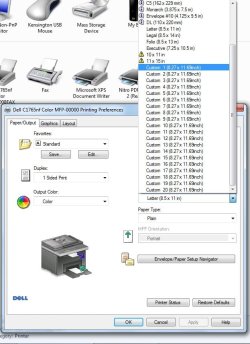


 it maybe an easy fix.