
Custom Theme or Style to Hide UI Elements?

larray

New member
First off - great resource - it look like a great community with lots of valuable knowledge!

I've perused some of the forums and either haven't been able to form the search the way I want or the topic hasn't been touched on. I hope someone here with the experience in UI customization might either be able to answer my question or point me in the right direction.

I need to change the Windows 7 skin (Aero Theme?) to remove the power options section from the UI. (The button that shows Shut down, Log off, Restart, Hibernate, etc). (See attached picture: StartMenu.jpg)
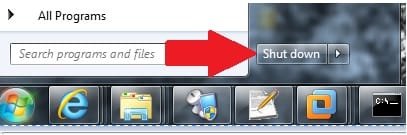
StartMenu.jpg

We want to use Windows 7 in a VDI environment and we would prefer for users to "Disconnect" - and while it is an option on the flyout menu, it cannot be set as the default for the button (using GPO or local policy/registry configuration). We have coded our own disconnect solution, but to prevent user confusion we want to eliminate the other option.

  1. Is it possible to outright eliminate UI features (such as buttons, user tile, etc) through a custom theme or style? (Possibly a compiled replacement for aero.msstyles?)
  2. If the answer to #1 is no, is there a relativly easy way to replace the shell with a duplicate that does not have these options in the UI?
  3. What tool(s) do I need to build a solution to make this change?
I've seen some pretty amazing re-skinning of the UI and thought this might be easy to do, but it seems that suppressing core OS features is not a simple task.

Thanks in advance for assistance,
Andy
 

My Computer

OS
Windows 7 x64
I got an answer in the form of some C code:

Code:
[COLOR=#000000][FONT=Courier New]int wmain(int argc, wchar_t* argv[])[/FONT][FONT=Calibri][/FONT][/COLOR]
[COLOR=#000000][FONT=Courier New]{[/FONT][FONT=Calibri][/FONT][/COLOR]
[COLOR=#000000][FONT=Courier New]    HWND hwndStart;[/FONT][FONT=Calibri][/FONT][/COLOR]
[COLOR=#000000][FONT=Courier New]    HWND hwndLogoffPane;[/FONT][FONT=Calibri][/FONT][/COLOR]
[COLOR=#000000][FONT=Courier New]    HWND hwndLogoffButton;[/FONT][FONT=Calibri][/FONT][/COLOR]
[COLOR=#000000][FONT=Courier New]    UINT nShow = SW_HIDE;[/FONT][FONT=Calibri][/FONT][/COLOR]
[COLOR=#000000][FONT=Courier New] [/FONT][FONT=Calibri][/FONT][/COLOR]
[COLOR=#000000][FONT=Courier New]    if (argc > 1)[/FONT][FONT=Calibri][/FONT][/COLOR]
[COLOR=#000000][FONT=Courier New]    {[/FONT][FONT=Calibri][/FONT][/COLOR]
[COLOR=#000000][FONT=Courier New]        switch (_wtoi(argv[1]))[/FONT][FONT=Calibri][/FONT][/COLOR]
[COLOR=#000000][FONT=Courier New]        {[/FONT][FONT=Calibri][/FONT][/COLOR]
[COLOR=#000000][FONT=Courier New]        case 0:[/FONT][FONT=Calibri][/FONT][/COLOR]
[COLOR=#000000][FONT=Courier New]            nShow = SW_SHOW;[/FONT][FONT=Calibri][/FONT][/COLOR]
[COLOR=#000000][FONT=Courier New]            break;[/FONT][FONT=Calibri][/FONT][/COLOR]
[COLOR=#000000][FONT=Courier New] [/FONT][FONT=Calibri][/FONT][/COLOR]
[COLOR=#000000][FONT=Courier New]        default:[/FONT][FONT=Calibri][/FONT][/COLOR]
[COLOR=#000000][FONT=Courier New]            nShow = SW_HIDE;[/FONT][FONT=Calibri][/FONT][/COLOR]
[COLOR=#000000][FONT=Courier New]            break;[/FONT][FONT=Calibri][/FONT][/COLOR]
[COLOR=#000000][FONT=Courier New]        }[/FONT][FONT=Calibri][/FONT][/COLOR]
[COLOR=#000000][FONT=Courier New]    }[/FONT][FONT=Calibri][/FONT][/COLOR]
[COLOR=#000000][FONT=Courier New] [/FONT][FONT=Calibri][/FONT][/COLOR]
[COLOR=#000000][FONT=Courier New]    hwndStart = FindWindow(L"DV2ControlHost", L"Start menu");[/FONT][FONT=Calibri][/FONT][/COLOR]
[COLOR=#000000][FONT=Courier New]    if (hwndStart)[/FONT][FONT=Calibri][/FONT][/COLOR]
[COLOR=#000000][FONT=Courier New]    {[/FONT][FONT=Calibri][/FONT][/COLOR]
[COLOR=#000000][FONT=Courier New]        hwndLogoffPane = FindWindowEx(hwndStart, NULL, L"DesktopLogoffPane", NULL);[/FONT][FONT=Calibri][/FONT][/COLOR]
[COLOR=#000000][FONT=Courier New]        if (hwndLogoffPane)[/FONT][FONT=Calibri][/FONT][/COLOR]
[COLOR=#000000][FONT=Courier New]        {[/FONT][FONT=Calibri][/FONT][/COLOR]
[COLOR=#000000][FONT=Courier New]            hwndLogoffButton = GetWindow(hwndLogoffPane, GW_CHILD);[/FONT][FONT=Calibri][/FONT][/COLOR]
[COLOR=#000000][FONT=Courier New]            if (hwndLogoffButton)[/FONT][FONT=Calibri][/FONT][/COLOR]
[COLOR=#000000][FONT=Courier New]            {[/FONT][FONT=Calibri][/FONT][/COLOR]
[COLOR=#000000][FONT=Courier New]                ShowWindow(hwndLogoffButton, nShow);[/FONT][FONT=Calibri][/FONT][/COLOR]
[COLOR=#000000][FONT=Courier New]            }[/FONT][FONT=Calibri][/FONT][/COLOR]
[COLOR=#000000][FONT=Courier New]        }[/FONT][FONT=Calibri][/FONT][/COLOR]
[COLOR=#000000][FONT=Courier New]    }[/FONT][FONT=Calibri][/FONT][/COLOR]
[COLOR=#000000][FONT=Courier New] [/FONT][FONT=Calibri][/FONT][/COLOR]
[COLOR=#000000][FONT=Courier New]    return 0;[/FONT][FONT=Calibri][/FONT][/COLOR]
[FONT=Courier New][COLOR=#000000]}[/COLOR][/FONT][FONT=Calibri][/FONT]

Good luck :)
 
Last edited:

My Computer

OS
Windows 7 x64
Back
Top