Custom User Restrictions(ideally Admin rights -new account creation)

Gargtholomew

New member
Local time
6:53 AM
Messages
4
Just wondering is it is possible to leave admin status on a user account while removing the ability to make new accounts. Alternatively could one make a standard account have admin style(ie. altering files, running files as an admin/in admin mode, etc.) rights except the creation of new accounts? Just wondering if that is possible in Windows vanilla or with other software.

If this is answered elsewhere please just post link.

Thank you very much for your time.
 

My Computer My Computer

At a glance

Win7 ult x64i7-477032GbGtx 970
Computer type
PC/Desktop
Computer Manufacturer/Model Number
Self made
OS
Win7 ult x64
CPU
i7-4770
Motherboard
H97M-E
Memory
32Gb
Graphics Card(s)
Gtx 970
Hard Drives
Samsung pro ssd 256G
Antivirus
AVG
Browser
IE
It's not possible.

Administrator account are, by design, capable of doing anything, that's the idea of having them in the first place. There are a few ways of imposing restrictions on admin accounts, but being an admin means that the user can simply lift them himself.

The alternative you propose is quite possible, within the limits of normal user accounts. Any account can manage the files within his own profile at will, and change all his personal settings, but nothing else. To perform admin-only tasks, he can use UAC to elevate, where he must provide an admin user/password to gain his privileges temporarily (to be true, it's the admin who actually do that, but within a standard user session, this being the scenario where UAC shines).

What's your idea about this? What do you want to achieve?
 

My Computer My Computer

At a glance

Windows 7 Ultimate x64Intel Core i7-740QM8 GB DDR3NVIDIA GeForce 330GT
Computer type
Laptop
Computer Manufacturer/Model Number
Toshiba Sattelite A665-S6092
OS
Windows 7 Ultimate x64
CPU
Intel Core i7-740QM
Memory
8 GB DDR3
Graphics Card(s)
NVIDIA GeForce 330GT
Screen Resolution
1366x768
Hard Drives
Samsung 840 SSD 500GB
1TB USB3 external HD
Cooling
Coolermaster Notepal U3 notebook cooling pad
Internet Speed
3mbps ASDL
Antivirus
ClamWin 0.98.7
Browser
Opera 12.17 x86 (main), Firefox 38 (sec), IE11 (last resort)
I thank you for your response and information. I am trying to prevent my son from getting around the windows family safety monitoring software by making a new profile on his computer but I would like him to retain most other admin rights since other then porn he's a good kid. From what I have read it seems windows family monitoring is a well rounded choice, it just seems to have its limits and I was hoping to work around them. I would not like to have to use UAC all the time for him to have "normal" use of his computer.

Also perhaps yourself or someone else knows if this is possible under window 10? Not sure if the family monitoring is better for it or not.

Perhaps I am missing an even better option that you know of anyway.

Thank you again for your time in this matter.
 

My Computer My Computer

At a glance

Win7 ult x64i7-477032GbGtx 970
Computer type
PC/Desktop
Computer Manufacturer/Model Number
Self made
OS
Win7 ult x64
CPU
i7-4770
Motherboard
H97M-E
Memory
32Gb
Graphics Card(s)
Gtx 970
Hard Drives
Samsung pro ssd 256G
Antivirus
AVG
Browser
IE
You could consider VoodooShield (Pro) if you want him to retain admin rights. It's possible to password protect the application and set it to "Autopilot Mode" - makes all decisions automatically on which files and command lines are allowed to run. Configuration might be an issue for new users.

Note: AutoPilot Mode may only be available in Beta version. The product is undergoing constant improvement and development and new features are added once they have proved to be stable. Also I personally use the Pro (paid for) version and currently have a beta version installed.

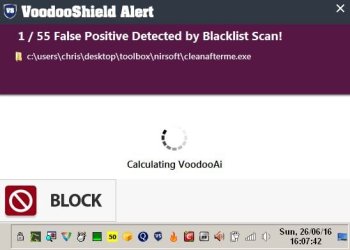
Basically after some initial configuration if any new non whitelisted executable attempts to launch or any non whitelisted command line you get a pop up like this:

VS 1.jpg

VS 2.jpg

File safety is determined and the user can choose to allow the file to run. In "Autopilot Mode" the decision is made entirely by VoodooShield so the file shown in the above screenshots would be blocked and blacklisted.

There's a user guide for the current stable version here:

Code:
http://www.voodooshield.com/Download/VoodooShieldUserGuide.pdf

Note: That version does not include Autopilot Mode.

I'm not recommending the software - just posting the info for consideration.
 

My Computer My Computer

At a glance

Microsoft Windows 7 Home Premium 64-bit 7601 ...AMD C-60 APU with Radeon(tm) HD Graphics4.00 GBAMD Radeon HD 6290 Graphics
Computer type
Laptop
Computer Manufacturer/Model Number
ASUS
OS
Microsoft Windows 7 Home Premium 64-bit 7601 Multiprocessor Free Service Pack 1
CPU
AMD C-60 APU with Radeon(tm) HD Graphics
Motherboard
ASUSTeK COMPUTER INC. X501U
Memory
4.00 GB
Graphics Card(s)
AMD Radeon HD 6290 Graphics
Sound Card
(1) AMD High Definition Audio Device (2) Realtek High Defi
Screen Resolution
1366 x 768 x 32 bits (4294967296 colors) @ 60 Hz
Hard Drives
Hitachi HTS545050A7E380 SATA Disk Device
Antivirus
Comodo CIS & FW, SecureAplus App Whitelisting, Threatfire
Browser
Cyberfox 64bit, Opera 64bit, Airfox
Other Info
Spy-The-Spy, HitmanPro.Alert, Norton Connect Safe, MJRegWatcher, BitDefender TrafficLight, Voodoo Shield, Zemana AntiMalware
Okay forget that last post. It won't prevent creation of another user account. Actually even if you only let him have a standard user account there are ways around restrictions that will allow him to create new user accounts.

Dig about in your router settings and take a look at this:

https://dns.norton.com/configureRouter.html
 

My Computer My Computer

At a glance

Microsoft Windows 7 Home Premium 64-bit 7601 ...AMD C-60 APU with Radeon(tm) HD Graphics4.00 GBAMD Radeon HD 6290 Graphics
Computer type
Laptop
Computer Manufacturer/Model Number
ASUS
OS
Microsoft Windows 7 Home Premium 64-bit 7601 Multiprocessor Free Service Pack 1
CPU
AMD C-60 APU with Radeon(tm) HD Graphics
Motherboard
ASUSTeK COMPUTER INC. X501U
Memory
4.00 GB
Graphics Card(s)
AMD Radeon HD 6290 Graphics
Sound Card
(1) AMD High Definition Audio Device (2) Realtek High Defi
Screen Resolution
1366 x 768 x 32 bits (4294967296 colors) @ 60 Hz
Hard Drives
Hitachi HTS545050A7E380 SATA Disk Device
Antivirus
Comodo CIS & FW, SecureAplus App Whitelisting, Threatfire
Browser
Cyberfox 64bit, Opera 64bit, Airfox
Other Info
Spy-The-Spy, HitmanPro.Alert, Norton Connect Safe, MJRegWatcher, BitDefender TrafficLight, Voodoo Shield, Zemana AntiMalware
Thank you very much for your time and information. I will try your suggestion as I have tried open DNS before, however for some reason it stopped working. I will have to find a way to lock the router away won't I to prevent him from just resetting it? He's less computer savvy than I am(so that why I wanted to try that other stuff first) but hopefully not willing to damage anything when alone.

I will try that and let you know, if in the meantime any other suggestions are available please do not hesitate to let me know.

Thank you again.
 

My Computer My Computer

At a glance

Win7 ult x64i7-477032GbGtx 970
Computer type
PC/Desktop
Computer Manufacturer/Model Number
Self made
OS
Win7 ult x64
CPU
i7-4770
Motherboard
H97M-E
Memory
32Gb
Graphics Card(s)
Gtx 970
Hard Drives
Samsung pro ssd 256G
Antivirus
AVG
Browser
IE
Those are opposing requirements. If you want to limit anything, the user MUST be standard.
Admins, by design, have control over everything, incluiding removing any restriction placed on them by any means. An admin account can impose restrictions, but can also lift them, install and uninstall software at will, and virtually owns the system. The only way to prevent those is to derprive the account of administrator access.


Actually even if you only let him have a standard user account there are ways around restrictions that will allow him to create new user accounts.

Standard user accounts cannot create new user accounts, nor change anything about other accounts or delete them. At most, they can change their own password, and only if an admin allows that. If that were possible, it would defeat the purpose of the standard account.
 

My Computer My Computer

At a glance

Windows 7 Ultimate x64Intel Core i7-740QM8 GB DDR3NVIDIA GeForce 330GT
Computer type
Laptop
Computer Manufacturer/Model Number
Toshiba Sattelite A665-S6092
OS
Windows 7 Ultimate x64
CPU
Intel Core i7-740QM
Memory
8 GB DDR3
Graphics Card(s)
NVIDIA GeForce 330GT
Screen Resolution
1366x768
Hard Drives
Samsung 840 SSD 500GB
1TB USB3 external HD
Cooling
Coolermaster Notepal U3 notebook cooling pad
Internet Speed
3mbps ASDL
Antivirus
ClamWin 0.98.7
Browser
Opera 12.17 x86 (main), Firefox 38 (sec), IE11 (last resort)
Surely Admin Accounts can be created using a boot CD? RE: Locking router away. Routers have passwords.
 

My Computer My Computer

At a glance

Microsoft Windows 7 Home Premium 64-bit 7601 ...AMD C-60 APU with Radeon(tm) HD Graphics4.00 GBAMD Radeon HD 6290 Graphics
Computer type
Laptop
Computer Manufacturer/Model Number
ASUS
OS
Microsoft Windows 7 Home Premium 64-bit 7601 Multiprocessor Free Service Pack 1
CPU
AMD C-60 APU with Radeon(tm) HD Graphics
Motherboard
ASUSTeK COMPUTER INC. X501U
Memory
4.00 GB
Graphics Card(s)
AMD Radeon HD 6290 Graphics
Sound Card
(1) AMD High Definition Audio Device (2) Realtek High Defi
Screen Resolution
1366 x 768 x 32 bits (4294967296 colors) @ 60 Hz
Hard Drives
Hitachi HTS545050A7E380 SATA Disk Device
Antivirus
Comodo CIS & FW, SecureAplus App Whitelisting, Threatfire
Browser
Cyberfox 64bit, Opera 64bit, Airfox
Other Info
Spy-The-Spy, HitmanPro.Alert, Norton Connect Safe, MJRegWatcher, BitDefender TrafficLight, Voodoo Shield, Zemana AntiMalware
Surely Admin Accounts can be created using a boot CD? RE: Locking router away. Routers have passwords.

Yes, it's possible to circumvent pretty much every limitation by using an external OS, or putting the hard disk into another computer, you can tweak anything with an offline OS, including things you don't have permissions normally.

This is actually a much greater problem. A person with access to the computer can always do that, no matter how many restrictions you put in place. If the OS isn't running it can't obviously prevent such things (and this isn't a vulnerability of Windows, any OS is susceptible to the very same thing).

The real problem is physical access. Anyone with it can simply boot off another medium and bypass the OS completely. You can even remove the HD and the attacker will use that boot CD with a portable OS to do whatever he wants with the hardware. There is no way around this.
Full disk encryption prevent tampering with the OS (without knowing the password), but they can still use it from the mobile OS, or just wipe your disk, or try to discover your password.

The same kind of attack is possible against the router. You can put a password on its admin interface, then the attacker disconnect it and uses it's special reset button and every setting (including the password) goes to default again. All because they have physical access to the equipment.

The moral of the history is that physical access means "game over, the attacker won".
The best we can aim to do is to protect things with an online OS, but with physical access you can't prevent attacks against it going offline.
 

My Computer My Computer

At a glance

Windows 7 Ultimate x64Intel Core i7-740QM8 GB DDR3NVIDIA GeForce 330GT
Computer type
Laptop
Computer Manufacturer/Model Number
Toshiba Sattelite A665-S6092
OS
Windows 7 Ultimate x64
CPU
Intel Core i7-740QM
Memory
8 GB DDR3
Graphics Card(s)
NVIDIA GeForce 330GT
Screen Resolution
1366x768
Hard Drives
Samsung 840 SSD 500GB
1TB USB3 external HD
Cooling
Coolermaster Notepal U3 notebook cooling pad
Internet Speed
3mbps ASDL
Antivirus
ClamWin 0.98.7
Browser
Opera 12.17 x86 (main), Firefox 38 (sec), IE11 (last resort)
I will have to find a way to lock the router away won't I to prevent him from just resetting it?

I guess that is really my best solution. Doing the above combined with the IP re-route. Thank you very much guys and have a great day. I will let you guys know if I come up with something else that works.
 

My Computer My Computer

At a glance

Win7 ult x64i7-477032GbGtx 970
Computer type
PC/Desktop
Computer Manufacturer/Model Number
Self made
OS
Win7 ult x64
CPU
i7-4770
Motherboard
H97M-E
Memory
32Gb
Graphics Card(s)
Gtx 970
Hard Drives
Samsung pro ssd 256G
Antivirus
AVG
Browser
IE
Back
Top