Customize for hidden Icons not working

AddWhat

New member
Local time
7:36 PM
Messages
6
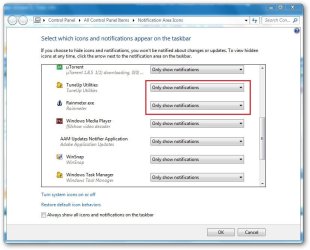
I did some registry cleanup & optimization using 3 different programs. Some where along the line apparently they killed the ability to customize the hidden icons. I have several that prior to this problem, were customized to always be showing. Now I would like to change them to only show when there is a notification. I have seen where there are ways to do a always or never show, BUT all or nothing is not my choice. Can some one please change from this
sad.gif
to this
smile.gif
for me?

Thanks​
 

My Computer

Computer Manufacturer/Model Number
Toshiba Satellite A505 and Self Built PC
OS
Windows 7 Ultimate 64 and 32 bit
CPU
Intel i3 330 and AMD Phenom X4 nnn
Motherboard
Unknown and GigaBit
Memory
4 GB and 3 GB
Hard Drives
500 GB and 2x 320 GB

My Computer

Computer type
PC/Desktop
Computer Manufacturer/Model Number
Self Assembled
OS
Microsoft Windows 10 Pro Insider Preview 64-bit
CPU
Intel(R) Core(TM) i3-4130 CPU @ 3.40GHz
Motherboard
Gigabyte Technology Co., Ltd. B85M-D3H
Memory
Corsair Vengence 4GB x2 (8.00GB Dual-Channel DDR3 @ 798MHz)
Graphics Card(s)
2047MB GeForce GTS 450 (ZOTAC International)
Sound Card
Onboard (Realtek High Definition Audio)
Monitor(s) Displays
LG Flatron E2040T
Screen Resolution
1600x900
Hard Drives
Western Digital 1 TB
Seagate 500 GB
PSU
Corsair VS550
Case
Cooler Master K380
Cooling
Cooler Master Seidon 120V Plus
Keyboard
Logitech MK260r
Mouse
Logitech MK260r
Internet Speed
PMPL Broadband
Antivirus
Windows Defender + MBAM
Browser
Firefox
Other Info
Dell Studio 15" Laptop
I have the same problem
 

My Computer

Computer Manufacturer/Model Number
HP
OS
Windows 7 Ultimate 64-bit
CPU
Intel(R) Core(TM) i5-540M @ 2.53GHz
Motherboard
Hewlett-Packard 1522
Memory
4GB DDR3 System Memory
Graphics Card(s)
1GB ATI Mobility Radeon HD 5830 Graphics
Monitor(s) Displays
15.6" diagonal Full High Definition LED
Screen Resolution
1920x1080
Hard Drives
500GB 7200RPM SATA Hard Drive
PSU
6 Cell Lithium Ion Polymer Battery
Cooling
NZXT Aluminum Notebook Cooler With 3 120mm Adjustable Fans
Other Info
Envy 15

My Computer

Computer type
PC/Desktop
Computer Manufacturer/Model Number
Self Assembled
OS
Microsoft Windows 10 Pro Insider Preview 64-bit
CPU
Intel(R) Core(TM) i3-4130 CPU @ 3.40GHz
Motherboard
Gigabyte Technology Co., Ltd. B85M-D3H
Memory
Corsair Vengence 4GB x2 (8.00GB Dual-Channel DDR3 @ 798MHz)
Graphics Card(s)
2047MB GeForce GTS 450 (ZOTAC International)
Sound Card
Onboard (Realtek High Definition Audio)
Monitor(s) Displays
LG Flatron E2040T
Screen Resolution
1600x900
Hard Drives
Western Digital 1 TB
Seagate 500 GB
PSU
Corsair VS550
Case
Cooler Master K380
Cooling
Cooler Master Seidon 120V Plus
Keyboard
Logitech MK260r
Mouse
Logitech MK260r
Internet Speed
PMPL Broadband
Antivirus
Windows Defender + MBAM
Browser
Firefox
Other Info
Dell Studio 15" Laptop
Ran SFC

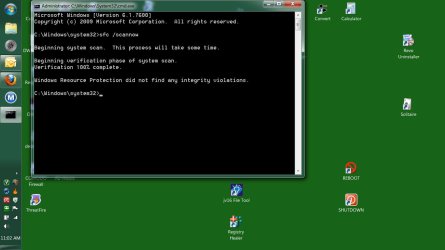
SFC was OK at 100%. See jpg. I ran to many registry cleanings to try & find the culprit. Guess that I will just have to live with it.

SFChecker-Results-100.jpg
 

Attachments

  • SFChecker-Results-100.jpg
    SFChecker-Results-100.jpg
    61.1 KB · Views: 14

My Computer

Computer Manufacturer/Model Number
Toshiba Satellite A505 and Self Built PC
OS
Windows 7 Ultimate 64 and 32 bit
CPU
Intel i3 330 and AMD Phenom X4 nnn
Motherboard
Unknown and GigaBit
Memory
4 GB and 3 GB
Hard Drives
500 GB and 2x 320 GB
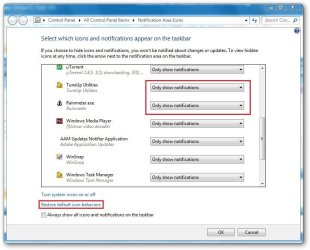
Not sure, but you may click on the restore default icon behavior link .
 

Attachments

  • sshot-2.jpg
    sshot-2.jpg
    61.9 KB · Views: 8

My Computer

Computer type
PC/Desktop
Computer Manufacturer/Model Number
Self Assembled
OS
Microsoft Windows 10 Pro Insider Preview 64-bit
CPU
Intel(R) Core(TM) i3-4130 CPU @ 3.40GHz
Motherboard
Gigabyte Technology Co., Ltd. B85M-D3H
Memory
Corsair Vengence 4GB x2 (8.00GB Dual-Channel DDR3 @ 798MHz)
Graphics Card(s)
2047MB GeForce GTS 450 (ZOTAC International)
Sound Card
Onboard (Realtek High Definition Audio)
Monitor(s) Displays
LG Flatron E2040T
Screen Resolution
1600x900
Hard Drives
Western Digital 1 TB
Seagate 500 GB
PSU
Corsair VS550
Case
Cooler Master K380
Cooling
Cooler Master Seidon 120V Plus
Keyboard
Logitech MK260r
Mouse
Logitech MK260r
Internet Speed
PMPL Broadband
Antivirus
Windows Defender + MBAM
Browser
Firefox
Other Info
Dell Studio 15" Laptop
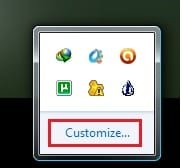
My problem is that when I click on the word "Customize", nothing happens.
 

My Computer

Computer Manufacturer/Model Number
Toshiba Satellite A505 and Self Built PC
OS
Windows 7 Ultimate 64 and 32 bit
CPU
Intel i3 330 and AMD Phenom X4 nnn
Motherboard
Unknown and GigaBit
Memory
4 GB and 3 GB
Hard Drives
500 GB and 2x 320 GB
First thing that needs to be done is we have to reverse what ever the registry "cleaners" did. For your own peace of mine and ours, don't bother with registry cleaners. Even if there was a left over key or two in there, any slow down, which I doubt there actually is, would be measured in milliseconds, and any space they take up on the hard disk can only be measured is KB or B. That is fair trade off considering the fact the most, if not all registry cleaners delete more keys than they are supposed to. I'm willing to bet more damage has been done than you've notice so far.

That said, the thing you need to try next is a http://www.sevenforums.com/tutorials/700-system-restore.html. This should put things back as they were. If the registry cleaners were installed recently, go ahead and go back to when you installed them. This will fix the changes and uninstall the programs in one swoop.
 

My Computer

Computer type
Laptop
Computer Manufacturer/Model Number
Toshiba P775-S7100
OS
Windows 7 Professional SP1 64-bit
CPU
Intel Core i5-2450M @2.5 GHz
Memory
6 GB DDR3 1333MHz
Graphics Card(s)
Intel HD 3000
Monitor(s) Displays
Built-in 17.3" LED; 22" Insignia NS-L22Q-10A
Screen Resolution
1600x900; 1360x768
Hard Drives
750 GB Hitachi
1TB Seagate FreeAgent External
Internet Speed
Verizon DSL Speed(Down/Up): 3360 Kbps / 800 Kbps
Antivirus
MSE and MBAM Pro
Browser
IE10
Hi, AddWhat.

Prior to using the registry cleaners, did you export the registry? Did the "cleaner" allow the creation of a backup prior to its destruction? (Yes, I agree whole-heartedly with Petey7 about the general uselessness of registry cleaners.)

In the event you do not have System Restore points dated prior to using those products or an image backup, import the registry items removed, starting with the most recent and going backward in date. Check your system after each import to see if the problem is solved.
 

My Computer

OS
Windows 7 & Windows Vista Ultimate
AddWhat,

Let's forget the past.

Describe the feature of Win 7 which is presently not working.

I'm trying to understand the problem and not the history, although there are times when history is important but let's ignore the past.
 

My Computer

Computer Manufacturer/Model Number
Toshiba Satellite S875D-S7239 laptop
OS
MS Windows 7 Ultimate SP1 64-bit
CPU
AMD A10-4600M
Motherboard
AMD Pumori (Socket FT1)
Memory
6.00 GB Dual-Channel DDR3 @ 798MHz (11-11-12-28)
Graphics Card(s)
AMD Radeon HD 7660G
Sound Card
High Definition Audio Device
Monitor(s) Displays
Generic PnP Monitor (1600x900@60Hz)
Screen Resolution
1600x900@60Hz
Hard Drives
SSD 119GB Corsair CSSD-V128GB2 ATA Device
Keyboard
Standard PS/2 Keyboard
Mouse
HP Wireless Optical Mobile Mouse Model FHA-3410
Internet Speed
What the local pub, local coffee shop offers.
Other Info
Optical Drive:MATSHITA BD-CMB UJ160B ATA Device


Also have an Asus ha1002xp netbook with Win 7 Ultimate installed.
AddWhat,

Let's forget the past.

Describe the feature of Win 7 which is presently not working.

I'm trying to understand the problem and not the history, although there are times when history is important but let's ignore the past.
As far as I understood, when he clicks on "Customize, nothing happens .


Untitled.jpg
 

My Computer

Computer type
PC/Desktop
Computer Manufacturer/Model Number
Self Assembled
OS
Microsoft Windows 10 Pro Insider Preview 64-bit
CPU
Intel(R) Core(TM) i3-4130 CPU @ 3.40GHz
Motherboard
Gigabyte Technology Co., Ltd. B85M-D3H
Memory
Corsair Vengence 4GB x2 (8.00GB Dual-Channel DDR3 @ 798MHz)
Graphics Card(s)
2047MB GeForce GTS 450 (ZOTAC International)
Sound Card
Onboard (Realtek High Definition Audio)
Monitor(s) Displays
LG Flatron E2040T
Screen Resolution
1600x900
Hard Drives
Western Digital 1 TB
Seagate 500 GB
PSU
Corsair VS550
Case
Cooler Master K380
Cooling
Cooler Master Seidon 120V Plus
Keyboard
Logitech MK260r
Mouse
Logitech MK260r
Internet Speed
PMPL Broadband
Antivirus
Windows Defender + MBAM
Browser
Firefox
Other Info
Dell Studio 15" Laptop
I'm awaiting his answer.
 

My Computer

Computer Manufacturer/Model Number
Toshiba Satellite S875D-S7239 laptop
OS
MS Windows 7 Ultimate SP1 64-bit
CPU
AMD A10-4600M
Motherboard
AMD Pumori (Socket FT1)
Memory
6.00 GB Dual-Channel DDR3 @ 798MHz (11-11-12-28)
Graphics Card(s)
AMD Radeon HD 7660G
Sound Card
High Definition Audio Device
Monitor(s) Displays
Generic PnP Monitor (1600x900@60Hz)
Screen Resolution
1600x900@60Hz
Hard Drives
SSD 119GB Corsair CSSD-V128GB2 ATA Device
Keyboard
Standard PS/2 Keyboard
Mouse
HP Wireless Optical Mobile Mouse Model FHA-3410
Internet Speed
What the local pub, local coffee shop offers.
Other Info
Optical Drive:MATSHITA BD-CMB UJ160B ATA Device


Also have an Asus ha1002xp netbook with Win 7 Ultimate installed.
Problem solved.
I am able to get to the "Notification area Icons" via the "Control Panel", so that route seems to be OK. I had not tried that route before as I would get to it by right clicking on the little triangle "Show hidden Icons".
Thanks to all !!!
 

My Computer

Computer Manufacturer/Model Number
Toshiba Satellite A505 and Self Built PC
OS
Windows 7 Ultimate 64 and 32 bit
CPU
Intel i3 330 and AMD Phenom X4 nnn
Motherboard
Unknown and GigaBit
Memory
4 GB and 3 GB
Hard Drives
500 GB and 2x 320 GB
Thanks for letting us know. I hope in the future that you will be more cautious with the use of registry cleaners.
 

My Computer

OS
Windows 7 & Windows Vista Ultimate
Back
Top