

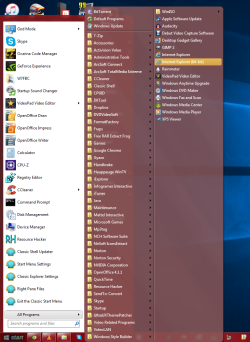
So I have the Classic Shell start menu replacement program (fantastic by the way), and it just occurred to me. Is it possible to have a menu on the right pane, instead of adding a scroll arrow on the bottom when there's too many items to fit on a screen, behave like the All Programs menu and automatically throw the other items into a second column? (If there's nothing you can tell me, that's fine, just thought I'd ask)
Attachments

My Computer
- Computer type
- PC/Desktop
- Computer Manufacturer/Model Number
- MrMiios (Custom Build by Me)
- OS
- Windows 7 Professional x64 (SP1)
- CPU
- AMD FX-6300 Six Core Processor 3.5GHz (Not OC'd)
- Motherboard
- ASROCK 980DE3/US3S
- Memory
- G.Skill Ripjaws - 4x4GB (16GB)
- Graphics Card(s)
- MSI GeForce GTX 970 TwinFrozr 4GB
- Sound Card
- [[Using Onboard HD Audio]]
- Monitor(s) Displays
- HP 27es
- Screen Resolution
- 1920x1080
- Hard Drives
- Western Digital Red 1TB (Internal)
Toshiba Canvio 2TB USB 3.0 Desktop Hard Drive (External)
- PSU
- EVGA 850W 80+ GOLD 220-G2-0850-XR (Fully Modular)
- Case
- DIYPC Ranger-R4-R
- Cooling
- Cooler Master Hyper 212 Evo
- Keyboard
- Dell USB Keyboard
- Mouse
- Red Logitech Wireless Mouse
- Internet Speed
- DL: 95mb/s, UL: 5.9mb/s
- Antivirus
- Norton Security (previous year's)
- Browser
- Google Chrome
- Other Info
- Now Aero SOMETIMES works on start, but everything's sluggish and Aero will usually crash back to Basic. Restarting still resolves the issue. I'll probably clean install later... But what a pain reinstalling the programs will be... ugh...


