Customize Tab - Add or Remove from Properties

How to Add or Remove the Customize Tab from Properties in Vista, Windows 7, and Windows 8

   Information
This will show you how to add or remove the Customize tab in the Properties window and the Cutomize this folder context menu item of folders and drives for all users in Vista, Windows 7, and Windows 8.

If the Customize tab is removed, all users will not be able to change the folder template, folder icon, or drive and folder pictures to show on icon.

   Note
By default, shell folders such as Desktop, Contact, Windows, Program Files, and system hard drives (ex: C: ) do not have the Customize tab in their Properties window and cannot have it added to them.


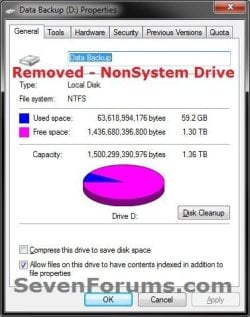
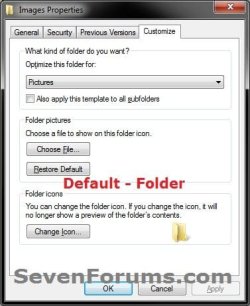
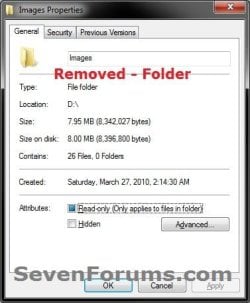
EXAMPLE: Customize Tab Added (default) and Removed from Properties
NOTE: This is in non system folders and drives when you right click on them and click on Properties. Default_Drive.jpgRemoved_Drive.jpg
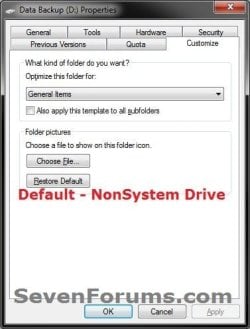
Default_folder.jpgRemoved_Folder.jpg
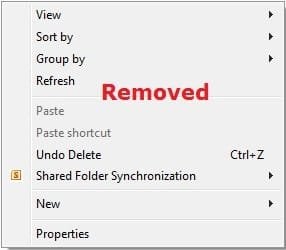
EXAMPLE: Customize Tab Added (default) and Removed from Context Menu
NOTE: This is in non system folders and drives when you open them in Windows Explorer, then right click on a empty space to open the context menu to see Customize this folder. Default.jpgRemoved.jpg
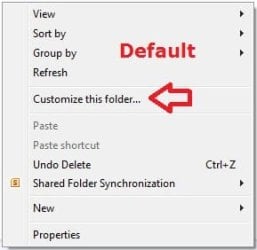

Here's How: 1. Do step 2 or 3 below for what you would like to do.

2. To Add or Restore the Customize Tab
NOTE: This is the default setting. A) Click/tap on the Download button below to download the file below, and go to step 4 below. Restore_Customize_Tab.reg

Download


3. To Remove the Customize Tab A) Click on the Download button below to download the file below, and go to step 4 below. Remove_Customize_Tab.reg

Download


4. Save the .reg file to your desktop.

5. Double click/tap on the downloaded .reg file to merge it.

6. If prompted, click/tap on Run, Yes (UAC Windows 7/8) or Continue (UAC Vista), Yes, and OK.

7. When finished, you can delete the downloaded .reg file if you like.
That's it,
Shawn


Attachments

Last edited:
But how to remove only the context menu item?
 

My Computer

OS
7
It didn't work for me. Any suggestions?

I downloaded the .reg file to restore the missing "customize this folder" and the "customize tab", and ran it, responding to the several messages that is required. No joy.

I'd really like to get it to work, so any other suggestions would be appreciated.
 

My Computer

Computer type
PC/Desktop
Computer Manufacturer/Model Number
Dell Inspiron N7010
OS
Windows 7 Home Premium 64-bit
CPU
Intel Core i3 CPU M 370 @ 2.40 GHz
Memory
4.00 GB
Antivirus
Avast
Browser
Firefox

My Computer

Computer type
PC/Desktop
Computer Manufacturer/Model Number
Self built custom
OS
64-bit Windows 11 Pro for Workstations
CPU
Intel i7-8700K OC'd to 5 GHz
Motherboard
ASUS ROG Maximus XI Formula Z390
Memory
64 GB (4x16GB) G.SKILL TridentZ RGB DDR4 3600 MHz
Graphics Card(s)
ASUS ROG-STRIX-GTX1080TI-O11G-GAMING
Sound Card
Integrated
Monitor(s) Displays
2 x Samsung Odyssey G7 27"
Screen Resolution
2560x1440
Hard Drives
1TB Samsung 990 PRO M.2,
4TB Samsung 990 PRO PRO M.2,
TerraMaster F8 SSD Plus NAS
PSU
Seasonic Prime Titanium 850W
Case
Thermaltake Core P3
Cooling
Corsair Hydro H115i
Keyboard
Logitech wireless K800
Mouse
Logitech MX Master 4
Internet Speed
2 Gb/s Download and 100 Mb/s Upload
Antivirus
Malwarebyte Anti-Malware Premium
Browser
Google Chrome
Other Info
Logitech Z625 speaker system,
Logitech BRIO 4K Pro webcam,
HP Color LaserJet Pro MFP M477fdn,
APC SMART-UPS RT 1000 XL - SURT1000XLI,
Galaxy S23 Plus phone
Stubborn bugger

That still didn't restore the context menu or the tab to the properties dialog. How did I lose them in the first place?
 

My Computer

Computer type
PC/Desktop
Computer Manufacturer/Model Number
Dell Inspiron N7010
OS
Windows 7 Home Premium 64-bit
CPU
Intel Core i3 CPU M 370 @ 2.40 GHz
Memory
4.00 GB
Antivirus
Avast
Browser
Firefox
As a test see if you may have it for your "C:\Users\(user-name)\Documents" folder to help see if it's all folders or just certain types.

If this just happened recently, then you could do a system restore using a restore point dated before it happened to undo it.
 

My Computer

Computer type
PC/Desktop
Computer Manufacturer/Model Number
Self built custom
OS
64-bit Windows 11 Pro for Workstations
CPU
Intel i7-8700K OC'd to 5 GHz
Motherboard
ASUS ROG Maximus XI Formula Z390
Memory
64 GB (4x16GB) G.SKILL TridentZ RGB DDR4 3600 MHz
Graphics Card(s)
ASUS ROG-STRIX-GTX1080TI-O11G-GAMING
Sound Card
Integrated
Monitor(s) Displays
2 x Samsung Odyssey G7 27"
Screen Resolution
2560x1440
Hard Drives
1TB Samsung 990 PRO M.2,
4TB Samsung 990 PRO PRO M.2,
TerraMaster F8 SSD Plus NAS
PSU
Seasonic Prime Titanium 850W
Case
Thermaltake Core P3
Cooling
Corsair Hydro H115i
Keyboard
Logitech wireless K800
Mouse
Logitech MX Master 4
Internet Speed
2 Gb/s Download and 100 Mb/s Upload
Antivirus
Malwarebyte Anti-Malware Premium
Browser
Google Chrome
Other Info
Logitech Z625 speaker system,
Logitech BRIO 4K Pro webcam,
HP Color LaserJet Pro MFP M477fdn,
APC SMART-UPS RT 1000 XL - SURT1000XLI,
Galaxy S23 Plus phone
No joy

I thought maybe it was that I hadn't rebooted Win7 after the merging of the .reg files. But rebooting didn't help.

At C:/Users/Charley/ there is no Documents folder. There is a My Documents, and it does not have a "customize this folder" context option, and the property dialog does not have a customize tag.

In my navigation pane, I have "Libraries" and "Documents" under that. If I right click that entry, it does not have "customize this folder" but it does have properties. It has only one tab titled "Libraries". In that dialog, it has a pull down for Optimize this library for: and it has the different view that I want to select for, but I don't want to apply this option to all subdirectories of this folder.
 

My Computer

Computer type
PC/Desktop
Computer Manufacturer/Model Number
Dell Inspiron N7010
OS
Windows 7 Home Premium 64-bit
CPU
Intel Core i3 CPU M 370 @ 2.40 GHz
Memory
4.00 GB
Antivirus
Avast
Browser
Firefox
If you are in Libraries, you will not have a customize option.

How about a system restore?
 

My Computer

Computer type
PC/Desktop
Computer Manufacturer/Model Number
Self built custom
OS
64-bit Windows 11 Pro for Workstations
CPU
Intel i7-8700K OC'd to 5 GHz
Motherboard
ASUS ROG Maximus XI Formula Z390
Memory
64 GB (4x16GB) G.SKILL TridentZ RGB DDR4 3600 MHz
Graphics Card(s)
ASUS ROG-STRIX-GTX1080TI-O11G-GAMING
Sound Card
Integrated
Monitor(s) Displays
2 x Samsung Odyssey G7 27"
Screen Resolution
2560x1440
Hard Drives
1TB Samsung 990 PRO M.2,
4TB Samsung 990 PRO PRO M.2,
TerraMaster F8 SSD Plus NAS
PSU
Seasonic Prime Titanium 850W
Case
Thermaltake Core P3
Cooling
Corsair Hydro H115i
Keyboard
Logitech wireless K800
Mouse
Logitech MX Master 4
Internet Speed
2 Gb/s Download and 100 Mb/s Upload
Antivirus
Malwarebyte Anti-Malware Premium
Browser
Google Chrome
Other Info
Logitech Z625 speaker system,
Logitech BRIO 4K Pro webcam,
HP Color LaserJet Pro MFP M477fdn,
APC SMART-UPS RT 1000 XL - SURT1000XLI,
Galaxy S23 Plus phone
I've probably been "in Libraries" since I upgraded from Vista to Win7. Is there a way to get out of "libraries"?
 

My Computer

Computer type
PC/Desktop
Computer Manufacturer/Model Number
Dell Inspiron N7010
OS
Windows 7 Home Premium 64-bit
CPU
Intel Core i3 CPU M 370 @ 2.40 GHz
Memory
4.00 GB
Antivirus
Avast
Browser
Firefox
Sure. If you haven't already, you could manually navigate to the folders (ex: My Documents) in the actual "C:\Users\Charley" folder have the "Customize..." option.
 

My Computer

Computer type
PC/Desktop
Computer Manufacturer/Model Number
Self built custom
OS
64-bit Windows 11 Pro for Workstations
CPU
Intel i7-8700K OC'd to 5 GHz
Motherboard
ASUS ROG Maximus XI Formula Z390
Memory
64 GB (4x16GB) G.SKILL TridentZ RGB DDR4 3600 MHz
Graphics Card(s)
ASUS ROG-STRIX-GTX1080TI-O11G-GAMING
Sound Card
Integrated
Monitor(s) Displays
2 x Samsung Odyssey G7 27"
Screen Resolution
2560x1440
Hard Drives
1TB Samsung 990 PRO M.2,
4TB Samsung 990 PRO PRO M.2,
TerraMaster F8 SSD Plus NAS
PSU
Seasonic Prime Titanium 850W
Case
Thermaltake Core P3
Cooling
Corsair Hydro H115i
Keyboard
Logitech wireless K800
Mouse
Logitech MX Master 4
Internet Speed
2 Gb/s Download and 100 Mb/s Upload
Antivirus
Malwarebyte Anti-Malware Premium
Browser
Google Chrome
Other Info
Logitech Z625 speaker system,
Logitech BRIO 4K Pro webcam,
HP Color LaserJet Pro MFP M477fdn,
APC SMART-UPS RT 1000 XL - SURT1000XLI,
Galaxy S23 Plus phone
Thank you, Thank you, Thank you! as soon as I rebooted, my “customize” tab was back. 🎸🎸 Thank YOU!
 

My Computer

Computer type
PC/Desktop
Computer Manufacturer/Model Number
Acer
OS
windows 7 Home Premium, service pack 1, 64 bit
Antivirus
Norton
Browser
Chrome

My Computer

Computer type
PC/Desktop
Computer Manufacturer/Model Number
Self built custom
OS
64-bit Windows 11 Pro for Workstations
CPU
Intel i7-8700K OC'd to 5 GHz
Motherboard
ASUS ROG Maximus XI Formula Z390
Memory
64 GB (4x16GB) G.SKILL TridentZ RGB DDR4 3600 MHz
Graphics Card(s)
ASUS ROG-STRIX-GTX1080TI-O11G-GAMING
Sound Card
Integrated
Monitor(s) Displays
2 x Samsung Odyssey G7 27"
Screen Resolution
2560x1440
Hard Drives
1TB Samsung 990 PRO M.2,
4TB Samsung 990 PRO PRO M.2,
TerraMaster F8 SSD Plus NAS
PSU
Seasonic Prime Titanium 850W
Case
Thermaltake Core P3
Cooling
Corsair Hydro H115i
Keyboard
Logitech wireless K800
Mouse
Logitech MX Master 4
Internet Speed
2 Gb/s Download and 100 Mb/s Upload
Antivirus
Malwarebyte Anti-Malware Premium
Browser
Google Chrome
Other Info
Logitech Z625 speaker system,
Logitech BRIO 4K Pro webcam,
HP Color LaserJet Pro MFP M477fdn,
APC SMART-UPS RT 1000 XL - SURT1000XLI,
Galaxy S23 Plus phone
this didn't work. i even rebooted my computer. i don't know why it didn't work, i tried like three times, and it said it was successful, but the customize tab is still not there.
 

My Computers

System One System Two

  • Computer type
    PC/Desktop
    Computer Manufacturer/Model Number
    dell
    OS
    windows 7
  • Computer type
    PC/Desktop
this didn't work. i even rebooted my computer. i don't know why it didn't work, i tried like three times, and it said it was successful, but the customize tab is still not there.

Hello, and welcome to Seven Forums. :-)

Just to note, not all folders support having the customize tab on the properties page.

Just to verify, does your Downloads folder have a Customize tab?
 

My Computer

Computer type
PC/Desktop
Computer Manufacturer/Model Number
Self built custom
OS
64-bit Windows 11 Pro for Workstations
CPU
Intel i7-8700K OC'd to 5 GHz
Motherboard
ASUS ROG Maximus XI Formula Z390
Memory
64 GB (4x16GB) G.SKILL TridentZ RGB DDR4 3600 MHz
Graphics Card(s)
ASUS ROG-STRIX-GTX1080TI-O11G-GAMING
Sound Card
Integrated
Monitor(s) Displays
2 x Samsung Odyssey G7 27"
Screen Resolution
2560x1440
Hard Drives
1TB Samsung 990 PRO M.2,
4TB Samsung 990 PRO PRO M.2,
TerraMaster F8 SSD Plus NAS
PSU
Seasonic Prime Titanium 850W
Case
Thermaltake Core P3
Cooling
Corsair Hydro H115i
Keyboard
Logitech wireless K800
Mouse
Logitech MX Master 4
Internet Speed
2 Gb/s Download and 100 Mb/s Upload
Antivirus
Malwarebyte Anti-Malware Premium
Browser
Google Chrome
Other Info
Logitech Z625 speaker system,
Logitech BRIO 4K Pro webcam,
HP Color LaserJet Pro MFP M477fdn,
APC SMART-UPS RT 1000 XL - SURT1000XLI,
Galaxy S23 Plus phone
Hello, and welcome to Seven Forums. :-)

Just to note, not all folders support having the customize tab on the properties page.

Just to verify, does your Downloads folder have a Customize tab?


no, none of my folders have a customize option. they never have. i want to change the icons on some folders that i downloaded because the person who uploaded them put customized icons on them, and i want to change them back to folder icons. still, i have never had such a tab or option to customize a folder.
 

My Computers

System One System Two

  • Computer type
    PC/Desktop
    Computer Manufacturer/Model Number
    dell
    OS
    windows 7
  • Computer type
    PC/Desktop
no, none of my folders have a customize option. they never have. i want to change the icons on some folders that i downloaded because the person who uploaded them put customized icons on them, and i want to change them back to folder icons. still, i have never had such a tab or option to customize a folder.

You might ask this person what they used to customize the icons in case it may have removed the tab.
 

My Computer

Computer type
PC/Desktop
Computer Manufacturer/Model Number
Self built custom
OS
64-bit Windows 11 Pro for Workstations
CPU
Intel i7-8700K OC'd to 5 GHz
Motherboard
ASUS ROG Maximus XI Formula Z390
Memory
64 GB (4x16GB) G.SKILL TridentZ RGB DDR4 3600 MHz
Graphics Card(s)
ASUS ROG-STRIX-GTX1080TI-O11G-GAMING
Sound Card
Integrated
Monitor(s) Displays
2 x Samsung Odyssey G7 27"
Screen Resolution
2560x1440
Hard Drives
1TB Samsung 990 PRO M.2,
4TB Samsung 990 PRO PRO M.2,
TerraMaster F8 SSD Plus NAS
PSU
Seasonic Prime Titanium 850W
Case
Thermaltake Core P3
Cooling
Corsair Hydro H115i
Keyboard
Logitech wireless K800
Mouse
Logitech MX Master 4
Internet Speed
2 Gb/s Download and 100 Mb/s Upload
Antivirus
Malwarebyte Anti-Malware Premium
Browser
Google Chrome
Other Info
Logitech Z625 speaker system,
Logitech BRIO 4K Pro webcam,
HP Color LaserJet Pro MFP M477fdn,
APC SMART-UPS RT 1000 XL - SURT1000XLI,
Galaxy S23 Plus phone
You might ask this person what they used to customize the icons in case it may have removed the tab.
i can't, there's no way to contact them because i downloaded these files a long time ago.
 

My Computers

System One System Two

  • Computer type
    PC/Desktop
    Computer Manufacturer/Model Number
    dell
    OS
    windows 7
  • Computer type
    PC/Desktop
Back
Top