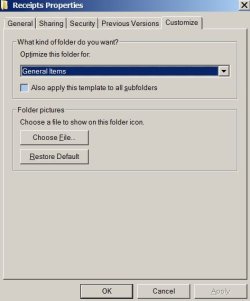
Customize Tab No Longer Shows "Change Icon"

NewW7User

New member
I've changed folder and shortcut icons in the past by right-clicking -> Properties -> Customize Tab -> Change Icon. But now that "change icon" has disappeared. What happened and how do I fix it?
 

Attachments

  • Change Icon Missing.jpg
    Change Icon Missing.jpg
    30.9 KB · Views: 3

My Computers

System One System Two

  • Computer type
    PC/Desktop
    Computer Manufacturer/Model Number
    Dell XPS 8300
    OS
    W7 Pro 64
    Memory
    8G
    Sound Card
    RealTek High Definition Audio
    Monitor(s) Displays
    Asus
    Hard Drives
    WD Elements, Samsung Story Station, Samsung EVO 860 / 870
    Mouse
    Logitech M310
    Antivirus
    Avast, Malwarebytes, SUPERAntiSpyware
    Browser
    Firefox, Avast Secure Browser
  • Computer type
    Laptop
    System Manufacturer/Model Number
    HP
    OS
    Win10
    Keyboard
    external
    Mouse
    wireless
    Browser
    Firefox, Avast
    Antivirus
    Avast / Malwarebytes / Superantispyware
Discovered the problem. Customized icons can be made only on the real folder. You can't customize icons on a shortcut. Thought I had in the past but apparently I was only in the real folder. Spinning my wheels because of another stupid Microsoft design.
 

My Computers

System One System Two

  • Computer type
    PC/Desktop
    Computer Manufacturer/Model Number
    Dell XPS 8300
    OS
    W7 Pro 64
    Memory
    8G
    Sound Card
    RealTek High Definition Audio
    Monitor(s) Displays
    Asus
    Hard Drives
    WD Elements, Samsung Story Station, Samsung EVO 860 / 870
    Mouse
    Logitech M310
    Antivirus
    Avast, Malwarebytes, SUPERAntiSpyware
    Browser
    Firefox, Avast Secure Browser
  • Computer type
    Laptop
    System Manufacturer/Model Number
    HP
    OS
    Win10
    Keyboard
    external
    Mouse
    wireless
    Browser
    Firefox, Avast
    Antivirus
    Avast / Malwarebytes / Superantispyware
Back
Top