
You are using an out of date browser. It may not display this or other websites correctly.
You should upgrade or use an alternative browser.
You should upgrade or use an alternative browser.
Customize the left hand folder pane?
- Thread starter al4x
- Start date


Hi al4x,
The closest I got with adding the desktop icon to the side pane is you can add the desktop Icon by clicking the Favorites arrow.(it might be already there). If you don't have any favorites or the arrow is not there you can add the Desktop Icon to it by Clicking and holding the icon and drag it to the favorites tab..
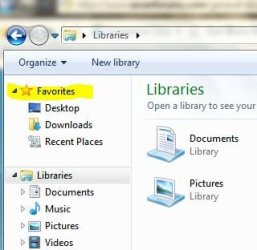
I have not been able to figure out if you can just add an icon anywhere in the side pane my guess in no..
And I have not found a way to change the icons for the libraries..(I don't think you can)
Hope this Helps..
The closest I got with adding the desktop icon to the side pane is you can add the desktop Icon by clicking the Favorites arrow.(it might be already there). If you don't have any favorites or the arrow is not there you can add the Desktop Icon to it by Clicking and holding the icon and drag it to the favorites tab..
I have not been able to figure out if you can just add an icon anywhere in the side pane my guess in no..
And I have not found a way to change the icons for the libraries..(I don't think you can)
Hope this Helps..
My Computer
- Computer Manufacturer/Model Number
- HP Pavilion dv5 Notebook PC
- OS
- Windows Seven x64
- CPU
- 2.2 GHz Dual Core
- Motherboard
- Quanta 3600
- Memory
- 4GB
- Graphics Card(s)
- ATI Mobility RADEON HD 3470
- Sound Card
- ATI
- Monitor(s) Displays
- Laptop
- Hard Drives
- ATA Hitachi HTS543215 (5400RPM)
- Case
- Laptop
- Cooling
- Fan
- Internet Speed
- Basic DSL 1.5 up and Down

Frostmourne
New member
- Local time
- 1:26 AM
- Messages
- 2,685
The icon can be changed:
Windows 7: How To Change a Library Icon | Microsoft Windows 7 | Tech-Recipes
Windows 7: How To Change a Library Icon | Microsoft Windows 7 | Tech-Recipes
My Computer
- Computer Manufacturer/Model Number
- Sony Vaio Z46GDU
- OS
- Windows 7 Ultimate x86-64
- CPU
- [email protected] 1066MHz FSB
- Motherboard
- Sony branded
- Memory
- 6GB DDR3 1066MHz
- Graphics Card(s)
- 9300M GS 256MB Dedicated (Speed) + Intel4500MHD (Stamina)
- Sound Card
- Realtek HD Audio
- Monitor(s) Displays
- 13.1' WXGA
- Screen Resolution
- 1600x900
- Hard Drives
- 320GB 7200RPM w/ 16MB cache
- Internet Speed
- 1MB/s
Hi al4x,
The closest I got with adding the desktop icon to the side pane is you can add the desktop Icon by clicking the Favorites arrow.(it might be already there). If you don't have any favorites or the arrow is not there you can add the Desktop Icon to it by Clicking and holding the icon and drag it to the favorites tab..
View attachment 36653
I have not been able to figure out if you can just add an icon anywhere in the side pane my guess in no..
And I have not found a way to change the icons for the libraries..(I don't think you can)
Hope this Helps..
see thats what ive tried and it doesnt work, cant get anything to appear in favourites
My Computer
- OS
- Windows 7 Premium

Have you tried sticking it in the favorites folder in your personal files?
My Computer
- Computer Manufacturer/Model Number
- Custom Build
- OS
- W7 RTM Ultimate x64
- CPU
- Intel Q8400 @ 2.66GHZ
- Motherboard
- Gigabyte GA-EG45M-UD2H
- Memory
- 4GB DDR2-800
- Graphics Card(s)
- Gainward GTS 450 GLH 1GB Edition
- Sound Card
- Integrated 8 Channel
- Monitor(s) Displays
- AOC 23.6 Inch Widescreen LCD
- Screen Resolution
- 1920x1080
- Hard Drives
- Seagate 500GB Internal
Western Digital 1TB Internal
Hitachi 1TB External
- PSU
- Apevia Java Power 500W
- Case
- Cooler Master HAF 922 Black
- Cooling
- Stock Intel CPU Fan
- Keyboard
- HP SK-2960 Multimedia Keyboard
- Mouse
- Logitech M350 Wireless Gaming Mouse
- Internet Speed
- 1.5MB
Have you tried sticking it in the favorites folder in your personal files?
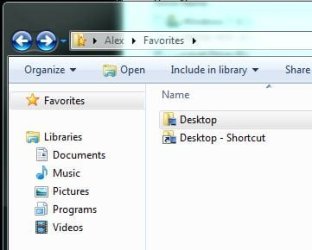
yep its in there :/
My Computer
- OS
- Windows 7 Premium
Did you ever find a solution for this problem? My computer just started doing it in it's very frustrating.Have you tried sticking it in the favorites folder in your personal files?
View attachment 36741
yep its in there :/
My Computer
- Computer type
- PC/Desktop
- Computer Manufacturer/Model Number
- Sager
- OS
- Microsoft Windows 7 Professional 64-bit 7601 Multiprocessor Free Service Pack 1
- CPU
- Intel(R) Core(TM) i7-4710MQ CPU @ 2.50GHz
- Motherboard
- Notebook W35xSS_370SS
- Memory
- 16.00 GB
- Graphics Card(s)
- (1) Intel(R) HD Graphics 4600 (2) NVIDIA GeForce GTX 860M
- Sound Card
- (1) VIA HD Audio (2) USB Audio Device (3) Intel(R) Displ
- Screen Resolution
- 0 x 0 x 0 bits (0 colors) @ 0 Hz
- Hard Drives
- (1) ATA HGST HTS721010A9 SCSI Disk Device (2) ATA Samsung SSD 840 SCSI Disk Device (3) USB Flash Memory USB Device (4) YMAX MagicJack USB Device
- Internet Speed
- 15 MB U-verse
- Antivirus
- Norton Security
Did you ever find a solution for this problem? My computer just started doing it in it's very frustrating.Have you tried sticking it in the favorites folder in your personal files?
View attachment 36741
yep its in there :/
See if this helps you out,
http://www.sevenforums.com/tutorials/38933-favorites-add-remove-navigation-pane.html
My Computer
- Computer type
- PC/Desktop
- Computer Manufacturer/Model Number
- Self Built
- OS
- Win 10 Pro x64
- CPU
- Intel I5-2500K @3.3GHz
- Motherboard
- Asrock P67 Extreme4
- Memory
- 16GB G.Skill Ripjaws X (4x4GB)
- Graphics Card(s)
- EVGA GeForce 750 Ti SC 2GB
- Sound Card
- ASUS Xonar DG 5.1 Channels 24-bit 96KHz PCI Interface Sound
- Monitor(s) Displays
- auria eq2367
- Screen Resolution
- 1920 x 1080
- Hard Drives
- 250GB Samsung 850 EVO SSD
1TB WD Blue
1TB Hitachi
- PSU
- SeaSonic X 650W 80 Plus Gold
- Case
- Corsair Obsidian 750D
- Cooling
- Corsair H60, Three 140mm case fans
- Keyboard
- Logitech Wireless Keyboard K520
- Mouse
- Logitech Wireless Mouse M310
- Internet Speed
- Wave Broadband ~ 100 dn 5 up
- Antivirus
- Windows Defender, Malwarebytes Premium
- Browser
- Edge, IE11, Chrome
- Other Info
- Laptop specs: HP g7-1365dx /
CPU: AMD A6-3420M APU with Radeon(tm) HD Graphics /
RAM: Crucial 8Gb (2x4Gb) /
SSD: Crucial M4-CT128M4SSD2 ATA Device/ FW 000F /
GFX: AMD Radeon HD 6520G /
OS: Windows 10 Pro x64

Hello Msradell, welcome to Seven Forums!
Maybe for you as you say it "just started" you can do a system restore to a point before the issue started, have a look at the tutorial at the link below; be sure to post back to keep us informed how it sorts out for you.
How to Do a System Restore in Windows 7
Maybe for you as you say it "just started" you can do a system restore to a point before the issue started, have a look at the tutorial at the link below; be sure to post back to keep us informed how it sorts out for you.
How to Do a System Restore in Windows 7
My Computer
- Computer Manufacturer/Model Number
- * BFK Customs *
- OS
- W 7 64-bit Ultimate
- CPU
- Intel Q9550 Yorkfield
- Motherboard
- ASUS P5Q Pro
- Memory
- 8GB Dominator 8500C5D
- Graphics Card(s)
- ATI : XFX 5870
- Sound Card
- Realtek HD Audio 7-1
- Monitor(s) Displays
- 1x 47" LCD HDMI & 3x 26" LCD HDMI
- Screen Resolution
- 1920x1080P & 1920x1200
- Hard Drives
- 1x 80GB Intel X25-M G2 SSD : 1x 500GB & 1x 640GB WD Caviar Black(s)
- PSU
- Corsair 620HX
- Case
- Cooler Master RC-690
- Cooling
- Tuniq Tower 120, 2x 140mm and 3x 120mm case fans
- Keyboard
- Microsoft 500
- Mouse
- Razer Diamondback 3G
- Internet Speed
- 14 Mb/s
- Other Info
- 1x Koutech 3Gb/s SATA HDD Hot Swap Rack
I already tried the system restore and it didn't affect the problem. I also checked the registry in the places identified in Derekimo's post and they also have the correct values but I still have a problem? Any more ideas I can try?
My Computer
- Computer type
- PC/Desktop
- Computer Manufacturer/Model Number
- Sager
- OS
- Microsoft Windows 7 Professional 64-bit 7601 Multiprocessor Free Service Pack 1
- CPU
- Intel(R) Core(TM) i7-4710MQ CPU @ 2.50GHz
- Motherboard
- Notebook W35xSS_370SS
- Memory
- 16.00 GB
- Graphics Card(s)
- (1) Intel(R) HD Graphics 4600 (2) NVIDIA GeForce GTX 860M
- Sound Card
- (1) VIA HD Audio (2) USB Audio Device (3) Intel(R) Displ
- Screen Resolution
- 0 x 0 x 0 bits (0 colors) @ 0 Hz
- Hard Drives
- (1) ATA HGST HTS721010A9 SCSI Disk Device (2) ATA Samsung SSD 840 SCSI Disk Device (3) USB Flash Memory USB Device (4) YMAX MagicJack USB Device
- Internet Speed
- 15 MB U-verse
- Antivirus
- Norton Security