
Hey everyone, new to the forums but I've browsed it a few times before, helpful board, this is.
I finally got my rear surround speakers mounted on my back wall, the problem is I'm about 3-4 feet from my front speakers and at least double that from my rears, when at my desk. When watching movies from my bed which is again the back wall, it's the opposite. I'm sure there are enough users with the same issue...
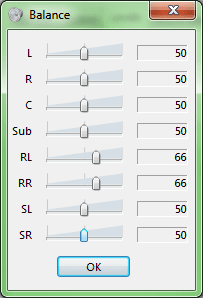
When I'm at my desk listening to music or gaming, I've got my front set turned down to 50% and the rears at the default of 66%
I'd like to create an easy way to switch that around so when I lay down at night and watch a movie I can turn the rears down to 50, the front left and right up to 66 and center channel all the way up to 75% so I can actually hear what the heck they're saying in the movie.
I'd like to be able to switch audio balance configuration with a quick shortcut both on my computer and on my remote control.
I'm willing to dig into this to get it done, if anyone can provide me some knowledge and information I'd greatly appreciate it. It would be awesome to compile a program so that others may easily accomplish the endpoint without the grunt work. I don't like repeated grunt work when you make things easier for others.
So what do you think, anyone else in the same boat and would care to help me accomplish my goal?
Illustration of the Audio balance panel in Windows 7:
I finally got my rear surround speakers mounted on my back wall, the problem is I'm about 3-4 feet from my front speakers and at least double that from my rears, when at my desk. When watching movies from my bed which is again the back wall, it's the opposite. I'm sure there are enough users with the same issue...
When I'm at my desk listening to music or gaming, I've got my front set turned down to 50% and the rears at the default of 66%
I'd like to create an easy way to switch that around so when I lay down at night and watch a movie I can turn the rears down to 50, the front left and right up to 66 and center channel all the way up to 75% so I can actually hear what the heck they're saying in the movie.
I'd like to be able to switch audio balance configuration with a quick shortcut both on my computer and on my remote control.
I'm willing to dig into this to get it done, if anyone can provide me some knowledge and information I'd greatly appreciate it. It would be awesome to compile a program so that others may easily accomplish the endpoint without the grunt work. I don't like repeated grunt work when you make things easier for others.
So what do you think, anyone else in the same boat and would care to help me accomplish my goal?
Illustration of the Audio balance panel in Windows 7:
Attachments
My Computer
- OS
- Windows 7 Ultimate x64