Customizing programs list on start menu?

debdemer

New member
Local time
11:23 PM
Messages
1
In older Windows up through XP I have always customized the start menu to reduce the clutter of programs shown. I create several main categories/folders such as Work Programs, Multimedia Programs, Games, Utilites, etc. and then move all the programs shortcuts listed into each category that I wanted them to be. Thus, when I clicked on Start, I would just see my category folders, then go to the category I wanted and see just the programs of that category. I am about to start using a computer with Windows 7 and I want to be able to do that also. I hate clicking on Start and seeing a long, jumbled up list every program. What a mess! Not being familiar with W7, I don't know how to do it. I know that the "old" Documents and Settings is no longer "real" and that everything is listed under Users. Which is listed as "access denied". So -- can I do what I want and, if so, how? I have to change security/permissions or something?
 

My Computer

Computer Manufacturer/Model Number
Gateway DX
OS
Windows 7 64
Memory
1 gig
Graphics Card(s)
Nvidia
Hard Drives
1 TB

My Computer

Computer type
Laptop
Computer Manufacturer/Model Number
Sager NP9170
OS
Win 7 Pro x64 / Win 10 Pro
CPU
Intel(R) Core(TM) i7-3630QM CPU @ 2.40GHz
Motherboard
CLEVO P170EM
Memory
12 GB
Graphics Card(s)
(1) Intel(R) HD Graphics 4000 (2) NVIDIA GeForce GTX 675M
Sound Card
(1) Realtek High Definition Audio (2) Intel(R) Display Aud
Monitor(s) Displays
17.3
Screen Resolution
1920x1080
Hard Drives
(1) Samsung 860 EVO 500GB(OS) (1) Samsung 860 EVO 500GB(Data)
Keyboard
Backlite
Antivirus
MSE, Malwarebytes Pro
Browser
Firefox
Other Info
DESKTOP: Custom-built.
OS: Win 10 Pro x64.
CASE: Rosewill R5.
CPU: Intel I5 4670K CPU @ 3.40GHz.
CPU COOLER: Cool Master Hyper 212 EVO.
MOTHERBOARD: Asus Z87-A.
MEMORY: Kingston HyperX 2x4 GB.
GPU: Nvidia Geforce 650 TI.
PSU: Corsair TX750.
DRIVES: (1) Samsung 840 120 GB SSD (2) Western Digital blue 500 GB 7200 RPM.
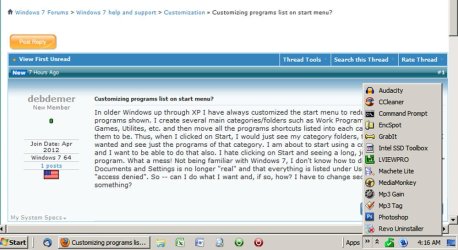
Another idea is to create a bunch of shortcuts to your most frequently used programs. Put those shortcuts in a folder. Then make a new toolbar with a link to those programs in that folder.

The result is a pop-up list, as seen in this pic. With this list of programs, I rarely look for programs in the start menu.
 

Attachments

  • Untitled-1.jpg
    Untitled-1.jpg
    266.1 KB · Views: 30

My Computer

Computer type
PC/Desktop
Computer Manufacturer/Model Number
Ignatz Special; 4 speed manual gearbox; factory air conditioning; one of one
OS
Windows 7 Home Premium SP1, 64-bit
CPU
Intel Skylake i5-6600K, not overclocked
Motherboard
AsRock Z170M Extreme 4, micro ATX
Memory
8 GB HyperX DDR4-2666 (2 x 4 GB)
Graphics Card(s)
none; graphics are integrated on CPU
Sound Card
onboard: Realtek ALC1150; external: USB Behringer UF0-202
Monitor(s) Displays
Dell S2340M 23 inch IPS
Screen Resolution
1600 x 900
Hard Drives
System: Crucial MX100 series SSD, 128 GB;
Data: Samsung Spinpoint 103SJ, 1 TB;
Backup: WD Caviar Green WD30EZRX-00D8PB0, 3 TB
PSU
Rosewill SilentNight 500 watt fanless, semi-modular
Case
Antec Solo II
Cooling
Noctua NH-U12S; Noctua F12 intake, Noctua S12A exhaust
Keyboard
Microsoft 200 6JH-00001 USB
Mouse
Dell or Microsoft optical wired; USB
Antivirus
Microsoft Security Essentials and Malwarebytes Premium
Browser
Pale Moon
Other Info
All fans PWM; speeds at idle: CPU circa 500 rpm; intake circa 600 rpm; exhaust circa 600 rpm; CPU temps 27 idle and 47 C load in a warm room (27 C/81 F) when running Intel Extreme Tuning Utility stress test.
Back
Top