Customizing Windows Card Games

Blizarro

New member
Local time
1:25 PM
Messages
95
Location
Los Banos Ca, USA
Is anyone interested in customizing solitaire, hearts, freecell, and spider solitaire?

Either no wants to or its too dayum hard to do it.

I checked around and only found one recent tutorial on how to overwrite the current backgrounds.

I guess im wondering if people would like an app to customize it. Im bored with StartOrbz and I think its time to release my next project.

Let me know what you think.
 

My Computer

OS
Windows 7 Ultimate x86
CPU
amd64
yes that would be cool it would be a great tutorial
 

My Computer

Computer type
PC/Desktop
Computer Manufacturer/Model Number
Custom Build
OS
Windows 7 Pro 64bit
CPU
Intel Core i7 2600K @ 3.40GHz
Motherboard
ASUSTeK Computer INC. P8P67 PRO (LGA1155)
Memory
16.0GB Dual-Channel DDR3 @ 799MHz
Graphics Card(s)
Dual GTX 560TI
Sound Card
Realtek High Definition Audio
Monitor(s) Displays
23" and 24" monitor
Screen Resolution
1920-1080
Hard Drives
128GB SSD

2TB HD
Internet Speed
100MB
Thanks for responding.

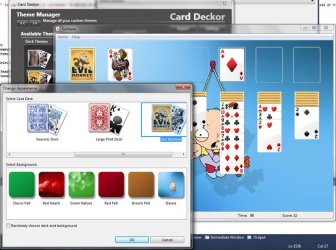
It wouldnt be a tutorial. The app is done. Im just polishing everything up.

Doing this wasnt easy. It took days to figure out how to actually add new decks and backgrounds. I had to learn how the cardgames.dll file was used. A lot of trial and error.

I understand why it wasnt done before. To manually mod the files and add new decks took like 30 minutes. That didnt include photoshop time. And thats AFTER I figured out how to do it! I guess thats why nobody has done it.

Coding it wasnt fun either. I borrowed code from so many of my projects. It took about 5 days to code it all.

-Blizo
 

Attachments

  • Deckor.jpg
    Deckor.jpg
    91.9 KB · Views: 135

My Computer

OS
Windows 7 Ultimate x86
CPU
amd64
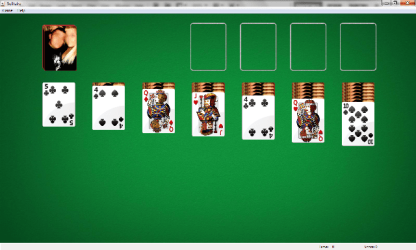
I skinned mine a while back the manual way when someone was asking how to do it. Figured the best way to find out how was to do it. I would have been nice if MS would have added the option to use a custom deck picture.
 

Attachments

  • deck.png
    deck.png
    92.7 KB · Views: 66

My Computer

Computer Manufacturer/Model Number
HP Compaq 6715b
OS
Windows 7 Enterprise RTM x64
Memory
4GB DDR2 800
Hello blizarro, I've had been doing some browsing into the dll file, now I'm not sure but in order to add more decks choices, you would need to created a new set of data for that new deck, and twik some numbers here and there to acomodate the extra space for the actual deck prints y all 5 jpg files. am I overthinking it or am on the right path some help be apresiated
 

My Computer

OS
Win7 Ultimate X64
Nice work Blizarro. Didn't want to change my card backs, 'cos it was a long process ;) (I know I'm lazy). Now it seems quite easy, thanks to you.

I skinned mine a while back the manual way when someone was asking how to do it. Figured the best way to find out how was to do it. I would have been nice if MS would have added the option to use a custom deck picture.

I remember the thread fritz :)
http://www.sevenforums.com/customization/108387-how-change-card-backs-2.html
 

My Computer

Computer type
Laptop
Computer Manufacturer/Model Number
HP EliteBook 8530w Mobile Workstation
OS
Windows 7 Ultimate x64 (XP, 98SE, 95, 3.11, DOS 7.10 on VM) + Ubuntu 10.04 LTS Lucid Lynx
CPU
Intel Core 2 Duo Processor P8600 (2.40 GHz, 3 MB L2 cache)
Motherboard
Mobile Intel PM45 Express Chipset ICH9M-Enhanced
Memory
4GB 800 MHz DDR2 SDRAM
Graphics Card(s)
ATI Mobility FireGL V5700 with 256 MB
Sound Card
SoundMAX Integrated Digital HD Audio
Monitor(s) Displays
15.4-inch WXGA anti-glare (1280 x 800 resolution)
Screen Resolution
1280 x 800
Hard Drives
500GB + 1TB
Mouse
Synaptics PS/2 Port Touchpad, USB Mouse
Internet Speed
4 Mbps
Antivirus
MSE
Browser
Firefox, Chrome, IE
Other Info
Authentec AES2810 Fingerprint Reader
Just discovered this thread and I'm so glad I did! I love playing these games on-line, but a lot of the apps appear way too small on the screen. (And zooms and other enlarging links don't help.) Could any of your customizations include displaying the games in full screen mode? That would be great!!!
 

My Computer

Computer Manufacturer/Model Number
HP Pavillion dv5t (generation 1)
OS
Vista 64 bit and 32 bit (SP2)
CPU
Intel(R) Core(TM)2 Duo Processor T9400 (2.53 GHz
Memory
4GB DDR2 System Memory (2 Dimm)
Graphics Card(s)
512 MB NVIDIA GeForce 9600M GT
Monitor(s) Displays
15.4" diagonal WSXGA+ High-Definition HP BrightView Widescre
Screen Resolution
1680 x 1050
Hard Drives
320GB 5400RPM SATA Hard Drive with HP ProtectSmart Hard Drive Protection
Keyboard
Built-in HP
Mouse
Built in - Synaptics TouchPad V6.5 on PS/2 Port
Internet Speed
Max
Other Info
~ Intel Next-Gen Wireless-N Mini-card w/Bluetooth ~ Blu-Ray ROM DVD+/-R/RW ~ Integ. HDTV Hybrid Tuner ~ 12 Cell Battery ~ MS Office (Home Premium) 2007 ~
Hello blizarro, I've had been doing some browsing into the dll file, now I'm not sure but in order to add more decks choices, you would need to created a new set of data for that new deck, and twik some numbers here and there to acomodate the extra space for the actual deck prints y all 5 jpg files. am I overthinking it or am on the right path some help be apresiated

Wow, I thought no one even cared about this app. I backed it up.

This is no simple tweak. Ms did not want us to add decks.

To add new decks would require creating several xmls , jpgs and cabs. If you have been tinkering with the dll then you will see the standard files and how they are named.

Manually doing this would take hours.

If you want I will slip you the beta, you can add a new deck and then peek at how i did it. It only has one bug. 4 cards show incorrectly. Its a mapping issue that I havnt fixed. I gave up on this app since no one was interested.
 

My Computer

OS
Windows 7 Ultimate x86
CPU
amd64
Just discovered this thread and I'm so glad I did! I love playing these games on-line, but a lot of the apps appear way too small on the screen. (And zooms and other enlarging links don't help.) Could any of your customizations include displaying the games in full screen mode? That would be great!!!

This only works on the cardgames.dll file. No online games.
 

My Computer

OS
Windows 7 Ultimate x86
CPU
amd64
If there is still interest, then I will fix the one bug and release it. Im currently working on my logon editor and I could use a break from authui.dll.

Let me know.
 

My Computer

OS
Windows 7 Ultimate x86
CPU
amd64
I fixed the known issues. Getting those mapping coordinates just right sucks.

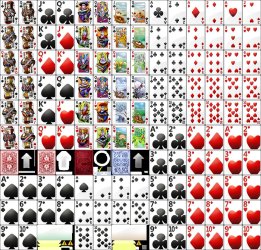
To create my own sheet I use the original deck sheet. Then in memory I recreate my own.

Below is my low res sheet and the ms one. Whats awesome is that even though im using my own custom sheets, cardgames.dll still uses the original sheet to paint the other sheet elements that I didnt draw.
 

Attachments

  • SHEETSHAUNTEDHOUSEDECKX2.JPG
    SHEETSHAUNTEDHOUSEDECKX2.JPG
    272.7 KB · Views: 24
  • SHEETSHIGHLIGHTSHEET1.JPG
    SHEETSHIGHLIGHTSHEET1.JPG
    251 KB · Views: 27

My Computer

OS
Windows 7 Ultimate x86
CPU
amd64
Beta tester

Hello Blizarro, As I mention in your Facebook post, I would like to be a part of your beta tester and and may be able to be of some asistands. I'm not much into the hall system yet but I'm not to lost ether, if you like you can contact me and like they say two head think better then one and we may be able to help each other.
 

My Computer

OS
Win7 Ultimate X64
Hello Blizarro, As I mention in your Facebook post, I would like to be a part of your beta tester and and may be able to be of some asistands. I'm not much into the hall system yet but I'm not to lost ether, if you like you can contact me and like they say two head think better then one and we may be able to help each other.

Sounds good. I want to get this app out as soon as possible. I will post on FB when beta testing begins. In the discussions page.
 

My Computer

OS
Windows 7 Ultimate x86
CPU
amd64
This is going to be one cool app :)
 

My Computer

Computer type
Laptop
Computer Manufacturer/Model Number
HP EliteBook 8530w Mobile Workstation
OS
Windows 7 Ultimate x64 (XP, 98SE, 95, 3.11, DOS 7.10 on VM) + Ubuntu 10.04 LTS Lucid Lynx
CPU
Intel Core 2 Duo Processor P8600 (2.40 GHz, 3 MB L2 cache)
Motherboard
Mobile Intel PM45 Express Chipset ICH9M-Enhanced
Memory
4GB 800 MHz DDR2 SDRAM
Graphics Card(s)
ATI Mobility FireGL V5700 with 256 MB
Sound Card
SoundMAX Integrated Digital HD Audio
Monitor(s) Displays
15.4-inch WXGA anti-glare (1280 x 800 resolution)
Screen Resolution
1280 x 800
Hard Drives
500GB + 1TB
Mouse
Synaptics PS/2 Port Touchpad, USB Mouse
Internet Speed
4 Mbps
Antivirus
MSE
Browser
Firefox, Chrome, IE
Other Info
Authentec AES2810 Fingerprint Reader
This is great. Back in 95/98SE I download this replacement cards.dll or something which replaced the card faces and backs. XP didn't allow replacing the dll so I lived without. Was a long time lemme tell ya :p

Btw any idea why they don't simply let us import images to make custom cards/backgrounds?
 

My Computer

Computer Manufacturer/Model Number
Self-built rig
OS
Win7 Pro x64
CPU
Koa i5-2550K
Memory
8 GB
Graphics Card(s)
Sapphire ATI 6870 1GB GDDR5
Sound Card
RealTek HD Audio / ATI HDMI Audio
Monitor(s) Displays
Samsung HDTV Monitor T23A350
Screen Resolution
1920 x 1080
Hard Drives
- SSD (C:)
- HDD (D:)
- BD-ROM (E:)
Keyboard
Logitech G110
Internet Speed
Unifi home (5mbps)
This is great. Back in 95/98SE I download this replacement cards.dll or something which replaced the card faces and backs. XP didn't allow replacing the dll so I lived without. Was a long time lemme tell ya :p

Btw any idea why they don't simply let us import images to make custom cards/backgrounds?

I was once told by an ms employee that the reason they hate customization is because of customer support.

MS CSTMR SRVCE: Sir, please click on the blue button.
USER: What blue button? All I see if a purple one. Is that it?
MS CSTMR SRVCE: No, its blue. It should be on the left bottom.
USER: NO, mine is purple and is on the top right.
MS CSTMR SRVCE: Are you on the right page? The background should be a blue screen with green plants sprouting out.
USER: No. mine is of pretty little kitties.

LOL, I still remember when the ms employee used this to explain to me why they hate customization. I was laughing. SO true.

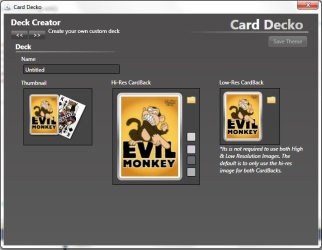
If you guys really want to try this. I will post the beta, its not like CardDecko is going to kill your install. Harmless customizations.

There is only one minor thing I gotta fix and then I can release.
 

My Computer

OS
Windows 7 Ultimate x86
CPU
amd64

My Computer

Computer type
PC/Desktop
Computer Manufacturer/Model Number
Self Built
OS
Win 10 Pro x64
CPU
Intel I5-2500K @3.3GHz
Motherboard
Asrock P67 Extreme4
Memory
16GB G.Skill Ripjaws X (4x4GB)
Graphics Card(s)
EVGA GeForce 750 Ti SC 2GB
Sound Card
ASUS Xonar DG 5.1 Channels 24-bit 96KHz PCI Interface Sound
Monitor(s) Displays
auria eq2367
Screen Resolution
1920 x 1080
Hard Drives
250GB Samsung 850 EVO SSD
1TB WD Blue
1TB Hitachi
PSU
SeaSonic X 650W 80 Plus Gold
Case
Corsair Obsidian 750D
Cooling
Corsair H60, Three 140mm case fans
Keyboard
Logitech Wireless Keyboard K520
Mouse
Logitech Wireless Mouse M310
Internet Speed
Wave Broadband ~ 100 dn 5 up
Antivirus
Windows Defender, Malwarebytes Premium
Browser
Edge, IE11, Chrome
Other Info
Laptop specs: HP g7-1365dx /
CPU: AMD A6-3420M APU with Radeon(tm) HD Graphics /
RAM: Crucial 8Gb (2x4Gb) /
SSD: Crucial M4-CT128M4SSD2 ATA Device/ FW 000F /
GFX: AMD Radeon HD 6520G /
OS: Windows 10 Pro x64
Back
Top