Customizing Windows

Kukag

New member
Pro User
Local time
6:35 AM
Messages
239
Location
California
Hey all so i just formatted and setting up windows, and well I'm having some trouble =( First i installed 7Pro off of deviant art the custom theme and it worked like a charm. Well then i was changing all the icons on my desktop and couldn't for control panel. so I followed the tuts on vista forums and well they didn't work at all, did exactly what was said and it didn't change the icon. So I tried just logging off and then logging back in to see if it would change the control panel icon and then my theme went all messed up, it was all white and crap. so I tried to apply windows 7 start theme and then go back to the 7Pro one and it was still messed up! So i re-downloaded and replaced the files again and tried to apply and once again it was still messed up! So someone please help me before I go crazy, I can't figure out why any of this isn't working!

Thanks,
Kukag
 

My Computer

Computer Manufacturer/Model Number
Custom
OS
Windows 7
CPU
AMD Phenom II X4 940 3.0 Stock
Motherboard
Gigabyte GA-MA78GM-S2H
Memory
G.SKILL DDR2 800 PI Black 4GB+Corsair XMS2 Xtrm Gaming 2GB
Graphics Card(s)
ASUS EN8800GT TOP (Fact OC)
Monitor(s) Displays
Optiquest 20" Flatscreen
Screen Resolution
1680x1050
Hard Drives
Seagate 3.5' 7200RPM 750GB HDD
PSU
Antec NeoHE 550W
Cooling
Stock AMD Phenom HSF
Keyboard
Logitech G15
Internet Speed
Charter HighSpeed 10 Down / 5 Up
Hi Kukag !!
Keep a cool head, pal ! I know that you are a good help to others, and so yourself.

Have you applied the uxtheme patch, pal ? If so, first unpatch all the three dlls' and go back to default aero theme. Then reapply the patches , and apply the custom theme. See whether if fixes the problem or not :)
 

My Computer

Computer type
PC/Desktop
Computer Manufacturer/Model Number
Self Assembled
OS
Microsoft Windows 10 Pro Insider Preview 64-bit
CPU
Intel(R) Core(TM) i3-4130 CPU @ 3.40GHz
Motherboard
Gigabyte Technology Co., Ltd. B85M-D3H
Memory
Corsair Vengence 4GB x2 (8.00GB Dual-Channel DDR3 @ 798MHz)
Graphics Card(s)
2047MB GeForce GTS 450 (ZOTAC International)
Sound Card
Onboard (Realtek High Definition Audio)
Monitor(s) Displays
LG Flatron E2040T
Screen Resolution
1600x900
Hard Drives
Western Digital 1 TB
Seagate 500 GB
PSU
Corsair VS550
Case
Cooler Master K380
Cooling
Cooler Master Seidon 120V Plus
Keyboard
Logitech MK260r
Mouse
Logitech MK260r
Internet Speed
PMPL Broadband
Antivirus
Windows Defender + MBAM
Browser
Firefox
Other Info
Dell Studio 15" Laptop
Lol alright, ya It was just 1:56 AM and I was tired lol I'll give that a try right now, I have em patched already, does uxstyle have unpatching tools?

Update : Crap! I didn't backup these 3 things, what should i do?

Thanks,
Kukag
 

My Computer

Computer Manufacturer/Model Number
Custom
OS
Windows 7
CPU
AMD Phenom II X4 940 3.0 Stock
Motherboard
Gigabyte GA-MA78GM-S2H
Memory
G.SKILL DDR2 800 PI Black 4GB+Corsair XMS2 Xtrm Gaming 2GB
Graphics Card(s)
ASUS EN8800GT TOP (Fact OC)
Monitor(s) Displays
Optiquest 20" Flatscreen
Screen Resolution
1680x1050
Hard Drives
Seagate 3.5' 7200RPM 750GB HDD
PSU
Antec NeoHE 550W
Cooling
Stock AMD Phenom HSF
Keyboard
Logitech G15
Internet Speed
Charter HighSpeed 10 Down / 5 Up
Lol alright, ya It was just 1:56 AM and I was tired lol I'll give that a try right now, I have em patched already, does uxstyle have unpatching tools?

Update : Crap! I didn't backup these 3 things, what should i do?

Thanks,
Kukag

Which three is it? I use uxstyle core which doesn't replace them but runs as a small footprint service so I should still have the originals if you need them. UxStyle - no more patching.
 

My Computer

Computer Manufacturer/Model Number
Averatec 6130HS-20
OS
Windows 7 Professional 32-bit (6.1, Build 7600)
CPU
Intel(R) Pentium(R) 4 3.00 GHz HT
Memory
2.0 GB
Graphics Card(s)
ATI Mobility Radeon 9600 64MB
Sound Card
Realtek AC'97 Audio
Screen Resolution
1280 x 800
Hard Drives
Seagate 96023A 60GB 7200RPM -
Seagate FreeAgentDesktop 250GB
Cooling
20 Inch Box Fan
Mouse
Targus PAWM10 Wireless Optical Laptop Mouse
Wait thats the one I used? I'm running a SFC through cmd.exe to replace the DLL's? but I'm guessing I didn't have to? what do i do now?

Thanks,
Kukag
 

My Computer

Computer Manufacturer/Model Number
Custom
OS
Windows 7
CPU
AMD Phenom II X4 940 3.0 Stock
Motherboard
Gigabyte GA-MA78GM-S2H
Memory
G.SKILL DDR2 800 PI Black 4GB+Corsair XMS2 Xtrm Gaming 2GB
Graphics Card(s)
ASUS EN8800GT TOP (Fact OC)
Monitor(s) Displays
Optiquest 20" Flatscreen
Screen Resolution
1680x1050
Hard Drives
Seagate 3.5' 7200RPM 750GB HDD
PSU
Antec NeoHE 550W
Cooling
Stock AMD Phenom HSF
Keyboard
Logitech G15
Internet Speed
Charter HighSpeed 10 Down / 5 Up
Wait thats the one I used? I'm running a SFC through cmd.exe to replace the DLL's? but I'm guessing I didn't have to? what do i do now?

Thanks,
Kukag

It should have an uninstall feature in the Programs and Features window.

Untitled.jpg
 

My Computer

Computer Manufacturer/Model Number
Averatec 6130HS-20
OS
Windows 7 Professional 32-bit (6.1, Build 7600)
CPU
Intel(R) Pentium(R) 4 3.00 GHz HT
Memory
2.0 GB
Graphics Card(s)
ATI Mobility Radeon 9600 64MB
Sound Card
Realtek AC'97 Audio
Screen Resolution
1280 x 800
Hard Drives
Seagate 96023A 60GB 7200RPM -
Seagate FreeAgentDesktop 250GB
Cooling
20 Inch Box Fan
Mouse
Targus PAWM10 Wireless Optical Laptop Mouse
Lol alright, ya It was just 1:56 AM and I was tired lol I'll give that a try right now, I have em patched already, does uxstyle have unpatching tools?

Update : Crap! I didn't backup these 3 things, what should i do?

Thanks,
Kukag
There is no cause of agony, till now, pal. You must keep a cool head to overcome the problem. First, go through the tutorial : http://www.sevenforums.com/tutorials/28377-theme-how-apply-custom-themes.html . If you dont have the theme patcher, download it from the link provided there.

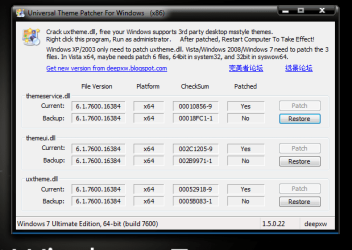
Now, unzip and run the themepatcher. Look carefully .... if the patches are applyed properly, the patcher window should look like this
2f09cp2.png

Look... no need for manual backup. it is already there :D Just click the three restore buttons.

And if the patcher window looks different ... that means if the Backup rows are empty and patch buttons are highlighted ... it is to understand that theprevious patching somehow disabled during the logoff - logon . Apply the three again. Do the next (you know it well, but for this time only ake the help of the tutorial), and apply the theme.

But if it is neither the first nor the second condition .... please let me know what happened :)
 

My Computer

Computer type
PC/Desktop
Computer Manufacturer/Model Number
Self Assembled
OS
Microsoft Windows 10 Pro Insider Preview 64-bit
CPU
Intel(R) Core(TM) i3-4130 CPU @ 3.40GHz
Motherboard
Gigabyte Technology Co., Ltd. B85M-D3H
Memory
Corsair Vengence 4GB x2 (8.00GB Dual-Channel DDR3 @ 798MHz)
Graphics Card(s)
2047MB GeForce GTS 450 (ZOTAC International)
Sound Card
Onboard (Realtek High Definition Audio)
Monitor(s) Displays
LG Flatron E2040T
Screen Resolution
1600x900
Hard Drives
Western Digital 1 TB
Seagate 500 GB
PSU
Corsair VS550
Case
Cooler Master K380
Cooling
Cooler Master Seidon 120V Plus
Keyboard
Logitech MK260r
Mouse
Logitech MK260r
Internet Speed
PMPL Broadband
Antivirus
Windows Defender + MBAM
Browser
Firefox
Other Info
Dell Studio 15" Laptop
I'm gonna try and uninstall the UXstyle thing first and then reinstalling it.

Thanks,
Kukag
 

My Computer

Computer Manufacturer/Model Number
Custom
OS
Windows 7
CPU
AMD Phenom II X4 940 3.0 Stock
Motherboard
Gigabyte GA-MA78GM-S2H
Memory
G.SKILL DDR2 800 PI Black 4GB+Corsair XMS2 Xtrm Gaming 2GB
Graphics Card(s)
ASUS EN8800GT TOP (Fact OC)
Monitor(s) Displays
Optiquest 20" Flatscreen
Screen Resolution
1680x1050
Hard Drives
Seagate 3.5' 7200RPM 750GB HDD
PSU
Antec NeoHE 550W
Cooling
Stock AMD Phenom HSF
Keyboard
Logitech G15
Internet Speed
Charter HighSpeed 10 Down / 5 Up
I'm gonna try and uninstall the UXstyle thing first and then reinstalling it.

Thanks,
Kukag
After uninstall, if you like, you could try Arc's tut on patching it. I've never been fond of the patching method although I did it in XP. Always had a tough time deciding which version of the patch to use. It appears the one mentioned by Arc has taken the guess work out of it though
 

My Computer

Computer Manufacturer/Model Number
Averatec 6130HS-20
OS
Windows 7 Professional 32-bit (6.1, Build 7600)
CPU
Intel(R) Pentium(R) 4 3.00 GHz HT
Memory
2.0 GB
Graphics Card(s)
ATI Mobility Radeon 9600 64MB
Sound Card
Realtek AC'97 Audio
Screen Resolution
1280 x 800
Hard Drives
Seagate 96023A 60GB 7200RPM -
Seagate FreeAgentDesktop 250GB
Cooling
20 Inch Box Fan
Mouse
Targus PAWM10 Wireless Optical Laptop Mouse
Ya I thought about it, but this seemed simpler and i like the uninstall to remove em so I did it and the theme works great =D Thanks a bunch, now all I need help on is why my control panel icon will not change =(

Thanks,
Kukag
 

My Computer

Computer Manufacturer/Model Number
Custom
OS
Windows 7
CPU
AMD Phenom II X4 940 3.0 Stock
Motherboard
Gigabyte GA-MA78GM-S2H
Memory
G.SKILL DDR2 800 PI Black 4GB+Corsair XMS2 Xtrm Gaming 2GB
Graphics Card(s)
ASUS EN8800GT TOP (Fact OC)
Monitor(s) Displays
Optiquest 20" Flatscreen
Screen Resolution
1680x1050
Hard Drives
Seagate 3.5' 7200RPM 750GB HDD
PSU
Antec NeoHE 550W
Cooling
Stock AMD Phenom HSF
Keyboard
Logitech G15
Internet Speed
Charter HighSpeed 10 Down / 5 Up
Ya I thought about it, but this seemed simpler and i like the uninstall to remove em so I did it and the theme works great =D Thanks a bunch, now all I need help on is why my control panel icon will not change =(

Thanks,
Kukag

I had trouble in XP with the control panel icon not changing at all locations of it. I used an older app to change it. What are you using to change it?
 

My Computer

Computer Manufacturer/Model Number
Averatec 6130HS-20
OS
Windows 7 Professional 32-bit (6.1, Build 7600)
CPU
Intel(R) Pentium(R) 4 3.00 GHz HT
Memory
2.0 GB
Graphics Card(s)
ATI Mobility Radeon 9600 64MB
Sound Card
Realtek AC'97 Audio
Screen Resolution
1280 x 800
Hard Drives
Seagate 96023A 60GB 7200RPM -
Seagate FreeAgentDesktop 250GB
Cooling
20 Inch Box Fan
Mouse
Targus PAWM10 Wireless Optical Laptop Mouse
After uninstall, if you like, you could try Arc's tut on patching it. I've never been fond of the patching method although I did it in XP. Always had a tough time deciding which version of the patch to use. It appears the one mentioned by Arc has taken the guess work out of it though
Hi Greg !
Me pal Sergio Garcia made that tutorial :D As an outstanding thememaker, he thinks it is the better way to apply themes, and so he recommends it :D And there is no more versions of universal themepatcher for windows 7; just two - 32 bit and 64 bit, so nothing to guess ... just pick up your one. In short, it is much different from the Uxtheme multipatchers we used to use in xp age :D
 

My Computer

Computer type
PC/Desktop
Computer Manufacturer/Model Number
Self Assembled
OS
Microsoft Windows 10 Pro Insider Preview 64-bit
CPU
Intel(R) Core(TM) i3-4130 CPU @ 3.40GHz
Motherboard
Gigabyte Technology Co., Ltd. B85M-D3H
Memory
Corsair Vengence 4GB x2 (8.00GB Dual-Channel DDR3 @ 798MHz)
Graphics Card(s)
2047MB GeForce GTS 450 (ZOTAC International)
Sound Card
Onboard (Realtek High Definition Audio)
Monitor(s) Displays
LG Flatron E2040T
Screen Resolution
1600x900
Hard Drives
Western Digital 1 TB
Seagate 500 GB
PSU
Corsair VS550
Case
Cooler Master K380
Cooling
Cooler Master Seidon 120V Plus
Keyboard
Logitech MK260r
Mouse
Logitech MK260r
Internet Speed
PMPL Broadband
Antivirus
Windows Defender + MBAM
Browser
Firefox
Other Info
Dell Studio 15" Laptop
Ya I thought about it, but this seemed simpler and i like the uninstall to remove em so I did it and the theme works great =D Thanks a bunch, now all I need help on is why my control panel icon will not change =(

Thanks,
Kukag
Hi Kukag !
Will you please explain me in which procedure you are trying to change the control panel icon? I know two methods.

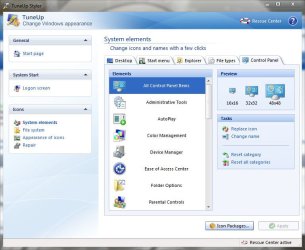
1. Install TuneUp Utilities . TuneUp Styler can do it . (Though I never have done it )
Capture.JPG

2. Access to imageres.dll using Resource Hacker, and change icongroup #27 to your desired one. (Have done this thing several times successfully )

I recommend you to adopt either process :D
 

My Computer

Computer type
PC/Desktop
Computer Manufacturer/Model Number
Self Assembled
OS
Microsoft Windows 10 Pro Insider Preview 64-bit
CPU
Intel(R) Core(TM) i3-4130 CPU @ 3.40GHz
Motherboard
Gigabyte Technology Co., Ltd. B85M-D3H
Memory
Corsair Vengence 4GB x2 (8.00GB Dual-Channel DDR3 @ 798MHz)
Graphics Card(s)
2047MB GeForce GTS 450 (ZOTAC International)
Sound Card
Onboard (Realtek High Definition Audio)
Monitor(s) Displays
LG Flatron E2040T
Screen Resolution
1600x900
Hard Drives
Western Digital 1 TB
Seagate 500 GB
PSU
Corsair VS550
Case
Cooler Master K380
Cooling
Cooler Master Seidon 120V Plus
Keyboard
Logitech MK260r
Mouse
Logitech MK260r
Internet Speed
PMPL Broadband
Antivirus
Windows Defender + MBAM
Browser
Firefox
Other Info
Dell Studio 15" Laptop
I'm doing the way it was done in vista by using regedit, and the CLSID folder or whatever and default icon but I'm gonna get Tuneup Styler

Edit - What exactly do I need to buy? Does TuneUp Utilities 2010 have something that can change the icons for Windows 7?

Thanks!
Kukag
 

My Computer

Computer Manufacturer/Model Number
Custom
OS
Windows 7
CPU
AMD Phenom II X4 940 3.0 Stock
Motherboard
Gigabyte GA-MA78GM-S2H
Memory
G.SKILL DDR2 800 PI Black 4GB+Corsair XMS2 Xtrm Gaming 2GB
Graphics Card(s)
ASUS EN8800GT TOP (Fact OC)
Monitor(s) Displays
Optiquest 20" Flatscreen
Screen Resolution
1680x1050
Hard Drives
Seagate 3.5' 7200RPM 750GB HDD
PSU
Antec NeoHE 550W
Cooling
Stock AMD Phenom HSF
Keyboard
Logitech G15
Internet Speed
Charter HighSpeed 10 Down / 5 Up
I'm doing the way it was done in vista by using regedit, and the CLSID folder or whatever and default icon but I'm gonna get Tuneup Styler

Edit - What exactly do I need to buy? Does TuneUp Utilities 2010 have something that can change the icons for Windows 7?

Thanks!
Kukag
Hi Kukag !
I do have TuneUp Utilities 2010; but I do not use them at all to change icons. Only a few icons can be changed by using the program . If you want to Change all the icons or whatever icon it may be, you may follow the tutorial http://www.sevenforums.com/tutorials/73191-icons-change-using-resource-hacker.html#post642539 .

Actually I am a customization frick. So I can tell you that it is a simple and sure way to change icons . You need not to buy anything but a few blank DVDs, to have an image backup of your system. And dont forget it, it is most important to have a backup of your system before starting customization.
 

My Computer

Computer type
PC/Desktop
Computer Manufacturer/Model Number
Self Assembled
OS
Microsoft Windows 10 Pro Insider Preview 64-bit
CPU
Intel(R) Core(TM) i3-4130 CPU @ 3.40GHz
Motherboard
Gigabyte Technology Co., Ltd. B85M-D3H
Memory
Corsair Vengence 4GB x2 (8.00GB Dual-Channel DDR3 @ 798MHz)
Graphics Card(s)
2047MB GeForce GTS 450 (ZOTAC International)
Sound Card
Onboard (Realtek High Definition Audio)
Monitor(s) Displays
LG Flatron E2040T
Screen Resolution
1600x900
Hard Drives
Western Digital 1 TB
Seagate 500 GB
PSU
Corsair VS550
Case
Cooler Master K380
Cooling
Cooler Master Seidon 120V Plus
Keyboard
Logitech MK260r
Mouse
Logitech MK260r
Internet Speed
PMPL Broadband
Antivirus
Windows Defender + MBAM
Browser
Firefox
Other Info
Dell Studio 15" Laptop
Back
Top