Cut and Paste glitch

InTents

New member
Local time
2:10 AM
Messages
21
Location
Cape Town, South Africa
I have searched everywhere and I can't seem to find a solution to this problem.

When I cut a file or folder from my desktop, and paste it anywhere else, another random icon on my desktop greys out as if I had cut that file as well.

At first I thought it might be some hidden malware but scans have come up with nothing.
I have also done a registry clean with ccleaner but the problem persists.

It does not interfere with system functionality, it is just a mild irritation.

However, I would love to hear what people have to say about it.

I am running Windows 7 Ultimate x64
 

My Computer

Computer Manufacturer/Model Number
Home built
OS
Windows 7 Ultimate x64
CPU
Intel Q8400 2.66Ghz
Motherboard
MSI P45T
Memory
Transcend 4Gb DDR2 800
Graphics Card(s)
Asus 250 GTS 512mb
Monitor(s) Displays
Samsung 2330H
Screen Resolution
1920x1080
Hard Drives
1x 750 GB Seagate Barracuda 7200.12
1x 500 GB Seagate 2.5" External
PSU
Vantec ion2+ 600W
Case
Coolermaster Elite 350
Cooling
2x 120mm fans 2x90mm fans
Keyboard
Logitech 350
Mouse
Logitech Performance MX
Internet Speed
384kbps
Does this also occur when you highlight the folder and use cntl-x to cut
 

My Computer

Computer Manufacturer/Model Number
Systemax N2000 Gaming PC
OS
Windows 7 Ultimate x64
CPU
Q6600 @2.4ghz (G0 stepping)
Motherboard
XFX nforce 680i LT
Memory
8 gb OCZ vista essential sli PC-6400
Graphics Card(s)
Dual 9800gt in SLI mode
Sound Card
Integrated 8.1 High Definition Audio
Monitor(s) Displays
Dual Sceptre x246w 24 inch monitors
Screen Resolution
1920 x 1200 each monitor
Hard Drives
500 GB SATA II / 7500 rpm
PSU
Cooler Master Real Power Pro 1250W
Case
N2000 server tower
Cooling
Thermaltake Bigwater 760 is
Keyboard
MS Intelitype 6000 v2.0
Mouse
MS Intelipoint 6000
Internet Speed
Wi-power 1.5GB up / 512k down
Other Info
Windows 7 Ultimate x64, Windows 7 Pro x64, Windows Home Premium X86, Windows XP pro, Windows Home Server x86, Ubuntu 10.4 x86 and x64, Ubuntu server 10.4, SQL Server 2005, MySQL 5.0
It happens when I press ctrl-x and when I right click and select cut
 

My Computer

Computer Manufacturer/Model Number
Home built
OS
Windows 7 Ultimate x64
CPU
Intel Q8400 2.66Ghz
Motherboard
MSI P45T
Memory
Transcend 4Gb DDR2 800
Graphics Card(s)
Asus 250 GTS 512mb
Monitor(s) Displays
Samsung 2330H
Screen Resolution
1920x1080
Hard Drives
1x 750 GB Seagate Barracuda 7200.12
1x 500 GB Seagate 2.5" External
PSU
Vantec ion2+ 600W
Case
Coolermaster Elite 350
Cooling
2x 120mm fans 2x90mm fans
Keyboard
Logitech 350
Mouse
Logitech Performance MX
Internet Speed
384kbps
If you then click on the desktop does the grayed out icon refresh
 

My Computer

Computer Manufacturer/Model Number
Systemax N2000 Gaming PC
OS
Windows 7 Ultimate x64
CPU
Q6600 @2.4ghz (G0 stepping)
Motherboard
XFX nforce 680i LT
Memory
8 gb OCZ vista essential sli PC-6400
Graphics Card(s)
Dual 9800gt in SLI mode
Sound Card
Integrated 8.1 High Definition Audio
Monitor(s) Displays
Dual Sceptre x246w 24 inch monitors
Screen Resolution
1920 x 1200 each monitor
Hard Drives
500 GB SATA II / 7500 rpm
PSU
Cooler Master Real Power Pro 1250W
Case
N2000 server tower
Cooling
Thermaltake Bigwater 760 is
Keyboard
MS Intelitype 6000 v2.0
Mouse
MS Intelipoint 6000
Internet Speed
Wi-power 1.5GB up / 512k down
Other Info
Windows 7 Ultimate x64, Windows 7 Pro x64, Windows Home Premium X86, Windows XP pro, Windows Home Server x86, Ubuntu 10.4 x86 and x64, Ubuntu server 10.4, SQL Server 2005, MySQL 5.0
Just to be clear.. when you have the one file you want to cut highlighted, and cut it, another random icon on your desktop also grey's out. BUT, when you paste the wanted file to the destination, the random icon does NOT get pasted?
 

My Computer

Computer Manufacturer/Model Number
Custom Built
OS
Windows 7 Ultimate
CPU
AMD Athlon II X2 245 2.90Ghz
Motherboard
Some Gigabyte one, dont remember model
Memory
3.00 GB
Graphics Card(s)
8800GTS 512MB
Sound Card
Sound Blaster X-Fi Titanium Fatal1ty
Monitor(s) Displays
Dual 22" widescreen
Hard Drives
250GB internal, 500GB internal
PSU
CORSAIR CMPSU-850TX 850W Power Supply
Case
Thermalkake Tsunami Dream
Cooling
Thermaltake Golden Orb II
Keyboard
Saitek Eclipse 2
Mouse
Logitech MX518
I have searched everywhere and I can't seem to find a solution to this problem.

When I cut a file or folder from my desktop, and paste it anywhere else, another random icon on my desktop greys out as if I had cut that file as well. At first I thought it might be some hidden malware but scans have come up with nothing. I have also done a registry clean with ccleaner but the problem persists. It does not interfere with system functionality, it is just a mild irritation. However, I would love to hear what people have to say about it. I am running Windows 7 Ultimate x64

Welcome to SevenForums.

When you say random, are you referring to the location or the particular icon that is grayed or perhaps both?

Would it be possible to make a "snip" showing a specific example?

I'm trying to grasp what is happening and how.

One easy step to try, which can't hurt, requires little effort and time, is to run System File Checker until you get a clean bill of health from SystemFileChecker.

Now let's see here's some info that will be of assistance to you.

======================================

Make a snapshot:
WIN | type SNIPPING | ENTER
Click the New button.
Drag the cursor around the area you want to snip.
File | Save as | select save location and name | Save button

Post the snapshot:
Screenshot - How to post
============================================


System File Checker - SFC /SCANNOW Command
 

My Computer

Computer Manufacturer/Model Number
Toshiba Satellite S875D-S7239 laptop
OS
MS Windows 7 Ultimate SP1 64-bit
CPU
AMD A10-4600M
Motherboard
AMD Pumori (Socket FT1)
Memory
6.00 GB Dual-Channel DDR3 @ 798MHz (11-11-12-28)
Graphics Card(s)
AMD Radeon HD 7660G
Sound Card
High Definition Audio Device
Monitor(s) Displays
Generic PnP Monitor (1600x900@60Hz)
Screen Resolution
1600x900@60Hz
Hard Drives
SSD 119GB Corsair CSSD-V128GB2 ATA Device
Keyboard
Standard PS/2 Keyboard
Mouse
HP Wireless Optical Mobile Mouse Model FHA-3410
Internet Speed
What the local pub, local coffee shop offers.
Other Info
Optical Drive:MATSHITA BD-CMB UJ160B ATA Device


Also have an Asus ha1002xp netbook with Win 7 Ultimate installed.
Once I have cut and paste the file and the other random file gets greyed out, the only way for it to return to normal is if I copy another file.

When I press copy again to see if the greyed out icon is in a "cut state", nothing happens.
So it seems like it's just icon visually being greyed out but not actually being cut
 

My Computer

Computer Manufacturer/Model Number
Home built
OS
Windows 7 Ultimate x64
CPU
Intel Q8400 2.66Ghz
Motherboard
MSI P45T
Memory
Transcend 4Gb DDR2 800
Graphics Card(s)
Asus 250 GTS 512mb
Monitor(s) Displays
Samsung 2330H
Screen Resolution
1920x1080
Hard Drives
1x 750 GB Seagate Barracuda 7200.12
1x 500 GB Seagate 2.5" External
PSU
Vantec ion2+ 600W
Case
Coolermaster Elite 350
Cooling
2x 120mm fans 2x90mm fans
Keyboard
Logitech 350
Mouse
Logitech Performance MX
Internet Speed
384kbps
What about if you click "paste" again, do you still get no action? agree that screen prints would help. Also, does the greyed out icon work?
 

My Computer

Computer Manufacturer/Model Number
Systemax N2000 Gaming PC
OS
Windows 7 Ultimate x64
CPU
Q6600 @2.4ghz (G0 stepping)
Motherboard
XFX nforce 680i LT
Memory
8 gb OCZ vista essential sli PC-6400
Graphics Card(s)
Dual 9800gt in SLI mode
Sound Card
Integrated 8.1 High Definition Audio
Monitor(s) Displays
Dual Sceptre x246w 24 inch monitors
Screen Resolution
1920 x 1200 each monitor
Hard Drives
500 GB SATA II / 7500 rpm
PSU
Cooler Master Real Power Pro 1250W
Case
N2000 server tower
Cooling
Thermaltake Bigwater 760 is
Keyboard
MS Intelitype 6000 v2.0
Mouse
MS Intelipoint 6000
Internet Speed
Wi-power 1.5GB up / 512k down
Other Info
Windows 7 Ultimate x64, Windows 7 Pro x64, Windows Home Premium X86, Windows XP pro, Windows Home Server x86, Ubuntu 10.4 x86 and x64, Ubuntu server 10.4, SQL Server 2005, MySQL 5.0
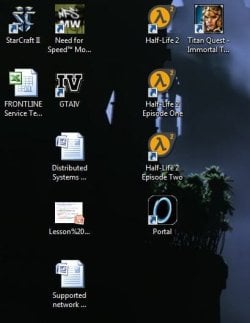
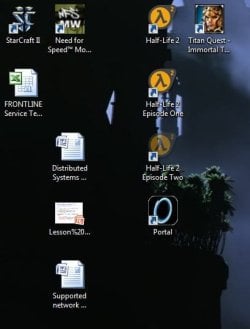
The first screen shot shows some desktop icons.

I cut the GTAIV shortcut and the Half Life 2 Episode Two Shortcut greys out
 

Attachments

  • Original Desktop.JPG
    Original Desktop.JPG
    31.2 KB · Views: 11
  • After cut.JPG
    After cut.JPG
    30 KB · Views: 10

My Computer

Computer Manufacturer/Model Number
Home built
OS
Windows 7 Ultimate x64
CPU
Intel Q8400 2.66Ghz
Motherboard
MSI P45T
Memory
Transcend 4Gb DDR2 800
Graphics Card(s)
Asus 250 GTS 512mb
Monitor(s) Displays
Samsung 2330H
Screen Resolution
1920x1080
Hard Drives
1x 750 GB Seagate Barracuda 7200.12
1x 500 GB Seagate 2.5" External
PSU
Vantec ion2+ 600W
Case
Coolermaster Elite 350
Cooling
2x 120mm fans 2x90mm fans
Keyboard
Logitech 350
Mouse
Logitech Performance MX
Internet Speed
384kbps
Nothing happens when I paste again
 

My Computer

Computer Manufacturer/Model Number
Home built
OS
Windows 7 Ultimate x64
CPU
Intel Q8400 2.66Ghz
Motherboard
MSI P45T
Memory
Transcend 4Gb DDR2 800
Graphics Card(s)
Asus 250 GTS 512mb
Monitor(s) Displays
Samsung 2330H
Screen Resolution
1920x1080
Hard Drives
1x 750 GB Seagate Barracuda 7200.12
1x 500 GB Seagate 2.5" External
PSU
Vantec ion2+ 600W
Case
Coolermaster Elite 350
Cooling
2x 120mm fans 2x90mm fans
Keyboard
Logitech 350
Mouse
Logitech Performance MX
Internet Speed
384kbps
Lol what the heck.. gimme a few minutes here
 

My Computer

Computer Manufacturer/Model Number
Custom Built
OS
Windows 7 Ultimate
CPU
AMD Athlon II X2 245 2.90Ghz
Motherboard
Some Gigabyte one, dont remember model
Memory
3.00 GB
Graphics Card(s)
8800GTS 512MB
Sound Card
Sound Blaster X-Fi Titanium Fatal1ty
Monitor(s) Displays
Dual 22" widescreen
Hard Drives
250GB internal, 500GB internal
PSU
CORSAIR CMPSU-850TX 850W Power Supply
Case
Thermalkake Tsunami Dream
Cooling
Thermaltake Golden Orb II
Keyboard
Saitek Eclipse 2
Mouse
Logitech MX518
Weird.....Are your mouse drivers up to date, if not then upgrade (or are they new you may want to revert your driver back). Have you tested your mouse (try a different one).

If all else fails then consider a repair of your Windows instance or a restore to before this issue began to occur.
 

My Computer

Computer Manufacturer/Model Number
Systemax N2000 Gaming PC
OS
Windows 7 Ultimate x64
CPU
Q6600 @2.4ghz (G0 stepping)
Motherboard
XFX nforce 680i LT
Memory
8 gb OCZ vista essential sli PC-6400
Graphics Card(s)
Dual 9800gt in SLI mode
Sound Card
Integrated 8.1 High Definition Audio
Monitor(s) Displays
Dual Sceptre x246w 24 inch monitors
Screen Resolution
1920 x 1200 each monitor
Hard Drives
500 GB SATA II / 7500 rpm
PSU
Cooler Master Real Power Pro 1250W
Case
N2000 server tower
Cooling
Thermaltake Bigwater 760 is
Keyboard
MS Intelitype 6000 v2.0
Mouse
MS Intelipoint 6000
Internet Speed
Wi-power 1.5GB up / 512k down
Other Info
Windows 7 Ultimate x64, Windows 7 Pro x64, Windows Home Premium X86, Windows XP pro, Windows Home Server x86, Ubuntu 10.4 x86 and x64, Ubuntu server 10.4, SQL Server 2005, MySQL 5.0
Sorry can I ask how my mouse would be related to this?
I first picked up this issue with me using my keyboard to cut and paste.
But I will check out those drivers anyway.

I will try doing a repair and see what happens
 

My Computer

Computer Manufacturer/Model Number
Home built
OS
Windows 7 Ultimate x64
CPU
Intel Q8400 2.66Ghz
Motherboard
MSI P45T
Memory
Transcend 4Gb DDR2 800
Graphics Card(s)
Asus 250 GTS 512mb
Monitor(s) Displays
Samsung 2330H
Screen Resolution
1920x1080
Hard Drives
1x 750 GB Seagate Barracuda 7200.12
1x 500 GB Seagate 2.5" External
PSU
Vantec ion2+ 600W
Case
Coolermaster Elite 350
Cooling
2x 120mm fans 2x90mm fans
Keyboard
Logitech 350
Mouse
Logitech Performance MX
Internet Speed
384kbps
Just an update. When the icon is greyed out, when I cut another file in another location, the icon comes back to normal as well. This means that it is somehow linked to the "cut state" of the icon
 

My Computer

Computer Manufacturer/Model Number
Home built
OS
Windows 7 Ultimate x64
CPU
Intel Q8400 2.66Ghz
Motherboard
MSI P45T
Memory
Transcend 4Gb DDR2 800
Graphics Card(s)
Asus 250 GTS 512mb
Monitor(s) Displays
Samsung 2330H
Screen Resolution
1920x1080
Hard Drives
1x 750 GB Seagate Barracuda 7200.12
1x 500 GB Seagate 2.5" External
PSU
Vantec ion2+ 600W
Case
Coolermaster Elite 350
Cooling
2x 120mm fans 2x90mm fans
Keyboard
Logitech 350
Mouse
Logitech Performance MX
Internet Speed
384kbps
Sorry can I ask how my mouse would be related to this?
I first picked up this issue with me using my keyboard to cut and paste.
But I will check out those drivers anyway.

I will try doing a repair and see what happens

Not sure it is mouse but this is a very weird issue, never seen it posted before. I also run Win7 ultimate and I do not have this issue nor have I heard of anyone else having it.

I have had bad hardware (mouse and keyboard) caused issues with subsystems and the cut/paste keyboard or mouse use the same system utility. It may not be an issue but is easy to check and eliminate as the culprit.
 
Last edited:

My Computer

Computer Manufacturer/Model Number
Systemax N2000 Gaming PC
OS
Windows 7 Ultimate x64
CPU
Q6600 @2.4ghz (G0 stepping)
Motherboard
XFX nforce 680i LT
Memory
8 gb OCZ vista essential sli PC-6400
Graphics Card(s)
Dual 9800gt in SLI mode
Sound Card
Integrated 8.1 High Definition Audio
Monitor(s) Displays
Dual Sceptre x246w 24 inch monitors
Screen Resolution
1920 x 1200 each monitor
Hard Drives
500 GB SATA II / 7500 rpm
PSU
Cooler Master Real Power Pro 1250W
Case
N2000 server tower
Cooling
Thermaltake Bigwater 760 is
Keyboard
MS Intelitype 6000 v2.0
Mouse
MS Intelipoint 6000
Internet Speed
Wi-power 1.5GB up / 512k down
Other Info
Windows 7 Ultimate x64, Windows 7 Pro x64, Windows Home Premium X86, Windows XP pro, Windows Home Server x86, Ubuntu 10.4 x86 and x64, Ubuntu server 10.4, SQL Server 2005, MySQL 5.0
Very, very strange.

First, let's go for the easy check, that is, to run,etc System File Checker.

This tutorial will show you how, what to expect if all is ok, and what to do if not.

If SFC indicates problems, keep running it. After three runs, you should be getting a clean bill of health.
System File Checker - SFC /SCANNOW Command
 

My Computer

Computer Manufacturer/Model Number
Toshiba Satellite S875D-S7239 laptop
OS
MS Windows 7 Ultimate SP1 64-bit
CPU
AMD A10-4600M
Motherboard
AMD Pumori (Socket FT1)
Memory
6.00 GB Dual-Channel DDR3 @ 798MHz (11-11-12-28)
Graphics Card(s)
AMD Radeon HD 7660G
Sound Card
High Definition Audio Device
Monitor(s) Displays
Generic PnP Monitor (1600x900@60Hz)
Screen Resolution
1600x900@60Hz
Hard Drives
SSD 119GB Corsair CSSD-V128GB2 ATA Device
Keyboard
Standard PS/2 Keyboard
Mouse
HP Wireless Optical Mobile Mouse Model FHA-3410
Internet Speed
What the local pub, local coffee shop offers.
Other Info
Optical Drive:MATSHITA BD-CMB UJ160B ATA Device


Also have an Asus ha1002xp netbook with Win 7 Ultimate installed.
Sorry can I ask how my mouse would be related to this?
I first picked up this issue with me using my keyboard to cut and paste.
But I will check out those drivers anyway.

I will try doing a repair and see what happens

Not sure it is mouse but this is a very weird issue, never seen it posted before. I also run Win7 ultimate and I do not have this issue nor have I heard of anyone else having it.

I have had bad hardware (mouse and keyboard) cause issues with subsystems and the cut/paste keyboard or mouse use the same system utility. It may not be an issue but is easy to check and eliminate as the culprit.

A repair install is a semi-drastic solution. I suggest we try a less invasive procedure first.
 

My Computer

Computer Manufacturer/Model Number
Toshiba Satellite S875D-S7239 laptop
OS
MS Windows 7 Ultimate SP1 64-bit
CPU
AMD A10-4600M
Motherboard
AMD Pumori (Socket FT1)
Memory
6.00 GB Dual-Channel DDR3 @ 798MHz (11-11-12-28)
Graphics Card(s)
AMD Radeon HD 7660G
Sound Card
High Definition Audio Device
Monitor(s) Displays
Generic PnP Monitor (1600x900@60Hz)
Screen Resolution
1600x900@60Hz
Hard Drives
SSD 119GB Corsair CSSD-V128GB2 ATA Device
Keyboard
Standard PS/2 Keyboard
Mouse
HP Wireless Optical Mobile Mouse Model FHA-3410
Internet Speed
What the local pub, local coffee shop offers.
Other Info
Optical Drive:MATSHITA BD-CMB UJ160B ATA Device


Also have an Asus ha1002xp netbook with Win 7 Ultimate installed.
Is it just with those two icons? What happens if you cut the Episode 2 icon, does a different one gray out?
 

My Computer

Computer Manufacturer/Model Number
Custom Built
OS
Windows 7 Ultimate
CPU
AMD Athlon II X2 245 2.90Ghz
Motherboard
Some Gigabyte one, dont remember model
Memory
3.00 GB
Graphics Card(s)
8800GTS 512MB
Sound Card
Sound Blaster X-Fi Titanium Fatal1ty
Monitor(s) Displays
Dual 22" widescreen
Hard Drives
250GB internal, 500GB internal
PSU
CORSAIR CMPSU-850TX 850W Power Supply
Case
Thermalkake Tsunami Dream
Cooling
Thermaltake Golden Orb II
Keyboard
Saitek Eclipse 2
Mouse
Logitech MX518
If I cut the Episode 2 icon then a different one will become greyed out. The same one will always be greyed out unless I either cut and paste a different icon or I rearrange the icons
 

My Computer

Computer Manufacturer/Model Number
Home built
OS
Windows 7 Ultimate x64
CPU
Intel Q8400 2.66Ghz
Motherboard
MSI P45T
Memory
Transcend 4Gb DDR2 800
Graphics Card(s)
Asus 250 GTS 512mb
Monitor(s) Displays
Samsung 2330H
Screen Resolution
1920x1080
Hard Drives
1x 750 GB Seagate Barracuda 7200.12
1x 500 GB Seagate 2.5" External
PSU
Vantec ion2+ 600W
Case
Coolermaster Elite 350
Cooling
2x 120mm fans 2x90mm fans
Keyboard
Logitech 350
Mouse
Logitech Performance MX
Internet Speed
384kbps
I have just ran the sfc scan 3 times now.

I get this message:
Windows Resource Protection found corrupt files but was unable to fix some of them

I have details in the CBS.log file
 

My Computer

Computer Manufacturer/Model Number
Home built
OS
Windows 7 Ultimate x64
CPU
Intel Q8400 2.66Ghz
Motherboard
MSI P45T
Memory
Transcend 4Gb DDR2 800
Graphics Card(s)
Asus 250 GTS 512mb
Monitor(s) Displays
Samsung 2330H
Screen Resolution
1920x1080
Hard Drives
1x 750 GB Seagate Barracuda 7200.12
1x 500 GB Seagate 2.5" External
PSU
Vantec ion2+ 600W
Case
Coolermaster Elite 350
Cooling
2x 120mm fans 2x90mm fans
Keyboard
Logitech 350
Mouse
Logitech Performance MX
Internet Speed
384kbps
Back
Top