
Solved Cygwin fails to read directory - setting up SSH Server

getstaby

99 Problems
Local time
12:18 PM
Messages
6
Location
Brisbane, Australia
Hey guys,

Just after some advice. I'm setting up a personal SSH server following this guide:

Geek to Live: Set up a personal, home SSH server

I'm up to the step where I connect to the server. The only step that I've skipped is changing the protocol from 1,2 to 2 because I couldn't find it. But I doubt that makes a difference to my setup?

Anyway the error when I type in the final command: ssh <192.168.0.5> -1 Rya it comes up with:

-bash: 192.168.0.5: No such file or directory.

My Default Gateway IP is 192.168.0.1 and the IPv4 address is 192.168.0.5 (which was the one that worked when I forwarded port 22 in my router). Neither of these IPs work when I interchange them in the command.

Any insight into my problem is much appreciated. Hope to hear back from some more knowledgeable in this field. :)

Thanks,

Ryan
 

My Computer My Computer

OS
Windows 7 Home Premium Home Edition
CPU
Intel(R) Core(TM) i7-2675QM CPU @ 2.20GHz
I dont know a lot about cygwin, but it sounds like it can find the home directory or default directory.

You dont have to use cygwin to create an ssh server. i use freesshd Its very easy to setup and use. Plus your not using linux command you can use windows command and you're actually in your windows folders.
 

My Computer My Computer

OS
Windows 7 Ultimate x64
Thanks anyway! :) I tried installing the one you're talking about from the link you provided. The .exe file doesn't even open properly but I'll have a look at it again later. Kind of want to figure out Cygwin to be honest! Is there any good tutorials you followed for setting up FreeSSHD though?
 

My Computer My Computer

OS
Windows 7 Home Premium Home Edition
CPU
Intel(R) Core(TM) i7-2675QM CPU @ 2.20GHz
FreeSSHd is a good option for home use, but has some problems on Win7 when running as a service (works perfectly on XP though).
I'm using another alternative called WinSSHd that's also a native Windows SSH server (don't have to use cygwin) and has a good range of configuration options. It's proprietary software, but has both a paid and free options. For home use the free version is more than enough.
 

My Computer My Computer

Computer type
Laptop
Computer Manufacturer/Model Number
Toshiba Sattelite A665-S6092
OS
Windows 7 Ultimate x64
CPU
Intel Core i7-740QM
Memory
8 GB DDR3
Graphics Card(s)
NVIDIA GeForce 330GT
Screen Resolution
1366x768
Hard Drives
Samsung 840 SSD 500GB
1TB USB3 external HD
Cooling
Coolermaster Notepal U3 notebook cooling pad
Internet Speed
3mbps ASDL
Antivirus
ClamWin 0.98.7
Browser
Opera 12.17 x86 (main), Firefox 38 (sec), IE11 (last resort)
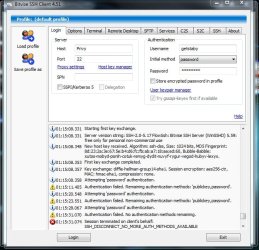
Thanks for the replies guys. I only got a chance to get back to the PC today. FreeSSHD did have problems, I've started setting up WinSSH though and it looks more promising. I am having an annoying error though which I've attached a picture of.

The Bitvise Server guide recommended checking whether the client would connect to a server before I locked down my personal server (this is where things begin to get fuzzy for me.) So that's what I'm doing but it's not recognising the authentication name which I've just made up on the spot. I don't actually know what I'm meant to put in that field.
 

Attachments

  • Bitvise SSH Client1.jpg
    Bitvise SSH Client1.jpg
    77.2 KB · Views: 10

My Computer My Computer

OS
Windows 7 Home Premium Home Edition
CPU
Intel(R) Core(TM) i7-2675QM CPU @ 2.20GHz
Apparently, it's attempting password login but fails according to the client's log. First thing that comes to mind is a wrong password.
Are you using, at the server, a virtual or a Windows user? If it's virtual, double check the password you've set for it. For Windows users, it's the very same password as your Windows login.
If not, checking the server log might contain some more clues.
 

My Computer My Computer

Computer type
Laptop
Computer Manufacturer/Model Number
Toshiba Sattelite A665-S6092
OS
Windows 7 Ultimate x64
CPU
Intel Core i7-740QM
Memory
8 GB DDR3
Graphics Card(s)
NVIDIA GeForce 330GT
Screen Resolution
1366x768
Hard Drives
Samsung 840 SSD 500GB
1TB USB3 external HD
Cooling
Coolermaster Notepal U3 notebook cooling pad
Internet Speed
3mbps ASDL
Antivirus
ClamWin 0.98.7
Browser
Opera 12.17 x86 (main), Firefox 38 (sec), IE11 (last resort)
Dear God.. I don't have a clue because I couldn't find a good setup guide for this one. Google search pulls up results from various pages of Bitvise's website and even they expect you to have some clue what you're doing with SSH.

I don't have a password for my Windows account at the moment and I never registered to Bitvise's servers or anything. I just installed the package because the server package installation guide recommended I try connect to the Bitvise server before I try to lock down my own server, and it came up with this.

EDIT: Anyway thanks for the advice guys but I'm just going to ask a friend to set everything up for me instead because it's becoming too time consuming for such a small task.
 
Last edited:

My Computer My Computer

OS
Windows 7 Home Premium Home Edition
CPU
Intel(R) Core(TM) i7-2675QM CPU @ 2.20GHz
That is only a suggestion, to test your setup before opening it to internet or anyone else, to make sure it works as you want before others have any access.

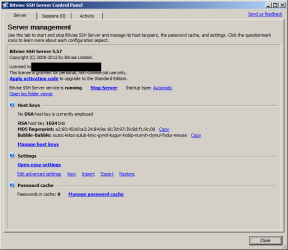
But that's the problem, you've not configured the server at all, so it doesn't knows what the user/passwords are. You need to open the SERVER control panel (the previous screenshot comes from the CLIENT, that's the next step). In that screen, go to the "easy settings" link, and there go to the "virtual accounts" tab. Create a new user there, those will be the username/password you'll have to enter when you enter the server. Accept to save the changes.

Then open the CLIENT. It may be the Bitvise one or any other SSH client out there you may like. Try connecting with localhost and when asked enter the user/password you've set before as a test. If everything is ok, the Windows command line should appear as expected.
 

Attachments

  • ServerConfig.png
    ServerConfig.png
    17 KB · Views: 4

My Computer My Computer

Computer type
Laptop
Computer Manufacturer/Model Number
Toshiba Sattelite A665-S6092
OS
Windows 7 Ultimate x64
CPU
Intel Core i7-740QM
Memory
8 GB DDR3
Graphics Card(s)
NVIDIA GeForce 330GT
Screen Resolution
1366x768
Hard Drives
Samsung 840 SSD 500GB
1TB USB3 external HD
Cooling
Coolermaster Notepal U3 notebook cooling pad
Internet Speed
3mbps ASDL
Antivirus
ClamWin 0.98.7
Browser
Opera 12.17 x86 (main), Firefox 38 (sec), IE11 (last resort)
Back
Top