
anil kumar
New member
- Local time
- 12:23 PM
- Messages
- 1
Dear All,
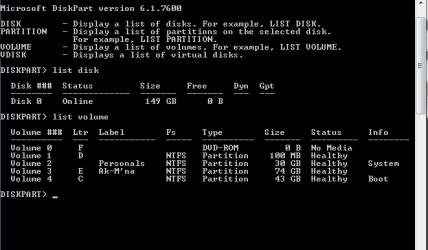
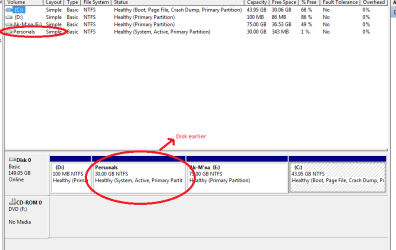
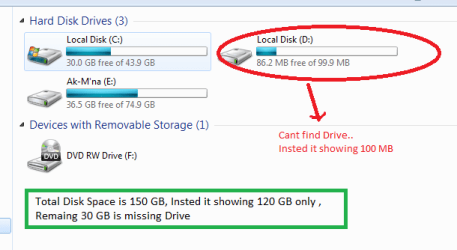
Here is the Problem that i could't find my D Drive in my Computer menu.
The problem evoked from Disk management settings, I wanted to extend Drive unfortunately i Made click on "Make Portion as active".
After clicking when i restart computer it shown boot manager missing ( Press Alt+Ctrl+Del to Restart).
I Made an attempt to Install win-7. when i selected the drive for windows installation it showed all the drives present earlier.
but after complete installation, when i check in "my computer" menu i couldn't find that drive.
but in disk management it is showing the drive with used space along with drive name.
what might be the problem???, i have very important data in that drive, how to get it back.
Can any one please Help mee ...
Thank you
yours faithully
Anil Kumar.
Here is the Problem that i could't find my D Drive in my Computer menu.
The problem evoked from Disk management settings, I wanted to extend Drive unfortunately i Made click on "Make Portion as active".
After clicking when i restart computer it shown boot manager missing ( Press Alt+Ctrl+Del to Restart).
I Made an attempt to Install win-7. when i selected the drive for windows installation it showed all the drives present earlier.
but after complete installation, when i check in "my computer" menu i couldn't find that drive.
but in disk management it is showing the drive with used space along with drive name.
what might be the problem???, i have very important data in that drive, how to get it back.
Can any one please Help mee ...
Thank you
yours faithully
Anil Kumar.
My Computer
- Computer type
- Laptop
- Computer Manufacturer/Model Number
- zenith
- OS
- Windows 7 ultimate 64-bit