Solved D Drive missing after Recovering Computer

megbooks

New member
Local time
8:24 PM
Messages
5
Location
Maine
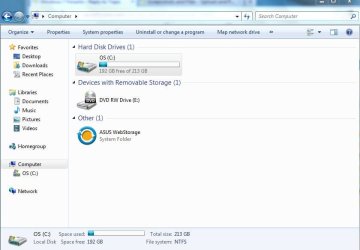
I had to recover my laptop to try and fix a problem I had with my graphic card (still don't know if it helped, but not the point). After recovering and starting my laptop again I noticed the D Drive did not show up in the my computer window.

I can't seem to find it anywhere on my laptop. I have opened up disk management but am not really sure what I am looking for when I am there.

Recovering is the only thing I have done to my laptop, and it is a problem because the D Drive seemed to have the most space on my laptop; my C Drive had about a fifth of the free space, if that.

The D Drive is internal and I have read about people opening up their laptop, but my computer is under warranty and I don't want to void that if this problem with my graphic card wasn't fixed.

I am not computer literate, so help for dummies. I have an ASUS laptop K50IJ (never again), Windows 7 PRO OA x64. Beyond that I really don't know any specifics.

I have all my files back-up on an external drive so recovering my computer is not a problem.

Thank you for any help.
 

My Computer

Computer Manufacturer/Model Number
ASUS K50IJ
OS
Windows 7 64

My Computer

Computer type
PC/Desktop
Computer Manufacturer/Model Number
Self Assembled
OS
Microsoft Windows 10 Pro Insider Preview 64-bit
CPU
Intel(R) Core(TM) i3-4130 CPU @ 3.40GHz
Motherboard
Gigabyte Technology Co., Ltd. B85M-D3H
Memory
Corsair Vengence 4GB x2 (8.00GB Dual-Channel DDR3 @ 798MHz)
Graphics Card(s)
2047MB GeForce GTS 450 (ZOTAC International)
Sound Card
Onboard (Realtek High Definition Audio)
Monitor(s) Displays
LG Flatron E2040T
Screen Resolution
1600x900
Hard Drives
Western Digital 1 TB
Seagate 500 GB
PSU
Corsair VS550
Case
Cooler Master K380
Cooling
Cooler Master Seidon 120V Plus
Keyboard
Logitech MK260r
Mouse
Logitech MK260r
Internet Speed
PMPL Broadband
Antivirus
Windows Defender + MBAM
Browser
Firefox
Other Info
Dell Studio 15" Laptop
Capture.PNG

If I right click the "disk" without a letter, the only option I have is to delete it.

Capture2.JPG

Before I recovered my laptop, the D Drive appeared right next to the C Drive
 

My Computer

Computer Manufacturer/Model Number
ASUS K50IJ
OS
Windows 7 64
You dont have the system reserved partition .... that means you said that you are not computer literate .. doesn't stand . It's difficult to avoid that partition.

If you right click on the other partition, you should get an option "Change Drive letter and paths" ; but you are saying that you are not getting it ?

You try to use partition wizard bootable cd to apply a drive letter there.
 

My Computer

Computer type
PC/Desktop
Computer Manufacturer/Model Number
Self Assembled
OS
Microsoft Windows 10 Pro Insider Preview 64-bit
CPU
Intel(R) Core(TM) i3-4130 CPU @ 3.40GHz
Motherboard
Gigabyte Technology Co., Ltd. B85M-D3H
Memory
Corsair Vengence 4GB x2 (8.00GB Dual-Channel DDR3 @ 798MHz)
Graphics Card(s)
2047MB GeForce GTS 450 (ZOTAC International)
Sound Card
Onboard (Realtek High Definition Audio)
Monitor(s) Displays
LG Flatron E2040T
Screen Resolution
1600x900
Hard Drives
Western Digital 1 TB
Seagate 500 GB
PSU
Corsair VS550
Case
Cooler Master K380
Cooling
Cooler Master Seidon 120V Plus
Keyboard
Logitech MK260r
Mouse
Logitech MK260r
Internet Speed
PMPL Broadband
Antivirus
Windows Defender + MBAM
Browser
Firefox
Other Info
Dell Studio 15" Laptop
you can easus partititon tool to make it as suggested by Arc
 

My Computer

Computer Manufacturer/Model Number
Sony VAIO VPCSB25FG/B
OS
Windows 7 Professional x32
CPU
Intel® Core™ i3-2310M Processor 2.10 GHz*1
Motherboard
Asus
Memory
4GB
Graphics Card(s)
AMD Radeon™ HD 6470M (SPEED MODE) / Intel® HD Graphics 3000
Sound Card
Intel® High Definition Audio
Monitor(s) Displays
13.3 (33.8cm) wide (WXGA: 1366x768) TFT colour display (VAIO
Screen Resolution
1366x768
Hard Drives
500 GB*4 (Serial ATA, 5400 rpm)
Hi megbooks. Welcome to the forum.

I had to recover my laptop to try and fix a problem

When you say 'recover' do you mean that you used the Asus Recovery tool, or do you mean you used Windows System Restore? Big difference.
The Asus Recovery will (is supposed to) reset the hard drive to the exact state it was in when you first got the laptop.
Windows System Restore will restore the system to the state it was in on the date you chose.
What is going on with your system and how to fix it depends on what you mean by "Restore".

I have opened up disk management but am not really sure what I am looking for when I am there.

When you look at Disk Management you see two actual, physical drives. A hard disk drive (Disk 0) and a CD/DVD drive (CD-ROM 0). The hard disk is divided into two 'partitions'. One of the partitions (Labeled C) is 213.35GB and contains Windows. The other partition is not labeled and contains 19.53 GB.


The D Drive is internal and I have read about people opening up their laptop.

No, don't do that. There is only one hard drive in the laptop. The "Drives" you see in Windows are just the partitions that were created.

Recovering is the only thing I have done to my laptop, and it is a problem because the D Drive seemed to have the most space on my laptop; my C Drive had about a fifth of the free space, if that.

This is where your problem gets weird. Because the screenshot shows the C drive with Windows taking up most of the space on the drive. The unnamed partition with only 19GB is about the size a typical computer manufacturer's Recovery Partition would be, and it's location on the drive is also typical of that Recovery Partition.

This might start to make sense if you, or someone else, changed the hard drive partitions at some point in the past. As Arc points out, it is also unusual for a new laptop's hard drive with Windows 7 installed on it from the manufacturer to not have another much smaller "System Reserved" partition.

One possibility is that the original laptop (new) had Vista on it and someone installed W7 afterward. If this is the case just let us know. We can't help if we are in the dark. Give as much information as you can.
 

My Computer

Computer type
PC/Desktop
Computer Manufacturer/Model Number
Home Built - Jan 2013
OS
Windows 7 64 Bit Home Premium SP1
CPU
i7-3820
Motherboard
Asus P9X79-PRO - Bios 4608
Memory
GSkill F3-14900CL9Q - 16GB
Graphics Card(s)
EVGA GeForce GTX660 - Driver 352.86
Sound Card
On board Realtek ALC898
Monitor(s) Displays
Acer S271HL
Screen Resolution
1920 x 1080
Hard Drives
#1- Samsung 840 Pro Series
#2- Western Digital WD1002FAEX Sata3 Black
#3- Western Digital WD1002FAEX Sata3 Black
PSU
Corsair CMPSU-850TX-V2 - 850 watt (by Seasonic)
Case
Corsair Obsidian 550D
Cooling
Standard 3 120mm case fans, Cooler Master Hyper 212 EVO
Keyboard
MS KC-0405
Mouse
Intellimouse 5-button
Internet Speed
56 Mbits/Sec (on a good day)
Antivirus
Avast & Malwarebytes
Browser
Firefox
Other Info
Asus DVD - DRW-24B1ST 24X
I used the Asus Recovery to try and fix my computer.

This is the screen shot from the Partition Wizard Mini Tool. I can relabel the smaller partition, but it is labeled recovery, which, from what you guys said, is an appropriate name.

Capture3.JPG
 

My Computer

Computer Manufacturer/Model Number
ASUS K50IJ
OS
Windows 7 64
I wondering -- if it's even possible -- did my D Drive combine with my C Drive?
 

My Computer

Computer Manufacturer/Model Number
ASUS K50IJ
OS
Windows 7 64
Yes, that is quite possibly what has happened.

You have restored the computer back to the way it was when you first got it. One Asus recovery partition, one Windows (C: ) partition.

So if you have all your data backed up then you just need to start over and create the partitions and the sizes you want. We can help with that if you need it.

I would not rename that Asus recovery partition if you ever plan to use it again. Although what a lot of folks do is burn the Recovery CD's from the Asus Recovery Menu (just to have), and then delete the partition to gain the disk space.
 

My Computer

Computer type
PC/Desktop
Computer Manufacturer/Model Number
Home Built - Jan 2013
OS
Windows 7 64 Bit Home Premium SP1
CPU
i7-3820
Motherboard
Asus P9X79-PRO - Bios 4608
Memory
GSkill F3-14900CL9Q - 16GB
Graphics Card(s)
EVGA GeForce GTX660 - Driver 352.86
Sound Card
On board Realtek ALC898
Monitor(s) Displays
Acer S271HL
Screen Resolution
1920 x 1080
Hard Drives
#1- Samsung 840 Pro Series
#2- Western Digital WD1002FAEX Sata3 Black
#3- Western Digital WD1002FAEX Sata3 Black
PSU
Corsair CMPSU-850TX-V2 - 850 watt (by Seasonic)
Case
Corsair Obsidian 550D
Cooling
Standard 3 120mm case fans, Cooler Master Hyper 212 EVO
Keyboard
MS KC-0405
Mouse
Intellimouse 5-button
Internet Speed
56 Mbits/Sec (on a good day)
Antivirus
Avast & Malwarebytes
Browser
Firefox
Other Info
Asus DVD - DRW-24B1ST 24X
I agree with TVeblen,

More than likely that C partition was previously divided into a C and D partition, possibly by hand at some point or maybe from the factory, but then running factory restore repartitioned it into one again :(
 

My Computer

Computer Manufacturer/Model Number
Scratch built
OS
Windows 7 x64 Ultimate
CPU
i7 960
Motherboard
Asus P6X58D
Memory
12 Gig Corsair Dominator
Graphics Card(s)
Nvidia 480
Sound Card
Maudio Delta 44 + breakout box
Monitor(s) Displays
Dell UltraSharp U2410 24in and Samsung 21 dual monitors
Screen Resolution
1920x1200 and 1280x1024
Hard Drives
Primary: Intel X-25M G2 160G SSD
Secondary: Segate baracuda 1.0 TB
HDs in AHCI mode.
PSU
Corasair TX850
Case
Cooler Master HAF
Cooling
Corsair H50
Keyboard
Logitech G15 + N52 game pad
Mouse
Logitech MX518
Internet Speed
15kbs down 4.5kbps up
Other Info
WEI 7.6
CPU & RAM 7.6
Graphics 7.9
Hard disk 7.7
Okay. I'm happy that I didn't lose any of my disk space, at least.
 

My Computer

Computer Manufacturer/Model Number
ASUS K50IJ
OS
Windows 7 64
Back
Top