
D Drive randomly dismounting.

ether3

New member
Local time
2:16 PM
Messages
25
Hi there, i have been running into an issue where my D drive will randomly dismount itself.

The very first time happened when i was playing Left 4 Dead while downloading a new update for steam in the background. All of a sudden steam locked up and my drive was no longer detected. It happened a second time when i went to load up another game while downloading patches through the steam client. Game locks, steam crashes, drives dismounts.
But this time it just happened out of nowhere. I was playing WoW which is on my C: drive and Steam came up and crashed. It was just running in the background and i didn't see that it was downloading anything. I have run a chkdsk on all my drives and nothing is coming up. Not sure what to do at this point but the only thing on that drive is Steam and games that i have downloaded . Event viewer is just spammed with:

An error was detected on device \Device\Harddisk1\DR1 during a paging operation.

With one or two:
The system failed to flush data to the transaction log. Corruption may occur.

I was able to continue to do everything that was on the C: drive with no problems whatsoever just the D drive wasn't being recognized.
Is the drive potentially dying?
 

My Computer My Computer

At a glance

Windows 7 Home Premium x64Intel(R) Core(TM) i5-2500K CPU @ 3.30GHzNVIDIA GeForce GTX 570
OS
Windows 7 Home Premium x64
CPU
Intel(R) Core(TM) i5-2500K CPU @ 3.30GHz
Motherboard
ASUSTeK Computer INC. P8Z68-V LX
Graphics Card(s)
NVIDIA GeForce GTX 570
Sound Card
(1) NVIDIA High Definition Audio
Hard Drives
(1) Corsair Force GT (2) Hitachi HDS721010DLE630
No idea what is going on now. I just tried to boot steam up and explorer repeatedly crashed. Like 20 times in a row just constantly crashing and trying to restart itself until i finally ended the steam process. I have never seen anything like this. In one of my previous posts a member here suggested that my registry could possibly be busted but could it really be this bad? Could it be my D Drive as well?
Really need some help and suggest0ions.


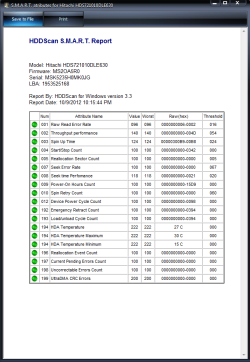
Attached a scan from HDDScan. No idea what is wrong then. It has only happened with steam and the secondary drive. Might try a clean Windows install.
 

Attachments

  • hddscan.png
    hddscan.png
    24.4 KB · Views: 24
Last edited:

My Computer My Computer

At a glance

Windows 7 Home Premium x64Intel(R) Core(TM) i5-2500K CPU @ 3.30GHzNVIDIA GeForce GTX 570
OS
Windows 7 Home Premium x64
CPU
Intel(R) Core(TM) i5-2500K CPU @ 3.30GHz
Motherboard
ASUSTeK Computer INC. P8Z68-V LX
Graphics Card(s)
NVIDIA GeForce GTX 570
Sound Card
(1) NVIDIA High Definition Audio
Hard Drives
(1) Corsair Force GT (2) Hitachi HDS721010DLE630
Could you give some more info on what kind of physical device the "D drive" is? Is it a second internal HDD? A partition of the same hard drive you have C on? An external HDD? Is it the Hitachi I see in your specs (as the other is an SSD)?

I've had plenty of external HDDs do exactly like that when they were not given enough power through their USB connectors. They run relatively fine when on idle (and were thus recognized and mouned by Win 7), but any serious operation and BANG, they die and dismount. Then the operation ends, and they return idle, and they mount again.

But I never had issues like that with internal drives. If that is an internal drive, trying to follow the same route, could you please fill your specs in this calculator? it should tell how much power you need to run your stuff. Then check your PSU's watts, that I don't see from your specs.
 

My Computer My Computer

At a glance

Win 7 Pro 64-bit 7601AMD Phenom 9650 QuadCore, revision DR-B35 GB yes I run 2x 2GB and 1x 1GB, different b...NVIDIA GeForce 9800 GT 512 Mb, unknown manufa...
Computer type
PC/Desktop
Computer Manufacturer/Model Number
custom built
OS
Win 7 Pro 64-bit 7601
CPU
AMD Phenom 9650 QuadCore, revision DR-B3
Motherboard
ASUS M4A78
Memory
5 GB yes I run 2x 2GB and 1x 1GB, different brand, spank me.
Graphics Card(s)
NVIDIA GeForce 9800 GT 512 Mb, unknown manufacturer.
Sound Card
Crappy Realtek Integrated Audio
Monitor(s) Displays
Fujitsu Siemens P19-3P
Screen Resolution
1280 x 1024 x 32 bits @ 60 Hz Oh yeah, 4:3 rocks!
Hard Drives
(1) MAXTOR S TM3320613AS SATA Disk Device (2) STM35004 18AS SATA Disk Device (3) TOSHIBA USB 2.5"-HDD
PSU
whatever, around 450w
Case
Scavenged from old company PC, 10+ years old
Cooling
CPU fan, GPU fan, case fan, nothing fancy
Keyboard
Microsoft, PS/2, white.
Mouse
Optical, logitec.
Internet Speed
effective max speeds: 70-ish kB/s down 30-ish kB/s up
Antivirus
Avira, free edition.
Browser
Firefox with FXChrome to make it look like Google Chrome :P
Other Info
Was discarded by previous owner due to "horrible performance".
Was running Win Xp from a IDE drive. Yeah. Was a pain.
SATA II drive and Win7 and it zips away! Yay!
Sure, it is an internal hitachi 1tb 7200 rpm. I just reformatted and reinstalled windows and tried it out with a game on the D drive and it went down again. Dismounted the drive and locked the game. Was able to task manager out the first time. Updated my bios after that. This time i tried again and it pretty much just hardlocked the drive or something. use ctrl+alt+del to override and get to task manager but it locked up explorer and it couldnt do anything after that. Had to hard reboot.

I ran that calc and it said i needed about 520 watts total. My power supply is a xtremegear 800w. I have heard some pretty bad stuff about them so maybe that could be a problem. I had this happen a couple of months back but was able to game pretty fine and the problem only appeared once more.
Now anytime i try to play a game or get it to load a game up it will immediately dismount and sometimes just continually crash explorer. I thought it might be a busted registry and the reformatting would fix it but it seems that isnt the case. I have run multiple scans of chkdsk, smart scans, hd diagnostics and it never comes up with anything.

Would the drive dismounting itself also cause explorer to just crash? Before i formatted both drives when i booted up steam (which is on the d drive) explorer just crashed and restarted itself about 6 times before i was able to open up task manager and end the steam process. Then it stopped crashing. Im completely confused why the D drive dismounting would cause my C: drive running windows (corsair 128gb ssd) to have problems.


EDIT: I also remembered that one of the times it dismounted was when steam was just sitting in the background. I was playing a game that was installed on my C when i saw that steam crashed. When i looked at windows explorer it didnt list my D drive. I was able to do everything pretty much fine that involved my c drive and nothing seemed to interfere. After that when i tried to load a game up is when the explorer crashes began and i decided to do the reformatting.
 

My Computer My Computer

At a glance

Windows 7 Home Premium x64Intel(R) Core(TM) i5-2500K CPU @ 3.30GHzNVIDIA GeForce GTX 570
OS
Windows 7 Home Premium x64
CPU
Intel(R) Core(TM) i5-2500K CPU @ 3.30GHz
Motherboard
ASUSTeK Computer INC. P8Z68-V LX
Graphics Card(s)
NVIDIA GeForce GTX 570
Sound Card
(1) NVIDIA High Definition Audio
Hard Drives
(1) Corsair Force GT (2) Hitachi HDS721010DLE630
Possibly a bad drive. One of my drives keeps disappearing and will lock up explorer when I try to open a folder on the drive.
When it disappears, I have to reboot to get it back. Western digital is sending me a replacement, hopefully I can get it to work for a bit so I can copy my games off it.
 

My Computer My Computer

At a glance

Windows 7 Ultimate 64bitIntel i7 3770K16GB DDR3 1333 Corsair XMS3XFX HD6950 2GB EyeFinity
Computer Manufacturer/Model Number
HAL-9000
OS
Windows 7 Ultimate 64bit
CPU
Intel i7 3770K
Motherboard
Asus Sabertooth Z77
Memory
16GB DDR3 1333 Corsair XMS3
Graphics Card(s)
XFX HD6950 2GB EyeFinity
Sound Card
Logitech G35 & Sennheiser PC135 & VIA HD
Monitor(s) Displays
23" HP 2310e, 23" Samsung B2230, 21.5" Viewsonic
Screen Resolution
5760x1080
Hard Drives
16TB of Storage
128GB & 256GB Crucial M4 SSD's, 2X 1TB WD Black, 3x 2TB WD, 3x 2TB Samsung F4, 1.5TB Seagate, WD 500GB,
PSU
Antec True Power New 650watt
Case
Cooler Master HAF-932
Cooling
Corsair H60 Hydro Cooler, 3x 230mm Fans, 2x120mm Fan
Keyboard
Logitech G15 and G13
Mouse
Logitech G700 Gaming Mouse
Internet Speed
50/10 Mbit
Other Info
Speakers : Alesis M1 Active Mk2 Studio Monitors , APC RS 1200 UPS, HP 4500DN Color Laser, HP P1006 mono Laser, Kodak 8500 Dye-Sub, Epson 1280 inkjet, Epson Worforce 610 MFC
in my setup 3 hdd
C-D 500gb WD blue
E-F 500gb WD black
G-H 1tb WD black

1tb hdd (g-h) disapears in explorer view from time to time
only reset help to bring it back.
Problem was a faulty sata connector on MB .
 

My Computer My Computer

At a glance

7 Ultimate x64 sp1Intel i5-4690K16Gb HyperX furyR9-270x 2Gb
Computer type
PC/Desktop
Computer Manufacturer/Model Number
696
OS
7 Ultimate x64 sp1
CPU
Intel i5-4690K
Motherboard
GA Z97X Gaming 5
Memory
16Gb HyperX fury
Graphics Card(s)
R9-270x 2Gb
Sound Card
On Board
Monitor(s) Displays
2443NW
Screen Resolution
1920x1200
Hard Drives
WD5000 -
WD5001 -
WD1002
PSU
Cft-650-14cs
Case
Very Big Case
Cooling
stock
Keyboard
G11
Mouse
Logitech
Internet Speed
Adsl
Browser
FF
Other Info
RWD
Can also be a faulty internal power connector (cables that come from PSU), or a very crowded one. Try a different one (possibly one that does not have any other device connected to it).

Im completely confused why the D drive dismounting would cause my C: drive running windows (corsair 128gb ssd) to have problems.
explorer is the program that shows you your files and must know where everything is at any given moment to do so. If some memory device has issues, explorer is likely to crash/lockup.
 

My Computer My Computer

At a glance

Win 7 Pro 64-bit 7601AMD Phenom 9650 QuadCore, revision DR-B35 GB yes I run 2x 2GB and 1x 1GB, different b...NVIDIA GeForce 9800 GT 512 Mb, unknown manufa...
Computer type
PC/Desktop
Computer Manufacturer/Model Number
custom built
OS
Win 7 Pro 64-bit 7601
CPU
AMD Phenom 9650 QuadCore, revision DR-B3
Motherboard
ASUS M4A78
Memory
5 GB yes I run 2x 2GB and 1x 1GB, different brand, spank me.
Graphics Card(s)
NVIDIA GeForce 9800 GT 512 Mb, unknown manufacturer.
Sound Card
Crappy Realtek Integrated Audio
Monitor(s) Displays
Fujitsu Siemens P19-3P
Screen Resolution
1280 x 1024 x 32 bits @ 60 Hz Oh yeah, 4:3 rocks!
Hard Drives
(1) MAXTOR S TM3320613AS SATA Disk Device (2) STM35004 18AS SATA Disk Device (3) TOSHIBA USB 2.5"-HDD
PSU
whatever, around 450w
Case
Scavenged from old company PC, 10+ years old
Cooling
CPU fan, GPU fan, case fan, nothing fancy
Keyboard
Microsoft, PS/2, white.
Mouse
Optical, logitec.
Internet Speed
effective max speeds: 70-ish kB/s down 30-ish kB/s up
Antivirus
Avira, free edition.
Browser
Firefox with FXChrome to make it look like Google Chrome :P
Other Info
Was discarded by previous owner due to "horrible performance".
Was running Win Xp from a IDE drive. Yeah. Was a pain.
SATA II drive and Win7 and it zips away! Yay!
I'm going to try to rewire everything once i feel a bit more up to it. It really seems to only have a problem when the drive needs some extra juice to have something written to it or for it to be read by booting up a game. I haven't had any problems with my C drive and gaming though so once i get the chance i will see what i can do.

Is there anything else i can do to see if there are problems with the HD other than the diagnostics i have run? I dont have anything on there but steam and darksiders 2. Everytime it tries to load the game, it gets to the intro sequence then locks up and dismounts. Everything is on a fresh install of windows 7 x64 and both drives were formatted.
 

My Computer My Computer

At a glance

Windows 7 Home Premium x64Intel(R) Core(TM) i5-2500K CPU @ 3.30GHzNVIDIA GeForce GTX 570
OS
Windows 7 Home Premium x64
CPU
Intel(R) Core(TM) i5-2500K CPU @ 3.30GHz
Motherboard
ASUSTeK Computer INC. P8Z68-V LX
Graphics Card(s)
NVIDIA GeForce GTX 570
Sound Card
(1) NVIDIA High Definition Audio
Hard Drives
(1) Corsair Force GT (2) Hitachi HDS721010DLE630
Back
Top