
Hello,
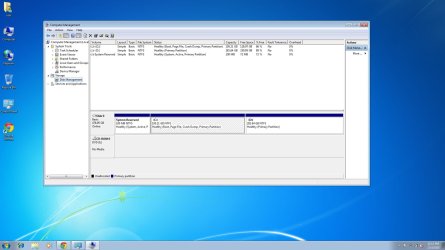
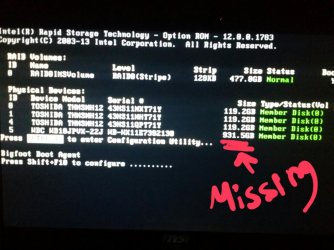
I uninstalled Ubuntu, and I installed Windows 7 because I couldn't restore my system, but a free space went missing with no reason, and I am not sure if I deleted the d drive or not. Furthermore, I lost more than 800GB. A page pops up when I start my laptop, and it shows that I still have the free space, but it is not shown either in computer or disk management as unallocated. I have tried so many programs to get back the 800GB and use it, but nothing seems to work. I will attach two pictures, the first one shows my disk management, and the second picture shows the page that pops up everytime I start my laptop. Long story short, I installed Ubuntu using Wubi, then I didn't like it that much, and I tried to format d drive, then I deleted by mistake. Now the d drive is shown, but missing around 800GB. I am really pissed
I am not sure how many Gbs that exactly I am missing, but it is around 800GB
I will appreciate your help, please.
I uninstalled Ubuntu, and I installed Windows 7 because I couldn't restore my system, but a free space went missing with no reason, and I am not sure if I deleted the d drive or not. Furthermore, I lost more than 800GB. A page pops up when I start my laptop, and it shows that I still have the free space, but it is not shown either in computer or disk management as unallocated. I have tried so many programs to get back the 800GB and use it, but nothing seems to work. I will attach two pictures, the first one shows my disk management, and the second picture shows the page that pops up everytime I start my laptop. Long story short, I installed Ubuntu using Wubi, then I didn't like it that much, and I tried to format d drive, then I deleted by mistake. Now the d drive is shown, but missing around 800GB. I am really pissed
I am not sure how many Gbs that exactly I am missing, but it is around 800GB
I will appreciate your help, please.
Attachments
My Computer
At a glance
Windows 7
- Computer type
- PC/Desktop
- Computer Manufacturer/Model Number
- MSI
- OS
- Windows 7


