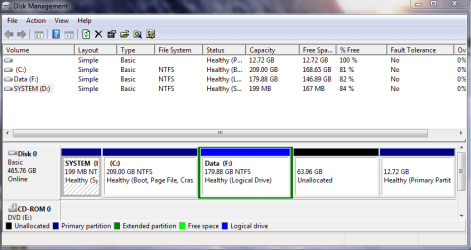
"D: system" partition

Anderson2

New member
Power User
Local time
1:58 AM
Messages
188
I have a new laptop that came with pre-installed Windows 7 home premium 64 bit. It had 2 partitions when it arrived:

1) a large partition labeled "C: Local Disk"
2) a small 200 mb partition labeled "D: System"

Looking at the contents of D: I see it contains the following folders:
a) recycle.bin
b) Boot (which seems to contain language files)
c) System Volume (which I cannot access)
and a file "bootmgr"

Questions:
Why does this partition (that contains the bootmgr and boot file) have a drive letter? Would it not be safer if it did _not_ have a drive letter = to avoid accidental injury?

If I remove its drive letter, will the laptop still boot correctly?

Is this what used to be called the mbr hidden partition?

Thanks.
 
Last edited:

My Computer

OS
Windows 7
Look in Disk Mgmt to see if D is marked Active.

Post back a full DMgmt drive map and listings screenshot using Snipping Tool in Start Menu, attach file with paper clip in Reply Box.
 
Questions:
Why does this partition (that contains the bootmgr and boot file) have a drive letter? Would it not be safer if it did _not_ have a drive letter = to avoid accidental injury?

Just hide the partition!
 

My Computer

OS
WIN 7 x64
It isn't really hidden without a drive letter, but you can remove it if you wish.
 

My Computer

Computer Manufacturer/Model Number
Homebuilt
OS
Windows 7 x64
CPU
i7-2600K
Motherboard
Asus P8Z77-v Pro
Memory
8 G
Graphics Card(s)
GTX 480
Sound Card
Onboard
Monitor(s) Displays
LG W2753V
Screen Resolution
1920x1080
Hard Drives
Crucial M4 128 G SSD
Thanks Gregrocker. I attached the image.
As you will see, I've added a data partition F:, so I know my way around disk partitioning.

The partition I am curious about is the small 200MB D: partition (which came with the pre-installed laptop) of which 166 MB is free. It is not a problem but because I am new to W 7 I am trying to understand. It does not seem to make sense to me that a mbr partition should have its own drive letter where someone might inadvertently write to it. (Trying to learn without losing the ability to reboot the laptop!).
 

Attachments

  • disk partitions.PNG
    disk partitions.PNG
    22.6 KB · Views: 175

My Computer

OS
Windows 7
it is normal for Win7 to create a small partition like that for system files.

However, it usualy hidden (except from certain programs like defragmenters and Acronis that see it)
and has no drive letter.

Bit odd.
 

My Computer

Computer Manufacturer/Model Number
Custom (Self Build)
OS
Windows 7 Home Premium 64bit
CPU
Intel Core i7 2700k
Motherboard
eVGA P67 SLI
Memory
8GB Mushkin Redline Ridgebacks @1866
Graphics Card(s)
EVGA GTX570 SC
Sound Card
XiFi Titanium HD
Monitor(s) Displays
LG W2453V
Screen Resolution
1920x1080
Hard Drives
Intel 320 80GB -- Intel X25-V 40GB --WD Black 1TB x2 -- WD Blue 640GB
PSU
Seasonic x750
Case
Corsair 600T SE White
Cooling
eVGA Superclocked CPU Cooler
Keyboard
Saitek Cyborg
Antivirus
Kaspersky
Browser
IE
Other Info
LG BD/DVD
I thought so too. It's a HP laptop.
 

My Computer

OS
Windows 7
I would not delete that partition if you do it may not boot correctly
 

My Computer

Computer Manufacturer/Model Number
Custom Built
OS
Windows 7 Ultimate 32 bit
CPU
AMD Athlon 64 X2 4200+ Overclocked to 3.0Ghz
Motherboard
Biostar TF560 A2+
Memory
2 Gigs of G.Skill DDR2 800
Graphics Card(s)
HIS ATI Radeon HD 2600 Pro With IceQ cooler
Sound Card
6.1 Channel Sound Blaster Live 24 Bit
Monitor(s) Displays
Dual 20.5 " LG Flatrons W2052TO
Screen Resolution
1152x864
Hard Drives
Dual 36 Gig 10,000 RPM Raptors
PSU
430 watt Seasonic 80%+ Dual 12v Rails 2x80mm fans
Case
CHIEFMAX YA-5X
Cooling
4-80mm case fans 1-140mm case fan freezer 64 Pro CPU cooler
Keyboard
Saitek Eclipse II
Mouse
A4Tech wireless battery free optical scroll mouse
Internet Speed
1.5 meg down 384 up
Other Info
Logisys LED fan/light controller and dual 16" LED sticks mounted inside top of case all fans are LED all lighting is blue
DVD RW and CD RW both and Memory card reader
To get rid of the letter, open an elevated cmd, type:

Diskpart

sel vol d

remove

exi.
 

My Computers

System One System Two

  • Computer type
    PC/Desktop
    OS
    7 X64
    CPU
    i5 8400
    Motherboard
    gigabyte b365m ds3h
    Memory
    2x8gb 3200mhz
    Hard Drives
    various
    PSU
    pure power 11 400w cm
    Case
    Coolermaster
    Cooling
    cryorig m9i
  • Computer type
    PC/Desktop
    OS
    7x64
    CPU
    g5400
    Motherboard
    ga b365m ds3h
    Memory
    8gb ddr4 2400
    PSU
    xfx pro 450w
It looks right to me. Just the System Active MBR partition with possibly some extra files (drivers?).

Unhide System and Hidden files in Control Panel>Folder Options>view tab to see if anything else is in there.

You're right, however, about the problem with a drive letter enabling Backup or other files to write there. We see this problem a lot here.

We can of course help you remove it to recover it's space and System active MBR into Win7.

However with all the space you have there, I'd just follow SIW2's commands above to remove the drive letter.
 
That is what I was leaning towards: removing the drive letter. Just hope the laptop will still boot after I do that.
 

My Computer

OS
Windows 7
Feedback for anyone else in my situation:
I removed the D: letter and the PC rebooted normally. (Ooph! That is what I was concerned about)
Even better, none of the other partitions (F: or the CD drive E: ) changed their letter designations. So everything works correctly.

Now I feel better. Thanks for the hand holding.
 
Last edited:

My Computer

OS
Windows 7
Back
Top