

- Local time
- 5:13 PM
- Messages
- 28
I have damaged a crucial component of my win7 installation (in a not so crucial manner  )! The taskbar and startmenu have lost the ability to have items pinned upon them. There is no longer an option to do so in the context menu (nor jump list) of apps or shortcuts. Dragging items onto the taskbar fails to perform a 'pin to', this method is still functional for the start menu.
The start menu's frequently run applications no longer respond to 'remove from this list' in the context menu; and their option to pin is also gone.
Furthermore, the added functionality by way of an expansion arrow for those programs located on the left side of the start menu is no longer responsive. The main program buttons highlight when hovered and can still be clicked but the arrow to the right doesn't highlight when hovered and can not be clicked. The button on the right-hand pane of the start menu and the 'all programs' switch still work as expected.
There are two mistakes I believe may have caused these malfunctions:
Another malfunction being caused by the same mistake (started the exact same time) is that I no longer can access computer management through the run dialogue. I can still access device manager stand-alone using hdwwiz.cpl
When I submit compmgmtlauncher I get the following error:
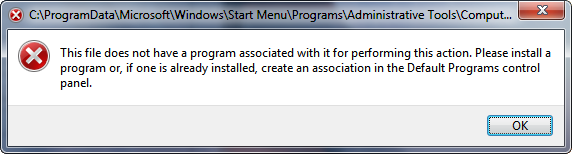
When I enter compmgmt the error is...

Hopefully those error boxes help point towards a solution; who knows what else is wrong.
I do not have any previous restore points (dual-boot of WinXP deleted them all ), and I'd like to avoid doing a repair upgrade of the OS. PC has already been restarted several times and the altered shortcut has been deleted and replaced by a valid one.
Thanks for any help.
)! The taskbar and startmenu have lost the ability to have items pinned upon them. There is no longer an option to do so in the context menu (nor jump list) of apps or shortcuts. Dragging items onto the taskbar fails to perform a 'pin to', this method is still functional for the start menu.The start menu's frequently run applications no longer respond to 'remove from this list' in the context menu; and their option to pin is also gone.
Furthermore, the added functionality by way of an expansion arrow for those programs located on the left side of the start menu is no longer responsive. The main program buttons highlight when hovered and can still be clicked but the arrow to the right doesn't highlight when hovered and can not be clicked. The button on the right-hand pane of the start menu and the 'all programs' switch still work as expected.
There are two mistakes I believe may have caused these malfunctions:
- I performed a rebuild of the icon cache using Axialis IconWorkshop. This programs implementation of the command is intended to be used under WinXP not Win7. (This one isn't the likeliest culprit, but I'm including because it was also done recently)
- I uninstalled a previous version of SpybotS&D to upgrade to version 2.0, but there was a pinned shortcut to the old version on the start menu that was not removed. After installing the newer version I simply changed this shortcut's target to point at the new installation. Here's the catch, this shortcut was one of those with the expansion arrow, meaning it contained specialized tasks for it's app. Not realizing this I clicked on the arrow for the altered shortcut, needless to say it did not expand and since then none of the other start menu items have been able to either.
Another malfunction being caused by the same mistake (started the exact same time) is that I no longer can access computer management through the run dialogue. I can still access device manager stand-alone using hdwwiz.cpl
When I submit compmgmtlauncher I get the following error:
When I enter compmgmt the error is...
Hopefully those error boxes help point towards a solution; who knows what else is wrong.
I do not have any previous restore points (dual-boot of WinXP deleted them all
), and I'd like to avoid doing a repair upgrade of the OS. PC has already been restarted several times and the altered shortcut has been deleted and replaced by a valid one.Thanks for any help.
My Computer
- Computer type
- PC/Desktop
- Computer Manufacturer/Model Number
- iBuyPower
- OS
- Windows 7 Professional 64-bit (6.1, Build 7601)
- CPU
- Intel Core i7-960 @ 3.20GHz
- Motherboard
- MSI X58 Pro-E (MS-7522)
- Memory
- 12GB (3x4GB) DDR3 1600 Crucial Ballistix
- Graphics Card(s)
- Nvidia GeForce 9800 GT
- Sound Card
- On Board (Realtek)
- Monitor(s) Displays
- Samsung Syncmaster T260HD
- Screen Resolution
- 1920x1200 @ 60Hz
- Hard Drives
- Western Digital 2TB SATA-II 7200RPM (WD20EARS-00MVWB0)
Seagate 40GB ATA Ultra DMA/100 5400RPM (ST340015A)
Hitachi 1TB 7200RPM (HDS7210010CLA332)
- PSU
- XION 700W (XON-700P12N)
- Case
- Antec DF-85
- Cooling
- Stock
- Keyboard
- HP Wireless Elite, Logitech Wave
- Mouse
- Logitech G700, Logitech G500
- Internet Speed
- 3Mbps/768kbps
- Antivirus
- Avira Free Edition
- Browser
- Firefox 23, Internet Explorer 10, Chrome 29
- Other Info
- Speakers: Creative GigaWorks T40 Series II


 , my system disk is pre-SP1.