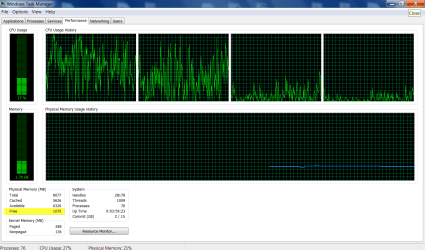
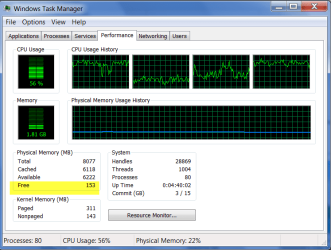
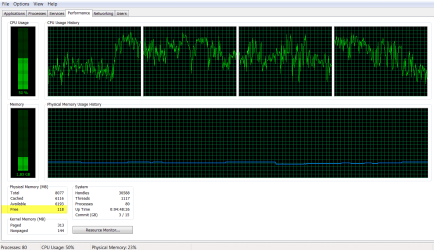
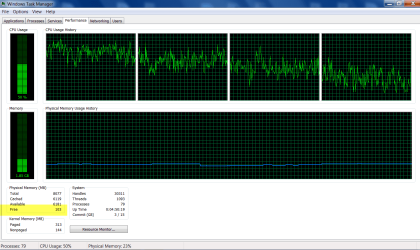
I see nothing in the screenshots that is unusual or cause for concern. Low free memory is a good thing, zero being the optimum value. I have seen zero free memory many times with no problems whatsoever. Windows, and any other modern OS as well, was designed to operate this way. Free memory has never been a desirable thing in any Windows OS released in the last 20+ years.
Windows will always try to find some use for as much memory as possible with the goal of maximizing performance. The lowering value for free memory is an indication it is doing it's job. Free memory is wasted memory. It is an evil which should be avoided whenever possible. The ideal state would be zero free memory at all times but we are not there yet.
The important number is "Available" memory and you have no shortage of that.
I don't know why free memory is displayed so prominently. It seems that most people who notice it misinterpret it's meaning. I would be more concerned about a high value than a low one.
My Computer
At a glance
Windows 7 Pro 64 bitXeon W35208 GBNvidia Geforce 210
But nothing opens. This PC saves opens & photoshop's plenty of pics. Just to open a folder or two with bulk photos with thumbnails is taking up to 6 hours.
If RAM is not a problem what is? (keep in mind the reformatt is only days old and not many programs installed)
My Computer
At a glance
Microsoft Windows 7 HomePremium 64-bit 7601 M...Intel(R) Core(TM)2 Duo CPU E4500 @ 2.20GHz8GbNVIDIA GeForce GT 710
Computer type
PC/Desktop
Computer Manufacturer/Model Number
Generic - custom build
OS
Microsoft Windows 7 HomePremium 64-bit 7601 Multiprocessor Free Service Pack 1
CPU
Intel(R) Core(TM)2 Duo CPU E4500 @ 2.20GHz
Motherboard
Gigabyte Technology Co., Ltd. EP35-DS3P
Memory
8Gb
Graphics Card(s)
NVIDIA GeForce GT 710
Sound Card
(1) USB Audio Device (2) USB Audio Device (3) NVIDIA Hig
Monitor(s) Displays
older 21" thinkvision brand?
Screen Resolution
1680 x 1050
Hard Drives
WDC WD5000AAKS-22A7B0 ATA Device
ST3500418AS ATA Device
ST3320813AS ATA Device
1*Samsung 840 EVO 120GB SSD;
1*OCZ Vertex 2 60GB SSD;
2*Samsung F3 SpinPoint 1TB in RAID0;
1*Samsung F1 SpinPoint 1TB;
2*Western Digital 1TB External USB 3.0
1*Western Digital 500GB External USB 3.0
1*Seagate 500GB External USB 2.0
PSU
Thermaltake ToughPower QFan 750W
Case
Thermaltake Element S VK60001W2Z
Cooling
Corsair H60 Water Cooling, 2*230mm and 2*80mm case fans
1*Samsung 840 EVO 120GB SSD;
1*OCZ Vertex 2 60GB SSD;
2*Samsung F3 SpinPoint 1TB in RAID0;
1*Samsung F1 SpinPoint 1TB;
2*Western Digital 1TB External USB 3.0
1*Western Digital 500GB External USB 3.0
1*Seagate 500GB External USB 2.0
PSU
Thermaltake ToughPower QFan 750W
Case
Thermaltake Element S VK60001W2Z
Cooling
Corsair H60 Water Cooling, 2*230mm and 2*80mm case fans