dark elegance theme

rabea111

New member
Local time
10:03 AM
Messages
15
hi everyone , i already downloaded a very nice theme for windows7 called dark elegance , but after extracting the file i found an extra folder called (extras) and it contain 5 folders in the following names :

1-custom system files contain anothe folder called (system32)
2-icons
3-rain meter skin
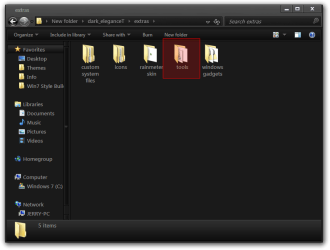
4-tools it contain (theme resources changer,universal theme patcher,add take ownership option,moo0 transparent menu1.09 installer , rebuild_icon_cash this is a windows batch file)

5-windows gadget

does anyone already installed this themes or anyone knows how to activate this themes...

thank you in advance.....
 

My Computer

OS
windows7 ultimate

My Computer

Computer Manufacturer/Model Number
Custom/DIY
OS
Windows 7 Ultimate x64
CPU
Intel C2D E8400@4Ghz OC
Motherboard
ASUS P5Q-E, bios 2101
Memory
4x2GB Kingston HyperX 8500@1066Mhz
Graphics Card(s)
Nvidia GTS450 OC
Sound Card
Onboard SoundMax
Monitor(s) Displays
Samsung Syncmaster 17"
Screen Resolution
1280x1024
Hard Drives
WD6402AAEX-640GB(system), WD10EALX-1TB(storage), other external disks & docking stations
PSU
Corsair TX-750 V2
Case
Custom Tower
Cooling
Air: Arctic Cooling 2xF8 & F12; Akasa AK-968, 2xAK-HD-BL
Mouse
Gigabyte M6900
Internet Speed
10M/1M
thanks but still dont know how??
 

My Computer

OS
windows7 ultimate
Did you try to apply custom themes before?
 

My Computer

Computer Manufacturer/Model Number
Custom/DIY
OS
Windows 7 Ultimate x64
CPU
Intel C2D E8400@4Ghz OC
Motherboard
ASUS P5Q-E, bios 2101
Memory
4x2GB Kingston HyperX 8500@1066Mhz
Graphics Card(s)
Nvidia GTS450 OC
Sound Card
Onboard SoundMax
Monitor(s) Displays
Samsung Syncmaster 17"
Screen Resolution
1280x1024
Hard Drives
WD6402AAEX-640GB(system), WD10EALX-1TB(storage), other external disks & docking stations
PSU
Corsair TX-750 V2
Case
Custom Tower
Cooling
Air: Arctic Cooling 2xF8 & F12; Akasa AK-968, 2xAK-HD-BL
Mouse
Gigabyte M6900
Internet Speed
10M/1M
1-custom system files contain anothe folder called (system32)
2-icons
3-rain meter skin
4-tools it contain (theme resources changer,universal theme patcher,add take ownership option,moo0 transparent menu1.09 installer , rebuild_icon_cash this is a windows batch file)

5-windows gadget

does anyone already installed this themes or anyone knows how to activate this themes...

thank you in advance.....
1st
You will need to do 1 of these 2 ways of Enabling custom themes for it to work.
http://www.sevenforums.com/tutorials/34579-enabling-custom-themes-windows-7-a.html
Or
http://www.sevenforums.com/tutorials/28377-theme-how-apply-custom-themes.html?filter
2nd
Most of the extras are there if you want to use them like the window gadgets, rainmeter skin, icons, custom system file's
3rd
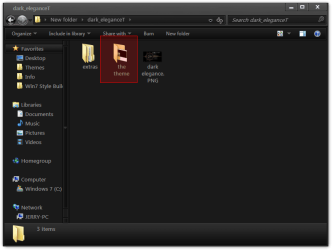
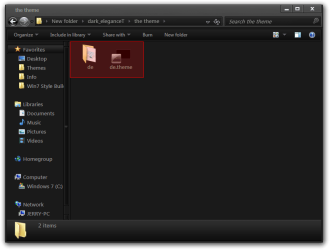
Open the theme folder and put the 2 (screenshot) in C/Windows/Resources/Themes
dark_eleganceT.pngthe theme.png
4th
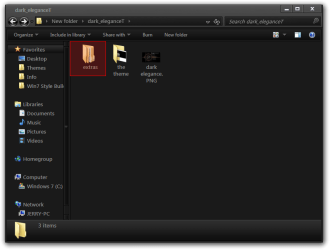
Open the extras folder then open the tools folder then open the theme resource changer folder in the install the theme resource changer for your version X64 or x86 there is some instructions in that folder if you need to read them.
3.pngextras.pngtheme resource changer.png
After it is installed go Personalize and start the theme it will change the resources for you.
Jerry
 

My Computer

Computer type
Laptop
Computer Manufacturer/Model Number
Sager NP9170
OS
Win 7 Pro x64 / Win 10 Pro
CPU
Intel(R) Core(TM) i7-3630QM CPU @ 2.40GHz
Motherboard
CLEVO P170EM
Memory
12 GB
Graphics Card(s)
(1) Intel(R) HD Graphics 4000 (2) NVIDIA GeForce GTX 675M
Sound Card
(1) Realtek High Definition Audio (2) Intel(R) Display Aud
Monitor(s) Displays
17.3
Screen Resolution
1920x1080
Hard Drives
(1) Samsung 860 EVO 500GB(OS) (1) Samsung 860 EVO 500GB(Data)
Keyboard
Backlite
Antivirus
MSE, Malwarebytes Pro
Browser
Firefox
Other Info
DESKTOP: Custom-built.
OS: Win 10 Pro x64.
CASE: Rosewill R5.
CPU: Intel I5 4670K CPU @ 3.40GHz.
CPU COOLER: Cool Master Hyper 212 EVO.
MOTHERBOARD: Asus Z87-A.
MEMORY: Kingston HyperX 2x4 GB.
GPU: Nvidia Geforce 650 TI.
PSU: Corsair TX750.
DRIVES: (1) Samsung 840 120 GB SSD (2) Western Digital blue 500 GB 7200 RPM.
+1
You really took the time to put this post together.
 

My Computer

Computer Manufacturer/Model Number
Custom/DIY
OS
Windows 7 Ultimate x64
CPU
Intel C2D E8400@4Ghz OC
Motherboard
ASUS P5Q-E, bios 2101
Memory
4x2GB Kingston HyperX 8500@1066Mhz
Graphics Card(s)
Nvidia GTS450 OC
Sound Card
Onboard SoundMax
Monitor(s) Displays
Samsung Syncmaster 17"
Screen Resolution
1280x1024
Hard Drives
WD6402AAEX-640GB(system), WD10EALX-1TB(storage), other external disks & docking stations
PSU
Corsair TX-750 V2
Case
Custom Tower
Cooling
Air: Arctic Cooling 2xF8 & F12; Akasa AK-968, 2xAK-HD-BL
Mouse
Gigabyte M6900
Internet Speed
10M/1M
hello , and i want to thank you all for this great help here , i will try as you are saying and i will get back with the result....
exellent work thanks
 

My Computer

OS
windows7 ultimate
hi , i did as you told and it works , but i am plaining to use the icons and the png images inside the (extras) folder , can you please tell how to do that , because inside the extras folder also there is another folder called (custom system file) for what is that ?

and what about the icon folder and the rainmeter skin and the windows gadget folder , how to makes them works with this particular themes...

thank you ....
 
Last edited:

My Computer

OS
windows7 ultimate

My Computer

Computer Manufacturer/Model Number
Custom/DIY
OS
Windows 7 Ultimate x64
CPU
Intel C2D E8400@4Ghz OC
Motherboard
ASUS P5Q-E, bios 2101
Memory
4x2GB Kingston HyperX 8500@1066Mhz
Graphics Card(s)
Nvidia GTS450 OC
Sound Card
Onboard SoundMax
Monitor(s) Displays
Samsung Syncmaster 17"
Screen Resolution
1280x1024
Hard Drives
WD6402AAEX-640GB(system), WD10EALX-1TB(storage), other external disks & docking stations
PSU
Corsair TX-750 V2
Case
Custom Tower
Cooling
Air: Arctic Cooling 2xF8 & F12; Akasa AK-968, 2xAK-HD-BL
Mouse
Gigabyte M6900
Internet Speed
10M/1M
  • Like
Reactions: JMH
hi , i did as you told and it works , but i am plaining to use the icons and the png images inside the (extras) folder , can you please tell how to do that , because inside the extras folder also there is another folder called (custom system file) for what is that ?

and what about the icon folder and the rainmeter skin and the windows gadget folder , how to makes them works with this particular themes...

thank you ....
TheReaper has you covered on rainmeter, the Windows gadgets all you need to do is double click on them and they will install.
The custom system files most of them I would not mess with maybe just imageres.dll it has some folder icons in it.
The icon folder has some icons that you can use where you would like to look at this tutorial it will show you how to change some icons and if you look at the bottom of the tutorial there are links to other tutorials that will show you other places where you can change other icons. http://www.sevenforums.com/tutorials/73191-icons-change-using-resource-hacker.html
Jerry
 

My Computer

Computer type
Laptop
Computer Manufacturer/Model Number
Sager NP9170
OS
Win 7 Pro x64 / Win 10 Pro
CPU
Intel(R) Core(TM) i7-3630QM CPU @ 2.40GHz
Motherboard
CLEVO P170EM
Memory
12 GB
Graphics Card(s)
(1) Intel(R) HD Graphics 4000 (2) NVIDIA GeForce GTX 675M
Sound Card
(1) Realtek High Definition Audio (2) Intel(R) Display Aud
Monitor(s) Displays
17.3
Screen Resolution
1920x1080
Hard Drives
(1) Samsung 860 EVO 500GB(OS) (1) Samsung 860 EVO 500GB(Data)
Keyboard
Backlite
Antivirus
MSE, Malwarebytes Pro
Browser
Firefox
Other Info
DESKTOP: Custom-built.
OS: Win 10 Pro x64.
CASE: Rosewill R5.
CPU: Intel I5 4670K CPU @ 3.40GHz.
CPU COOLER: Cool Master Hyper 212 EVO.
MOTHERBOARD: Asus Z87-A.
MEMORY: Kingston HyperX 2x4 GB.
GPU: Nvidia Geforce 650 TI.
PSU: Corsair TX750.
DRIVES: (1) Samsung 840 120 GB SSD (2) Western Digital blue 500 GB 7200 RPM.
hi , and thanks for your help all . mostly i manage to get everything works fine , exept changing the icons i am still working on that and i am looking at the tutorial called (icons-change using resource hacker) and i am very sure that i can get a result with that....

again thank you all for your support.....
best regards
rabea :)
 

My Computer

OS
windows7 ultimate
hi , and thanks for your help all . mostly i manage to get everything works fine , exept changing the icons i am still working on that and i am looking at the tutorial called (icons-change using resource hacker) and i am very sure that i can get a result with that....

again thank you all for your support.....
best regards
rabea :)
Your Welcome
Jerry
 

My Computer

Computer type
Laptop
Computer Manufacturer/Model Number
Sager NP9170
OS
Win 7 Pro x64 / Win 10 Pro
CPU
Intel(R) Core(TM) i7-3630QM CPU @ 2.40GHz
Motherboard
CLEVO P170EM
Memory
12 GB
Graphics Card(s)
(1) Intel(R) HD Graphics 4000 (2) NVIDIA GeForce GTX 675M
Sound Card
(1) Realtek High Definition Audio (2) Intel(R) Display Aud
Monitor(s) Displays
17.3
Screen Resolution
1920x1080
Hard Drives
(1) Samsung 860 EVO 500GB(OS) (1) Samsung 860 EVO 500GB(Data)
Keyboard
Backlite
Antivirus
MSE, Malwarebytes Pro
Browser
Firefox
Other Info
DESKTOP: Custom-built.
OS: Win 10 Pro x64.
CASE: Rosewill R5.
CPU: Intel I5 4670K CPU @ 3.40GHz.
CPU COOLER: Cool Master Hyper 212 EVO.
MOTHERBOARD: Asus Z87-A.
MEMORY: Kingston HyperX 2x4 GB.
GPU: Nvidia Geforce 650 TI.
PSU: Corsair TX750.
DRIVES: (1) Samsung 840 120 GB SSD (2) Western Digital blue 500 GB 7200 RPM.
Back
Top