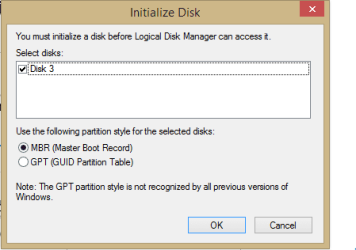
Data on previous HDD is not accesbile .

aringan

New member
Local time
11:10 PM
Messages
7
I changed my laptops drive and I put a new SSD ! then I plugged the previous one to my laptop using USB to use my previous files and folders locating in the HDD. after I connect it no drives are showing up in "My Computer". I opened Disk Management and I get an error "Initialize Disk" which I attached the picture. no matter which option I choose (MBR or GPT) it won't recognize the HDD. and is listed as an unknown Disk, Not initialized, Unallocated.

I have some important data on that Drive ! please help me !

unallocated-1.PNG
 

Attachments

  • unallocated-1.PNG
    unallocated-1.PNG
    5.2 KB · Views: 27
  • unallocated-3.PNG
    unallocated-3.PNG
    1.8 KB · Views: 1
  • unallocated-2.PNG
    unallocated-2.PNG
    2.6 KB · Views: 27

My Computer My Computer

Computer type
Laptop
OS
windows 8.1 Professional x64
I hope you didn't try to initialize your original disk... Anyway, I would remove the SSD, restore the first drive to its original role, and go from there. See if you can access the SSD over USB. If you can't, then there's your problem.
 

My Computer My Computer

Computer type
PC/Desktop
OS
Windows 7 Ultimate x64
I hope you didn't try to initialize your original disk... Anyway, I would remove the SSD, restore the first drive to its original role, and go from there. See if you can access the SSD over USB. If you can't, then there's your problem.


thanks for your respond ! why it's not recognizing my hdd in the first place . and what makes the difference if I remove the SSD and plug the original one !
 

My Computer My Computer

Computer type
Laptop
OS
windows 8.1 Professional x64

My Computer My Computer

Computer type
PC/Desktop
Computer Manufacturer/Model Number
Custom Built
OS
Windows 10 Pro
CPU
AMD Ryzen 5 2400G Processor with Radeon RX Vega 11 Graphics
Motherboard
ASRock X470 Master SLI/AC AM4 AMD Promontory X470 SATA 6Gb/s
Memory
G.SKILL Ripjaws V Series 16GB (2 x 8GB) 288-Pin DDR4 SDRAM D
Graphics Card(s)
2047MB NVIDIA GeForce GTX 1060 6GB (EVGA)
Sound Card
Motherboard Built in
Monitor(s) Displays
Acer R240HY bidx 23.8-Inch IPS HDMI DVI VGA (1920 x 1080) Wi
Screen Resolution
1920 x 1080
Hard Drives
1TB Sandisk SSD PLUS (Main drive)
500 GB Seagate 7200 RPM (Games)
500 GB Western Digital 7200 RPM (Virtual Machines)
PSU
CORSAIR TX Series TX650M 650W 80+ Gold Modular Power Supply
Case
CORSAIR CARBIDE SPEC-02 Mid-Tower Gaming Case, Red LED Fan
Cooling
220mm, two 120mm, and four 60mm fans
Keyboard
Wired Dell keyboard
Mouse
Wireless Logitech mouse
Internet Speed
250mb down, 30mb up
Antivirus
Panda Cloud Antivirus
Browser
Chrome-ish x64
Other Info
Your awesome for reading this.
First try MiniTools Partition Wizard Home Edition 8.1.1 Free download Magic Partition Manager Software, partition magic alternative, free partition magic, partition magic Windows 7 and server partition software - Partition Wizard Online and run Partition Recovery Wizard and check whether any partitions and data are shown.

http://www.sevenforums.com/hardware...-not-initialized-unallocated.html#post2386144

Here is a cut and paste from Microsoft answers http://answers.microsoft.com/en-us/...rd-drive/b3591e8a-a4c7-42b9-8b59-a22f3ecff547

"The problem is that the hard drive partition of the external drive is corrupt. You need to use the mini-tool partition wizard and it will scan the disk and recover the data. The reason no drive letter is being assigned is because the drive had an operating system on it that is now corrupt, and the partition is not being recognized by windows 8 so it does not assign a drive letter to it. Follow the instructions found here http://www.sevenforums.com/hardware-devices/288692-disk-1-unknown-not-initialized-unallocated.html

and you can recover the data and the drive will work. After many hours of searching, this solved my problem."

Please report if that solved your problem too. If not we shall look into other ways.
 

My Computer My Computer

OS
Windows 7 Home Premium 32 bit
Mhhh maybe this is a silly thing but, is your external HDD enclosure giving enough power to the hard drive? maybe trying to recconect as internal as crawfish suggested may tell if your USB enclosure is faulty or not...
 

My Computer My Computer

Computer type
PC/Desktop
Computer Manufacturer/Model Number
Assembled Desktop PC
OS
Microsoft Windows 7 Home Premium SP1 64-bit Build 7600
CPU
AMD Athlon 64 X2 5200+ Dual Core CPU @ 2.7 Ghz (Brisbane)
Motherboard
PCChips A13G+ v3.0
Memory
2x2 GB DDR2 PC-5300 (667 Mhz) Kingston ValueRAM
Graphics Card(s)
XFX ATI Radeon HD 4350 GPU (512 MB + 512 MB HM)
Sound Card
Realtek High Definition Audio Driver ALC660 @ MCP61S
Monitor(s) Displays
HP S2031 20" LED HD Widescreen Display Monitor
Screen Resolution
1600 x 900 px
Hard Drives
Maxtor Diamond Max 10 (160 GB, 7200 RPM, SATA-II Hard Disk)
Western Digital Scorpion Blue (250 GB, 5400 RPM, SATA-II External Hard Disk - Personal Data)
Toshiba MQ01ABD050 (500 GB, 5400 RPM, SATA-II External Hard Disk - Software & ISOs)
PSU
Pixxo Transformer 850W 80+ Certification PSU
Case
Compaq 5BW353 Case
Cooling
Many solutions, see other info...
Keyboard
Green Leaf (Mitzu) Standard Keyboard
Mouse
Microsoft USB Lasser Pointing Device
Internet Speed
10 MB
Antivirus
Avast Antivirus Free
Browser
Firefox, Chrome, Internet Explorer
Other Info
Windows Experience Index Result: 3.8 of 7.9.

Cooling solutions:
- AVC @ 2000/5000 RPM Copper Heatpipes (For Athlon 64 X2 6000+ CPU used in an Athlon 64 X2 5200+)
- Rear Fan 80 mm @ 2700 RPM for heat extraction
- Manhatan Chipset Cooler @ 4700/7200 RPM (For nVidia Chipset in MoBo)
- Foxconn @ 2500 RPM (Old Pentium III heatsink fan) in XFX ATI Radeon HD 4350
He has already put it in an external enclosure.

So our first effort should always be to deal with it as it is. Only if such efforts fail, then will come the ultimate - removing it from the external enclosure and hooking it up as an internal drive.

So in the order of priority

1. Partition Recovery Wizard in PW

2. Live Linux

3. directly as an internal drive.
 

My Computer My Computer

OS
Windows 7 Home Premium 32 bit
I hope you didn't try to initialize your original disk... Anyway, I would remove the SSD, restore the first drive to its original role, and go from there. See if you can access the SSD over USB. If you can't, then there's your problem.


thanks for your respond ! why it's not recognizing my hdd in the first place . and what makes the difference if I remove the SSD and plug the original one !

I have no idea why the HDD is not being recognized. You said you have important data on the HDD, implying you don't have a backup, which means the first thing is to safeguard that data. If the HDD was working before, it should still be working when restored to its original role. If it is, then whew! your data is safe. You should also be able to plug in your SSD over USB to see if it works or not. If not, then USB is the problem. If your HDD still isn't recognized after being restored to its original role, then you have a more serious problem.
 

My Computer My Computer

Computer type
PC/Desktop
OS
Windows 7 Ultimate x64
I hope you didn't try to initialize your original disk... Anyway, I would remove the SSD, restore the first drive to its original role, and go from there. See if you can access the SSD over USB. If you can't, then there's your problem.


thanks for your respond ! why it's not recognizing my hdd in the first place . and what makes the difference if I remove the SSD and plug the original one !
To test if the USB is bad.
You said you put in a new SSD, did you install a Windows on it?
 

My Computer My Computer

Computer type
PC/Desktop
Computer Manufacturer/Model Number
Home Built Desktop By DataTech
OS
Windows 7 Ultimate X64 SP1
CPU
Intel i5-2550K, Differing ~4.4-4.8GHz No built in GPU
Motherboard
ASUS P8Z68-V PRO/GEN3
Memory
16GB G.Skill Sniper 1866MHz @ 2133MHz 2x8GB
Graphics Card(s)
ASUS GTX650TIB-DC2OC-2GD5, (650TI Boost)
Sound Card
Onboard Realtek 5-1
Monitor(s) Displays
Samsung P2570HD
Screen Resolution
1920x1080
Hard Drives
Samsung 840 Pro 256GB SSD for OS, 500GB Seagate Constellation (Enterprise drive) for Data
PSU
Corsair HX650W
Case
Inwin Dragon Rider
Cooling
Hyper 212 EVO w/two Noctua fans, push-pull, @1300 RPM
Keyboard
E-Z Eyes, bright yellow keys with large characters
Mouse
steelseries SENSEI Laser Pro Gaming
Internet Speed
48-51Mbs Mbs down, 11 Mbs up Xfinity Cable
Antivirus
Norton Internet Security 2013
Browser
IE 10, Opera, Pale Moon if needed
Other Info
4 case fans, LG BluRay-RE, ASUS DVD-RW, Mr. Fusion power supply, 1.21 gigawatts.
^The OP had put in a screenshot of the external disk in his first post. So it is assumed that the OS is already installed and the USB port is working. :)

Again taking out the system drive ,putting it in an external enclosure and then Windows 7 or 8 throwing out this error message seems to be a common problem.

The Microsoft thread I had referenced in my post #5 deals with such a problem.In that, atleast one user as quoted in my post#5 has pointed to the Seven Forums Thread and the referenced it saying using PW as stated therein resolved his problem. Incidentally that referred to my post on PW in that thread.:)
 

My Computer My Computer

OS
Windows 7 Home Premium 32 bit
I never assume anything, gets me in trouble. ;) OP has Win 8 in specs yet is at a w7 forum.
 

My Computer My Computer

Computer type
PC/Desktop
Computer Manufacturer/Model Number
Home Built Desktop By DataTech
OS
Windows 7 Ultimate X64 SP1
CPU
Intel i5-2550K, Differing ~4.4-4.8GHz No built in GPU
Motherboard
ASUS P8Z68-V PRO/GEN3
Memory
16GB G.Skill Sniper 1866MHz @ 2133MHz 2x8GB
Graphics Card(s)
ASUS GTX650TIB-DC2OC-2GD5, (650TI Boost)
Sound Card
Onboard Realtek 5-1
Monitor(s) Displays
Samsung P2570HD
Screen Resolution
1920x1080
Hard Drives
Samsung 840 Pro 256GB SSD for OS, 500GB Seagate Constellation (Enterprise drive) for Data
PSU
Corsair HX650W
Case
Inwin Dragon Rider
Cooling
Hyper 212 EVO w/two Noctua fans, push-pull, @1300 RPM
Keyboard
E-Z Eyes, bright yellow keys with large characters
Mouse
steelseries SENSEI Laser Pro Gaming
Internet Speed
48-51Mbs Mbs down, 11 Mbs up Xfinity Cable
Antivirus
Norton Internet Security 2013
Browser
IE 10, Opera, Pale Moon if needed
Other Info
4 case fans, LG BluRay-RE, ASUS DVD-RW, Mr. Fusion power supply, 1.21 gigawatts.
I hope you didn't try to initialize your original disk... Anyway, I would remove the SSD, restore the first drive to its original role, and go from there. See if you can access the SSD over USB. If you can't, then there's your problem.


thanks for your respond ! why it's not recognizing my hdd in the first place . and what makes the difference if I remove the SSD and plug the original one !

I have no idea why the HDD is not being recognized. You said you have important data on the HDD, implying you don't have a backup, which means the first thing is to safeguard that data. If the HDD was working before, it should still be working when restored to its original role. If it is, then whew! your data is safe. You should also be able to plug in your SSD over USB to see if it works or not. If not, then USB is the problem. If your HDD still isn't recognized after being restored to its original role, then you have a more serious problem.


Again, thank you so much. I did replace the drive and put it internally. then as I didn't have any OS to boot up "AS I had installed a brand new OS on SSD" I used the win 8.1 media and using the cmd I ran the xcopy command to copy everything from the that drive to another portable USB !

so yeah USB ports are working fine ! and I guess the reasons is what is mentioned in the post #5 by Jumanji
I had a windows on it's C drive (HDD) which was corrupted ! I guess I have to format it again !

Thank you very much to all you guys ! :):)
 

My Computer My Computer

Computer type
Laptop
OS
windows 8.1 Professional x64
^The OP had put in a screenshot of the external disk in his first post. So it is assumed that the OS is already installed and the USB port is working. :)

Again taking out the system drive ,putting it in an external enclosure and then Windows 7 or 8 throwing out this error message seems to be a common problem.

The Microsoft thread I had referenced in my post #5 deals with such a problem.In that, atleast one user as quoted in my post#5 has pointed to the Seven Forums Thread and the referenced it saying using PW as stated therein resolved his problem. Incidentally that referred to my post on PW in that thread.:)


Thanks !
 

My Computer My Computer

Computer type
Laptop
OS
windows 8.1 Professional x64
He has already put it in an external enclosure.

So our first effort should always be to deal with it as it is. Only if such efforts fail, then will come the ultimate - removing it from the external enclosure and hooking it up as an internal drive.

So in the order of priority

1. Partition Recovery Wizard in PW

2. Live Linux

3. directly as an internal drive.

Seems reasonable. It's quite weird how can this happen... is the transfer to a USB powered connection the reason behind a partition corruption?
Anyway, I'm definetely bookmarking this solution just in case this happens to me one day :P
 

My Computer My Computer

Computer type
PC/Desktop
Computer Manufacturer/Model Number
Assembled Desktop PC
OS
Microsoft Windows 7 Home Premium SP1 64-bit Build 7600
CPU
AMD Athlon 64 X2 5200+ Dual Core CPU @ 2.7 Ghz (Brisbane)
Motherboard
PCChips A13G+ v3.0
Memory
2x2 GB DDR2 PC-5300 (667 Mhz) Kingston ValueRAM
Graphics Card(s)
XFX ATI Radeon HD 4350 GPU (512 MB + 512 MB HM)
Sound Card
Realtek High Definition Audio Driver ALC660 @ MCP61S
Monitor(s) Displays
HP S2031 20" LED HD Widescreen Display Monitor
Screen Resolution
1600 x 900 px
Hard Drives
Maxtor Diamond Max 10 (160 GB, 7200 RPM, SATA-II Hard Disk)
Western Digital Scorpion Blue (250 GB, 5400 RPM, SATA-II External Hard Disk - Personal Data)
Toshiba MQ01ABD050 (500 GB, 5400 RPM, SATA-II External Hard Disk - Software & ISOs)
PSU
Pixxo Transformer 850W 80+ Certification PSU
Case
Compaq 5BW353 Case
Cooling
Many solutions, see other info...
Keyboard
Green Leaf (Mitzu) Standard Keyboard
Mouse
Microsoft USB Lasser Pointing Device
Internet Speed
10 MB
Antivirus
Avast Antivirus Free
Browser
Firefox, Chrome, Internet Explorer
Other Info
Windows Experience Index Result: 3.8 of 7.9.

Cooling solutions:
- AVC @ 2000/5000 RPM Copper Heatpipes (For Athlon 64 X2 6000+ CPU used in an Athlon 64 X2 5200+)
- Rear Fan 80 mm @ 2700 RPM for heat extraction
- Manhatan Chipset Cooler @ 4700/7200 RPM (For nVidia Chipset in MoBo)
- Foxconn @ 2500 RPM (Old Pentium III heatsink fan) in XFX ATI Radeon HD 4350
The OP is knowledgeable and took to the route of running cmd from Windows media and use Xcopy command to copy all the files. Kudos. The solution is noted as another option. Thanks to the OP for sharing that info.

But for ordinary users who don't have such skills, or unable to invest in another external drive to copy all the files or don't have the Windows media, resurrecting the drive with PW would still be the first option.

( We missed a chance to get to know whether that solution indeed worked. Though one user had reported that it worked, I was interested in getting a first-hand report.:D)
 

My Computer My Computer

OS
Windows 7 Home Premium 32 bit
Back
Top