Data Overwriting Not Working?

hummer1730

New member
Local time
5:21 PM
Messages
12
Hey guys, I'm trying to wipe my HDD to remove any sensitive information by doing a 3 pass overwrite, but it doesn't seem to be working?

I let the wiping program run and it took about 14-16 hours for a 1TB drive, but when I rebooted and ran easus data recovery to check and make sure nothing was recoverable, it found hundreds of thousands of RAW files (documents, images, videos, etc., various files).

I thought doing a 3 pass overwrite was supposed to completely remove any traces of past data that was written to the HDD? I ran the free space wiper after a fresh install too, so 99.9% of the space was free.

Am I doing something wrong?

Should I be making a boot-loader of a data overwriting program instead and not running one from my OS?
 

My Computer My Computer

At a glance

Windows 6 Premium 64bit
OS
Windows 6 Premium 64bit
Hi,

Whichn program are you using to wipe the HDD?

Regards,
Golden
 

My Computer My Computer

At a glance

Windows 10 Pro x64 ; Xubuntu x64Intel i7 860 @ 2.80 GHz O/C'ed to 4.0GHz16GB Corsair Vengance DDR3 @ 661 MHz Dual Cha...EVGA NVidia GTX 560 1024MB
Computer type
PC/Desktop
Computer Manufacturer/Model Number
Golden Mk. I.4
OS
Windows 10 Pro x64 ; Xubuntu x64
CPU
Intel i7 860 @ 2.80 GHz O/C'ed to 4.0GHz
Motherboard
Gigabyte P55A-UD3R Rev.1. Award BIOS F13
Memory
16GB Corsair Vengance DDR3 @ 661 MHz Dual Channel (9-9-9-24)
Graphics Card(s)
EVGA NVidia GTX 560 1024MB
Sound Card
Realtek Integrated
Monitor(s) Displays
Dual Samsung SyncMaster 2494HS
Screen Resolution
1920*1080 and 1920*1080
Hard Drives
1*Samsung 840 EVO 120GB SSD;
1*OCZ Vertex 2 60GB SSD;
2*Samsung F3 SpinPoint 1TB in RAID0;
1*Samsung F1 SpinPoint 1TB;
2*Western Digital 1TB External USB 3.0
1*Western Digital 500GB External USB 3.0
1*Seagate 500GB External USB 2.0
PSU
Thermaltake ToughPower QFan 750W
Case
Thermaltake Element S VK60001W2Z
Cooling
Corsair H60 Water Cooling, 2*230mm and 2*80mm case fans
Keyboard
Logitech G110
Mouse
Logitech MX518
Hi,

Whichn program are you using to wipe the HDD?

Regards,
Golden

CyberScrub Privacy Suite and I've tried Eraser.

Eraser shows A LOT of errors when I run it, saying it cannot erase this and that because it's a system file, or a files locked.
 

My Computer My Computer

At a glance

Windows 6 Premium 64bit
OS
Windows 6 Premium 64bit
Can you recommend any usb bootable data overwriting programs that I could use? I think that may be the problem.
 

My Computer My Computer

At a glance

Windows 6 Premium 64bit
OS
Windows 6 Premium 64bit
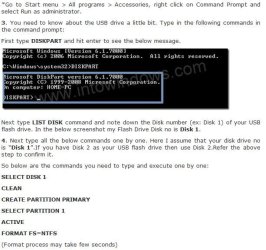
Diskpart is one way. Basically a format way.

Note: You might not need to do

CREATE PARTITION PRIMARY
SELECT PARTITION 1
ACTIVE
 

Attachments

  • Noname.jpg
    Noname.jpg
    50.1 KB · Views: 5

My Computer My Computer

At a glance

Windows 7 Ultimate 64BitGenuineIntel Intel(R) Core(TM) DuoCore T2400 ...2.00 GBMobile Intel(R) 945 Express Chipset
Computer Manufacturer/Model Number
Lenovo ThinkPad T60
OS
Windows 7 Ultimate 64Bit
CPU
GenuineIntel Intel(R) Core(TM) DuoCore T2400 @ 1.83GHz
Motherboard
Intel(R) 82801G (ICH7 Family)
Memory
2.00 GB
Graphics Card(s)
Mobile Intel(R) 945 Express Chipset
Sound Card
SoundMAX Integrated Digital HD Audio
Monitor(s) Displays
ThinkPad Display
Screen Resolution
1400x1050
Hard Drives
100Gb SATA
Keyboard
Standard Keyboard
Mouse
HID-compliant Mouse
Internet Speed
Cable Broadband - 54Mbps
Other Info
Intel(R) PRO/1000 PL Network Connection
11a/b/g Wireless LAN Mini PCI Express Adapter
Diskpart is one way. Basically a format way.

Note: You might not need to do

CREATE PARTITION PRIMARY
SELECT PARTITION 1
ACTIVE

?

Not exactly sure what these instructions are for, is this how to make a bootable usb stick? I need to overwrite all previous data multiple times (just to make sure :p)

I don't think diskpart does that.
 

My Computer My Computer

At a glance

Windows 6 Premium 64bit
OS
Windows 6 Premium 64bit
It's part of making a bootable USB yes but that section there is to wipe and format the stick.

Just give it a go and then see if you can find another on the stick afterwards
 

My Computer My Computer

At a glance

Windows 7 Ultimate 64BitGenuineIntel Intel(R) Core(TM) DuoCore T2400 ...2.00 GBMobile Intel(R) 945 Express Chipset
Computer Manufacturer/Model Number
Lenovo ThinkPad T60
OS
Windows 7 Ultimate 64Bit
CPU
GenuineIntel Intel(R) Core(TM) DuoCore T2400 @ 1.83GHz
Motherboard
Intel(R) 82801G (ICH7 Family)
Memory
2.00 GB
Graphics Card(s)
Mobile Intel(R) 945 Express Chipset
Sound Card
SoundMAX Integrated Digital HD Audio
Monitor(s) Displays
ThinkPad Display
Screen Resolution
1400x1050
Hard Drives
100Gb SATA
Keyboard
Standard Keyboard
Mouse
HID-compliant Mouse
Internet Speed
Cable Broadband - 54Mbps
Other Info
Intel(R) PRO/1000 PL Network Connection
11a/b/g Wireless LAN Mini PCI Express Adapter
It's part of making a bootable USB yes but that section there is to wipe and format the stick.

Just give it a go and then see if you can find another on the stick afterwards

Thanks, it's formatting to NTFS now. How do I make a bootloader from an ISO now? I'm sorta lost.
 

My Computer My Computer

At a glance

Windows 6 Premium 64bit
OS
Windows 6 Premium 64bit
Honestly, I would use SDelete

It's safe, simple, and effective. (Complies with Department of Defense standard 5220.22-M)

Cheers!

EDIT: Examples:

To securely delete a file/s or directory/ies with 3 passes
Code:
sdelete -p 3 -a [I]filename/path[/I]

To safely delete already deleted data (i.e. make them unrecoverable) with 3 passes
Code:
sdelete -c -p 3
 

My Computer My Computer

At a glance

Windows 2000 5.0 Build 2195Intel Core i7-2630QM@2GHz(2.9GHz Turbo Boost)...Kingston DDR3 1333 16GB (4GBx4)nVidia GTX 460m 1.5GB
Computer Manufacturer/Model Number
Asus G73SW-XN2
OS
Windows 2000 5.0 Build 2195
CPU
Intel Core i7-2630QM@2GHz(2.9GHz Turbo Boost) [Sandy Bridge]
Motherboard
Asus G73SW (Intel HM65 Chipset)
Memory
Kingston DDR3 1333 16GB (4GBx4)
Graphics Card(s)
nVidia GTX 460m 1.5GB
Sound Card
EAX Advanced HD 5.0, THX TruStudio
Monitor(s) Displays
17.3 in. primary & 23 in. secondary
Screen Resolution
1920x1080
Hard Drives
Seagate Momentus XT (SATA II) 500 GB @ 7200 RPM
Hitachi (SATA II) 500GB @ 7200 RPM

Non Raid because ASUS was crappy to choose an HM65 Chipset
Keyboard
Built-in 102-Key Backlit Keyboard
Other Info
It's a Laptop.
Honestly, I would use SDelete

It's safe, simple, and effective. (Complies with Department of Defense standard 5220.22-M)

Cheers!

EDIT: Examples:

To securely delete a file/s or directory/ies with 3 passes
Code:
sdelete -p 3 -a [I]filename/path[/I]

To safely delete already deleted data (i.e. make them unrecoverable) with 3 passes
Code:
sdelete -c -p 3

Thanks but I need a way to run that from a bootloader, which is my problem - a lot of data isn't being overwritten because I'm using the program's while my OS is loaded.
 

My Computer My Computer

At a glance

Windows 6 Premium 64bit
OS
Windows 6 Premium 64bit
It's a command line utility. I'm pretty sure it can run on a PE environment. Window's Startup Repair is a quick and good one. Just put it on a folder you can access easily like the root of a drive so you can type something like

Code:
cd /d C:
sdelete [I]blahblah[/I]
 

My Computer My Computer

At a glance

Windows 2000 5.0 Build 2195Intel Core i7-2630QM@2GHz(2.9GHz Turbo Boost)...Kingston DDR3 1333 16GB (4GBx4)nVidia GTX 460m 1.5GB
Computer Manufacturer/Model Number
Asus G73SW-XN2
OS
Windows 2000 5.0 Build 2195
CPU
Intel Core i7-2630QM@2GHz(2.9GHz Turbo Boost) [Sandy Bridge]
Motherboard
Asus G73SW (Intel HM65 Chipset)
Memory
Kingston DDR3 1333 16GB (4GBx4)
Graphics Card(s)
nVidia GTX 460m 1.5GB
Sound Card
EAX Advanced HD 5.0, THX TruStudio
Monitor(s) Displays
17.3 in. primary & 23 in. secondary
Screen Resolution
1920x1080
Hard Drives
Seagate Momentus XT (SATA II) 500 GB @ 7200 RPM
Hitachi (SATA II) 500GB @ 7200 RPM

Non Raid because ASUS was crappy to choose an HM65 Chipset
Keyboard
Built-in 102-Key Backlit Keyboard
Other Info
It's a Laptop.
It's a command line utility. I'm pretty sure it can run on a PE environment. Window's Startup Repair is a quick and good one. Just put it on a folder you can access easily like the root of a drive so you can type something like

Code:
cd /d C:
sdelete [I]blahblah[/I]

Alright, I'll give that a shot if this bootloader I'm making doesn't work out. Thanks.

Not very good with the command line :S.
 

My Computer My Computer

At a glance

Windows 6 Premium 64bit
OS
Windows 6 Premium 64bit
It's a command line utility. I'm pretty sure it can run on a PE environment. Window's Startup Repair is a quick and good one. Just put it on a folder you can access easily like the root of a drive so you can type something like

Code:
cd /d C:
sdelete [I]blahblah[/I]

Hey, when using sdelete, should I just type what you said or use the -z command listed in this guide?
http://www.guidingtech.com/2834/sdelete-permanently-delete-windows-files/


Something like
-z C: -p 3?
or
sdelete -c -p 3
 

My Computer My Computer

At a glance

Windows 6 Premium 64bit
OS
Windows 6 Premium 64bit
Thank you for pointing that out. I usually assume that some people have a certain degree of knowledge because apparently, some users get offended when I go to too much detail, thinking that I think they are stupid when I'm just being informative...

Anyway, to use this in an off-line command line, I would put the sdelete file on the root of an extra drive. Then, I would Boot to Startup Repair using either a Win7 installation disk, or pressing F8 crazily when booting up Windows. If there's a system recovery partition on your drive, there should be a "Repair your Computer" option you could use.

Next, I would select the command prompt as a system recovery option. Note we're not actually recovering anything. We're just exploiting Windows 7's nice little feature ;)

Next, confirm the drive letter you placed your sdelete file in, and the drive letter you want to do a safe delete on. To do this, in the command prompt, I would type notepad, then press Ctrl+O when notepad is open, click Computer, and then look for the drive that has the file (selecting "All Files" under the drop down menu where the *.txt extension is listed helps too)

After I found the drive, I would close notepad and change the command prompt to that drive sdelete is in. Let's assume it's D:. I would type:
Code:
cd /d D:\
Then I would do the wiping. Let's assume the disk is C:. I would type:
Code:
sdelete -p 3 -c C:
And that's it!

Oh, one more example. To delete ALL FILES on C: and securely wipe them, [BE CAREFUL WITH THIS ONE! You don't want to accidentally wipe your main hard drive :p]
Code:
sdelete -p 3 -c C:\*
 

My Computer My Computer

At a glance

Windows 2000 5.0 Build 2195Intel Core i7-2630QM@2GHz(2.9GHz Turbo Boost)...Kingston DDR3 1333 16GB (4GBx4)nVidia GTX 460m 1.5GB
Computer Manufacturer/Model Number
Asus G73SW-XN2
OS
Windows 2000 5.0 Build 2195
CPU
Intel Core i7-2630QM@2GHz(2.9GHz Turbo Boost) [Sandy Bridge]
Motherboard
Asus G73SW (Intel HM65 Chipset)
Memory
Kingston DDR3 1333 16GB (4GBx4)
Graphics Card(s)
nVidia GTX 460m 1.5GB
Sound Card
EAX Advanced HD 5.0, THX TruStudio
Monitor(s) Displays
17.3 in. primary & 23 in. secondary
Screen Resolution
1920x1080
Hard Drives
Seagate Momentus XT (SATA II) 500 GB @ 7200 RPM
Hitachi (SATA II) 500GB @ 7200 RPM

Non Raid because ASUS was crappy to choose an HM65 Chipset
Keyboard
Built-in 102-Key Backlit Keyboard
Other Info
It's a Laptop.
Thank you for pointing that out. I usually assume that some people have a certain degree of knowledge because apparently, some users get offended when I go to too much detail, thinking that I think they are stupid when I'm just being informative...

Anyway, to use this in an off-line command line, I would put the sdelete file on the root of an extra drive. Then, I would Boot to Startup Repair using either a Win7 installation disk, or pressing F8 crazily when booting up Windows. If there's a system recovery partition on your drive, there should be a "Repair your Computer" option you could use.

Next, I would select the command prompt as a system recovery option. Note we're not actually recovering anything. We're just exploiting Windows 7's nice little feature ;)

Next, confirm the drive letter you placed your sdelete file in, and the drive letter you want to do a safe delete on. To do this, in the command prompt, I would type notepad, then press Ctrl+O when notepad is open, click Computer, and then look for the drive that has the file (selecting "All Files" under the drop down menu where the *.txt extension is listed helps too)

After I found the drive, I would close notepad and change the command prompt to that drive sdelete is in. Let's assume it's D:. I would type:
Code:
cd /d D:\
Then I would do the wiping. Let's assume the disk is C:. I would type:
Code:
sdelete -p 3 -c C:
And that's it!

Oh, one more example. To delete ALL FILES on C: and securely wipe them, [BE CAREFUL WITH THIS ONE! You don't want to accidentally wipe your main hard drive :p]
Code:
sdelete -p 3 -c C:\*

Thanks so much, but I encountered an error :(

When I try to run "sdelete -p 3 -c C:" after making the directory C:\ (sdelete on root), it gives me the error "The subsystem needed to support the image type is not present".

Any ideas?

I don't have a repair partition, I had to boot from my restore CD.
 

My Computer My Computer

At a glance

Windows 6 Premium 64bit
OS
Windows 6 Premium 64bit
Try using a 32-bit restore CD instead. :)
 

My Computer My Computer

At a glance

Windows 2000 5.0 Build 2195Intel Core i7-2630QM@2GHz(2.9GHz Turbo Boost)...Kingston DDR3 1333 16GB (4GBx4)nVidia GTX 460m 1.5GB
Computer Manufacturer/Model Number
Asus G73SW-XN2
OS
Windows 2000 5.0 Build 2195
CPU
Intel Core i7-2630QM@2GHz(2.9GHz Turbo Boost) [Sandy Bridge]
Motherboard
Asus G73SW (Intel HM65 Chipset)
Memory
Kingston DDR3 1333 16GB (4GBx4)
Graphics Card(s)
nVidia GTX 460m 1.5GB
Sound Card
EAX Advanced HD 5.0, THX TruStudio
Monitor(s) Displays
17.3 in. primary & 23 in. secondary
Screen Resolution
1920x1080
Hard Drives
Seagate Momentus XT (SATA II) 500 GB @ 7200 RPM
Hitachi (SATA II) 500GB @ 7200 RPM

Non Raid because ASUS was crappy to choose an HM65 Chipset
Keyboard
Built-in 102-Key Backlit Keyboard
Other Info
It's a Laptop.
Is someone writing a thesis here?
 

My Computer My Computer

At a glance

Windows 7 Ultimate 64BitGenuineIntel Intel(R) Core(TM) DuoCore T2400 ...2.00 GBMobile Intel(R) 945 Express Chipset
Computer Manufacturer/Model Number
Lenovo ThinkPad T60
OS
Windows 7 Ultimate 64Bit
CPU
GenuineIntel Intel(R) Core(TM) DuoCore T2400 @ 1.83GHz
Motherboard
Intel(R) 82801G (ICH7 Family)
Memory
2.00 GB
Graphics Card(s)
Mobile Intel(R) 945 Express Chipset
Sound Card
SoundMAX Integrated Digital HD Audio
Monitor(s) Displays
ThinkPad Display
Screen Resolution
1400x1050
Hard Drives
100Gb SATA
Keyboard
Standard Keyboard
Mouse
HID-compliant Mouse
Internet Speed
Cable Broadband - 54Mbps
Other Info
Intel(R) PRO/1000 PL Network Connection
11a/b/g Wireless LAN Mini PCI Express Adapter

My Computer My Computer

At a glance

Windows 2000 5.0 Build 2195Intel Core i7-2630QM@2GHz(2.9GHz Turbo Boost)...Kingston DDR3 1333 16GB (4GBx4)nVidia GTX 460m 1.5GB
Computer Manufacturer/Model Number
Asus G73SW-XN2
OS
Windows 2000 5.0 Build 2195
CPU
Intel Core i7-2630QM@2GHz(2.9GHz Turbo Boost) [Sandy Bridge]
Motherboard
Asus G73SW (Intel HM65 Chipset)
Memory
Kingston DDR3 1333 16GB (4GBx4)
Graphics Card(s)
nVidia GTX 460m 1.5GB
Sound Card
EAX Advanced HD 5.0, THX TruStudio
Monitor(s) Displays
17.3 in. primary & 23 in. secondary
Screen Resolution
1920x1080
Hard Drives
Seagate Momentus XT (SATA II) 500 GB @ 7200 RPM
Hitachi (SATA II) 500GB @ 7200 RPM

Non Raid because ASUS was crappy to choose an HM65 Chipset
Keyboard
Built-in 102-Key Backlit Keyboard
Other Info
It's a Laptop.

My Computer My Computer

At a glance

Windows 7 Professional SP1 32-bitIntel Core 2 Duo E6600 2.4GHz4GB DDR2-667 (4x1GB in dual-channel config)nVidia GeForce 9800 GT
Computer type
PC/Desktop
Computer Manufacturer/Model Number
Custom-built
OS
Windows 7 Professional SP1 32-bit
CPU
Intel Core 2 Duo E6600 2.4GHz
Motherboard
Asus PL5D2
Memory
4GB DDR2-667 (4x1GB in dual-channel config)
Graphics Card(s)
nVidia GeForce 9800 GT
Sound Card
Creative X-Fi XtremeMusic
Monitor(s) Displays
Acer P236H
Screen Resolution
1920x1200 (DVI)
Hard Drives
OCZ SSD Vertex Plus 60GB SATA (Firmware 3.55), 64MB cache
Hitachi HD321KJ SATA, 320GB, 7200rpm, 16MB cache
PSU
Antec TruePower 2.0
Case
Cooler Master Centurion
Cooling
Too many fans
Keyboard
Standard
Mouse
Microsoft wireless optical mouse
Internet Speed
AT&T U-verse (18mbit/sec)
Antivirus
Microsoft Security Essentials
Browser
Firefox
Other Info
Other devices:
Compaq CQ-60 laptop
Google Nexus 7 (2012) tablet
Nvidia SHIELD tablet (US/LTE)
Hardkernel ODROID-XU single-board computer (Samsung Exynos 5420)
Back
Top