My HP Pavilion's HDD is under warranty & I have to send in the old drive. I want to delete sensitive text and data files. I mounted the drive as external to another Win7 laptop and used TestDisk to recover partitions and then recover my data, which I've already safely copied. TestDisk says that my System and Recovery partitions have bad MFT and MFT Mirror that can't be fixed. So I doubt I can access the files at all if I put the HDD back in the notebook, with a bad file system.
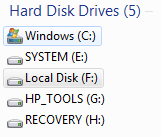
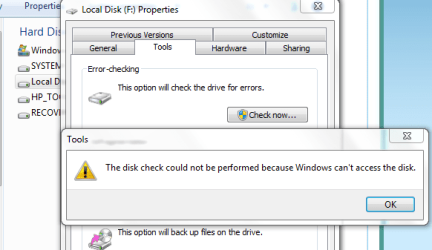
I want to delete the old user files in the C: partition and use CCleaner to write the space over with 0's and 1's. But Win7 in my new laptop can't "see" the C: drive - it shows 2 partitions on the external (Recovery & HP Tools), but 2 don't show up -- System and C: are hidden in a general "F:" disk. I can't access the drive/partition from Win7. I don't know why Recovery partition shows when it has corrupt MFT and C: won't show when it has good MFT.
The files can be individually listed within TestDisk application and a partition can be wiped but I don't want to screw up my warranty so need to just delete folders and files and then clean up. How can I do that?
Thanks.
(C and E are the new laptop; local disk F is the part of the external corrupt HDD that is not accessible but contains that HDD's System and C: partitions and G and H are on the external as well)
Attachments
Win7 view of external corrupt HDD.PNG
3 KB
· Views: 273
Cannot access local F disk which is external with 2 partitions not visible.PNG
18.7 KB
· Views: 10
My Computer
At a glance
Windows 7 Home Premium (x64) (build 7600)2.4gib Intel core i54gbIntel HD Graphics with shared video memory
Computer Manufacturer/Model Number
HP Pavilion DM4-1165dx
OS
Windows 7 Home Premium (x64) (build 7600)
CPU
2.4gib Intel core i5
Motherboard
Hewlett-Packard 146A 58.23
Memory
4gb
Graphics Card(s)
Intel HD Graphics with shared video memory
Sound Card
IDT High Definition Audio CODEC
Monitor(s) Displays
Intel(R) HD Graphics [Display adapter] Generic PnP Monitor
Thanks to both of you, BUT, from another forum post here, it seems wiping the disk completely may void my warranty. HP has my credit card # and could then charge me for the new HDD they sent. So I want to selectively DELETE rather than wipe.
My Computer
At a glance
Windows 7 Home Premium (x64) (build 7600)2.4gib Intel core i54gbIntel HD Graphics with shared video memory
Computer Manufacturer/Model Number
HP Pavilion DM4-1165dx
OS
Windows 7 Home Premium (x64) (build 7600)
CPU
2.4gib Intel core i5
Motherboard
Hewlett-Packard 146A 58.23
Memory
4gb
Graphics Card(s)
Intel HD Graphics with shared video memory
Sound Card
IDT High Definition Audio CODEC
Monitor(s) Displays
Intel(R) HD Graphics [Display adapter] Generic PnP Monitor
Unless I misunderstood you, you already seem to have the choice of wiping select partitions rather than the entire disk - so you should be fine just wiping everything except the recovery partition. I don't think there would be a warranty issue with that.
Still, it's probably a good idea to call HP first as whs suggests.
My Computer
At a glance
Windows 7 Professional SP1 32-bitIntel Core 2 Duo E6600 2.4GHz4GB DDR2-667 (4x1GB in dual-channel config)nVidia GeForce 9800 GT
Computer type
PC/Desktop
Computer Manufacturer/Model Number
Custom-built
OS
Windows 7 Professional SP1 32-bit
CPU
Intel Core 2 Duo E6600 2.4GHz
Motherboard
Asus PL5D2
Memory
4GB DDR2-667 (4x1GB in dual-channel config)
Graphics Card(s)
nVidia GeForce 9800 GT
Sound Card
Creative X-Fi XtremeMusic
Monitor(s) Displays
Acer P236H
Screen Resolution
1920x1200 (DVI)
Hard Drives
OCZ SSD Vertex Plus 60GB SATA (Firmware 3.55), 64MB cache
Hitachi HD321KJ SATA, 320GB, 7200rpm, 16MB cache
I will try. I did call them and the particular rep I got said anything to do with the drive as an external was outside what they would discuss because outside of warranty coverage as a notebook drive. I'll try this specific question. They of course gave me the party line that it will be securely destroyed.
My Computer
At a glance
Windows 7 Home Premium (x64) (build 7600)2.4gib Intel core i54gbIntel HD Graphics with shared video memory
Computer Manufacturer/Model Number
HP Pavilion DM4-1165dx
OS
Windows 7 Home Premium (x64) (build 7600)
CPU
2.4gib Intel core i5
Motherboard
Hewlett-Packard 146A 58.23
Memory
4gb
Graphics Card(s)
Intel HD Graphics with shared video memory
Sound Card
IDT High Definition Audio CODEC
Monitor(s) Displays
Intel(R) HD Graphics [Display adapter] Generic PnP Monitor
If you wipe it clean, I'm not aware of how they can tell if it was done inside or outside. I don't know how HP works, but I have had 2 Dell drives go out and was able to wipe them with the clean all command that Brink suggested. They never complained either time. Besides, If my personal info was on it, I would not send it back.
Solved: Burned a BootMed boot CD and using ubuntu dd, overwrote the partition twice, first with random numbers, then with zeros. Feel much better now about sending it off.
My Computer
At a glance
Windows 7 Home Premium (x64) (build 7600)2.4gib Intel core i54gbIntel HD Graphics with shared video memory
Computer Manufacturer/Model Number
HP Pavilion DM4-1165dx
OS
Windows 7 Home Premium (x64) (build 7600)
CPU
2.4gib Intel core i5
Motherboard
Hewlett-Packard 146A 58.23
Memory
4gb
Graphics Card(s)
Intel HD Graphics with shared video memory
Sound Card
IDT High Definition Audio CODEC
Monitor(s) Displays
Intel(R) HD Graphics [Display adapter] Generic PnP Monitor




 and I have it in writing.
