Data recovery

Daz1966

New member
Member
Local time
9:13 PM
Messages
27
Location
Nottingham
Hi,

Just wondering if you guys could give me advice please.

Ironically my backup hard drive appears to have given up the ghost & i was wondering if retrieving my date is possible.
It is actually a network drive, Iomega 1tb, it became undiscovered so i removed the Seagate Barracuda from it's case & tried it in a sata drive dock. It runs quietly and sounds like it is spinning but doesn't show in my computer.
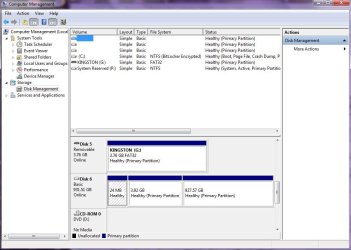
It shows as disk 6 in disk management as well as online & healthy but will not initialize, so no drive letter.

Am i wasting my time?


Thanks in advance.
 

My Computer

OS
Windows 7 Ultimate 32 bit

My Computers

System One System Two

  • Computer type
    PC/Desktop
    OS
    7 X64
    CPU
    i5 8400
    Motherboard
    gigabyte b365m ds3h
    Memory
    2x8gb 3200mhz
    Hard Drives
    various
    PSU
    pure power 11 400w cm
    Case
    Coolermaster
    Cooling
    cryorig m9i
  • Computer type
    PC/Desktop
    OS
    7x64
    CPU
    g5400
    Motherboard
    ga b365m ds3h
    Memory
    8gb ddr4 2400
    PSU
    xfx pro 450w
No luck...tried Linux system rescue too.

Guess it must be dead.
 

My Computer

OS
Windows 7 Ultimate 32 bit
Try Partition Recovery Wizard in MiniTools Partition Wizard. Best Free Partition Manager Freeware and free partition magic for Windows 7, Windows 8, Windows Vista and Windows XP 32 bit & 64 bit. MiniTool Free Partition Manager Software Home Edition.

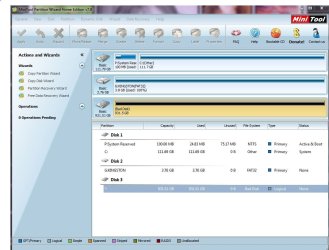
If your problem HDD is shown as Unallocated in the Partition Wizard disk map, run Partition Recovery Wizard, and do a quick scan. If it can find the partition and the Partition Explorer shows the files after a quick scan, click Finish to rewrite the partition table and it should be through.

If the Partition Wizard shows the problem drive as bad, then you have a serious problem. HDD Failure ( most probably the electronics.). ( This is what I learnt from another user experience.)
 

My Computer

OS
Windows 7 Home Premium 32 bit
Hi Jumanji,

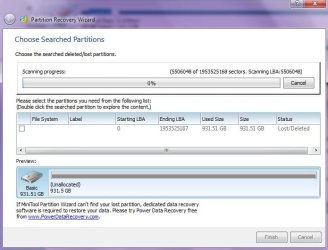
I ran the tool & the drive shows as unallocated but also as a bad disk. I am running the scan anyway but i'm not holding my breath.

Thanks for your help, much appreciated.
 

My Computer

OS
Windows 7 Ultimate 32 bit
OK, carry on with the scan. Let us know how long the scan takes and the end result and keep us posted.

1. I would also appreciate if you can post a screenshot of how the drive appears in the Partition Wizard's disk map.

2. What is the capacity of the drive? Does Partition Wizard show the correct capacity?
 

My Computer

OS
Windows 7 Home Premium 32 bit
1tb drive.


Attachments

  • Screenshot.JPG
    Screenshot.JPG
    96 KB · Views: 6
  • Screenshot 2.JPG
    Screenshot 2.JPG
    52.1 KB · Views: 11

My Computer

OS
Windows 7 Ultimate 32 bit
Thanks for the screenshot.

Now it is clear. What matters is what is shown in the main screen, which is bad disk.

The scan screen will show it as unallocated during the scan.

You said Windows Disk Management showed it as healthy. Also the drive capacity is shown correctly. I am just wondering whether that gives us a ray of hope. I am keeping my fingers crossed.

Let the scan complete and let us see the end result. The scan may take a long long time. So get away from the computer and do other work, peeping in only once in a while.:)
 

My Computer

OS
Windows 7 Home Premium 32 bit
OK, there's a big orange thing appeared in the sky today, i'll go check it out.
 

Attachments

  • Screenshot 3.JPG
    Screenshot 3.JPG
    77.5 KB · Views: 6

My Computer

OS
Windows 7 Ultimate 32 bit
Better fly to Reykjavik, have a closer look and return. :)
 

My Computer

OS
Windows 7 Home Premium 32 bit
Back
Top