Date and time

alexzutzu

New member
Local time
8:43 AM
Messages
19
hello all
i have a little bit of a problem.
i installed nexus and a theme from it and now my clock is not showing the day of the week even though i removed nexus. i think it's got something to do with the font size or the font it self. any ideas on how to make it like before?

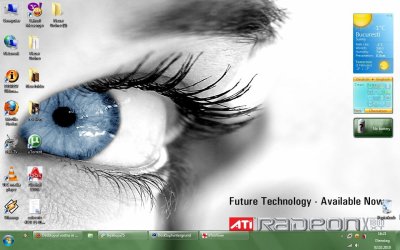
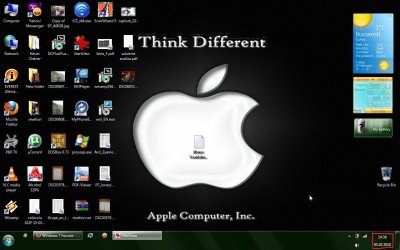
i uploaded the befoare and after pictures:).
Thanks.
 

Attachments

  • capture_02022010_162146.jpg
    capture_02022010_162146.jpg
    120.7 KB · Views: 28
  • capture_05022010_143842.jpg
    capture_05022010_143842.jpg
    110.7 KB · Views: 25

My Computer

OS
7
Welcome!

Have you tried a System Restore to a point before you installed Nexus?
 

My Computer

Computer Manufacturer/Model Number
Custom
OS
Windows 7 Professional x64
CPU
Intel i7 2600K OC'd @ 4620 MHz
Motherboard
Asus P8Z68-V Pro
Memory
16GB GSkill Sniper 2133 Mhz (4x4GB)
Graphics Card(s)
EVGA GeForce GTX 480 SuperClocked+
Sound Card
Realtek High Definition Audio
Monitor(s) Displays
2x Acer S273HLbmii 27"
Screen Resolution
2 x 1920x1080
Hard Drives
64GB Crucial M4 SSD

Storage: Hitachi 1TB 5400RPM, Samsung 1.5TB 5400RPM
PSU
Corsair HW Series 750w (modular)
Case
Cooler Master HAF 932 Advanced Blue Edition
Cooling
CM Hyper 212+ CPU cooler, 3x 230mm + 1x 140mm case fans
Keyboard
Logitech MK320 (wireless)
Mouse
Logitech MK320 (wireless)
Internet Speed
30 Mb/s : 2 Mb/s

My Computer

Computer type
PC/Desktop
Computer Manufacturer/Model Number
Me
OS
Win 7 Ultimate x64
CPU
FX-8350 @ 4.6 GHz so far
Motherboard
Asus M5A97 EVO
Memory
ADATA XPG V1 Series Black 8GB DDR3 1600
Graphics Card(s)
Sapphire R9 270x Dual-X
Sound Card
Xonar DGX w/ Corsair Vengence 1300
Monitor(s) Displays
Acer S232HL Abid
Screen Resolution
1920x1080
Hard Drives
120 GB OCZ Vertex 3
500 GB Seagate 7200.12
PSU
Antec Earthwatts 650W Green
Case
Antec Three Hundred
Cooling
Cooler Master 212 EVO
Keyboard
Logitech G510
Mouse
Logitech G500s
Internet Speed
35000/3000
i actually did that befoare i posted here.
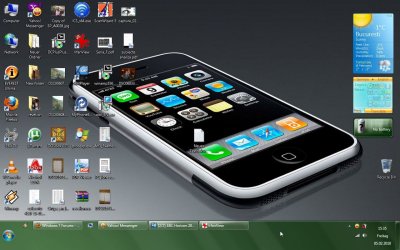
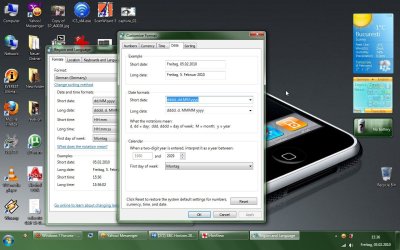
here's the problem. if i were to expand my taskbar to three rows it would look like in the first image, and if i were to add "dddd" to the short date format it would look like the second image. but that really takes alot of taskbar space. i want it to look like it does in 3 rows but to have 2 rows just like in the first post.
 

Attachments

  • capture_05022010_153512.jpg
    capture_05022010_153512.jpg
    126.8 KB · Views: 15
  • capture_05022010_153641.jpg
    capture_05022010_153641.jpg
    128.9 KB · Views: 20

My Computer

OS
7
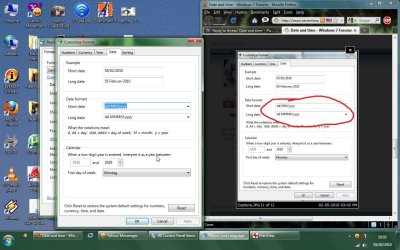
try making it like this:
Capture.JPG
 

My Computer

OS
Windows 7 Ultimate x86 SP1

My Computer

Computer Manufacturer/Model Number
Home built
OS
Windows 7 Ultimate 32 bit
CPU
Intel(R) Pentium(R) 4 CPU 3.00GHz
Motherboard
ASUS P4P800-VM Motherboard Chipset: Intel 865G + ICH5
Memory
2.50 GB RAM
Graphics Card(s)
NVIDIA GeForce 7600 GS
Sound Card
SoundMax Integrated Digital Audio (Chip)
Monitor(s) Displays
ViewSonic VX 1962 wm
Screen Resolution
1680 X 1050
Hard Drives
Seagate Barracuda 7200.10 80 GB
ST380215A ATA Device 18.6 GB
Western Digital "My Book" external hard drive 750 GB
Cooling
Fan based
Keyboard
Microsoft Comfort Curve Keyboard 2000 v10 USB
Mouse
Logitec optic USB
Internet Speed
3.01 Mb/s download 0.64 Mb/s upload
here's the result. nothing changed.

about system restore: i turned it off because there's where viruses like to hide and it usually slows my system.
 

Attachments

  • capture_05022010_190320.jpg
    capture_05022010_190320.jpg
    150.5 KB · Views: 10

My Computer

OS
7
Viruses can't hide in system restore if your system is clean when the restore point is created.
 

My Computer

Computer Manufacturer/Model Number
Home built
OS
Windows 7 Ultimate 32 bit
CPU
Intel(R) Pentium(R) 4 CPU 3.00GHz
Motherboard
ASUS P4P800-VM Motherboard Chipset: Intel 865G + ICH5
Memory
2.50 GB RAM
Graphics Card(s)
NVIDIA GeForce 7600 GS
Sound Card
SoundMax Integrated Digital Audio (Chip)
Monitor(s) Displays
ViewSonic VX 1962 wm
Screen Resolution
1680 X 1050
Hard Drives
Seagate Barracuda 7200.10 80 GB
ST380215A ATA Device 18.6 GB
Western Digital "My Book" external hard drive 750 GB
Cooling
Fan based
Keyboard
Microsoft Comfort Curve Keyboard 2000 v10 USB
Mouse
Logitec optic USB
Internet Speed
3.01 Mb/s download 0.64 Mb/s upload
here's the result. nothing changed.

about system restore: i turned it off because there's where viruses like to hide and it usually slows my system.
1. What is that Sorting Tab on your settings?
Can you give screenshot?

2. Try clicking "reset" (I think it was obvious and you already did?)

3. Is it the same with large icons?
 

My Computer

OS
Windows 7 Ultimate x86 SP1
Viruses can't hide in system restore if your system is clean when the restore point is created.

yes you're right, but i don't know an antivirus that removes or detects every existing virus, so it is posible to have a virus and not even know it. but i disabled it mostly because of the resources it uses. I want my computer to run smooth even if that means a little bit less secured. I'm not that afraid of reinstalling windows and everything i have on this computer is recoverable.

i remember once on windows xp, i just installed it, it was running really fast and i just thought why not do all the updates. i gotta tell you it's not the best of ideas. i made my computer start a minute, a minute and a half slower. it was secured but it was running really bad, i didn't like it at all. I really think that enabling system restore and doing all the updates should be done if you have some sort of very important stuff. And trust me i don't.
 

My Computer

OS
7
here's the result. nothing changed.

about system restore: i turned it off because there's where viruses like to hide and it usually slows my system.
1. What is that Sorting Tab on your settings?
Can you give screenshot?

2. Try clicking "reset" (I think it was obvious and you already did?)

3. Is it the same with large icons?


no, with large icons it does show it, but the taskbar becomes bigger(as big as it would be with small icons and 3 rows).
i did click reset, now and before posting here.
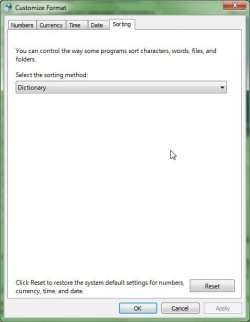
here's the sorting tab, it has nothing to do with this.
 

Attachments

  • capture_05022010_201512.jpg
    capture_05022010_201512.jpg
    23.8 KB · Views: 5

My Computer

OS
7
hmmm...
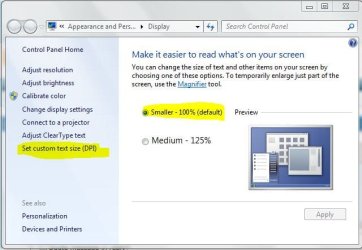
Maybe check display magnification aswell.

Open Start.
Write Display and click enter

check highlighted options:
Capture.JPG

:confused:
 

My Computer

OS
Windows 7 Ultimate x86 SP1
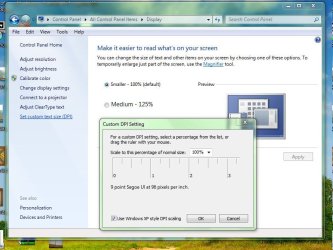
i did. I tried it with the option use windows xp dpi style DPI settings both checked and unchecked. same result.
 

Attachments

  • capture_05022010_204434.jpg
    capture_05022010_204434.jpg
    72.2 KB · Views: 3

My Computer

OS
7
Viruses can't hide in system restore if your system is clean when the restore point is created.

virus can hide in system restore. that's why before you run any virus scan, it's recommended you turn off system restore.
 

My Computer

OS
XP Vista 7
guys, you're really digressing from the original problem.
 

My Computer

OS
7
alex, if all else fail, a different profile will fix the problem.
 

My Computer

OS
XP Vista 7
I run out of ideas for now :confused:
 

My Computer

OS
Windows 7 Ultimate x86 SP1
Back
Top