date modification field does not change

joelight

New member
Local time
5:49 PM
Messages
4
hi, i searched in vain for an answer to this question:
when i edit an image file and resave, the date modified date does not change. since i started using computers 100s of years ago, this was automatic. how can i enable this (obvious) field? what point is there in even having a date modified field if it stays the same as the date created field? thanks!
 

My Computer

Computer Manufacturer/Model Number
Toshiba satellite
OS
Windows 7 Home Premium
Are you sure you have the Date Modified selected as a column to display?

Right click on the header column (has Name, Date, Type, etc.) and select the Date Modified tag.
 

My Computer

Computer type
PC/Desktop
Computer Manufacturer/Model Number
Lenovo IdeaCenter 450
OS
Windows 10 Pro X64
CPU
Intel Quad Core i7-4770 @ 3.4Ghz
Memory
16.0GB PC3-12800 DDR3 SDRAM 1600 MHz
Graphics Card(s)
Intel Integrated HD Graphics
Sound Card
Realtek HD Audio
Monitor(s) Displays
HP 22" LCD
Screen Resolution
1680 x 1050
Hard Drives
250GB Samsung EVO SATA-3 SSD
2TB Seagate ST2000DM001 SATA-2
1.5TB Seagate ST3150041AS SATA
Keyboard
Dell USB
Mouse
Lenovo USB
Internet Speed
Cable via Road Runner 3MB Upload, 30MB Download
Antivirus
Windows Defender, MBAM Pro, MBAE
Browser
Seamonkey
Other Info
UEFI/GPT
PLDS DVD-RW DH16AERSH
well, if it wasn't displayed i wouldn't know whether it was changing or not right? :D
so, yes, it is displayed. it does not CHANGE when the file is changed.
 

My Computer

Computer Manufacturer/Model Number
Toshiba satellite
OS
Windows 7 Home Premium
What program are you editing the files with? Under normal conditions, the date modified property should change. Some programs have options to disallow that.

James
 

My Computer

OS
Win7U 64 RTM
CPU
Q9550
Motherboard
GA-EP45-UD3R
Memory
8GB Gskill
Graphics Card(s)
ASUS|EAH4850/HTDI/1GD3/A
Sound Card
xfi Plat
Monitor(s) Displays
Dell 2405fpw
Screen Resolution
1920x1200
Hard Drives
Seagate & WD sata Drives
PSU
Antec
Case
Antec
Keyboard
MS Natural Ergonomic 4000
Mouse
Logitech MX610 USB Cordless
editing jpg files

hi, i'm using irfanview which i have used for years. the only thing different is i'm using a toshiba laptop with windows 7; before i had an acer desktop with windows vista.

what's weirder is, i got the laptop in june and didn't notice this discrepancy right away... it started a couple months later.

i was hoping to find someone on the forum or even on windows.com that could say, oh yeah, that's a bug we put in just to screw with you and here's how to fix ... any suggestions welcome
 

My Computer

Computer Manufacturer/Model Number
Toshiba satellite
OS
Windows 7 Home Premium
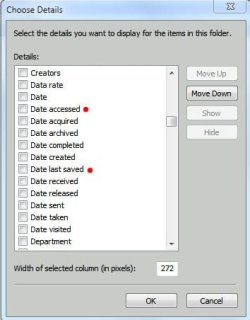
Do any of the other 'Date' options available reflect your changes?:

Date Options.JPG


James
 

My Computer

OS
Win7U 64 RTM
CPU
Q9550
Motherboard
GA-EP45-UD3R
Memory
8GB Gskill
Graphics Card(s)
ASUS|EAH4850/HTDI/1GD3/A
Sound Card
xfi Plat
Monitor(s) Displays
Dell 2405fpw
Screen Resolution
1920x1200
Hard Drives
Seagate & WD sata Drives
PSU
Antec
Case
Antec
Keyboard
MS Natural Ergonomic 4000
Mouse
Logitech MX610 USB Cordless
Going offline for a while. :geek:

James
 

My Computer

OS
Win7U 64 RTM
CPU
Q9550
Motherboard
GA-EP45-UD3R
Memory
8GB Gskill
Graphics Card(s)
ASUS|EAH4850/HTDI/1GD3/A
Sound Card
xfi Plat
Monitor(s) Displays
Dell 2405fpw
Screen Resolution
1920x1200
Hard Drives
Seagate & WD sata Drives
PSU
Antec
Case
Antec
Keyboard
MS Natural Ergonomic 4000
Mouse
Logitech MX610 USB Cordless
james, sorry i missed you. i had to enable some other date functions as usually i only use date modified and date created. but no, i added date accessed and it didn't change either.
 

My Computer

Computer Manufacturer/Model Number
Toshiba satellite
OS
Windows 7 Home Premium
Just to clarify, I'm assuming:

1) That you are vieiwing the unchanged Date Modified Stamp (DMS) in Windows Explorer

2) That only the image files you've edited in Irfanview are affected

Questions that occur:

1) What file extensions are affected?
2) Are there some file types that you've edited in Irfanview whose (DMS) are correctly updated?
3) Are you using any other graphics software to edit or change the problem files (Picasa or any other)?
4) Are there any circumstances under which the (DMS) does change (i.e., if you copy them to another folder, move them, edit them in another program, etc.)

5) Have you checked at the Irfanview support forums?:

IrfanView Support Forum

It may not be an Irfanview problem, but it can't hurt to post something there just in case.

If you find a solution elsewhere, be sure to past back here or any other site you may have asked at so as to eliminate any dead ends for others who might be searching for a solution to the same problem.

A late development:

Have you checked in Irfanview options to see if there is an option to turn off the DMS? The 1st post at the following link suggests that there is:


http://forums.adobe.com/thread/480901?tstart=0

James
 

My Computer

OS
Win7U 64 RTM
CPU
Q9550
Motherboard
GA-EP45-UD3R
Memory
8GB Gskill
Graphics Card(s)
ASUS|EAH4850/HTDI/1GD3/A
Sound Card
xfi Plat
Monitor(s) Displays
Dell 2405fpw
Screen Resolution
1920x1200
Hard Drives
Seagate & WD sata Drives
PSU
Antec
Case
Antec
Keyboard
MS Natural Ergonomic 4000
Mouse
Logitech MX610 USB Cordless
jpg file date modified does not change

I'm posting to this thread in case anyone is still looking here. I've had exactly the same problem -- except with a different image editing program (Picture Window Pro 5.0 by Digital Light&Color, Inc.). Have used it for years with XP and no problems. Just today Win 7 started to change the date of edited jpg files sporadically -- it updated the dates for 8 out of 30 files that were edited. Win 7 search finds them all and lists the date modified correctly, but explorer does not -- even after reboot, and empty recycle bin just to be compulsive. All edited files were saved to the same folder. I emailed the Picture Window people and they say that PW5.0 does not change the date -- that is left to Windows 7 to do. Has there been any update to thinking about this problem? Should I start new thread? Thanks for any help.
 

My Computer

Computer Manufacturer/Model Number
HP Pavilion dm4 notebook PC
OS
Windows 7 Home Premium SP1 64 bit
CPU
intel core i5
If a program says not to update the date modified the date will not update.
There is no setting in Windows that will turn it off. Its an application problem.
 

My Computer

Computer type
PC/Desktop
Computer Manufacturer/Model Number
Alienware Aurora ALX R4
OS
Windows 10 Pro (x64)
CPU
Intel Core i7-3930K (3.2GHz - 4.5GHz)
Motherboard
Alienware Aurora-R4 x79
Memory
4x Samsung 4GB PC3-12800 DDR3 (16GB 1600MHz)
Graphics Card(s)
Nvidia Geforce GTX 690
Sound Card
SteelSeries Siberia Elite
Monitor(s) Displays
Dell UltraSharp U3011
Screen Resolution
2560x1600
Hard Drives
Samsung 850 Pro 256 GB, Seagate 1TB Desktop Hybrid HDD, 2x Western Digital 4TB Green HDD
PSU
875W Some Dell PSU <.<
Case
Alienware Aurora ALX
Cooling
Custom Liquid Cooling (EK CPU & GPU blocks) dual EK 480RAD
Keyboard
Logitech G710+ Mechanical
Mouse
Logitech G700s
Internet Speed
Verizon Fios (50 mbps average)
Other Info
Server: Intel NUC D54250WYK: i5-4250U, 16GB, 256 GB mSATA, Windows Server 2012 R2
Do any of the other 'Date' options available reflect your changes?:

View attachment 132076


James

this is it.. it's just that mine got only 4 DATE OPTIONS (date, date created, date modified, date taken)..

STEPS:

► go to WINDOWS EXPLORER..
► go to the FOLDER which your photos are situated..
► on the right panel of the window → right click on any of the column titles (e.g. Name, Date, Type, Size, etc..)
► then unchecked all Date options but leave the "Date Modified" checked..


At your service!
-Emil
 

My Computer

Computer type
PC/Desktop
OS
windows 7 ultimate 32bit
i use irfanview also.. and it worked fine, it's not even a case of faulty program.. just a little familiarization is all we need..

cheers!
-Emil
 

My Computer

Computer type
PC/Desktop
OS
windows 7 ultimate 32bit
Back
Top