Dbanning/wiping out HD, can I use windows 7 OEM or Windows 8 upgrade?

Externalhard

New member
Member
Local time
3:57 PM
Messages
29
I'm guessing it overwrites all the partitions.
 
Last edited:

My Computer My Computer

At a glance

windows 7
OS
windows 7
Google

As long as you have a COA with your key, a W7 oem should work.

Don`t think you have to have Windows 7 installed to do the 8 upgrade, but you do have to have the qualifying W7 information available, ID# Key etc. I`m no expert on doing upgrades that way.
 

My Computer My Computer

At a glance

Windows 10 Pro x64Intel Core i7 6700KGSkill TridentZ RGB 16GB 3600 16-16-16-36EVGA GTX 980 Ti SC x2
Computer type
PC/Desktop
Computer Manufacturer/Model Number
Skylake Special #666
OS
Windows 10 Pro x64
CPU
Intel Core i7 6700K
Motherboard
Asus Sabertooth Z170 Mark 1
Memory
GSkill TridentZ RGB 16GB 3600 16-16-16-36
Graphics Card(s)
EVGA GTX 980 Ti SC x2
Sound Card
Realtek High Definition
Monitor(s) Displays
AOC G2460PG
Screen Resolution
1920 x 1080 144Hz
Hard Drives
Samsung 860 Pro 256GB, Seagate Barracuda 4TB x2
PSU
EVGA 1000 P2, EVGA White Custom Braided Cables
Case
Corsair Vengeance C70 Gunmetal Black
Cooling
Corsair H100i v2, Corsair ML120 x2, Thermal Grizzly Kryonaut
Keyboard
Logitech G910 Orion Spectrum
Mouse
Logitech G700s
Internet Speed
Verizon Fios Quantum Gateway 75/75
Antivirus
Windows Defender, Malwarebytes Free 3.8.3
Browser
Chrome
Other Info
Corsair SP120 x4, LG Blu-ray Drive, Durabrand HT-395 100 Watt Dolby Digital Amp, Corsair H2100 Wireless 7.1 Headset
i dont know what a coa or key, does that come with the above link?

what about a windows 8 upgrade, can that be installed on a wiped HD with no partition/trace of original windows OS? dont understand why microsoft doesn't release the retail version now.
 

My Computer My Computer

At a glance

windows 7
OS
windows 7

My Computer My Computer

At a glance

Windows 10 Pro x64Intel Core i7 6700KGSkill TridentZ RGB 16GB 3600 16-16-16-36EVGA GTX 980 Ti SC x2
Computer type
PC/Desktop
Computer Manufacturer/Model Number
Skylake Special #666
OS
Windows 10 Pro x64
CPU
Intel Core i7 6700K
Motherboard
Asus Sabertooth Z170 Mark 1
Memory
GSkill TridentZ RGB 16GB 3600 16-16-16-36
Graphics Card(s)
EVGA GTX 980 Ti SC x2
Sound Card
Realtek High Definition
Monitor(s) Displays
AOC G2460PG
Screen Resolution
1920 x 1080 144Hz
Hard Drives
Samsung 860 Pro 256GB, Seagate Barracuda 4TB x2
PSU
EVGA 1000 P2, EVGA White Custom Braided Cables
Case
Corsair Vengeance C70 Gunmetal Black
Cooling
Corsair H100i v2, Corsair ML120 x2, Thermal Grizzly Kryonaut
Keyboard
Logitech G910 Orion Spectrum
Mouse
Logitech G700s
Internet Speed
Verizon Fios Quantum Gateway 75/75
Antivirus
Windows Defender, Malwarebytes Free 3.8.3
Browser
Chrome
Other Info
Corsair SP120 x4, LG Blu-ray Drive, Durabrand HT-395 100 Watt Dolby Digital Amp, Corsair H2100 Wireless 7.1 Headset
Yes, you can Clean Install with Windows 8 Upgrade.

How is your original Win7 licensed? Did it come preinstalled on the PC (with a COA sticker which Brian refers to above) or is it a retail copy? You need a qualifying copy of Win7 to use Win8 upgrade version. Otherwise buy the Builder's OEM version.

If you have a Win7 license, I would try Win8 for 30 days before it must be activated, then if you don't want it you can wipe the HD and reinstall Win7.
 
my laptop came pre-installed with windows 7 and it has a program where i must burn 6 CDs. it isnt working for me and i hate the hassle. i dont see any windows key on my laptop. i dont have any CD, many laptops no longer come with a recovery disk or hard copy of windows. lame i know.

the instructions you list assumes the partition is still available. DBAN wipes the entire drive, im wondering if the windows 8 upgrade - which is this - Buy Windows - Microsoft Windows - can install on a drive that is dbanned. it is different than formatting as you know.

so??
 

My Computer My Computer

At a glance

windows 7
OS
windows 7
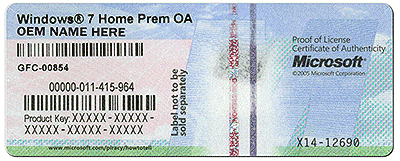
Every PC sold with preinstalled Win7 must have a COA sticker on it. Look on the bottom or under the battery if its a Dell. That is your ticket to http://www.sevenforums.com/tutorials/219487-clean-reinstall-factory-oem-windows-7-a.html#post1839164 as well as use the Upgrade version for Win8.

I don't know why you're all concerned about DBanning the HD. There's no difference between that and deleting all partitions during a booted install as shown in Steps 6/7 of http://www.sevenforums.com/tutorials/1649-clean-install-windows-7-a.html which is also available on booted Win8 install. Only if you have installation issues do we recommend wiping the HD with http://www.sevenforums.com/tutorials/52129-disk-clean-clean-all-diskpart-command.html to clear code from the boot sector. The only reason to do a full DBAN or Clean All command is to make data irretrievable by most means, and has no performance or troubleshooting benefit whatsoever.
 
im reselling the computer and always dban them, but usually i have a recovery disk (desktops for example). it's the only program i trust. after a dban can i reinstall windows 7 OEM or windows 8 upgrade?
 

My Computer My Computer

At a glance

windows 7
OS
windows 7
Do you have a COA sticker with Product Key for the Win7 OEM version? What is the PC brand, or is it retail OEM which also has a COA sticker with Product Key?
 
Wow, back to your original question, so

Drop the disc in and try to install windows, that`s it, get the job done. Come on Man :(

There`s only 1 way to find out ;) Just do it.
 

My Computer My Computer

At a glance

Windows 10 Pro x64Intel Core i7 6700KGSkill TridentZ RGB 16GB 3600 16-16-16-36EVGA GTX 980 Ti SC x2
Computer type
PC/Desktop
Computer Manufacturer/Model Number
Skylake Special #666
OS
Windows 10 Pro x64
CPU
Intel Core i7 6700K
Motherboard
Asus Sabertooth Z170 Mark 1
Memory
GSkill TridentZ RGB 16GB 3600 16-16-16-36
Graphics Card(s)
EVGA GTX 980 Ti SC x2
Sound Card
Realtek High Definition
Monitor(s) Displays
AOC G2460PG
Screen Resolution
1920 x 1080 144Hz
Hard Drives
Samsung 860 Pro 256GB, Seagate Barracuda 4TB x2
PSU
EVGA 1000 P2, EVGA White Custom Braided Cables
Case
Corsair Vengeance C70 Gunmetal Black
Cooling
Corsair H100i v2, Corsair ML120 x2, Thermal Grizzly Kryonaut
Keyboard
Logitech G910 Orion Spectrum
Mouse
Logitech G700s
Internet Speed
Verizon Fios Quantum Gateway 75/75
Antivirus
Windows Defender, Malwarebytes Free 3.8.3
Browser
Chrome
Other Info
Corsair SP120 x4, LG Blu-ray Drive, Durabrand HT-395 100 Watt Dolby Digital Amp, Corsair H2100 Wireless 7.1 Headset
i havent opened the package yet. if i open it then that's 70 dollars i wasted on windows 8 upgrade. this is my problem.

@greg

it is an asus laptop, no windows cd given or included in the original package. everything was pre-installed.
 

My Computer My Computer

At a glance

windows 7
OS
windows 7
yeah like i said i plan on dbanning on the hard drive as i always do. im betting i cant use the windows 8 upgrade, right? after wiping out the partition and any trace of windows 7 will i be able to install windows 7 OEM product? the link i gave on amazon.
 

My Computer My Computer

At a glance

windows 7
OS
windows 7
Yes, that OEM copy of Win7 will work on there.

You would need an existing Win7 license to install the Win8 Upgrade, which is what I was trying to find out all this time.

What was the licensed OS that came with the PC? We can help you reinstall it so that you and the buyer get the full value of the machine and it's $100+ OS license.
 
it is windows 7. but like i said the laptop didnt come with a recovery disk, asus includes AI recovery but it keeps giving me errors. it requires a bunch of CDs and i dont think it will work after a dban.
 

My Computer My Computer

At a glance

windows 7
OS
windows 7
I've asked you now NINE times if Win7 came preinstalled on the PC, whether there is a COA sticker, even gave you a picture of one you also ignored.

The fact is Asus cannot legally sell you a PC with preinstalled Win7 without a COA sticker attached. It doesn't happen.

You do not need the Recovery partition or Disks to http://www.sevenforums.com/tutorials/219487-clean-reinstall-factory-oem-windows-7-a.html#post1839164 with the official installer for your licensed version provided in Step 1 and the Product Key on COA sticker. You own that copy of WIn7 for life to reinstall whenever and however you please on that machine. It also qualifies you for Win8.

I cannot remember it ever being this difficult in four years and 32,000 posts to get a point across.
 
yes okay i believe there is a COA sticker. like i said, my computer includes programs to create recovery disks but it isn't working for me. IT is asus i shouldn't expect anything less than that LOL.

is this all i need to do?

http://www.sevenforums.com/tutorials/31541-windows-7-usb-dvd-download-tool.html?filter[2]=General%20Tips

and then i can dban before, reinstall windows 7 like that? or create a system image?

http://www.sevenforums.com/tutorials/663-backup-complete-computer-create-image-backup.html

the point is dban should wipe out the partition and ntfs. with my other computers id just boot with a recovery desk and everything is fine. is there an equivalent with windows 7?
 

My Computer My Computer

At a glance

windows 7
OS
windows 7
how is it vastly superior? with recovery disks the process takes me five minutes and windows installs on its own. this just more work for the same thing.
 

My Computer My Computer

At a glance

windows 7
OS
windows 7
how is it vastly superior?

Its a native installation without the OEM bloatware that slows sysyems, and in some cases causes BSOD's depending on the bloatware.

Regards,
Golden
 

My Computer My Computer

At a glance

Windows 10 Pro x64 ; Xubuntu x64Intel i7 860 @ 2.80 GHz O/C'ed to 4.0GHz16GB Corsair Vengance DDR3 @ 661 MHz Dual Cha...EVGA NVidia GTX 560 1024MB
Computer type
PC/Desktop
Computer Manufacturer/Model Number
Golden Mk. I.4
OS
Windows 10 Pro x64 ; Xubuntu x64
CPU
Intel i7 860 @ 2.80 GHz O/C'ed to 4.0GHz
Motherboard
Gigabyte P55A-UD3R Rev.1. Award BIOS F13
Memory
16GB Corsair Vengance DDR3 @ 661 MHz Dual Channel (9-9-9-24)
Graphics Card(s)
EVGA NVidia GTX 560 1024MB
Sound Card
Realtek Integrated
Monitor(s) Displays
Dual Samsung SyncMaster 2494HS
Screen Resolution
1920*1080 and 1920*1080
Hard Drives
1*Samsung 840 EVO 120GB SSD;
1*OCZ Vertex 2 60GB SSD;
2*Samsung F3 SpinPoint 1TB in RAID0;
1*Samsung F1 SpinPoint 1TB;
2*Western Digital 1TB External USB 3.0
1*Western Digital 500GB External USB 3.0
1*Seagate 500GB External USB 2.0
PSU
Thermaltake ToughPower QFan 750W
Case
Thermaltake Element S VK60001W2Z
Cooling
Corsair H60 Water Cooling, 2*230mm and 2*80mm case fans
Keyboard
Logitech G110
Mouse
Logitech MX518
Back
Top